1:03

The new Apple HomeView: Keep the whole home connected, entertained, and in the know.
Apple · Hardware · Oct 2026
Runtime.si · Nov 2026 · 0:54 · AI-annotated · YC Fall 2026
The video alternates locked-off text cards on a pale gray field with flat UI mockups and 3D renders, and each feature is announced by a single centered headline before its demo. Signature moves include the sim-to-real crossfade, the slow pull-back from one duck to a warehouse of robots, and the letter-by-letter logo assembly with a sliding green square.
Apple · Hardware · Oct 2026
OpenAI · AI · Apr 2026
Spline · Design · Oct 2026
A dark gray robotic gripper holds a yellow rubber duck centered on a plain light gray background. The two prongs open and close gently around the duck's head, lifting and releasing it in a slow loop.
Techniques: 3D mockup
Camera: Static
A rounded yellow 3D figure with a dark gray bar behind its head exits the top of the frame, leaving the centered headline on a pale gray background.
On-screen text: “A new way for robots to decide their next move”
Camera: Static
A single line of black text sits centered on a plain light gray background. The frame is locked off and the line holds static for the full duration.
On-screen text: “A new way for robots to decide their next move”
Camera: Static
The frame opens black, then the background fades to light gray, revealing the centered line “No teleoperation. No fine-tuning” in dark gray. Below it, “Now think in simulation” fades in in pale gray. The frame stays locked off.
On-screen text: “A new way for robots to decide their next move”, “No teleoperation. No fine-tuning”, “Now think in simulation”
Camera: Static
On a pale gray field, a centered black line reads “Now think in simulation”, then fades away as a second line, “Build from what you see”, appears near the top.
On-screen text: “Now think in simulation”, “Build from what you see”
Camera: Static
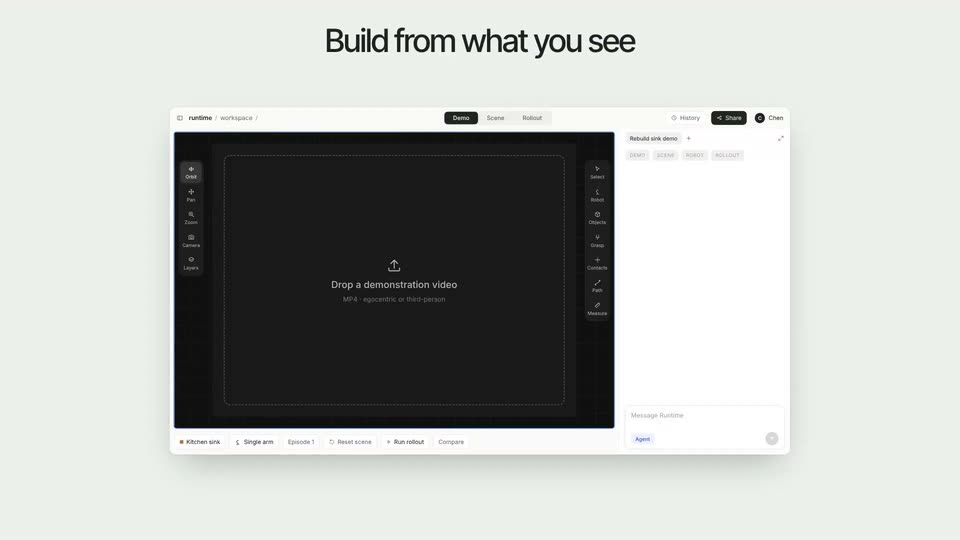
A flat product interface sits beneath the static headline; a video card labeled sink_demo.mp4 with a kitchen thumbnail and 0:12 runtime slides into the dark canvas as the drop-zone prompt fades, and a cursor hovers beside it.
On-screen text: “Build from what you see”
Techniques: Cursor demo
Camera: Push in
A flat workspace UI sits under a black headline on a pale gray field. A first-person video of hands at a kitchen sink plays in the center player, while the right panel's build steps tick from Running to Finished and the top tab flips from Demo to Scene.
On-screen text: “Build from what you see”
Camera: Static
A product interface window in 3D perspective floats on a light gray field, showing a robot arm demo in a kitchen sink with a rollout sidebar. The whole window scales down and centers while the black headline holds above it.
On-screen text: “Build from what you see”
Techniques: 3D mockup
Camera: Pull out
A light gray backdrop holds a centered dark headline above a four-by-three grid of perspective-tilted interface cards. Each card plays a first-person video of a manual task, and the frames inside shift as the simulations run.
On-screen text: “Simulate possible futures”
Techniques: 3D mockup
Camera: Static
A 4 by 3 grid of simulation screenshots sits under the headline Simulate possible futures. The grid fades to a ghost as the headline Act in reality crossfades in at the center over the dimmed cards.
On-screen text: “Simulate possible futures”, “Egg transfer”, “Rebuilt in sim”, “Ink-cartridge packing”, “Rebuilt in sim”, “Retail packing”, “Rebuilt in sim”, “Carton picking”, “Rebuilt in sim”, “Gift-box shelf, Rebuilt in sim, Roller boxes, Rebuilt in sim, Tweezer desk, Rebuilt in sim, Carton stacks, Rebuilt in sim, Bin sorting, Rebuilt in sim, Candy, B”
Camera: Static
A light gray card holds the headline centered. A rounded video panel scales in below, showing a top-down kitchen counter where a robotic arm grips an egg beside a sink, as the headline shifts up to the top.
On-screen text: “Act in reality”
Techniques: Kinetic type
Camera: Push in
A rounded video card shows a real kitchen sink from above: a black robot arm moves near the drain, where two eggs sit, while a second arm waits at right. The static headline Act in reality sits above on a pale background.
On-screen text: “Act in reality”, “Real robot”, “3x”
Camera: Static
A plain light gray card holds a single centered line of black text, static and locked off for the whole shot.
On-screen text: “Sim and reality, in sync”
Camera: Static
A split-screen dashboard compares a 3D simulation on the left with live robot footage on the right, each with two wrist-cam insets. Both arms pick up a white plug and thread it through a cable loop while speed badges tick up.
On-screen text: “Sim”, “Real”, “Fully autonomous”
Techniques: Split screen, 3D mockup
Camera: Static
A centered headline on a flat light-gray field, “Simulate, then make the move”, fades from pale gray to solid black and holds still on a locked-off frame.
On-screen text: “Simulate, then make the move”
Camera: Static
A white robotic arm with a black gripper picks up a yellow rubber duck from a table of many, lifting it into a cardboard box. The camera then pulls back and rises to a top-down view of a vast white warehouse full of robots at workstations.
Techniques: 3D mockup
Camera: Pull out
A dense grid of tiny 3D miniature objects, like small room corners and shelves, fills a white wall from top to bottom. The whole field holds still, then dissolves to white.
Camera: Static
On a light gray field, the black wordmark Runtime.si assembles letter by letter from the left, while a bright green square slides rightward from behind the u to the end of the word. Locked-off frame.
On-screen text: “Runtime.si”
Techniques: Kinetic type
Camera: Static