0:38
New Raycast. Coming 2026
Raycast · Productivity · Dec 2025
Perplexity · Jun 2026 · 1:06 · AI-annotated
Perplexity’s 1:06 launch film runs 19 scenes, about 3.5 s each. The product is on screen from the first frame and 3 features are revealed. There is no explicit call to action. The video opens on a dark particle field, then settles into a flat cream layout where each feature is announced by a centered serif headline and proven by a slow zoom or pan through the interface. Signature moves are the drifting dot plexus, character-by-character typing, and tight zooms into teal memory links.
Is this your launch? to your site or press kit.
Raycast · Productivity · Dec 2025
Anthropic · AI · Sep 2026
OpenAI · AI · Sep 2026
A dark 3D field of undulating light waves studded with glowing particles drifts slowly forward. White serif text “Introducing Brain” scales in at center, then “for Perplexity Computer” appears beneath it.
On-screen text: “Introducing Brain”, “for Perplexity Computer”
Techniques: Kinetic type, Particles, Parallax
Camera: Pan
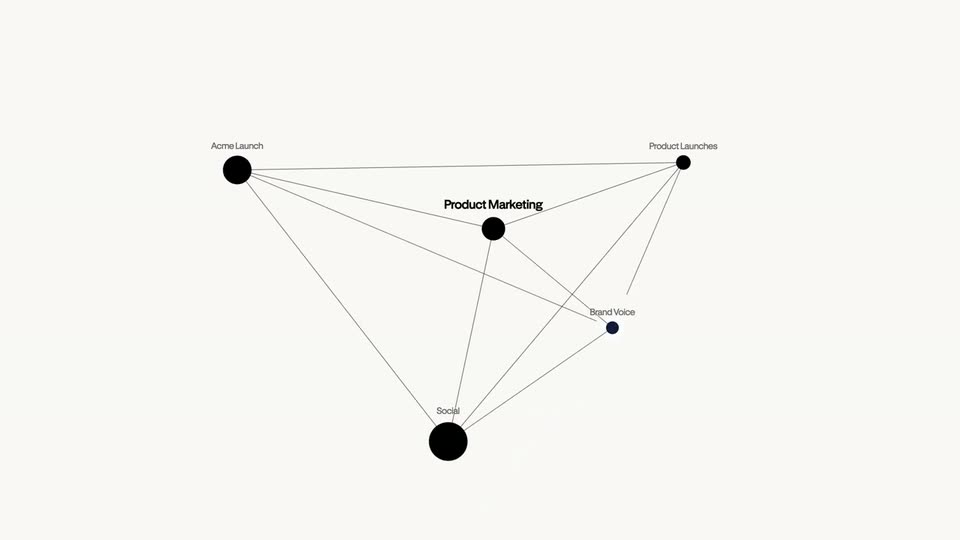
On a plain off-white field, a network diagram assembles itself: black dots pop in one by one, each tagged with a small label, and thin gray lines draw between them until a connected mesh forms around the bold central node “Product Marketing”.
On-screen text: “Product Marketing”, “Acme Launch”, “Product Launches”, “Social”, “Brand Voice”
Camera: Pull out
A network of dark circular nodes joined by thin lines floats on a cream field. The camera pulls back, shrinking the cluster toward the right as small purple dots drift in around it, while node labels such as Product Marketing and Social stay pinned to their points.
Techniques: Parallax
Camera: Pull out
On a cream field, scattered gray dots drift and gradually gather into a loose ring. A two-line serif headline fades in from pale to dark, holds, then fades back out as the dots settle around it.
On-screen text: “Brain builds a context graph from your sessions, sources, and connections.”
Techniques: Particles, Kinetic type
Camera: Pull out
A swarm of small black dots drifts across an off-white field, then settles into a thin-line network of labeled nodes with a hand-drawn cursor arrow resting on the bold Messaging node. A flat white document card slides up from the bottom edge, covering the lower half with the Messaging page.
Techniques: Particles
Camera: Static
A white document card titled Messaging sits centered on a cream background. It opens doubled and vertically offset, then settles into a single clean page showing a serif heading, an updated timestamp, three related-page columns and two paragraphs of body copy.
Camera: Static
A dark serif headline, “New tasks start with full,” holds static at center. A faint plexus of gray dots joined by thin lines spreads across the cream background.
On-screen text: “New tasks start with full”
Camera: Static
A faint constellation of small gray dots joined by thin lines fills an off-white field. Centered black serif type states the tagline and holds still while the network pattern drifts slowly behind it.
On-screen text: “New tasks start with full context from Brain.”
Camera: Pull out
A white command bar sits on a cream background, holding a plus icon, a Computer chip, an Orchestrator dropdown, a mic icon and a black send button. The prompt types in character by character, then a white cursor glides in and rests on the send button.
Techniques: Kinetic type, Cursor demo
Camera: Static
A rounded chat input box holding the prompt, a Computer chip and a black send button fades out on a cream background, and a centered serif line, “Let me prepare the launch plan...”, with “Let” in teal, fades in.
Camera: Static
A black serif headline slides in over a cream background, a thin strikethrough line crossing it then clearing. Three gray sans-serif task lines with small line icons stack in below, above a teal laptop icon at the lower left.
On-screen text: “Let me prepare the launch plan...”, “Drafting launch plan PDF”, “Getting context from Brain”, “Pulling memory”
Techniques: Kinetic type
Camera: Static
A cream text pane holds the assistant's result in dark serif. A faint task list, “Let me prepare the launch plan...” with check-marked lines, fades out at the top while the two result paragraphs hold. The view then scrolls up to reveal the plan sections, What's ready, Tier and Launch date, with “Acme Launch memory” in teal.
Camera: Static
A cream document screen shows a launch plan, lines of body text filling in, then the view zooms into the line holding the teal Acme Launch memory link as a cursor glides in to rest on it.
Techniques: UI zoom, Cursor demo
Camera: Push in
A centered black serif caption holds over a cream field with a faint network of dots and lines drifting slowly. The scene cuts to a wiki page titled Acme Launch, where three related-page cards fade in from the left.
On-screen text: “launches like this before. The plan below is built from that.”, “Every entry is readable, searchable, and traceable.”
Camera: Static
A light wiki page shows the Acme Launch title, an update line, and a paragraph of body copy. The frame then zooms into the Related pages row and pans right, sliding across the Workstreams, Entities and Concepts cards.
Techniques: UI zoom
Camera: Push in
A row of rounded light-gray cards slides rightward across a cream background. Each card pairs a thin outline icon with a gray label, so Concepts, Workstreams, Social and Messaging Framework cross the frame while Brand Voice and Message enter and exit at the edges.
Techniques: Kinetic type
Camera: Static
A cream field shows a thin network graph on the left over a scatter of small dots. Right, a large serif headline keeps 'Repeated tasks' fixed while its second line swaps between 'take fewer steps', 'are more efficient' and 'make fewer wrong turns', then 'Available in Research Preview' appears.
On-screen text: “Repeated tasks take fewer steps”, “Repeated tasks are more efficient”, “Repeated tasks make fewer wrong turns”, “Available in Research Preview”
Techniques: Kinetic type, Particles
Camera: Pull out
A cream field with a faint constellation of dots and thin lines holds a centered black serif headline. The headline fades out and a small dark outline logo settles at the center.
On-screen text: “Available in Research Preview”
Camera: Static
On a plain off-white field, the black line-drawn Perplexity mark assembles at center as its curved strokes straighten into the angular star, while the lowercase wordmark fades in to its right. The lockup then holds still in a locked-off frame.
Techniques: Morph
Camera: Static