1:34

Demo Cifrato
Cifrato · B2B · Feb 2026
oh-my-hermes · Nov 2026 · 0:22 · Code only · AI-annotated
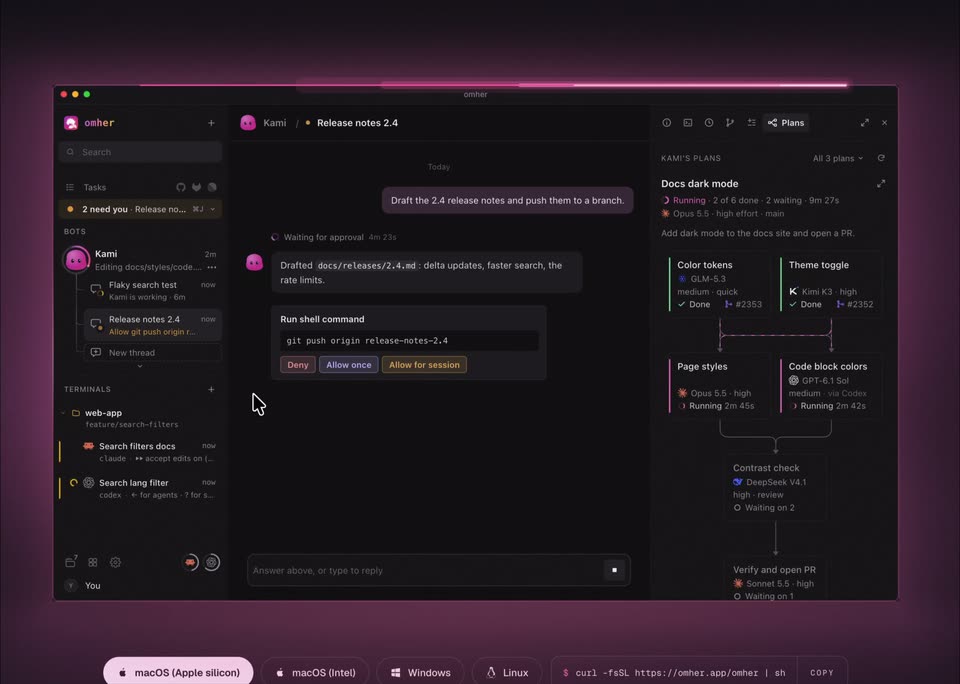
oh-my-hermes’s 0:22 launch film runs 5 scenes, about 4.5 s each. The product is on screen from the first frame. There is no explicit call to action. The video opens on the product name over a tilted 3D mockup that flattens into the live window, then drives a single cursor through the sidebar, the side panels and a fresh thread in one unbroken take. A pink glow travels around the window frame while a fixed install bar holds the bottom edge, giving the piece a steady, glossy, dark look.
Is this your launch? to your site or press kit.
Cifrato · B2B · Feb 2026
DJI · Hardware · Jan 2013
Timper · Jan 2026
Films whose music sounds like this one, voice left out
Clippers · Spoken word with sound effects
A dark landing page scrolls down, the OMHER Desktop headline sliding off the top as a tilted 3D mockup of the desktop app settles into frame. The window shows a bot chat, a terminal list, and a plans panel with task cards; a cursor hovers over the panel.
On-screen text: “OMHER Desktop”, “Your Hermes bots and coding agents, in one window.”
Techniques: 3D mockup
Camera: Pan
A dark app window with a glowing magenta border fades in over a purple gradient, its chat and sidebar panels brightening. A white cursor glides from the center to the left panel and hovers over a task row. A tagline sits centered above the window.
On-screen text: “Your Hermes bots and coding agents, in one window.”
Techniques: Cursor demo
Camera: Static
A dark software interface displays a sidebar and a central message area. A cursor selects a sidebar item, switching the view to a release notes task with a shell command prompt. The cursor moves down the list while a pink border traces the right-hand panel.
Techniques: Cursor demo
Camera: Static
A dark app window in a pink glow sits on a purple gradient. A white cursor hops across sidebar rows as the main panel switches from a docs terminal to a lang filter terminal, then to a chat with Kami. Platform chips and a curl bar sit at the bottom.
On-screen text: “macOS (Apple silicon)”, “macOS (Intel)”, “Windows”, “Linux”, “$ curl -fsSL https://omher.app/omher | sh”, “COPY”
Techniques: Cursor demo, Light sweep
Camera: Static
A dark chat-and-terminal app window, edged by a pink glow that travels around the frame, is shown flat. A cursor clicks the right-side panels, then New thread in the left list, opening an empty thread where a bot reply bubble appears.
On-screen text: “macOS (Apple silicon)”, “macOS (Intel)”, “Windows”, “Linux”, “$ curl -fsSL https://omher.app/omher | sh”, “COPY”
Techniques: Light sweep, Cursor demo
Camera: Static