
1:08
Explore
Introducing ClickUp Chat
ClickUp · Sep 2024 · 1:17 · AI-annotated
- Length
- 1:17
- Scenes
- 26 · 3.0 s avg
- Product on screen
- 0:17
- Features shown
- 3
- Call to action
- 1:11 · 92%
- Voiceover
- No
00:00:00 / 01:17:14
ClickUp’s 1:17 launch film runs 26 scenes, about 3.0 s each. The product shows up at 0:17 and 3 features are revealed. The call to action lands at 1:11 (92% in). Tone is confident and punchy, built on a near-black void lit by neon blue, magenta and orange streaks, with a bold rounded sans-serif (Inter-like) for the typed problem lines and a glowing outlined display face for the title cards. The video is structured as a typed problem statement, a logo sting into a fast neon-and-3D-interface intro montage, three named feature beats each opened by a glowing headline card and closed by a UI demo, and a held CTA lockup; its signature moves are the type-on/er擦
No filming indicatedEstimated needs: 3 capture groups — your screens or recordings · 1 official logo — reused across the film · 2 graphic passages — draw or supply · 7 3D passages — build or supply
Is this your launch? to your site or press kit.
More like this
0:29

High-Converting Job Search Launch Video | Tsenta
Tsenta · Oct 2026
1:24
Voyager - AI Harness for Creative Work
Voyager · B2B · Oct 2026
Introducing ClickUp Chat, scene by scene
· 26 scenes as text
01 · Problem · 0:00–0:12
White text is typed on a black background with a blinking cursor. 'Chat is broken.' is typed and backspaced, then 'Chat and work are disconnected.' and 'Chat and work are in different apps.' follow, each typed and partially erased.
On-screen text: “Chat is broken.”, “Chat and work are disconnected.”, “Chat and work are in different apps.”
Techniques: Kinetic type
Camera: Static
02 · Problem · 0:12–0:17
On a black screen, white bold sans-serif text types out “We fixed it.” with a blinking cursor, then the line blooms with a soft white glow. The frame stays locked and centered throughout.
On-screen text: “We fixed it.”
Techniques: Kinetic type
Camera: Static
03 · Product intro · 0:17–0:18
A white wireframe band converges on a glowing X logo at center, with faint purple arcs above on black. The camera dives into the mark as the lines stretch into a deep tunnel and dim menu labels surface behind it.
Techniques: Parallax
Camera: Static
04 · Product intro · 0:18–0:20
A dark app sidebar floats in 3D space, the Chat icon glowing purple. The camera pushes in as a white cursor clicks the icon, sending purple particle lines arcing toward the Posts and Drafts panel.
Techniques: 3D mockup, UI zoom, Cursor demo, Particles
Camera: Push in
05 · Product intro · 0:20–0:23
A black space fills with radiating streaks of blue, pink and orange light plus drifting particles. A glowing hashtag symbol assembles in the center while the word Chat flares in white, scales up, then fades, leaving the gradient hashtag.
On-screen text: “Chat”
Techniques: Kinetic type, Particles
Camera: Push in
06 · Product intro · 0:23–0:25
A dark chat interface sits at a 3D angle, fading in from black. A message from Nick Smith appears, followed by a reply from Dana Jones, above a text input bar with a row of icons.
Techniques: 3D mockup
Camera: Static
07 · Product intro · 0:25–0:27
The outlined neon title “meet Work” scales up at center on a black field. Blue and magenta light streaks radiate outward from behind the letters, a glowing arc sweeps across the text, and small dots drift through the frame.
On-screen text: “meet Work”
Techniques: Kinetic type, Light sweep, Particles
Camera: Push in
08 · Product intro · 0:27–0:32
A dark chat thread sits tilted in 3D perspective. The view zooms onto one message's action bar, a cursor clicks the sparkle icon, and a dropdown opens listing task options before the screen fades to black.
Techniques: 3D mockup, UI zoom, Cursor demo
Camera: Push in
09 · Product intro · 0:32–0:33
A tilted dark chat interface in 3D perspective. A white cursor hops from the sidebar chat icon to a second icon, then to the New Task button on a highlighted message card, while a dotted pink light beam sweeps diagonally across the right edge.
Techniques: Cursor demo, Light sweep
Camera: Pull out
10 · Product intro · 0:33–0:33
A dark chat replies panel sits in 3D perspective, tilted to the right, showing a message thread with two replies. A white cursor hovers over the pin icon in the right toolbar, which lights up purple.
Techniques: 3D mockup, Cursor demo
Camera: Static
11 · Product intro · 0:33–0:35
A dark app interface floats at an angle in 3D space against a starfield. A white cursor clicks a bookmark icon in the right toolbar, swapping the side panel from a Connections list to a Bookmarks list of linked pages.
Techniques: 3D mockup, Cursor demo
Camera: Static
12 · Product intro · 0:35–0:39
On a black field, the word Introducing scales in at center, white with a blue-to-pink neon glow, framed by wireframe circles, rectangles and radiating speed lines. It is swapped for ClickUp Chat in the same neon style, which holds, then fades to black.
On-screen text: “Introducing”, “ClickUp Chat”
Techniques: Kinetic type
Camera: Push in
13 · Feature reveal · 0:39–0:42
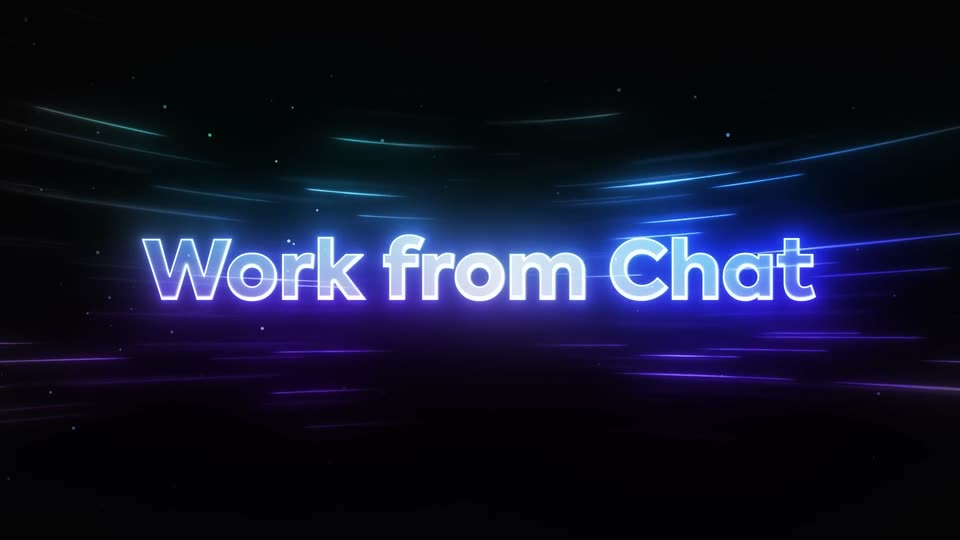
On a black field, neon-outlined ClickUp Chat holds while horizontal light streaks and small dots drift past. A white swoosh draws under the word, then the text swaps to a glowing Work from Chat that scales up, brightens, and fades to black.
On-screen text: “ClickUp Chat”, “Work from Chat”
Techniques: Kinetic type, Particles
Camera: Static
14 · Feature reveal · 0:42–0:43
A dark project-management dashboard fills the frame, with a left sidebar and a chat thread on the right. A cursor hovers over the Posts tab while the headline Work from Chat scales up across the center.
On-screen text: “Work from Chat”
Techniques: Kinetic type, Cursor demo
Camera: Static
15 · Feature reveal · 0:43–0:44
On a dark chat app screen, a cursor moves from the Posts tab to the Tasks tab and clicks it. The post composer fades out while a task list with green and blue status pills fills in, and the left sidebar dims.
Techniques: Cursor demo
Camera: Static
16 · Feature reveal · 0:44–0:45
A dark project UI shows a left sidebar and a task list. A cursor clicks the Posts tab, the task rows fade out, and a post card with a team update and an embedded screenshot slides in as the sidebar dims.
Techniques: Cursor demo
Camera: Static
17 · Feature reveal · 0:45–0:51
A dark chat feed zooms in on a bug report post. The cursor clicks the green AI icon, picks Create a task with AI, and a task chip appears above the post, then is checked to Task Complete as the screen darkens and a glowing pink headline sweeps in.
On-screen text: “Context always Connected”
Techniques: UI zoom, Cursor demo, Kinetic type, Light sweep
Camera: Push in
18 · Feature reveal · 0:51–0:53
A glowing magenta headline sits centered on a black field as horizontal purple light streaks and tiny particles drift across the frame. The text flickers with a scanline stretch at the start, then holds steady.
On-screen text: “Context always Connected”
Techniques: Particles
Camera: Static
19 · Feature reveal · 0:53–0:55
A dark chat interface sits in 3D perspective against black. The thread scrolls up as a new message from Wyatt drops in with a red divider line, and the view zooms toward the message box.
Techniques: 3D mockup, UI zoom
Camera: Push in
20 · Feature reveal · 0:55–1:01
In a dark chat interface, a cursor clicks a toolbar icon and a Connect a task panel opens beside the thread. The view then zooms into the panel as a list of tasks fills in and the cursor moves down it.
Techniques: Cursor demo, UI zoom
Camera: Pull out
21 · Feature reveal · 1:01–1:02
A darkened chat view with a right-hand panel listing a connected task card; a cursor hovers over the card as a gray caption fades in across the lower center.
On-screen text: “All keeps chat manageable”
Techniques: Cursor demo
Camera: Static
22 · Feature reveal · 1:02–1:04
A dark void filled with drifting purple and cyan light streaks and small floating particles. The white headline “AI keeps chat manageable” sits centered, starting blurred and racking into sharp focus with a neon glow.
On-screen text: “AI keeps chat manageable”
Techniques: Particles
Camera: Static
23 · Feature reveal · 1:04–1:05
A glowing white headline with a blue-purple outline holds centered on a black field as curved magenta and cyan light streaks drift horizontally and tiny dots float.
On-screen text: “AI keeps chat manageable”
Techniques: Particles
Camera: Static
24 · Feature reveal · 1:05–1:09
A dark team-chat screen, tilted in 3D perspective, fills the frame. A thread of three user messages settles into view, then a purple sparkle pill appears under the last question and flips to a replied state as the view reframes right to expose an AI answer panel.
Techniques: 3D mockup, UI zoom
Camera: Static
25 · Feature reveal · 1:09–1:11
A dim team chat brightens to show a gradient answer card with Accept and Reject buttons, then a dark field of purple and blue light streaks fills the frame around the centered headline.
On-screen text: “10x Your Productivity”
Techniques: Light sweep
Camera: Static
26 · CTA · 1:11–1:17
A glowing headline and a pill button sit centered on a black field. Magenta arcs and cyan streaks drift slowly behind the text while small particles float, and the lockup holds still for the full shot.
On-screen text: “10x Your Productivity”, “TRY CLICKUP CHAT”
Techniques: Particles
Camera: Static