2:13
Explore
Darko Fabijan - Last month, 52% of the pull requests our team merged were automated t
SuperPlane · Oct 2026 · 2:12 · AI-annotated
- Length
- 2:12
- Scenes
- 58 · 2.3 s avg
- Product on screen
- 0:07
- Call to action
- 2:02 · 93%
- Voiceover
- Yes
00:00:00 / 02:12:14
SuperPlane’s 2:12 launch film runs 58 scenes, about 2.3 s each. The product shows up at 0:07, with social proof. The call to action lands at 2:02 (93% in), over a voiceover. A talking-head host in a brick loft alternates with isometric 3D animation and dark UI screen recordings, cut fast at about twenty cuts a minute. Signature moves include glowing display type, floating task cards, orange collaborator stickers, and cascading pipeline diagrams that sharpen into focus on landing.
Footage neededEstimated needs: 2 capture groups — your screens or recordings · 1 official logo — reused across the film · 17 filmed passages — shoot, supply or replace · 7 graphic passages — draw or supply · 12 3D passages — build or supply
Is this your launch? to your site or press kit.
More like this
Darko Fabijan - Last month, 52% of the pull requests our team merged were automated t, scene by scene
· 58 scenes as text
01 · Hook · 0:00–0:00
A bald man in a gray t-shirt stands centered before a brick wall, gesturing with both open hands as he speaks directly to the camera.
Camera: Push in
02 · Hook · 0:00–0:01
A bald man in a gray superplane t-shirt speaks on the right as a photo of Michael Jordan in a red Bulls 23 jersey, holding a tray of water bottles, fades from transparent to solid on the left. The man blurs and dissolves out as the photo becomes fully opaque.
Camera: Push in
03 · Hook · 0:01–0:03
A blurred 3D render of a player in a red Bulls 23 jersey carries a tray of water bottles while large white text reads WATER ANYONE?. The word ANYONE? wipes in, then the player fades to a dark background as a blurred figure enters from the right.
On-screen text: “WATER”, “ANYONE?”
Techniques: Kinetic type, 3D mockup, Masking
Camera: Pan
04 · Problem · 0:03–0:04
A bald man in a gray superplane T-shirt speaks to the camera in front of an exposed brick wall, gesticulating with both hands. A large still caption reads WATER, then ANYONE?
On-screen text: “WATER”, “ANYONE?”
Camera: Push in
05 · Problem · 0:04–0:07
A bald presenter in a gray superplane tee talks to camera and gestures, beside a cutout of a distressed gray-haired man clutching his head. A large tilted caption HALF A DAY slides in at the top left, then a small name label pops in under the man.
On-screen text: “HALF A DAY”, “-JOHN 24 YO”, “SENIOR DEV”
Techniques: Kinetic type
Camera: Pull out
06 · Product intro · 0:07–0:12
A bald presenter in a gray T-shirt stands in a brick-walled loft, gesturing as he talks. Large glowing white uppercase text “WORK AI COULD DO” appears behind him, then an orange superplane logo badge pops in at chest height.
On-screen text: “WORK AI COULD DO”, “superplane”
Techniques: Kinetic type
Camera: Static
07 · Demo · 0:12–0:13
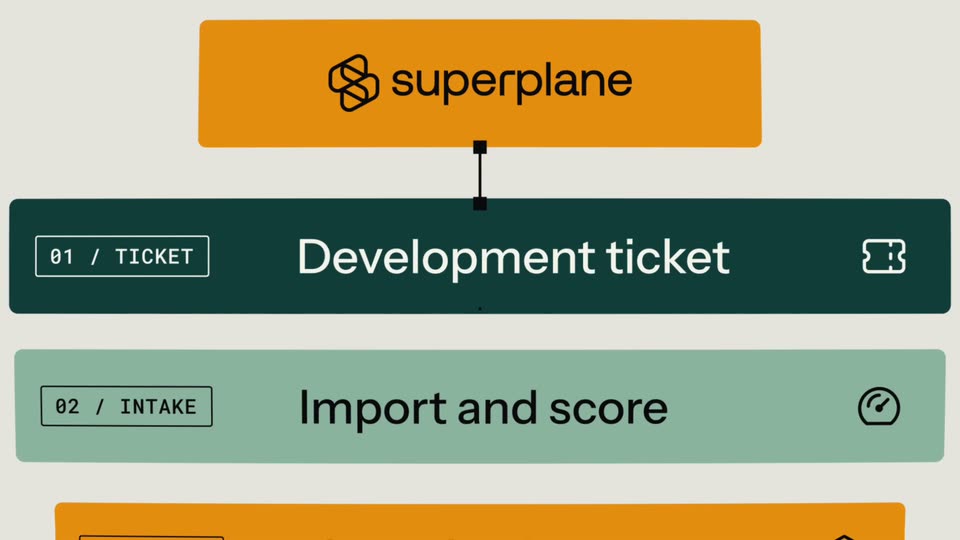
The orange superplane logo bar slides up to the top as a thin line drops to a node. Three step cards, Development ticket, Import and score, Agent implements, cascade in below, each sliding up from behind the last and sharpening on landing.
On-screen text: “01 / TICKET”, “Development ticket”, “02 / INTAKE”, “Import and score”, “03 / AGENT”, “Agent implements”
Camera: Pan
08 · Demo · 0:13–0:16
A vertical pipeline of colored step bars scrolls up past the superplane logo bar at a steady pace, revealing numbered stages from Development ticket to Merge or close, each with a monospace tag and a line icon, joined by a dashed connector with square nodes.
On-screen text: “superplane”
Camera: Pan
09 · Demo · 0:16–0:20
The shot opens tight on the lower steps of a vertical workflow diagram and zooms out to reveal the full six-step pipeline, from the orange superplane logo down to a black “Merge or close” bar, with small side annotations. The frame then blurs out of focus.
Camera: Pull out
10 · Demo · 0:20–0:24
A bald man in a gray t-shirt speaks and gestures on the right against a blurred blue background with a vertical light bar. Three colored labels (white Backlog to Merged, orange Issues to PRs, yellow To-do to Deployed) drift and shuffle positions on the left.
On-screen text: “Backlog → Merged”, “Issues → PRs”, “To-do → Deployed”
Camera: Push in
11 · Problem · 0:24–0:26
A bald man in a gray superplane t-shirt stands in a room with an exposed brick wall, speaking to the camera and gesturing with open hands. The shot is a locked-off medium frame.
Camera: Static
12 · Problem · 0:26–0:27
A light kanban board with Backlog and In progress columns fills a locked-off frame. An orange cursor tagged DARKO slides in and hovers over the Update stale API example card, while a second cursor tip peeks in at the bottom edge.
Techniques: Cursor demo
Camera: Static
13 · Problem · 0:27–0:28
A close-up of a light kanban backlog list. An orange collaborator cursor labeled DARKO hovers over the card Fix flaky retry handling, tagged bug and backend, drifting a few pixels while the frame eases in on the column.
Techniques: UI zoom
Camera: Push in
14 · Problem · 0:28–0:34
A black rounded cube with a white face and orange pin rests on a green pad in a hazy white isometric world. An orange name tag reading DARKO slides in beside it, then the cube hops down a stair bridge toward a golden arch while the camera tracks it.
On-screen text: “DARKO”
Techniques: Parallax
Camera: Push in
15 · Problem · 0:34–0:35
A black rounded cube with a white two-eyed face rests on a white circuit board. The cube tilts in 3D as orange traces ignite across the surface and a small gray disc scales into a glowing orange ring.
Techniques: 3D mockup
Camera: Static
16 · Problem · 0:35–0:36
A close-up isometric view of a black rounded 3D cube with a white two-dot logo on its face, hovering over a white circuit-board surface. Orange traces light up and extend across the board toward a small orange ring node.
Techniques: 3D mockup
Camera: Static
17 · Problem · 0:36–0:37
A matte black rounded cube bearing a white two-dot logo rotates on a pale circuit-board plane, a white pin topped with an orange ball standing on its upper face. An orange disc node and yellow trace lines sit beside it as the camera drifts, revealing more of the board.
Techniques: 3D mockup
Camera: Static
18 · Problem · 0:37–0:38
A black 3D roll with white code-like marks and an orange pin rests on a pale field of orange and gray path lines. An orange disc connects it to a vertical panel sliding in from the right, its face showing small glyphs, as the camera drifts left.
Techniques: Parallax
Camera: Static
19 · Problem · 0:38–0:39
A black rounded 3D cube bearing a white robot face icon sits on a white surface, next to an orange circuit line with a disc node and a white panel of orange geometric shapes. The camera drifts, shifting the isometric perspective.
Techniques: 3D mockup
Camera: Static
20 · Problem · 0:39–0:46
Opening tight on a black cube with a white robot face, the view pulls back to an isometric track where the cube rides along orange dashed arrows and bounces at the steps. A green target, a person-and-document speech bubble, a red X disc, and a gold archway line the route.
Techniques: 3D mockup
Camera: Pull out
21 · Problem · 0:46–0:48
Opens on a white X filling a red field, then pulls back to a 3D isometric space where a black robot cube hovers at center. Red X-marked discs, gold coins, a white staircase, a gold arch gate, and comment bubbles drift at different depths on a grainy pink-red gradient.
Techniques: 3D mockup, Parallax
Camera: Pull out
22 · Demo · 0:48–0:49
A red circle with a white X fills the frame, then clears to show a bald man in a gray Superplane t-shirt gesturing with both hands as he talks. He stands before a brick wall and a pale wall, lit softly.
Camera: Push in
23 · Demo · 0:49–0:52
A bald man in a gray superplane t-shirt stands before a brick wall, gesturing with both hands as he speaks to camera. The shot then cuts to a defocused close-up of a dark screen corner against a pale green background.
Camera: Push in
24 · Demo · 0:52–0:54
A dark task card flies in from the left, rotating in 3D, and docks into the Backlog column of a project board. The board, showing Backlog and Implement lists, sharpens from blur into focus as the card settles.
Techniques: 3D mockup
Camera: Push in
25 · Demo · 0:54–0:56
A dim task list brightens and reframes onto a single card as a yellow cursor glides toward the Start button. An orange sticker reading DARKO tilts into the lower right corner.
On-screen text: “DARKO”
Techniques: UI zoom, Cursor demo
Camera: Push in
26 · Demo · 0:56–0:57
A white wireframe pinwheel of angular 3D blocks sits centered on black, then the camera dives straight into it. The lines blur into oversized cells and a soft green rectangle glows at the core.
Techniques: Parallax
Camera: Static
27 · Demo · 0:57–0:58
A dark two-column task panel scales up and settles on a pale green pixel-grid background. The left column logs agent steps, the right column lists spec sections, all static after the entrance.
Camera: Push in
28 · Demo · 0:58–1:08
A close-up zooms onto a dark agent panel; the status line flips from Analyzing to a green ready state with Clarity and Confidence dots filling, then to a red low-score state, before an agent question card types out and a cursor picks an answer.
On-screen text: “DARKO”
Techniques: UI zoom, Kinetic type, Cursor demo
Camera: Static
29 · Demo · 1:08–1:10
A blurred green rectangle sharpens and zooms into a tilted dark task card titled Implement, floating over a pale green pixel-patterned backdrop. The top task's status flips from a blue Implementing pill to an orange PR #1843 chip as the card rotates to face the camera.
Techniques: UI zoom, 3D mockup
Camera: Static
30 · Demo · 1:10–1:17
A dark Verify task card floats in 3D over a mint background. A bald presenter in a gray superplane tee gestures at right as a red unit-tests failed chip and a Changes requested chip pop into the card, then a white panel wipes in from the right.
Techniques: 3D mockup, Parallax, Masking
Camera: Pull out
31 · Demo · 1:17–1:19
A white notification card titled PR #1843 feedback scales in on a teal-to-peach gradient, its rows unit-tests failed and Changes requested and a TRIGGERED badge fading in, while a second card peeks in from the right edge.
Camera: Static
32 · Demo · 1:19–1:19
Two white notification cards float on a teal-to-orange gradient. The left card reads PR #1843 feedback with unit-tests failed and a TRIGGERED badge. The view slides right to reveal a second card, Run Agent, marked by a cube icon and a small black corner square.
Camera: Pan
33 · Demo · 1:19–1:21
A close-up of a workflow interface pans slowly across a soft green-to-orange gradient. A white Run Agent card with a green RUNNING badge sits center, linked by a green line to a Run Verification card with checkmarks that slides into view on the right.
Camera: Pan
34 · Demo · 1:21–1:23
The camera pans right across a board of white task cards on a teal-to-orange gradient, from a Run Verification card with green checkmarks to a Create pull request card with a READY TO MERGE badge and a Needs review card listing reviewer nina-k as WAITING.
Camera: Pull out
35 · Demo · 1:23–1:24
A workflow board of connected cards sits on a teal-to-orange gradient. The view pulls back to reveal the full pipeline, from a triggered PR feedback card through Run Agent and Run Verification to a pull request and a needs-review card, each card glowing softly as green lines link them.
Camera: Pull out
36 · Demo · 1:24–1:25
A bald man in a gray t-shirt stands before a brick wall, gesturing with both hands as he talks. A white notification card showing a pull request status and check counts scales in on the right and settles into place.
Camera: Static
37 · Demo · 1:25–1:26
A dark interface window slides into the center of a green-to-orange gradient. Its task list fills with rows for Backlog, Implement, Verify, and Done, and a side panel opens on the right showing a green Merge confidence bar.
Camera: Push in
38 · Demo · 1:26–1:29
A dark interface panel zooms out from a close-up of the Blast radius warning to a full check list, then scrolls down past Performance and Security entries with green check icons and explanatory text, an orange textured strip running along the right edge.
Techniques: UI zoom
Camera: Push in
39 · Demo · 1:29–1:29
A dark interface panel sits on a textured orange background while its text list scrolls upward, the frame locked off as a green checkmark row titled Reversibility settles into view.
Camera: Static
40 · Demo · 1:29–1:31
Two oversized orange letterforms, the word “Yo”, sit on a light gray field. A curved arm grows from the left letter and plugs into the right one, then the arm and the right letter turn yellow.
On-screen text: “Yo”
Techniques: Kinetic type, Morph
Camera: Static
41 · Demo · 1:31–1:31
An abstract node diagram in orange and yellow sits on a cream background, a glowing yellow ring on the right. The shapes blur and drift rightward as the clip transitions out.
Camera: Pull out
42 · Demo · 1:31–1:35
A bald man in a gray superplane tee talks and gestures, medium close-up, while a large orange merge icon tile spins down and docks into a white notification card reading Merged · PR #1843 with a green Done pill.
Techniques: Morph
Camera: Static
43 · Demo · 1:35–1:36
A dark kanban board with four columns floats on a blurred orange gradient. The header label updates to the product name while a finished task card with green status pills appears on the right edge.
Camera: Pull out
44 · Demo · 1:36–1:37
A 3x3 grid of dark kanban boards sits on blurred orange and teal gradients. Tilted paper tags reading IMPLEMENT, VERIFY, FIX, and REVIEW AGENT pop into different panels one after another, hopping across the grid.
On-screen text: “IMPLEMENT AGENT”, “VERIFY AGENT”, “FIX AGENT”, “REVIEW AGENT”
Techniques: Split screen
Camera: Pull out
45 · Demo · 1:37–1:39
A 3x3 grid of dark kanban boards scrolls vertically against gradient backdrops. Rotated sticker callouts with a pointing cursor, reading REVIEW AGENT, VERIFY AGENT and FIX AGENT, sit on several windows and slide into place as the grid pans.
On-screen text: “REVIEW AGENT”, “VERIFY AGENT”, “FIX AGENT”, “IMPLEMENT AGENT”
Techniques: Split screen
Camera: Push in
46 · Demo · 1:39–1:49
A dark four-column kanban board sits on a blurred orange and teal backdrop. The camera pulls back from the Done column to the full board, then zooms into Verify as tilted name stickers and cursors pop onto tasks, joined by hand emojis.
On-screen text: “ZURI”, “MATEO”, “DARKO”
Techniques: UI zoom, Cursor demo
Camera: Push in
47 · Social proof · 1:49–1:54
A bald man in a gray SuperPlane t-shirt stands before an exposed brick wall, speaking and gesturing to camera. A white lower-third with an orange logo block slides in at the bottom left showing his name and title. The camera slowly pushes in on him.
On-screen text: “Darko Fabijan”, “Co-founder & CEO, SuperPlane”
Camera: Push in
48 · Social proof · 1:54–1:56
A bald man in a gray shirt speaks to camera on the right against a dark backdrop. On the left, large white glowing words stack line by line into TEAMS WE'VE HELPED, then a small Previously at line with a curved logo and the name semaphore fades in.
On-screen text: “TEAMS”, “WE'VE”, “HELPED”, “Previously at”, “semaphore”
Techniques: Kinetic type
Camera: Static
49 · Social proof · 1:56–1:56
A bald man in a gray tee talks to camera on a dark set. A glowing white headline and a Previously at semaphore caption hold at left, then drop out, leaving him center frame as a small superplane wordmark fades in below.
On-screen text: “TEAMS WE'VE HELPED”, “Previously at semaphore”, “superplane”
Camera: Pull out
50 · Social proof · 1:56–1:58
A bald man in a gray t-shirt stands center frame against a brick wall, gesturing with open hands. White logo cards for Superhuman, Replit and Confluent float around him in 3D, linked by thin orange lines, sliding into place.
On-screen text: “SUPERHUMAN”, “replit”, “CONFLUENT”, “an IBM Company”
Camera: Pull out
51 · Social proof · 1:58–1:58
A white chip labeled Review with a tag icon slides from center to the upper left over a soft green gradient, while an empty white chip slides in from the lower right. Both tilt slightly with drop shadows and a small black square at one edge.
Techniques: 3D mockup
Camera: Static
52 · Social proof · 1:58–1:59
Four white tags reading Review, Test, Shipped and Fixed scale into place on the left over a blurred green and beige background. Thin curved lines draw from each tag's handle to a white tile on the right, where a black knot logo fades in.
On-screen text: “Review”, “Test”, “Shipped”, “Fixed”
Camera: Pull out
53 · Social proof · 1:59–2:00
A white rounded tile with a black knot logo slides out to the left across a grainy green-to-gray gradient, its curved connectors straightening into a single thin line with a small square node, while large words enter one by one.
On-screen text: “Review”, “Test”, “Shipped”, “Fixed”
Techniques: Kinetic type
Camera: Static
54 · Social proof · 2:00–2:02
A white rounded card floats on a soft blurred gradient background, a thin line with a small square at its left edge. Inside, the headline Test & Ship Software fades in from pale gray to solid black while scaling up.
On-screen text: “Test & Ship Software”
Techniques: Kinetic type
Camera: Static
55 · Social proof · 2:02–2:02
The gray headline “Test & Ship Software” sits centered on a plain white background, then scales and fades to white on a locked-off frame.
On-screen text: “Test & Ship”, “Software”
Techniques: Kinetic type
Camera: Static
56 · CTA · 2:02–2:04
A bald man in a gray superplane t-shirt stands before a brick wall, gesturing with both open hands as he speaks to camera. Large white words scale in over the shot.
On-screen text: “Test & Ship”, “Software”
Techniques: Kinetic type
Camera: Static
57 · CTA · 2:04–2:06
A white “In” logo sits centered on black while white speed streaks radiate outward from the middle. The logo scales down behind the glowing headline “In Half The Time.”, which holds steady.
On-screen text: “In Half The Time.”
Techniques: Particles
Camera: Pull out
58 · CTA · 2:06–2:12
A black outlined cube mark assembles at center of a cream field, then the lowercase wordmark types in beside it. The lockup gives way to the tagline, and the URL types in letter by letter before holding.
On-screen text: “In Half The Time.”, “Try it at superplane.com”
Techniques: Kinetic type
Camera: Static