0:22
HOPE. - i built oh-my-hermes bot desktop app (+ terminal) ⭐️ GitHub 5,900+ st
oh-my-hermes · Nov 2026
Cifrato · Feb 2026 · 1:34 · Full motion · AI-annotated
Cifrato’s 1:34 launch film runs 22 scenes, about 4.3 s each. The product is on screen from the first frame. There is no explicit call to action; a voiceover carries the film. A linear screen-recording tutorial that walks through account creation, Siigo connection, DIAN token sync and invoice upload as one continuous cursor-driven flow, alternating flat captures with tilted 3D screen shots. Steady pacing of about seven cuts per minute, with white cards on a blurred blue backdrop, green accent buttons, and a single pointer that types, selects and clicks as the only motion.
Is this your launch? to your site or press kit.
oh-my-hermes · Nov 2026
Superhuman · Productivity · Oct 2025
Timper · Jan 2026
A white Cifrato sign-up form sits on a blurred blue backdrop in a locked-off frame. A cursor types an email, phone and password, each field flashing a red border and error message as it fills. The form then scrolls to a second panel with company data fields.
Techniques: Cursor demo
Camera: Static
A white account form sits on a blurred blue background. A cursor types the company name, selects the NIT and legal ID from dark dropdown lists, ticks the privacy box, and clicks the green button, fading to the next screen.
Techniques: Cursor demo
Camera: Static
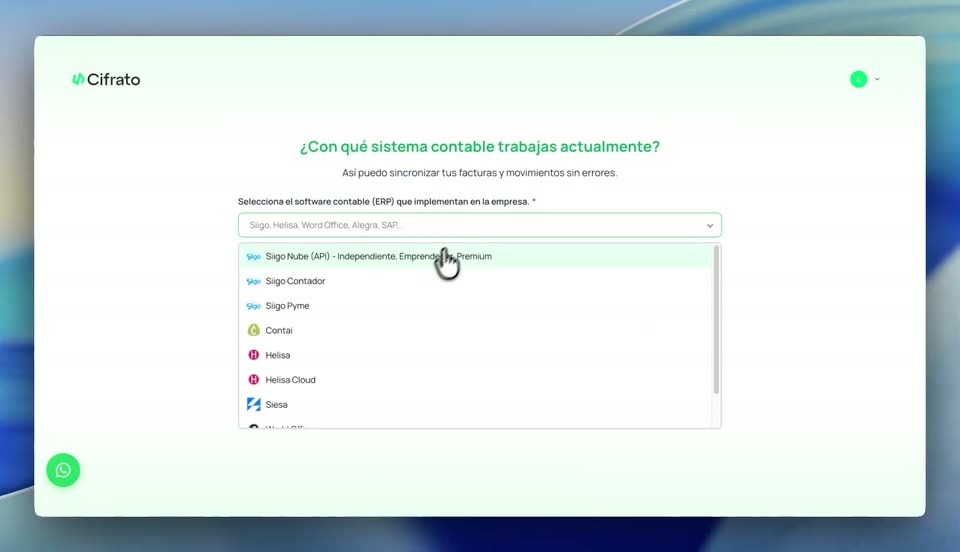
A white Cifrato form panel on a blurred blue background. A hand cursor opens the software dropdown, selects the Siigo Nube entry, then clicks the green Siguiente button.
Techniques: Cursor demo
Camera: Static
A white registration form on a blurred blue background scrolls down as a hand cursor types the Siigo username and API key into the fields. Embedded tutorial videos play inside the form, then a spreadsheet file is attached and a green loading spinner fills the center.
On-screen text: “[email protected]”
Techniques: Cursor demo
Camera: Pan
A white app window sits on a blurred blue backdrop with a hand cursor centered. The window fills with a green line-art illustration of a seated figure among floating icons, then a confirmation message and a small loading spinner appear.
Techniques: Cursor demo
Camera: Static
A laptop in 3D perspective shows a blurred dashboard behind a white welcome modal whose title scales in. An illustration of a person with floating icons sits above a green button, which a cursor hovers, while confetti falls.
Techniques: 3D mockup, Cursor demo, Particles
Camera: Static
A white settings panel for syncing DIAN purchase invoices sits over a blurred dashboard. A hand cursor hovers the form fields while an embedded video player starts playing a short demo clip.
Techniques: Cursor demo
Camera: Static
A tilted Gmail inbox mockup floats on a blue gradient. A cursor glides down from the top banner to hover over the Token Acceso DIAN row, which highlights and sprouts a small New badge.
Techniques: 3D mockup, Cursor demo
Camera: Static
A tilted Gmail window floats over a blurred blue background. A hand cursor rests on an email titled Token Acceso DIAN while the top-right status flips to a green Active dot.
Techniques: 3D mockup, Cursor demo
Camera: Static
A Gmail window in slight 3D perspective shows an inbox list, then cuts to an opened email. A cursor right-clicks a link, opening a context menu over the link while the link URL appears in the status bar.
Techniques: Cursor demo, 3D mockup
Camera: Static
A Gmail window shows an open email with a right-click context menu overlaid on the message body. The cursor glides down the menu, highlighting the link-copy options while the voiceover notes the token URL is extracted.
Techniques: Cursor demo
Camera: Static
A right-click context menu is open over a Gmail email, with the cursor hovering over the 'Copiar vínculo' option. The menu then disappears, revealing the full email body.
Techniques: Cursor demo
Camera: Static
A flat capture of a sync modal over a blurred dashboard: the cursor pastes a token URL, opens a February 2026 calendar to set the range, then clicks Import. The modal closes to reveal an invoice list with a spinner.
Techniques: Cursor demo
Camera: Static
A sync app's invoice table fills the frame over a blurred blue background. The progress pill counts up to 19 of 19 as rows load, then swaps to a green sync button with a summary while the cursor hovers a row.
Techniques: Cursor demo
Camera: Static
A white invoice screen scrolls down as a hand cursor clicks into fields; the Tipo de factura and Centro de costo dropdowns fill with suggested values, then a product row with a loading spinner appears in the Items table.
Techniques: Cursor demo
Camera: Pan
A flat invoice form fills the frame over a blue desktop. A cursor opens the Bodega dropdown, picks Materias Primas, and the product cells auto-fill. The view scrolls to the retenciones block, then the cursor hits Guardar y siguiente, swapping to the next invoice.
Techniques: Cursor demo, UI zoom
Camera: Pan
A tilted 3D screen of an invoice form scrolls down past its field rows. A hand cursor opens a dropdown and selects an entry, then a small gray cube floats up over the items table.
Techniques: 3D mockup, Cursor demo
Camera: Pan
A white tax-assignment modal sits over a dimmed invoice screen. The cursor scrolls the panel, opens the tax dropdown, picks an option, then scrolls to the green save button. The interface text stays static while the pointer drives the flow.
Techniques: Cursor demo
Camera: Static
The invoicing interface is held in a tilted 3D perspective over a blurred blue backdrop. A cursor glides from the item table down to the bottom-right corner and rests on the 'Ver 21 facturas listas' button.
Techniques: 3D mockup, Cursor demo
Camera: Static
A white invoice-list modal sits over a dimmed dashboard. A cursor moves to the green upload button and clicks it, and the panel switches to a confirmation view with a green check mark.
On-screen text: “Factura n° 2 de 22”
Techniques: Cursor demo
Camera: Static
A white invoice detail screen floats at a slight 3D angle over a blurred blue backdrop. A cursor glides to the Borrar en Silgo button, a black tooltip with a document code pops up, then the cursor clicks it.
On-screen text: “Factura n° 2 de 22”
Techniques: 3D mockup, Cursor demo
Camera: Static
A tilted 3D browser window of the Siiigo dashboard floats over a blurred blue backdrop. A cursor opens a filter dropdown, types a document code into the search bar, and a results panel appears, then the frame zooms onto the top bar.
Techniques: 3D mockup, Cursor demo, UI zoom
Camera: Static