1:30

Tire Swing
Tire Swing · B2B · Jul 2026
Superhuman · Oct 2025 · 0:29 · AI-annotated
Superhuman’s 0:29 launch film runs 4 scenes, about 7.5 s each. The product is on screen from the first frame. There is no explicit call to action. One continuous UI walkthrough: a tilted Gmail window flattens, the Superhuman Go panel opens, and a cursor walks through feedback, inline edits, a Jira summary, and sending. Slow reframes and zooms follow the cursor, keeping the pace steady and the motion minimal.
Is this your launch? to your site or press kit.
Tire Swing · B2B · Jul 2026
Raycast · Productivity · Jan 2023
Hoplite · B2B · Jul 2026
A Gmail window tilted in 3D on a purple gradient zooms flat as a hand cursor clicks a person icon, opening a Superhuman Go side panel. The camera reframes on the panel while the cursor hovers the feedback prompt.
Techniques: 3D mockup, UI zoom, Cursor demo
Camera: Push in
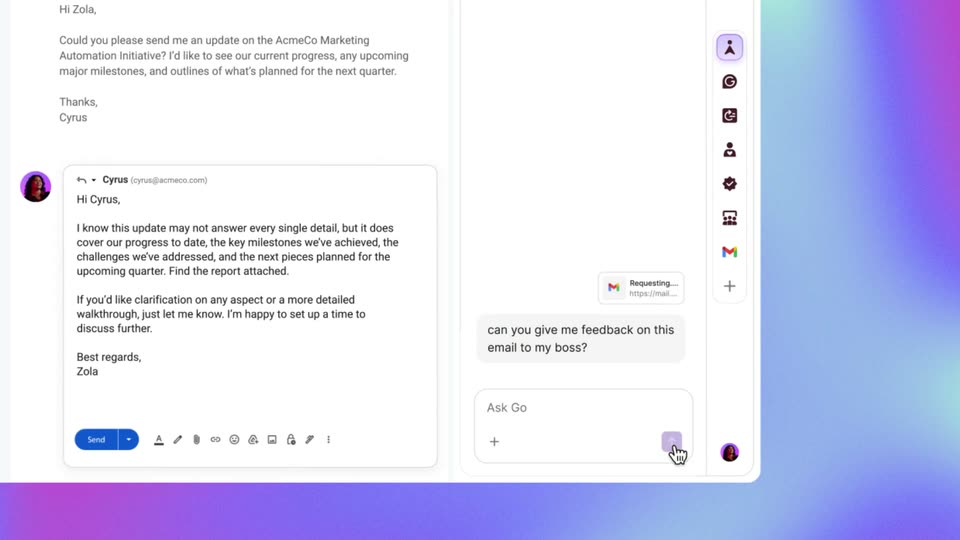
A mail composer sits left with a draft to Cyrus; a purple AI sidebar right shows a typed prompt and a cursor pressing send. The view reframes as a feedback note fills the sidebar and an inline Sound less defensive card with green highlight and Accept button overlays the draft.
Techniques: Cursor demo, UI zoom
Camera: Pan
A Gmail compose window sits beside an AI chat panel on a purple gradient. A cursor accepts and dismisses inline edit suggestions, then opens a connections menu, types a Jira prompt, and inserts the returned summary into the email before the view zooms out to the full browser.
Techniques: Cursor demo, UI zoom
Camera: Pull out
A browser window shows a Gmail thread with a reply draft and an AI assistant panel on the right, set on a purple gradient. A cursor moves to the blue Send button and clicks it, swapping the button for a Message sent confirmation with an Undo link.
Techniques: Cursor demo
Camera: Static