1:30
Tire Swing
Tire Swing · B2B · Jul 2026
Raycast · Jan 2023 · 0:27 · AI-annotated
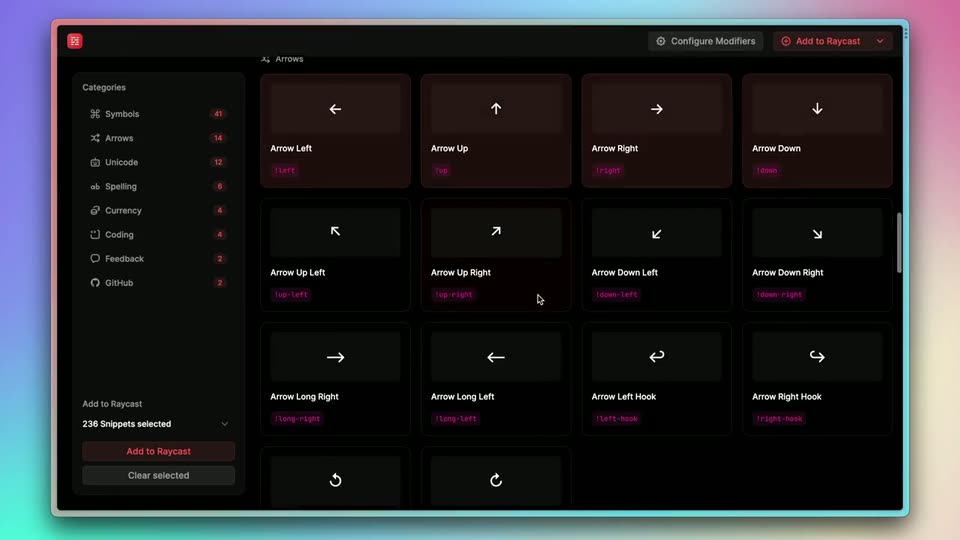
Raycast’s 0:27 launch film runs 9 scenes, about 3.1 s each. The product is on screen from the first frame and 3 features are revealed. There is no explicit call to action. The video is one continuous product tour: a command palette opener names the product, a 3D showcase sweeps across the snippet grid and category rail, then a hands-on flow runs drag selection, export, and import into Raycast before a fade to black. Its signature moves are slow 3D camera pushes and tilts over dark UI panels, the blue drag-selection rectangle, and the floating window framed by a glowing gradient on a pastel backdrop.
Is this your launch? to your site or press kit.
Tire Swing · B2B · Jul 2026
Cursor · Developer tools · Feb 2026
Result · Consumer · Nov 2026
A dark command palette window floats centered on a soft pink-to-blue gradient. The query snippets.ray.so is typed into the search field while the results list below reorders, the top match highlighted in orange.
On-screen text: “snippets.ray.so”
Camera: Push in
A dark grid of rounded cards shows keyboard and icon snippets, each with a white glyph, a name and a pink trigger tag, beside a left rail of pink numbers. The grid pans slowly downward.
Camera: Pull out
A dark symbol-library screen sits flat with a glowing gradient edge, then the camera pushes in and tilts to an angled 3D view, reframing onto the left categories list while the right-hand symbol grid blurs out of focus.
Techniques: UI zoom, 3D mockup
Camera: Push in
A dark keyboard-mapping interface in 3D perspective, a glowing cyan device edge on the left. A sidebar of categories with pink badges sits beside a grid of key icons receding right. The view pulls back from a tight crop to the full layout, a cursor over the Install Snippets panel.
Techniques: 3D mockup
Camera: Pull out
A dark Raycast snippet picker sits on a pastel gradient. The cursor drags a blue selection box across rows of symbol cards, the grid scrolls down through Arrows and Unicode, then zooms into the Unicode section as a second box selects a block of cards.
Techniques: Cursor demo, UI zoom
Camera: Push in
A dark grid of Unicode emoticon cards fills the screen, each pairing a face glyph with a white name and a pink tag. A cursor drags a thin blue selection rectangle outward from the center, enclosing two rows of cards. The top bar holds two buttons.
Techniques: Cursor demo
Camera: Static
A dark app window tilts in 3D perspective over a pink-to-blue gradient, then levels to face the camera. A cursor clicks a dropdown arrow to open a three-item export menu, then hovers the red top-right button.
Techniques: 3D mockup, Cursor demo
Camera: Pull out
A dark app window shows a left category list and a right grid of snippet cards. A centered modal displays a red icon and the line Import 12 Snippets, with a footer button. A cursor rests over the Add to Raycast button at the top right.
Techniques: Cursor demo
Camera: Static
A dark product interface, with a left sidebar, a centered import dialog, and a right activity list, fades out to a fully black screen.
Camera: Static