0:30
Explore
0xMarioNawfal - CLIPPERS ARE DONE. Drop a YouTube link. AI finds the viral cuts, edi
Clippers · Mar 2026 · 0:50 · AI-annotated
- Length
- 0:50
- Scenes
- 8 · 6.3 s avg
- Product on screen
- 0:31
- Features shown
- 1
- Voiceover
- No
00:00:00 / 00:50:31
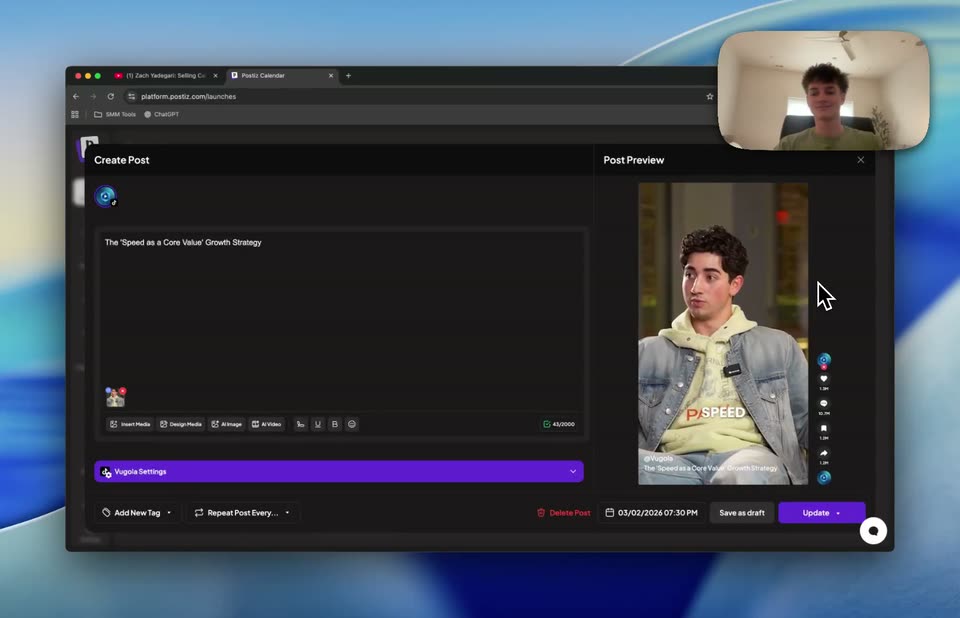
Clippers’s 0:50 launch film runs 8 scenes, about 6.3 s each. The product shows up at 0:31 and 1 feature is revealed. There is no explicit call to action. The video opens with a 3D-tilted browser window that snaps flat, then flows through a screen-recorded workflow of a Telegram chat and a scheduling calendar before ending on a post editor. Its style is defined by smooth perspective tilts, zoom-ins on UI panels, and a consistent blue gradient backdrop with a corner webcam feed.
No filming indicatedEstimated needs: 4 capture groups — your screens or recordings · 1 3D passage — build or supply
Is this your launch? to your site or press kit.
More like this
0xMarioNawfal - CLIPPERS ARE DONE. Drop a YouTube link. AI finds the viral cuts, edi, scene by scene
· 8 scenes as text
01 · Hook · 0:00–0:02
A tilted 3D browser window showing a YouTube video page rotates to face the camera on a blue desktop. A cursor moves from the video play button to the search field and the address bar. A small webcam feed sits in the top-right corner.
Techniques: 3D mockup, Cursor demo
Camera: Static
02 · Hook · 0:02–0:05
A dark browser window on a blue desktop scales up into a full-screen YouTube page. The video shows a man seated in a chair, with a dark analytics panel to the right and a webcam feed in the top-right corner. A cursor drifts down the page.
Techniques: UI zoom, Cursor demo
Camera: Static
03 · Demo · 0:05–0:11
A desktop screen recording. A dark Telegram chat window overlays a playing YouTube podcast video, with a small webcam feed top right. The frame zooms out to show the full browser and blue wallpaper, then a cursor drags the Telegram window right by its title bar.
Techniques: Cursor demo
Camera: Static
04 · Demo · 0:11–0:30
A Telegram chat window sits over a YouTube page, with a webcam feed in the corner. The frame zooms out to the blue background, then the chat scrolls as a schedule table and a clip list appear, and the cursor clicks a bottom tab.
Techniques: Cursor demo
Camera: Static
05 · Demo · 0:30–0:31
A browser window showing a YouTube interview sits on a blue gradient desktop. The window shrinks and shifts up as a cursor moves from the video controls to a new tab at the top.
Techniques: Cursor demo
Camera: Static
06 · Product intro · 0:31–0:33
A dark calendar web interface sits angled in 3D perspective against a blue abstract background, then flattens and zooms in as a cursor glides across the weekly grid, hovering to reveal a small plus button.
Techniques: 3D mockup, UI zoom, Cursor demo
Camera: Static
07 · Product intro · 0:33–0:44
A dark calendar web app fills a tilted browser window, a small webcam feed of a man sits in the top-right corner. The cursor scrolls the week grid past purple event blocks and hovers to add one, then the frame zooms in on the grid.
Techniques: 3D mockup, Cursor demo, UI zoom
Camera: Push in
08 · Feature reveal · 0:44–0:50
A dark Postiz post editor fills a browser window, its right panel playing a vertical video of a man in a denim jacket, with the presenter's webcam in the top corner. The frame zooms in, then tilts into 3D perspective as the cursor moves across the panels.
Techniques: UI zoom, Cursor demo, 3D mockup
Camera: Pull out