0:44

Consus Intro
Consus · Industrials · Nov 2024
Odigos Technologies Inc. · Aug 2022 · 3:29 · Clip · AI-annotated
Odigos Technologies Inc.’s 3:29 clip runs 31 scenes, about 6.8 s each. The product is on screen from the first frame and 3 features are revealed. A screen-recording tutorial built as a single continuous walkthrough: a named-product intro, a one-scene problem setup, then alternating feature reveals and long in-app demos that close on the results dashboard. Pacing is steady and procedural, driven by cursor movement, terminal typing and UI state changes rather than cuts or motion graphics, with the palette anchored by Datadog purple and Odigos indigo against white panels and black terminals.
Is this your launch? to your site or press kit.
A full-screen browser window shows the Datadog APM Service List page in an empty state, with a purple magnifying glass and the line No services match the filter. The cursor drifts slowly across the page and ends on a dock icon.
Techniques: Cursor demo
Camera: Static
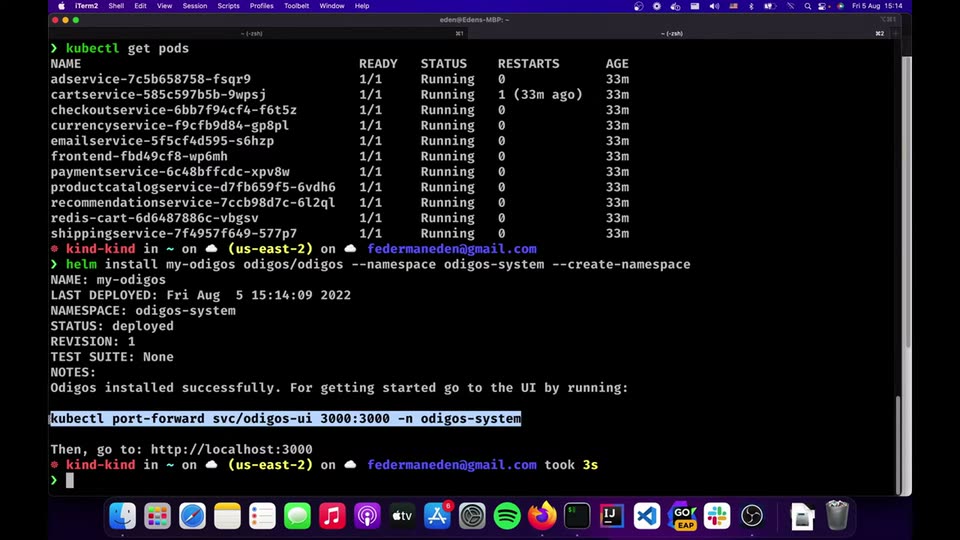
A full-screen macOS terminal on a black desktop shows the kubectl get pods output: eleven pods, all Running. The list holds still while the mouse pointer drifts across the text. At the end the screen resets to a fresh prompt with kubectl get pods typed.
Techniques: Cursor demo
Camera: Static
A macOS terminal window fills the frame. The user types a helm install command, the autocomplete list clears, and the deployment output scrolls in. A line is then selected and the port-forward command runs, ending with an app switcher popping up over the screen.
Techniques: Cursor demo
Camera: Static
A browser window shows the Datadog APM service list in an empty state, with a purple magnifying glass icon and the line 'No services match the filter' centered in the main panel. The left sidebar lists navigation items and the top bar holds view tabs. The frame stays static.
Camera: Static
A flat screen recording of a Firefox new-tab page on a Mac desktop. The focused address bar shows a suggestion dropdown; the user types localhost:3000 and the list fills with Odigos URLs, then the page loads to a dark, empty view.
Camera: Static
A browser window displays the Odigos setup page, headed Choose target applications, with a grid of service cards. A cursor drifts across the page, switches the radio option, highlights two cards in blue, then rests on the Save Changes button.
Techniques: Cursor demo
Camera: Static
A browser window shows the odigos Add New Destination page with a grid of backend cards. The cursor clicks Datadog, the view switches to a setup form, and the cursor types a name and picks a region from a dropdown.
Techniques: Cursor demo
Camera: Static
A full-screen Firefox window shows the Datadog service list. The cursor travels down the left sidebar, opens a user dropdown, and hovers over the red Log Out entry. The view then cuts to the Organization Settings page with the Users panel selected.
Techniques: Cursor demo
Camera: Static
The Datadog organization settings page shows a user card and an invite panel. A mouse cursor moves from the user card to the left sidebar and highlights the API Keys menu item.
Techniques: Cursor demo
Camera: Static
A Firefox window shows the Datadog API Keys settings page. The results table begins as gray skeleton rows, then fills with two populated entries. A cursor drifts from the top right down to hover the eye icon on the first row.
Techniques: Cursor demo
Camera: Static
A browser window on the Datadog API Keys page centers a modal with a masked key and a Copy button. The cursor clicks Copy, a green toast slides in at the top, then the modal closes to reveal the keys table.
Techniques: Cursor demo
Camera: Static
A browser window on a Mac desktop shows the odigos app. The Datadog destination form's API key field fills with masked dots, the form dims and a spinner spins, then the view cuts to the Overview page listing detected sources and the new datadog destination.
Camera: Static
A full-screen macOS terminal on a purple desktop. Green and white monospace text scrolls as a kubectl command lists pods, their status column flipping from Running to Terminating. A port-forward command types out first, then the watch list updates continuously.
Camera: Pan
A dark macOS terminal fills the frame, its pod list refreshing as rows flip from Running to Terminating. The kubectl get pods command rests at the prompt with a block cursor, the app dock lined up below.
Camera: Static
A dark macOS terminal window fills the screen above the dock. After clearing, a kubectl port-forward command is typed and two forwarding output lines print. A small rounded panel of four app icons then fades in at the center.
Camera: Static
A macOS browser window displays the odigos dashboard. The white panel flashes “failed to load” before filling with a Sources list, a Destinations strip of app icons, and a Collectors line, while a dark sidebar holds the menu.
Camera: Static
A Firefox browser window fills the frame on a dark desktop. The address bar types a local URL, an autocomplete list drops down, then the page loads to a blank dark screen as the tab retitles to Online Boutique. The mouse cursor moves across the top bar.
Techniques: Cursor demo
Camera: Static
A full Firefox window on a Mac desktop displays the Online Boutique storefront with a hero image and a three-item product row. The cursor moves across the page and the address bar changes to a reviews URL, while an orange AWS label sits on the left margin.
On-screen text: “AWS”
Techniques: Cursor demo
Camera: Static
A browser window on a Mac desktop shows a product page for a vintage camera lens. The cursor moves to the teal Add to Cart button and clicks it, darkening the button, then the page scrolls down to reveal a row of related product thumbnails.
Techniques: Cursor demo
Camera: Static
A browser window displays a product page for a metal camping mug with an orange mug photo and a teal add to cart button. The cursor clicks the button, and the page switches to a cart view showing the item total and a checkout form.
Techniques: Cursor demo
Camera: Static
A browser window displays a checkout form with a product card and filled fields. A cursor moves onto the teal Place Order button and clicks it, and the view switches to a confirmation page showing a green checkmark and order details.
Techniques: Cursor demo
Camera: Static
A desktop browser window displays a web store. The first view is an order confirmation page with a green boutique logo and totals; it then switches to an empty cart page showing four product thumbnails. A mouse cursor hovers at the top right.
Techniques: Cursor demo
Camera: Static
A Firefox window on a Mac desktop shows a localhost product page for a Vintage Record Player, with image, price, quantity field and an Add to Cart button. An orange AWS tab sits at the left edge. The page scrolls up slightly and the cursor drifts down toward the Other Products row.
On-screen text: “AWS”
Camera: Static
A browser window on a Mac desktop shows an Online Boutique product page for a City Bike with price and add-to-cart controls. The page scrolls down to reveal an Other Products You Might Like row of four thumbnails. An orange AWS tab sits at the left edge.
Camera: Static
A browser window shows an online boutique product page for a metal camping mug. The cursor clicks the add to cart button, the view switches to a checkout form with pre-filled fields, and the cursor rests on the place order button.
Techniques: Cursor demo
Camera: Static
A macOS browser window fills the frame, showing the Online Boutique checkout page beside an orange AWS tab. The layout resolves from a doubled, overlapping state into a clean confirmation view with the headline, two IDs, totals and a teal Keep Browsing button.
Camera: Static
A full-screen Firefox window shows the Datadog API Keys page. The cursor moves down the left sidebar and clicks APM, opening a dropdown of tracing and profiling links, then the submenu expands inline.
Techniques: Cursor demo
Camera: Static
In a browser, the Datadog service list shows an empty state with a purple magnifying glass. The cursor opens the time filter, picks Past 15 Minutes, and eight service rows fill the table. It then hovers a row and clicks cartservice, opening a new tab.
Techniques: Cursor demo
Camera: Static
The Datadog service page loads in a browser as request charts draw a blue spike. The cursor hovers to pop a tooltip, the view scrolls down to a resources table, then the cursor moves up and clicks the Traces tab.
Techniques: Cursor demo
Camera: Static
A web dashboard scrolls down past a promotional banner to reveal line graphs and a data table. A cursor moves to highlight a specific row in the table.
Techniques: Cursor demo
Camera: Static
A cursor hovers over a green span bar in a flame graph, popping a tooltip with the span name and duration. The cursor then moves to a nested span, and the detail panel below switches from the cartservice POST span to the redis.command span. The view holds still.
Techniques: Cursor demo
Camera: Static