
0:24
Explore
Your rater shouldn’t take months to implement. Today, we’re launching Qlo’s Rater Converter. Give it an existing Excel rating file. It turns that file into a working digital rater inside Qlo while… | Ryan Hu
Qlo · 2:03 · Full motion · AI-annotated
- Length
- 2:03
- Scenes
- 11 · 11.2 s avg
- Product on screen
- 0:00
- Features shown
- 3
- Call to action
- 1:47 · 87%
- Voiceover
- Yes
00:00:00 / 02:03:15
- Length
- 2:03
- Scenes
- 11 · 11.2 s avg
- Product on screen
- 0:00
- Features shown
- 3
- Call to action
- 1:47 · 87%
- Voiceover
- Yes
Qlo’s 2:03 launch film runs 11 scenes, about 11 s each. The product is on screen from the first frame and 3 features are revealed. The call to action lands at 1:47 (87% in), over a voiceover. A single continuous screen recording of the Rater Converter app, framed by a fixed presenter webcam and Qlo logo, with caption lines swapping in a dark bar at the bottom. Pacing is steady and demo-led: each feature is announced by a caption, shown end to end in the real UI, and handed off to the next with no cuts, motion graphics, or music.
No filming indicatedEstimated needs: 5 capture groups — your screens or recordings · 1 official logo — reused across the film
Is this your launch? to your site or press kit.
More like this

0:11

Suno - Introducing Suno MCP Beta Create songs from wherever you get inspire
Suno · AI · Oct 2026
0:53

Introducing Linear Mobile
Linear · Productivity · Sep 2024
Your rater shouldn’t take months to implement. Today, we’re launching Qlo’s Rater Converter. Give it an existing Excel rating file. It turns that file into a working digital rater inside Qlo while… | Ryan Hu, scene by scene
· 11 scenes as text
01 · Product intro · 0:00–0:24
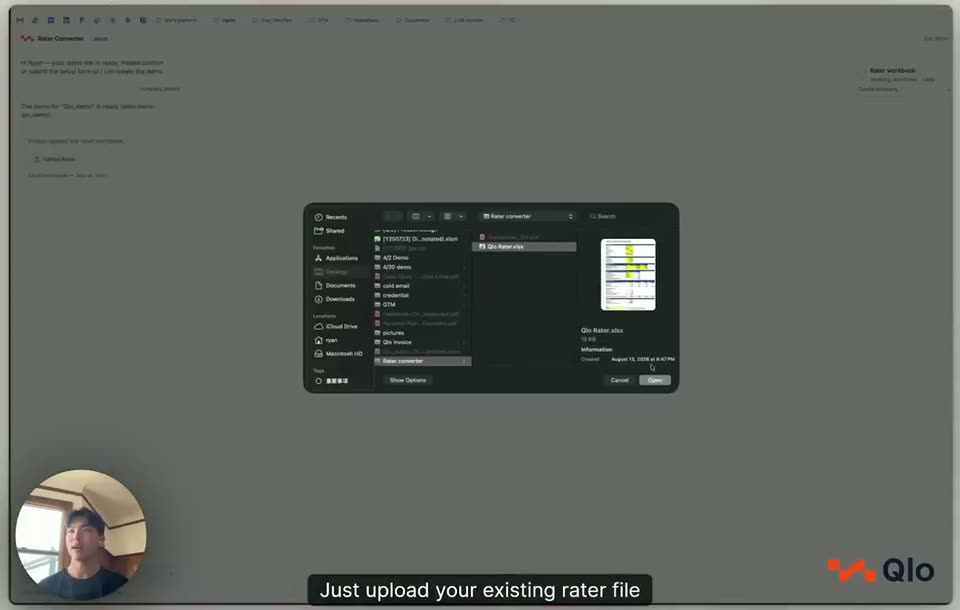
A locked-off screen recording of the Rater Converter chat page in a browser, with a circular webcam feed of the presenter bottom-left and the Qlo logo bottom-right. Caption lines swap in at the bottom as he introduces the demo; the cursor moves to the Upload Rater button at the end.
On-screen text: “this is Ryan from klo.”, “We just launched our radio converter agent.”, “Adding a new insurance program shouldn't mean”, “rebuilding another rating file from scratch.”, “We know how painful that is.”, “Today I will show you how the agent converts a”, “how we could verify the result and what happens”, “when a real broker submission comes in.”, “This chat interface is something we quickly put”, “together for the demo. Just upload your existing rater file”
Techniques: Cursor demo
Camera: Static
02 · Feature reveal · 0:24–0:26
A screen recording of a dark macOS file dialog over the Qlo Rater Converter page. The cursor selects an Excel file and a preview thumbnail appears, while a circular webcam of the presenter stays in the lower left corner.
On-screen text: “Just upload your existing rater file”, “Qlo”
Techniques: Cursor demo
Camera: Static
03 · Feature reveal · 0:26–0:38
A locked-off browser view of the onboarding app. A center Submission card switches from a System Inbox diagram with status chips to an Ingestion form, while a task checklist in the top right accumulates completed steps. A circular webcam feed of the speaker sits in the bottom left.
On-screen text: “and the agent start mapping the dependencies”, “required data points and rating”, “logic behind a”, “calculation.”, “This normally takes two to three minutes”, “so let's skip ahead.”
Camera: Static
04 · Feature reveal · 0:38–1:01
A static browser view of the Cloak Rate Converter workspace: chat panel left, form middle, quote panel right. A circular webcam of the presenter sits bottom left, the Qlo logo bottom right. White captions in a dark bar cycle across the bottom while the cursor opens a dropdown.
On-screen text: “Once it is done,”, “Cloak gives you a dynamic worksheet and your quote”, “option setup.”, “Both can affect a premium.”, “You can configure things like coverage,”, “limits,”, “retentions and where the modifier starts,”, “nothing is locked.”, “You can adjust”, “a setup around how your program actually works., But how do we know the conversion is correct?, So let's do parity.”
Techniques: Cursor demo
Camera: Static
05 · Feature reveal · 1:01–1:10
Locked-off screen recording of the Qlo onboarding app. The cursor closes the Parity Check modal, a spinner runs, then three input rows with matching premiums and green Match badges fill in. A presenter's webcam bubble sits bottom left.
On-screen text: “Qlo”, “the agent,”, “assign”, “same randomized inputs to the original”, “spreadsheets and the clone version.”, “Then compare the premium they produce.”, “You can open any test,”
Techniques: Cursor demo
Camera: Static
06 · Feature reveal · 1:10–1:18
A screen capture of the Genlo rate-converter UI fills the frame, with a small circular webcam of the presenter in the lower left. The center rate sheet scrolls while a red outline steps down the right field list, then the center swaps to a form view.
On-screen text: “You can open any test,”, “inspect every input value to see”, “exactly how the premium was calculated.”, “We think that matters”
Techniques: Cursor demo
Camera: Static
07 · Feature reveal · 1:18–1:30
A locked-off screen capture of the Rater Converter interface: a chat panel on the left, a policy form in the middle, a data panel on the right. A circular webcam video of a man sits bottom-left and the Qlo logo sits bottom-right while subtitle lines swap at the bottom.
On-screen text: “We think that matters”, “if the converted result cannot pass parity.”, “An underwriter shouldn't be expected to trust it.”, “Now comes to the part every AI demo has”
Camera: Static
08 · Feature reveal · 1:30–1:32
A macOS open-file dialog sits over a blurred insurance app workspace; the PDF Appication_Qlo.pdf is selected and the Open button highlights. A circular webcam feed of a man sits lower left, and a bottom caption reads Uploading, then a submission in production.
On-screen text: “Uploading”, “a submission in production.”
Camera: Static
09 · Feature reveal · 1:32–1:47
A locked-off browser view of the Qlo agent interface: a chat log on the left, a diagram on the right that steps through clearance checks, an ingestion data card, and two quote options. A circular webcam of the presenter sits bottom-left, caption lines swap along the bottom.
On-screen text: “a submission in production.”, “A broker Forward it into a dedicated inbox.”, “For this demo,”, “I uploaded directly the agent extract the data,”, “populated the converted worksheet and linked each”, “value back to the exact section of the application”, “it came from.”
Camera: Static
10 · CTA · 1:47–1:49
A locked-off web app view: a chat panel left, a workspace form with account and quote fields right, a video-call circle of a person lower left, the Qlo logo lower right. Bottom captions change from 'And that's it.' to 'If you want to see'.
On-screen text: “And that's it.”, “If you want to see”
Camera: Static
11 · CTA · 1:49–2:03
A locked-off screen recording of the Rater Converter app: chat and form workspace on the left, a sample insurance application document on the right. A circular webcam feed of a man sits bottom left, captions roll along the bottom, and the Olo logo stays bottom right.
On-screen text: “what your own radar”, “looks like after conversion,”, “shoot me the message”, “the private demo link will come with an NDA.”, “Your rating logic is sensitive and we take that”, “very seriously.”
Camera: Static