2:37

Giga - Introducing Scout. Tell it the KPI you care about, like funded depos
Giga (Scout) · Jun 2026
Newton’s 1:57 launch film runs 35 scenes, about 3.3 s each. The product is on screen from the first frame and 4 features are revealed. The call to action lands at 1:48 (93% in), over a voiceover. The video is built as a flat green card system: a centered serif wordmark opens, then cream tiles, line icons, photos, and 3D dashboard mockups assemble in short beats. Its signature moves are icons morphing into avatars, chat bubbles popping in sequence, and UI screens sliding or zooming under cream caption pills.
Is this your launch? to your site or press kit.
Giga (Scout) · Jun 2026
Risely AI · Education · Jul 2025
Films whose music sounds like this one, voice left out
YouLearn · Upbeat electronic
Hanji · Modern electronic, corporate tech
Rainbrand · Upbeat electronic
A solid dark green frame. The white serif word Newton fades in at the center and holds perfectly still, the locked-off shot acting as the product's title reveal as a voiceover names it.
Camera: Static
The Newton wordmark in a light cream serif sits on a flat green field. The green splits into a lighter top band while small white rounded bars slide in along the left and bottom edges.
On-screen text: “Newton”
Camera: Static
On a green field, scattered cream cards slide into a grid, forming a hero panel above three feature tiles. A phone and a chat-monitor icon draw in, a photo of a receptionist on a call fades into the right tile, and the headline fills in line by line.
On-screen text: “AI-powered VoIP”, “for the modern dental practice”
Techniques: Kinetic type
Camera: Static
A cream rounded card with a line-drawn desk phone icon holds center on a dark green field. A light green header band carrying the serif Newton wordmark slides up out of frame, and the card settles into the middle of a uniform green background.
On-screen text: “Newton”
Camera: Static
A cream rounded card with a green line-art phone icon sits centered on dark green, then slides right while a serif tagline fades in at left. The phone morphs into a person avatar as the card expands into a wide panel.
On-screen text: “Powered by Sophia,”, “your own AI expert.”
Techniques: Morph
Camera: Static
A cream card on a green field shows a serif headline over a line-drawn agent with a speech bubble. An orange chat banner drops onto the card's top, and phone and calendar tiles slide in at the lower corners, then all elements slide apart to exit.
On-screen text: “Handle calls and texts and”, “book directly into your PMS.”
Camera: Static
On a flat green field, a cream pill types out AI-Powered Toolkit at the top while four sage tiles with line icons (calendar, laptop with person, desk phone, calendar with clock) scale in, each label fading in beside it. The completed grid holds, then the whole layout drifts up out of frame at the end.
On-screen text: “AI-Powered Toolkit”, “Automated Appointment Management”, “Targeted Patient Engagement”, “24/7 Phone & Text Support”, “Online AI Chat & Forms”, “Handle calls and texts and”
Techniques: Kinetic type
Camera: Static
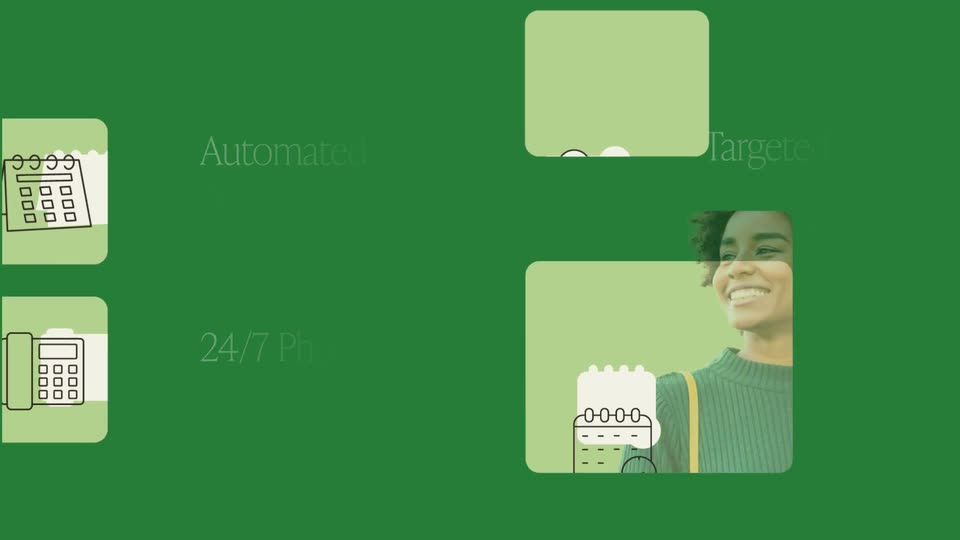
A dark green grid of four light-green icon cards sits under a cream pill reading AI-Powered Toolkit. The layout pans diagonally, the headline and left cards slide off frame, and the top-right card fills with a video of a smiling woman in a green top.
On-screen text: “AI-Powered Toolkit”, “Automated Appointment Management”, “Targeted Patient Engagement”, “24/7 Phone & Text Support”, “Online AI Chat & Forms”
Camera: Push in
Flat green backdrop with a rounded photo card of a smiling woman on the right and a line-drawn avatar labeled Sophia on the left. A white chat bubble expands beside the avatar to reveal the appointment message.
Camera: Static
A cream banner reads 'Automated Appointment Management' over dark green; a smiling woman with a phone sits in a light green panel at right. At left, Sophia and Patient chat bubbles pop in one by one, the column scrolling up, then the scene slides right as a gray table enters.
On-screen text: “Confirming your appointment on 3/12 at 1 PM. Can you still make it?”, “Automated Appointment Management”, “I can't make it. Can I reschedule for Monday?”, “Yes! How about 3/24 at 9 AM?”, “That works great!”
Techniques: Kinetic type
Camera: Static
A black laptop mockup rises from the bottom edge into a light blue backdrop, its screen showing a dental practice activity feed list with patient rows. Above it a white rounded pill label slides in reading “Activity Feed Dashboard” as the previous green card with a smiling woman exits the top.
On-screen text: “Appointment Management”, “Activity Feed Dashboard”
Techniques: 3D mockup
Camera: Static
A tablet mockup in 3D perspective shows the Newton dashboard's Activity Feed table on a light blue backdrop. The camera zooms into the rows of patient entries as a white rounded card above reads Activity Feed Dashboard.
On-screen text: “Activity Feed Dashboard”
Techniques: 3D mockup, UI zoom
Camera: Push in
A white dashboard table of patient appointment rows scrolls upward as a green rounded caption reading Activity Feed Dashboard rests over the lower rows. The frame then tightens, shifting the table left and a solid green panel into the right edge.
On-screen text: “Activity Feed Dashboard”
Techniques: UI zoom
Camera: Pan
A white activity feed list of patient appointments sits left of a green panel holding a dark green card titled Activity. The whole layout slides left and up, the green panel filling the frame as the card scrolls off the top.
On-screen text: “Activity”
Camera: Static
A line-art monitor with a person and two gears sits in a lavender rounded square on a green background. A cream caption box slides up from the bottom edge and fills with the sentence, while chat-bubble and notepad icons fade in at the left and right.
On-screen text: “Stop worrying about dropped or missed calls.”
Techniques: Kinetic type
Camera: Static
Line-art icons of a monitor with a person, chat bubbles, and a notepad sit on a green background above a cream caption bar. A horizontal band wipes open, revealing a photo of a smiling man on a phone, with a dotted line leading to an audio waveform.
On-screen text: “Stop worrying about dropped or missed calls.”
Techniques: Masking
Camera: Static
A smiling man on a phone sits in a dark green rounded panel at left while a green voice waveform pulses at right. Chat bubbles from Patient and Sophia pop in and scroll up beneath a cream headline banner.
On-screen text: “24/7 AI-Powered Voice and Text Support”
Techniques: Kinetic type
Camera: Static
A flat green layout scrolls upward. On the left a man in a light shirt holds a phone and smiles; on the right a chat thread between Patient and Sophia slides up with a green audio waveform behind it. A cream headline banner sits at top.
On-screen text: “24/7 AI-Powered Voice and Text Support”
Camera: Static
A tilted 3D laptop mockup shows the Newton interface with two floating chat cards above it. The view then pushes in to center on the escalations table, dropping the cards from frame.
Techniques: 3D mockup, UI zoom
Camera: Static
A dark tablet mockup in 3D perspective shows the Newton escalations table. A white card with the title floats above it. The screen scrolls upward while a second copy of the screen slides in below, the title card pinned between the two layers.
On-screen text: “Escalation Dashboard”
Techniques: 3D mockup, Parallax
Camera: Push in
A patient escalation table scrolls upward as each status pill flips from Open to Resolved and its link becomes Mark Unresolved. A white chip labeled Escalation Dashboard rides the lower edge, then a green panel slides in from the top.
On-screen text: “Escalation Dashboard”
Techniques: UI zoom
Camera: Push in
A white interface panel slides upward over a green app screen, moving past a contact list to reveal a scenario form with tabs, a name field, and an AI targeting checkbox.
Camera: Static
A white form panel slides down the frame, making room for a green header band where the Targeted Patient Engagement title card and a line-drawn phone illustration slide into place. A hand cursor hovers over the Target Custom Group with AI button.
On-screen text: “Targeted Patient Engagement”
Techniques: Cursor demo, Kinetic type
Camera: Push in
A split frame holds a green title card reading Targeted Patient Engagement and a clipboard icon above a dark UI panel. The panel zooms onto an AI assistant input as a prompt types out, then a hand cursor clicks the Send button.
On-screen text: “Targeted Patient Engagement”, “Change targeting method”
Techniques: Split screen, UI zoom, Cursor demo
Camera: Static
A green title card reads Targeted Patient Engagement beside a line-drawn clipboard icon, above a white command bar holding a patient-list prompt and a dark Send button with a hand pointer. The card dissolves into the Newton app screen showing the Edit Engagement Scenario editor with steps and message preview.
On-screen text: “Targeted Patient Engagement”, “Give me a list of patients with pending treatments”, “Send”
Camera: Static
The Newton dashboard opens on the Edit Engagement Scenario page; the Method field flips from Phone to Email, then the view pans right and zooms into the message panel with English and Spanish tabs as a dark-bordered card slides up from the bottom.
Techniques: UI zoom
Camera: Push in
A flat chat window in a dark frame sits on a lavender background. The camera pushes in as messages pop in one by one and the list scrolls up, ending with an appointment booked. A cream pill caption rests at the bottom edge.
On-screen text: “Online AI Chat & Forms”
Techniques: UI zoom
Camera: Push in
A flat vector chat window with booking messages scrolls upward, revealing a line-drawn calendar icon on a light green square over a green panel. A cream caption pill reading Online AI Chat & Forms sits at the bottom edge throughout the pan.
On-screen text: “Online AI Chat & Forms”
Camera: Static
Dark green field. Above a < 1 Week label, a cream calendar icon in a light green tile shrinks from center to the upper left as Map out your process fades in. Laptop and phone tiles stack below with their labels, then the list slides up and right to exit.
On-screen text: “< 1 Week”, “Map out your process”, “Train Sophia on the workflows”, “Launch your custom AI phone system”
Techniques: Kinetic type
Camera: Pull out
On a dark green field, a row of light green rounded tiles with line icons (calendar, shield, phone) slides right past white serif captions. The camera drifts left and eases out, revealing the shield tile and the caption Patient data is safe.
On-screen text: “< 1 Week”, “Map out your process”, “Launch your custom AI phone system”, “Patient data is safe”
Techniques: Parallax
Camera: Pan
On a dark green field, white serif text reads Patient data is safe at left. A pale green rounded square holding a line-drawn shield with circuit traces and a keyhole slides from the right toward center, passing in front of the text as Fully HIPAA Compliant appears at right.
On-screen text: “Patient data is safe”, “Fully HIPAA Compliant”
Camera: Static
A line-art checklist with shield and padlock draws into a light green rounded square on dark green, beside the serif headline “Fully HIPAA Compliant”. The pair holds, then the icon and text fade out as the empty square scales up to fill the frame.
On-screen text: “Fully HIPAA Compliant”
Techniques: Masking
Camera: Static
A dark green serif Newton wordmark on a flat sage background starts small and scales up until the letters fill the frame. A cream rounded button reading Book a demo today! appears below it and stays still.
On-screen text: “Newton”, “Book a demo today!”
Techniques: Kinetic type
Camera: Push in
Dark green diagonal bars cross a light green field while a small white rounded square bearing a green A pops in at center. The bars then expand to fill the frame, wiping to a flat dark green.
Techniques: Masking
Camera: Static
A flat dark green field fills the entire frame for the whole shot. No elements, text or motion appear; the color holds steady as a plain background plate.
Camera: Static