2:51

ClickUp Release 4.08: Meetings Hub, Super Agent Cloning, and more!
ClickUp · Productivity · Sep 2026
Notion · Mar 2026 · 1:26 · AI-annotated
Notion’s 1:26 launch film runs 32 scenes, about 2.7 s each. The product is on screen from the first frame and 5 features are revealed, with social proof. There is no explicit call to action; a voiceover carries the film. The video is built as one continuous argument: a typographic question opens, the product is defined by negation, then a single zoom-through of the workspace demos the AI features back to back, closing on a logo wall and a tagline before the final mark. Signature moves are caret typing, smooth zooms into flat UI cards, and the doodle face mascot traveling between screens on a clean white field.
Is this your launch? to your site or press kit.
ClickUp · Productivity · Sep 2026
Vendo · Oct 2026
Anthropic · AI · Apr 2026
A blinking caret on a white field gives way to 'Notion' typed in oversized black letters, which shrink to a centered line as 'is' is added, then a period and a dotted trail extend off to the right.
On-screen text: “Notion is....”
Techniques: Kinetic type
Camera: Static
On a plain white field, the bold black text “Notion is” holds at left, mid-height, while a horizontal row of black dots to its right enlarges in sequence from left to right, the rightmost dot swelling into a large solid circle.
On-screen text: “Notion is”
Camera: Static
On white, a row of black pills of increasing size gives way to a dark bar sliding in on the right, its right end tinted blue. The bar carries the blue text AI chatbot beside a circular up-arrow icon.
On-screen text: “AI chatbot”
Techniques: Kinetic type
Camera: Static
Three chat-style rows slide in one by one on white, each pairing a hand-drawn avatar with 'Notion is not a' and a colored label: a blue 'AI chatbot' pill, a red 'Task tracker' box with a crossed checkbox, then a 'Note taking app' bar struck through.
On-screen text: “Notion is not an”, “AI chatbot”, “Notion is not a”, “Task tracker”, “Notion is not a”, “Note taking app”
Techniques: Kinetic type
Camera: Static
On a plain white background, illustrated cartoon faces and a red text box drift left and exit the frame while the 3D Notion cube logo holds center and shrinks, ending alone in the middle.
Camera: Static
A white card holding the blue flask icon and Lumi Labs wordmark sits centered on a pale background, then the view pulls back to show the card as a window with a top tab and a three-item menu list aligned to the lower right.
Techniques: UI zoom
Camera: Static
The Lumi Labs Hub dashboard scales up until it fills the frame, showing the sidebar, project lists and a results chart beside a New AI chat panel. The view then zooms into the chat input, where a blinking caret sits beside the Add context and All sources controls.
Techniques: UI zoom
Camera: Push in
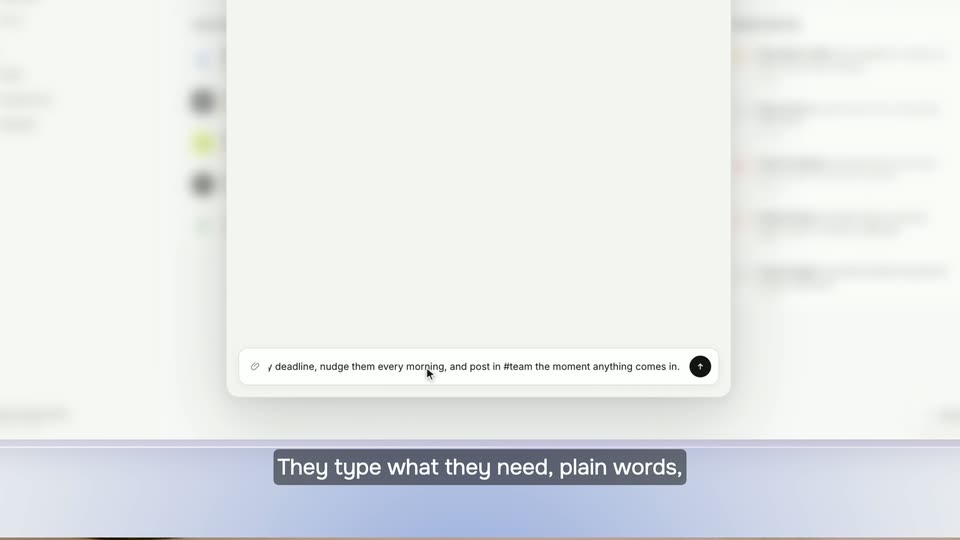
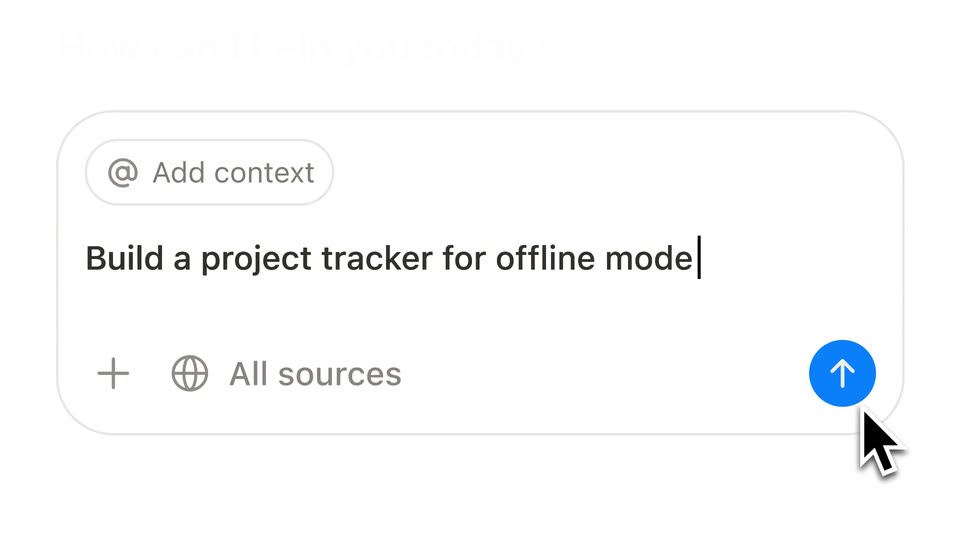
A rounded prompt input box sits on a white background, with an Add context pill and an All sources row. The prompt Build a project tracker for offline mode types out, then a black cursor arrow moves in and rests on the blue send button.
Techniques: Cursor demo
Camera: Static
A plain white frame holds the Thinking logo, a black circular line-drawn face beside the bold wordmark. Three dots, yellow, red and blue, sit to the right and drift down and to the right as the lockup settles.
Camera: Static
A white task card on a pale background, a hand-drawn circle logo at the top left. The project checklist extends downward as new rows appear one by one, from Test behavior to Measure usage, ending on a New task line.
Camera: Static
A flat white project-tracker card assembles on a light background: the task list fills with due dates, priorities and assignees, then a detail panel for one task slides open on the right. A doodle face logo sits in the corner while a cursor hovers a row.
Techniques: Cursor demo
Camera: Push in
A cursor clicks the Start transcribing button on a meeting card, and the frame tightens onto the card as a transcript types out word by word. A sketched headset character and three participant faces appear around the card on a plain white background.
Techniques: Cursor demo, UI zoom
Camera: Static
A white rounded card on a light field shows a meeting summary. A circular logo slides from the top-left corner to the top-right as the card fills with a status line, three bullets, and a sign-off, then the card background warms to peach.
Camera: Static
A centered white document card on a light gray field shows an offline project plan: a cloud-off icon, a line logo, a bold title, a peach note box, and an overview paragraph. The card eases down from a tight frame as the note text crossfades to a clean list.
Camera: Pull out
A project plan document crossfades into a close-up of a Kanban board, then the view scrolls down the completed-tasks column past cards tagged with merged pull requests. A hand-drawn face in a circle stays pinned at the left edge.
Techniques: UI zoom
Camera: Push in
A kanban board titled Engineering tasks crossfades into a chat prompt bar. The three columns and task cards dim and fade out while a centered input field reading How can I help you today? and a row of app icons fade in. The circular logo drifts from the board's center to the top right corner.
Camera: Pull out
A light AI prompt screen with a sketchy face logo and the headline “How can I help you today?” zooms in as a question is typed into the input. The frame settles on the app-integration icon row as the send arrow turns blue.
Techniques: UI zoom
Camera: Push in
A white rounded panel holds a blue circular button with a white up arrow, while a black cursor rests at the button's lower-right edge. Partial black, blue and gray icon shapes sit on a light gray strip below. The frame stays locked off with no movement.
Techniques: Cursor demo
Camera: Static
A white search screen holds a magnifying glass, 59 Results, and a row of app icons above a result line. The line, led by a small blue tray icon, types its message in dark gray word by word, ending with iOS, Android, Mac, and Windows.
Techniques: Kinetic type
Camera: Static
A white UI screen shows a search header with a magnifier, “59 Results”, and a row of app icons, above a message row with an inbox icon and a bold “Project Plan: Offline Mode” heading. The frame is locked-off as the platform line slides in.
Camera: Static
A white list of three questions with illustrated avatars scrolls upward; a blue “1 reply” tag with a small face icon pops in beneath each row, while a large hand-drawn face in a circle draws itself in on the right.
Camera: Static
A flat chat interface displays a user question and an AI response with a hyperlink and a reaction pill in a locked-off frame.
Camera: Static
A two-line chat shows Catherine asking the launch date and Notion AI replying with a date and a link. The frame then reframes onto the fire reaction pill, where the count ticks up from six to twelve.
Techniques: UI zoom
Camera: Static
A blue-outlined light-blue pill on a white field holds a red-orange flame beside a blue frowning face. It gives way to the OpenAI wordmark on the left and the Figma icon and wordmark on the right, the Figma mark fading in.
On-screen text: “OpenAI”, “Figma”
Camera: Static
On an off-white background, a two-by-four grid of company logos (OpenAI, Figma, ramp, Cursor, Vercel, NVIDIA, Toyota, Perplexity) fades in one by one, filling the frame from left to right.
Camera: Static
A grid of partner logos on white, including OpenAI, Figma and Toyota, gives way to a 3D perspective mockup of the ramp product roadmap page, with a yellow header band and a circular ramp mark at the lower right.
Techniques: 3D mockup
Camera: Static
A light product interface shows a yellow header with the ramp logo above a Product Roadmap timeline and a tasks board. A hand-drawn black circle holding a cursor arrow drifts toward the bottom right corner.
Camera: Push in
A light roadmap board lists feature rows with avatars and status pills; the Ramp Plus pill switches from a blue Launch Ready to a green Launched, then the view cuts to a white comment feed where illustrated avatars and messages stack in and the list scrolls up.
Camera: Push in
A blinking caret on a white field types “No”, then “Notion is.”, which is deleted and retyped as “Notion does”. A white rounded card slides in at right and grows, its to-do list scrolling as blue checkboxes tick and labels strike through.
On-screen text: “Notion is.”, “Notion does”
Techniques: Kinetic type
Camera: Static
A white Notion task list scrolls up past grayed, struck-through items while a large black headline on the right swaps from Review check to Update roadmap; a small white card on the left scales in carrying the caption Notion does.
On-screen text: “Notion does”, “Update roadmap”
Techniques: Kinetic type
Camera: Push in
On a plain off-white background, a black-outlined checkbox sits left of the gray word To-do. The box fills light blue with a white checkmark, then a black cursor arrow appears at its lower-right corner.
On-screen text: “To-do”
Techniques: Cursor demo
Camera: Static
On a plain light background, the black Notion cube icon sits left of the wordmark, which builds up letter by letter until the full logo locks in.
Techniques: Kinetic type
Camera: Static