2:09

Y Combinator - .@SynScience is building AI co-scientists for end-to-end scientific r
SynScience · Feb 2026
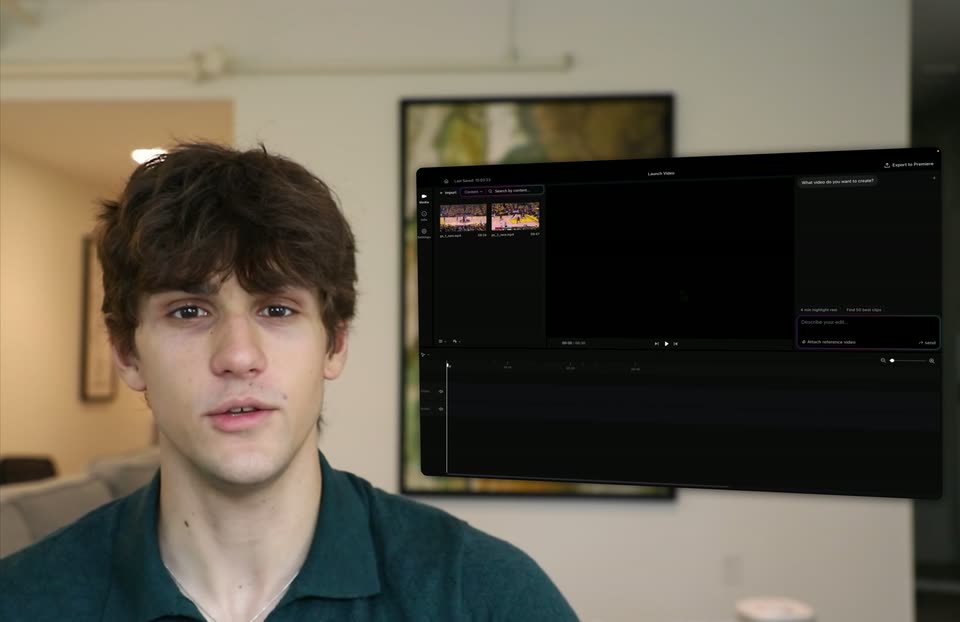
Narrative’s 0:59 launch film runs 15 scenes, about 3.9 s each. The product shows up at 0:01 and 3 features are revealed, with social proof. There is no explicit call to action; a voiceover carries the film. The video opens with a talking head that hands off to full screen recordings of a dark editor, cutting at about seven cuts per minute on the voiceover's beats. Its signature moves are the 3D tilted editor screen floating beside the presenter and quick zooms into the preview window that follow the cursor.
Is this your launch? to your site or press kit.
SynScience · Feb 2026
Descript · Design · Jun 2024
Sidekick · B2B · Jul 2026
Films whose music sounds like this one, voice left out
Yutori · Modern electronic
Hanji · Modern electronic, corporate tech
YouLearn · Upbeat electronic
A young man with dark hair in a green polo shirt speaks to camera in a home, framed chest-up against a hallway and a framed abstract painting. He nods and shifts his expression as he talks, the shot held steady.
On-screen text: “DON”
Camera: Static
A young man with dark curly hair and a teal shirt talks to camera in a living room, a grey sofa and a framed green-and-orange abstract painting behind him. The camera stays locked off on his face as he speaks.
On-screen text: “DON”
Camera: Static
A young man with dark hair and a dark green polo shirt sits in a softly lit living room, speaking directly to the camera. A gray sofa and a framed abstract painting in green and yellow hang behind him. The medium close-up shot stays static as he talks.
Camera: Pull out
A young man in a teal polo shirt talks to camera in a blurred living room, while a dark video editor interface floats at a 3D angle on the right, showing two clip thumbnails, a chat panel and a timeline. He holds his pose, mouth moving as he speaks.
Techniques: 3D mockup
Camera: Push in
A dark editing app reframes onto a chat panel. A cursor clicks the prompt field and types a request to find the ten best moments from an NBA finals game, then sends it. The agent begins planning, and the view dissolves.
Techniques: UI zoom, Cursor demo
Camera: Push in
A video editor shows a basketball game preview beside a chat log of appended clips. The view zooms into the preview and input box as 'Add a dunk to the beginning' is typed, then pulls back as the timeline gains more clips.
Techniques: UI zoom
Camera: Pull out
A dark video editor interface fills the frame, a chat log on the right and a clip timeline below a center preview of a basketball game. The view zooms into the preview as it switches to a player shooting at the hoop, while the timeline re-lays out the clips.
Techniques: UI zoom
Camera: Push in
A video editor interface frames a basketball clip playing in the center, a wide locked-off shot of a player at the rim before a yellow crowd. The right panel lists editing actions and the bottom timecode ticks from 00:05 to 00:06.
Camera: Static
A video editing app fills the frame; a basketball clip of a player dunking at the rim plays in the center viewer before a yellow-clad crowd, with a timeline strip at left and a text panel at right.
Camera: Static
A screen recording of a video editor shows a basketball clip in the preview window, then the view scrolls down to the timeline where several clips sit on a track and a cursor hovers over them.
Techniques: UI zoom, Cursor demo
Camera: Pan
A cursor clicks the Find similar clips row in a dark context menu over a video timeline. The interface then dissolves into a media browser, filling the left panel with a grid of matching basketball clips and a live court preview on the right.
Techniques: Cursor demo
Camera: Pull out
A video editor interface with a basketball clip in the center preview that zooms from a wide overhead court view to a tight top-down shot of the basket. A left panel lists similar clip thumbnails and a timeline runs along the bottom.
Camera: Static
The cursor moves to the search bar and types a query, filling the media panel with a grid of matched clips. The frame then zooms into the preview window as a basketball shot flies through the hoop.
Techniques: Cursor demo, UI zoom
Camera: Pan
A young man in a dark polo speaks to the camera in a softly lit room. Behind him, a 3D-tilted screen shows the editor interface: a basketball clip in the preview, a thumbnail grid on the left, a prompt panel on the right, and a timeline below.
Techniques: 3D mockup
Camera: Static
A white lowercase wordmark 'narrative.video' sits centered on a solid black background. The frame is locked off and the text holds still for the full duration, serving as a static sign-off.
On-screen text: “narrative.video”
Camera: Static