1:09

Introducing Zapier Agents: The Future of Automation is Here!
Zapier · Productivity · Jan 2025
SynScience · Feb 2026 · 2:09 · AI-annotated
SynScience’s 2:09 launch film runs 29 scenes, about 4.5 s each. The product is on screen from the first frame and 1 feature is revealed, with social proof. The call to action lands at 2:02 (94% in), over a voiceover. The video alternates locked-off two-shot couch interviews with fast-cut dark UI demos framed in a pink-to-red gradient, letting white bottom captions carry the narration. Signature moves are slow zooms into UI panels, scrolling agent feeds, and a red loop-arrow graphic that closes the flywheel loop.
Is this your launch? to your site or press kit.
Zapier · Productivity · Jan 2025
Pika · AI · Feb 2026
Warp · Developer tools · Sep 2025
A white line-art logo, an orbital star mark with a play triangle in the center, sits above the wordmark Synthetic Sciences on a solid black background. The frame is centered and static, holding without motion for the full second.
On-screen text: “Synthetic Sciences”
Camera: Static
A white Synthetic Sciences logo and wordmark sit centered on black, then a dimmed shot of two young men seated on a couch cross-fades in behind them, then the logo fades out to leave the men in a modern living room.
Camera: Static
Two young men sit side by side on a gray couch with yellow pillows in a bright office lobby, facing the camera. The locked-off frame holds as they speak, while subtitle lines appear at the bottom. A faint logo watermark sits in the center.
On-screen text: “Hey,”, “I'm Ishaan and I'm Aayam from Synthetic”, “Sciences. Today, we're really excited”, “to introduce you to SynSci,”, “our platform that lets you orchestrate Al”, “co-scientists. Let's see it in action.”
Camera: Static
Two young men sit on a beige couch in a bright office, facing the camera. A translucent product interface, with a session panel and top and bottom bars, fades in over them.
On-screen text: “co-scientists. Let's see it in action.”
Camera: Push in
A close-up of a dark chat input shows a typed prompt, first highlighted then plain, as a cursor clicks the send button. The frame zooms out to reveal the full app window in a red gradient border, where status lines and a step-by-step plan begin typing.
On-screen text: “I'm going to ask it if we can fine-tune”, “ESM2 to predict protein mutations accurately enough.”, “From here, it's in the driver's seat.”, “After making a step-by-step plan, it hits the literature,”
Techniques: Cursor demo, UI zoom
Camera: Pull out
A dark agent chat view shows a planning message above a to-dos checklist panel that resolves into focus, eight unchecked items stacked. A white caption sits across the bottom. The frame stays locked off.
On-screen text: “After making a step-by-step plan, it hits the literature,”
Camera: Static
A dark task-list interface scrolls down, the checklist of steps sliding up as two new agent rows, Literature-Review Agent and Task Agent, fade in below the plan. A white caption sits fixed along the bottom edge throughout.
On-screen text: “After making a step-by-step plan, it hits the literature,”
Camera: Static
A dark agent-activity feed scrolls line by line, opening zoomed in on the list before pulling back to the full app window on a pink gradient desk. The feed keeps scrolling through research tasks and ends on a two-panel view showing a markdown plan and a compute-cost estimate.
On-screen text: “reads through dozens of papers,”, “and adjusts its approach based on what it finds.”, “Then, it designs the experiment,”, “estimates compute costs,”
Techniques: UI zoom, Split screen
Camera: Pull out
A dark IDE fills the locked-off frame: a file tree on the left, an empty editor pane, and an agent chat on the right that streams shell commands for a ProteinGym fine-tuning run. A white caption sits at the bottom.
On-screen text: “and asks for approval. Once ready,”
Camera: Static
A dark editor UI holds a locked-off frame: the left pane shows a faint atom mark above 'select a file to open', the right pane lists Shell command rows and status lines, and a white caption sits centered at the bottom.
On-screen text: “and asks for approval. Once ready,”
Camera: Static
A dimmed close-up of a chat panel of shell commands brightens and pulls back to a full ML dashboard: file tree left, training-loss chart and log table center, command feed right, with a white caption running along the bottom.
On-screen text: “and asks for approval. Once ready,”, “it spins up GPUs and launches the training job on”
Techniques: UI zoom
Camera: Static
A dark logs dashboard fills the frame, an orange histogram across the top and a left nav rail. A table of training logs scrolls upward as new rows populate, while a mouse cursor drifts to the top navigation bar. White caption text sits along the bottom edge.
On-screen text: “it spins up GPUs and launches the training job on”, “Disconnect safe so you can watch what happens in real time.”
Techniques: Cursor demo
Camera: Static
A full app interface fills the frame: a file tree on the left, a research paper PDF in the center, and a results table panel on the right. The view slowly zooms in on the center while a white caption stays pinned to the bottom.
On-screen text: “Disconnect safe so you can watch what happens in real time.”
Techniques: UI zoom
Camera: Push in
A split product screen shows a research paper on the left and a results table on the right. The cursor hovers over the Spearman figures as the PDF scrolls and zooms onto the diagram. Captions announce the gains and that the tool writes up tables, methods, and citations.
On-screen text: “Training finishes, we're up 10 points on Spearman.”, “That's solid.”, “And competitive with models 5 to 20 times larger.”, “It”, “also writes the whole thing up for you.”, “Schematics, methods, and citations.”, “All verified and ready to go.”
Techniques: Cursor demo, UI zoom
Camera: Pull out
Two men sit on a gray couch with yellow cushions in a bright office lounge. The one in the dark hoodie speaks to camera while the other in a white polo stays still. A chat UI overlay dissolves out at the start; white subtitles on a dark bar swap below.
On-screen text: “Let's zoom out for a second. Today,”, “strong open-weight models allow you to exceed”, “frontier performance on specific tasks through”, “advances in post-training and RL.”, “But let's be honest.”, “The infrastructure headaches are real.”, “What if it was frictionless?”
Camera: Static
Two men sit side by side on a beige couch in a bright office lounge, facing the camera with hands resting on their laps. A white caption reads at the bottom center while they hold a still pose.
On-screen text: “What if it was frictionless?”
Camera: Static
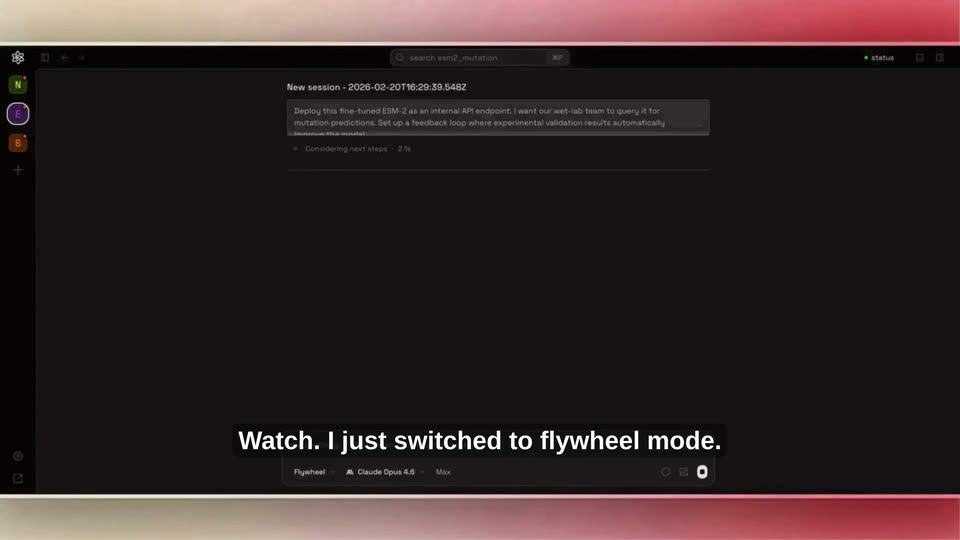
On a dark new-session screen, an open dropdown lists modes from Code to Research. A cursor rests on Flywheel, the menu closes, and the bottom mode pill flips from Write to Flywheel as a prompt fills in. A caption line sits centered at the bottom.
On-screen text: “What if it was frictionless?”, “Watch. I just switched to flywheel mode.”
Techniques: Cursor demo
Camera: Push in
A dark agent chat fills the frame, its log scrolling upward as the assistant reads files, writes scripts and runs shell commands. A soft pink-to-cream gradient frames the panel. White subtitles swap line by line along the bottom edge.
On-screen text: “Watch. I just switched to flywheel mode.”, “This is a harness built for post-training.”, “Dozens of compute integrations. Hundreds of skills.”, “It orchestrates ML scientists to deploy that same”
Camera: Static
A dark agent interface fills the locked frame. An API spec document types out in the center while a white endpoint-reference table slides in on the left. A black rounded caption bar holds the line along the bottom.
On-screen text: “It orchestrates ML scientists to deploy that same”
Camera: Static
A static white documentation page shows an API endpoint reference table and a JSON request schema, with a gray rounded caption box at the bottom carrying the voiceover line. The frame is locked off with no camera movement.
On-screen text: “It orchestrates ML scientists to deploy that same”, “model we just trained as a live API”
Camera: Static
A tight crop on a PDF endpoint table pulls back to reveal a dark IDE workspace with a file tree and an AI chat panel. The document then turns to a flowchart page and zooms in on the retraining pipeline diagram.
On-screen text: “model we just trained as a live API”, “with every result feeding back into retraining”
Techniques: UI zoom
Camera: Pull out
A close-up of a pipeline diagram zooms out to reveal the full application window, then a large red-and-white production workflow graphic wipes across the screen from left to right. The interface sits at a slight 3D tilt against a pink background.
On-screen text: “with every result feeding back into retraining.”, “our AI co-scientists let small teams finally own the”
Techniques: UI zoom, 3D mockup
Camera: Pull out
A five-box flowchart runs left to right, Production workflow to Deploy private model, with a thick red arrow looping from box five back to box two and a red Iterate continuously label below. A faded editor UI behind it clears to plain cream as a bottom caption bar holds.
On-screen text: “our AI co-scientists let small teams finally own the”, “Iterate continuously”
Camera: Static
A static five-step flowchart on a cream background: black-bordered boxes linked by arrows, with a thick orange loop returning from the last box to the second. White subtitles on a dark bar change at the bottom.
On-screen text: “our AI co-scientists let small teams finally own the”, “full loop. Train, evaluate, deploy, iterate.”, “Your model lives on your infrastructure,”
Camera: Static
The synaci services page sits over a blurred warm desert backdrop, framed by red bars. A cursor clicks the more integrations row, expanding the grid to reveal extra provider cards. Subtitles roll along the bottom as the UI dissolves into two men seated on a couch.
On-screen text: “gets sharper with your data,”, “and the advantage finally accrues to you.”, “This is an exciting problem.”
Techniques: Cursor demo
Camera: Static
Two men sit side by side on a gray couch in a bright office lounge, each holding a game controller and facing the camera. The locked-off frame stays static while white caption lines swap at the bottom.
On-screen text: “This is an exciting problem.”, “and we are rapidly expanding across domains.”, “For example,”, “our biology mode achieved state-of-the-art”
Camera: Static
A bar chart titled BixBench is overlaid on a shot of two men sitting on a couch. The chart displays benchmark results and fades out to reveal the men, one in a white polo and the other in a grey hoodie, sitting in a modern room with orange pillows.
On-screen text: “BixBench”, “AI Biology Agent Leaderboard — Open Response Accuracy”, “our biology mode achieved state-of-the-art”, “If you want to try orchestrating Al co-scientists,”
Camera: Static
Two young men sit side by side on a beige couch in a bright office, facing the camera and smiling. White subtitle lines on a dark bar swap in at the bottom, first a sentence, then a URL. Locked-off framing.
On-screen text: “If you want to try orchestrating Al co-scientists,”, “visit syntheticsciences.ai!”
Camera: Static
A white line-drawn atom mark sits centered above the wordmark on a black background. The frame stays locked-off and still for the full duration.
On-screen text: “Synthetic Sciences”
Camera: Static