
0:34
Explore
00:00:00 / 00:40:01
- Length
- 0:40
- Scenes
- 19 · 2.1 s avg
- Product on screen
- 0:02
- Features shown
- 1
- Voiceover
- No
- Views
- 224 on YouTube
as of November 28, 2026
Morphic’s 0:40 launch film runs 19 scenes, about 2.1 s each. The product shows up at 0:02 and 1 feature is revealed. There is no explicit call to action. The video is built as one continuous feature demo: a glowing button opens, a prompt bar types a scene, low-poly 3D sets resolve from heavy blur, then each set wipes into live-action footage before a launch headline and logo close it. Its style is defined by blur-to-focus reveals, fast whip camera moves, split-screen 3D-to-live wipes, and a stark black-and-white palette with a single blue accent.
Footage neededEstimated needs: 2 capture groups — your screens or recordings · 1 official logo — reused across the film · 6 filmed passages — shoot, supply or replace · 9 3D passages — build or supply
Is this your launch? to your site or press kit.
More like this
1:58

Introducing Plan Mode
Cursor · Developer tools · Oct 2025
0:54

Runtime - Robots shouldn't need to be fine-tuned for every new task. Introduci
Runtime · B2B · Nov 2026
Similar soundtrack
Films whose music sounds like this one, voice left out
0:25

TRON Mode
Tesla · Electronic dance music, dubstep, electro house
1:43
Meet Insta360 X5 BMW Motorrad Edition - We Ride Again
Insta360 · Electronic dance music (hardstyle, hard trance)
1:20

Lovable 2.0 is here. Multiplayer vibe coding. Smarter & more secure.
Lovable · High-energy electronic dance music
Introducing 3D Scene, scene by scene
· 19 scenes as text
01 · Hook · 0:00–0:02
A small blue dot on a dark dot-grid background expands into a glowing blue rounded button with a cube icon and the label 3D Scene. A white outlined cursor arrow moves up from below and hovers on the button.
Techniques: Cursor demo
Camera: Static
02 · Feature reveal · 0:02–0:05
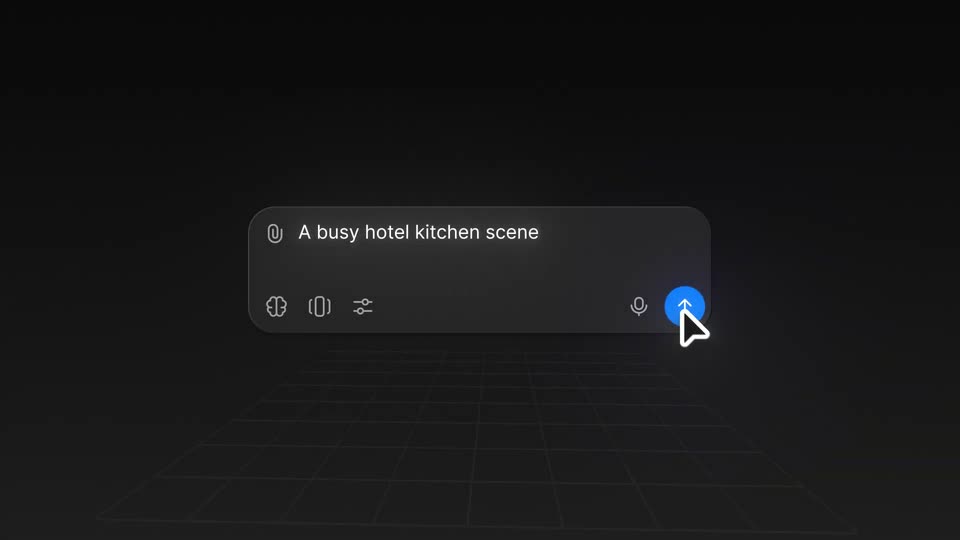
A dark rounded prompt bar hovers over a perspective grid floor on black. The placeholder 'Imagine...' is typed over into 'A busy hotel kitchen scene', then a cursor moves in and clicks the blue up-arrow button.
Techniques: 3D mockup, Kinetic type, Cursor demo
Camera: Static
03 · Feature reveal · 0:05–0:06
A 3D white room with a counter, shelves and copper spheres resolves from heavy blur into focus over the clip, while a dark prompt bar with an Imagine... placeholder stays sharp at the bottom. A cursor taps the blue send button at the start, then the frame holds locked-off.
Techniques: Cursor demo
Camera: Static
04 · Feature reveal · 0:06–0:10
A low-poly 3D restaurant with gray counters and round pendant lights sits behind a dark prompt bar. The background blurs as the bar sharpens and “Add a sushi table” is typed, then a white cursor clicks the blue up-arrow button as a second empty bar fades in below.
Techniques: Cursor demo
Camera: Static
05 · Feature reveal · 0:10–0:16
A white 3D room with shelves of colored cylinders and pedestals. The camera orbits and pushes in toward a plate of small pink blocks on a pedestal, then whips back out with motion blur as the dark chat bar at the bottom disappears.
Techniques: 3D mockup, Parallax, Speed ramp
Camera: Pull out
06 · Feature reveal · 0:16–0:19
An isometric 3D white showroom with counters and shelves. A white arrow cursor hovers over a dark bottle, and a blue selection box with corner handles surrounds it. The scene blurs out and a blue pill button appears at the center.
Techniques: 3D mockup, Cursor demo
Camera: Static
07 · Feature reveal · 0:19–0:20
A blue Generate button sits centered on a blurred dark background. A white outlined cursor rises from below and fills with black as it hovers over the button's lower edge, suggesting a click.
Techniques: Cursor demo
Camera: Static
08 · Feature reveal · 0:20–0:21
A blue Generate button with a white cursor hovers over a blurred white 3D room. The button vanishes as the camera pushes through the space, sharpening into a table with cylinders and a wall shelf of discs.
Techniques: Cursor demo, 3D mockup
Camera: Static
09 · Feature reveal · 0:21–0:23
A white appliance's frosted door swings open, revealing a row of tan discs. The camera flies through a rounded-rectangle window into the interior, past shelves of discs and cups, and settles on a white kitchen with a chef at the counter on a dark dotted grid.
Techniques: 3D mockup, Masking
Camera: Static
10 · Feature reveal · 0:23–0:25
A rounded card on a dark dotted grid shows a kitchen split by a vertical white line; the line wipes to merge a chef-filled commercial kitchen with a white minimalist one, then the frame shifts to a soft blue tint.
Techniques: Masking
Camera: Pan
11 · Feature reveal · 0:25–0:29
A rounded video window sits on a dark dotted grid. Inside, a sushi kitchen is shown wide, then the frame pushes in on a chef in black pouring sauce from a metal pitcher over a row of nigiri. The window shrinks and blurs to end the scene.
Camera: Push in
12 · Feature reveal · 0:29–0:29
A low-poly 3D room with terracotta striped walls and a cream floor holding a blue triangle. A dark gray panel slides left across the foreground as a blocky brown figure with a white cap and a brown sphere hold position on the right.
Camera: Static
13 · Feature reveal · 0:29–0:31
A man in a cowboy hat and leather jacket rides a brown horse across a sandy canyon floor, red rock walls behind him. The camera tracks alongside the rider as the horse moves in profile.
Camera: Push in
14 · Feature reveal · 0:31–0:32
A low-poly blue truck with a sphere-headed driver drives left in 3D perspective, camera locked on it. The desert background, a white railroad crossbuck and green cacti, scrolls right past it. The opening frames are motion-blurred before the image sharpens.
Techniques: Parallax, Speed ramp
Camera: Pull out
15 · Feature reveal · 0:32–0:33
A split screen frames a vintage pickup truck receding down a dusty desert road on the left and a red freight car streaking past on the right, then the train fills the full frame.
Techniques: Split screen
Camera: Static
16 · Feature reveal · 0:33–0:35
A fast blurred sweep through a dark 3D set of cylinders topped with white spheres and a glowing yellow panel reveals a man in a long coat, then the frame splits: live-action night parking lot on the left, the 3D set on the right.
Techniques: Split screen
Camera: Pull out
17 · Feature reveal · 0:35–0:37
A man in a dark coat stands in a wet alley at night beside a parked car. Two men approach him across the frame, the nearer one in a tan jacket carrying a briefcase. A slow push-in tightens on the standing figure under orange streetlight against a concrete wall.
Camera: Static
18 · Outro · 0:37–0:39
On a black field, the gray title “D morphic” fades and scales down as the white headline “3D scene is now live” scales up over it, settling centered. The frame stays locked off while the two lines crossfade.
On-screen text: “D morphic”, “3D scene is now live”
Techniques: Kinetic type
Camera: Static
19 · Outro · 0:39–0:40
The Morphic wordmark with a three-bar icon sits centered on a black background, then fades to black over the short clip.
On-screen text: “Morphic”
Camera: Static