1:12

Introducing Comet: Browse at the Speed of Thought
Perplexity · AI · Jul 2025
Runtime · Nov 2026 · 0:54 · AI-annotated
Runtime’s 0:54 launch film runs 18 scenes, about 3.0 s each. The product shows up at 0:07 and 5 features are revealed. There is no explicit call to action; a voiceover carries the film. The video is built as a relay of locked-off one-line text cards, each handing off to a demo of the same idea in product UI, 3D render, or live robot footage. Its signature moves are the duck squeeze gag, the centered sans-serif cards on flat gray, and the continuous pull-back from a single robot to a grid of hundreds.
Is this your launch? to your site or press kit.
Perplexity · AI · Jul 2025
Apple · Hardware · Sep 2026
Cursor · Developer tools · Oct 2025
A black two-finger robotic gripper holds a small yellow rubber duck centered on a plain light gray background. The fingers close gradually, compressing the duck's head and body.
Camera: Static
A small yellow 3D figure carrying a dark rectangular device on its back falls from the top of a plain light-gray frame and exits view. A centered gray headline then appears and holds.
On-screen text: “A new way for robots to decide their next move”
Techniques: 3D mockup
Camera: Static
A single line of black sans-serif text sits centered on a plain light gray background. The frame is locked off; the line holds, then fades out to nothing.
On-screen text: “A new way for robots to decide their next move”
Camera: Static
Plain off-white background. A series of short statements appears centered, each line fading in and holding still before cutting to the next. The final line, “Build from what you see”, sits at the top of the frame.
On-screen text: “A new way for robots to decide their next move”, “No teleoperation. No fine-tuning”, “Now think in simulation”, “Build from what you see”
Camera: Push in
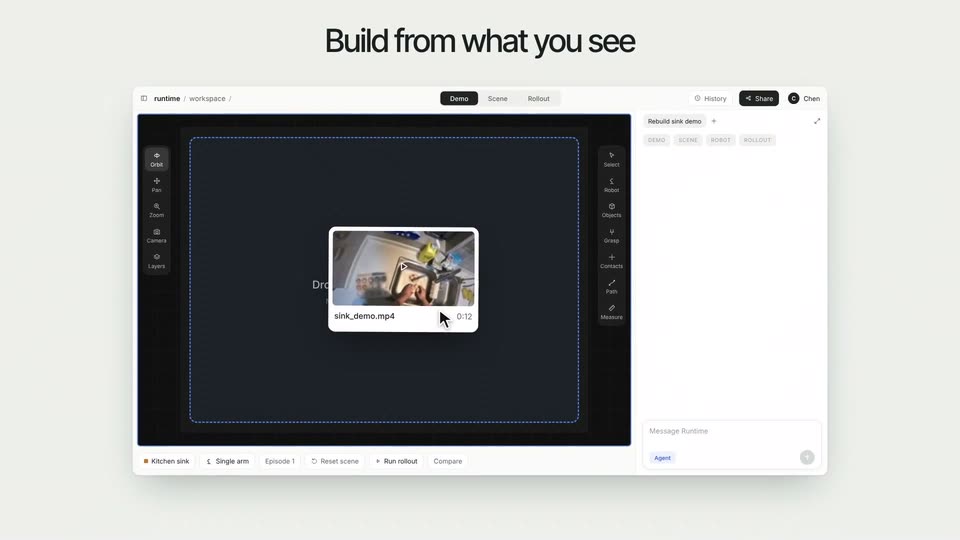
A product UI window sits centered on a light gray field beneath a black headline. A video thumbnail labeled sink_demo.mp4 drops into the dark canvas, and a cursor arrow appears beside it. The window eases slightly downward.
On-screen text: “Build from what you see”
Techniques: Cursor demo
Camera: Static
A flat product interface sits under a static headline. Inside, a first-person video of a kitchen sink plays in a player flanked by toolbars, while the right panel's status lines refresh and the top tab highlight slides from Demo to Rollout.
On-screen text: “Build from what you see”
Camera: Static
A light gray backdrop holds the headline above a flat product interface. The interface shows a 3D simulation of a kitchen sink with a robot gripper holding an egg, flanked by a left tool rail and a right task panel. The 3D viewport slowly reframes to reveal the egg tray and counter.
On-screen text: “Build from what you see”
Camera: Pull out
A light gray slide shows the headline Simulate possible futures over a 4 by 3 grid of app windows, each playing a short first-person video of a task such as egg transfer or carton picking.
On-screen text: “Simulate possible futures”
Camera: Static
A grid of twelve simulation thumbnails on a light gray field sits under the headline 'Simulate possible futures'. The cards fade and collapse as the headline is replaced by a centered 'Act in reality'.
On-screen text: “Simulate possible futures”, “Act in reality”
Techniques: Kinetic type
Camera: Static
A flat light gray field holds the phrase Act in reality centered in black. The line stays locked in the middle of the frame for the full duration, with no motion, reveal, or camera movement.
On-screen text: “Act in reality”
Camera: Static
A black headline 'Act in reality' sits above a rounded video card on pale gray. The card scales up to play 3x real robot footage: a black arm places brown eggs into a stainless sink drain beside egg cartons, then shrinks and fades.
On-screen text: “Act in reality”
Camera: Push in
A single line of dark gray text sits centered on a plain light gray background. The frame is locked off and the text holds still for the full duration of the clip.
On-screen text: “Sim and reality, in sync”
Camera: Static
A locked-off split screen shows a 3D robot arm on the left and a live robot arm on the right, both plugging a white cable into a black pegboard on a table. Two wrist-camera feeds sit under each column, and speed badges tick between 1x and 41x.
On-screen text: “Sim”, “Real”, “Fully autonomous”, “Sim and reality, in sync”
Techniques: Split screen, 3D mockup
Camera: Static
A static headline reads “Simulate, then make the move” in black text, centered on a plain light gray background.
On-screen text: “Simulate, then make the move”
Camera: Static
A white robotic arm with a black gripper lowers over a blue-matted table of yellow rubber ducks, closes on one, lifts it and drops it into an open cardboard box. The camera starts tight on the gripper and pulls back to reveal the wider lab.
On-screen text: “Simulate, then make the move”
Techniques: 3D mockup, Parallax
Camera: Pull out
A white robotic arm works a wooden table strewn with yellow rubber ducks and an open box. In one smooth pull-back, the camera rises to reveal a vast white floor tiled with hundreds of identical robot workstations.
Techniques: 3D mockup
Camera: Pull out
Top-down 3D grid of miniature office cubicles on a white plane. One central cubicle lights up green with a red marker dot as the camera pushes in on it.
Techniques: 3D mockup, UI zoom
Camera: Pull out
The black text “Runtime.si” is centered on a light gray background, with a bright green square block positioned to its right.
On-screen text: “Runtime.si”
Techniques: Kinetic type
Camera: Static