
2:58
Explore
00:00:00 / 01:31:50
- Length
- 1:31
- Scenes
- 46 · 2.0 s avg
- Product on screen
- 0:23
- Features shown
- 1
- Call to action
- 1:23 · 91%
- Voiceover
- Yes
- Views
- 17M on X
as of November 14, 2026
OpenArt’s 1:31 launch film runs 46 scenes, about 2.0 s each. The product shows up at 0:23 and 1 feature is revealed, with social proof. The call to action lands at 1:23 (91% in), over a voiceover. The video is built as a three-act launch: a warm live-action problem montage of three stuck creators, a fast screen-recording demo of the prompt-to-video flow and the editor, then a VFX payoff and a social-proof close. Its signature moves are handwritten captions that build line by line over live footage, magenta UI pills that pop and scale to announce each tool, and a recurring orbit of floating UI cards and a blue dragon around the creator, all cut at a brisk tempo against a near-black UI and暖
Footage neededEstimated needs: 2 capture groups — your screens or recordings · 18 filmed passages — shoot, supply or replace · 1 graphic passage — draw or supply · 4 3D passages — build or supply
Is this your launch? to your site or press kit.
More like this


OpenArt - The way videos are made is about to change. Introducing OpenArt Dire, scene by scene
· 46 scenes as text
01 · Problem · 0:00–0:01
Overhead shot of an artist in an orange sweater and headphones sketching at a wooden easel. Anime character drawings are pinned to the walls and scattered on the floor; a desk with a laptop, lamp and plants sits to the right.
Camera: Static
02 · Problem · 0:01–0:03
A woman in an orange cardigan and cream headphones pins a colored anime character sketch to a wall covered with pencil character designs, lit by warm window light. The caption builds line by line over her shoulder.
On-screen text: “A Story worth telling”
Techniques: Kinetic type
Camera: Static
03 · Problem · 0:03–0:06
Overhead locked-off shot of a warm room: a person in an orange sweater sits on a bean bag amid scattered anime sketches, an empty easel centered, a laptop desk to the right. The person leans back as white handwritten words build on the left.
On-screen text: “No”, “way”, “to”, “tell it”
Techniques: Kinetic type
Camera: Static
04 · Problem · 0:06–0:18
Top-down on a man lying on a patterned rug amid guitar pedals and cables, holding a sunburst guitar. A green chat icon with a red badge pops in beside the headstock; he picks up his phone and frowns. Handwritten white text appears top-left, then right.
On-screen text: “A song ready to share”, “No way to show it”
Techniques: Kinetic type
Camera: Static
05 · Problem · 0:18–0:22
A blonde woman is seen from behind, typing on a laptop showing a grid of crocheted doilies. A tilted ad card with a video thumbnail hovers at left. Handwritten white text forms above her, then rewrites. Flowers, a yarn basket, and a coffee cup sit on the green table.
On-screen text: “An ad she could see.”, “No way to create it.”
Techniques: Kinetic type, 3D mockup
Camera: Pull out
06 · Problem · 0:22–0:23
A frustrated blonde woman rests her cheek on her hand at a laptop, framed by crochet flowers and yarn balls; scattered white handwritten letters drift and settle into the phrase Until Now across her chest.
On-screen text: “Until Now”
Techniques: Kinetic type
Camera: Pan
07 · Product intro · 0:23–0:24
Three vertical panels sit side by side: a guitarist clutching a phone, a woman in white headphones typing, and a blonde woman frowning at a laptop. Each frame drifts slowly sideways.
Techniques: Split screen
Camera: Pan
08 · Product intro · 0:24–0:24
Three vertical panels show a guitarist, a woman with headphones at a desk, and a distressed woman at a laptop. The side panels slide outward to reveal the central woman working at her desk with a laptop and lamp.
Techniques: Split screen
Camera: Static
09 · Product intro · 0:24–0:26
A person in an orange sweater types on a laptop at a sunlit desk with pens and a mug. The camera pushes in on the screen as a prompt is typed into the input field above a grid of project cards.
Techniques: UI zoom
Camera: Push in
10 · Product intro · 0:26–0:27
A tablet tilted in 3D perspective shows a dark interface with the headline Vibe-Direct Your Next Video; a prompt field types a sentence about a cinematic trailer while a pink Start button and a grid of template cards fill the lower half.
Techniques: 3D mockup, Cursor demo
Camera: Static
11 · Product intro · 0:27–0:29
A laptop sits on a wooden desk with a black screen. White text reading Vibe Direct and Your Videos appears in the center of the display. The camera slowly zooms in on the laptop as the scene progresses.
On-screen text: “Vibe Direct”, “Your Videos”
Camera: Push in
12 · Demo · 0:29–0:29
On a dark chat screen, a right-aligned message bubble slides in carrying the user's prompt. Below it, a pink 'Ori is thinking' status with a pulsing dot cluster sits above an empty input bar holding a plus, an at-sign and a stop button; the frame stays locked off.
Camera: Static
13 · Demo · 0:29–0:32
A dark chat interface shows a user prompt bubble while a question card with three numbered options scales up into the center. At 2 seconds the view cuts to a locked-off card reading “Ori is thinking” with a status line.
Techniques: UI zoom
Camera: Push in
14 · Demo · 0:32–0:34
On a black background, a dark rounded card grows downward, fading in body text under its first bullet, then expanding to reveal a second bullet and paragraph. A magenta logo and the header 'Cooking up your script' sit above, static.
Camera: Static
15 · Demo · 0:34–0:36
A dark app screen dims its story generator and right-hand Story Script panel as a modal card, the trailer script card, scales up from the lower left to center frame. Its paragraph and Continue button sharpen into focus while the right panel scrolls to the generated script.
Techniques: UI zoom
Camera: Push in
16 · Demo · 0:36–0:36
A right hand rests on a silver laptop trackpad, fingers gliding gently across the surface. The black keyboard sits blurred to the left on a warm wooden desk, lit by soft golden light from the right.
Camera: Static
17 · Demo · 0:36–0:37
A dark interface shows a story script card with a paragraph and a white Continue button. A cursor hovers near the button, moving slightly toward it.
Techniques: Cursor demo
Camera: Pan
18 · Demo · 0:37–0:38
A dark app screen scrolls down past a story outline card, revealing a Building your characters section. A yellow sun-face icon and a 3D girl avatar appear in white rounded tiles below the heading, while a Continue button sits at the top right.
Camera: Pan
19 · Demo · 0:38–0:39
A dark onboarding screen shows a heading and body copy sliding in at left while two rounded avatar tiles, a smiling sun and a 3D woman, scale up. The woman's tile tilts into 3D perspective and drifts right.
Techniques: 3D mockup
Camera: Static
20 · Demo · 0:39–0:39
A dark product screen shows a heading and two rounded character cards, a sun and a 3D girl avatar, that tilt and stack in 3D. The screen then switches to a Generating Assets panel with an empty preview box and a purple View button.
Techniques: 3D mockup
Camera: Static
21 · Demo · 0:39–0:42
A dark Generating Assets card scales up on a black screen, pushing the top-right Continue button off frame. Inside, a 3D girl portrait sits beside the lines 2 characters, 4 scenes, 3 objects, appearing in sequence above magenta View and white Continue buttons.
Techniques: UI zoom
Camera: Pan
22 · Demo · 0:42–0:43
A dark product panel scrolls up to reveal a video card with a night-time thumbnail of a girl at a desk, a play button and a Download button. A cursor hovers at the play button while a Continue button sits top right.
Techniques: Cursor demo
Camera: Pan
23 · Demo · 0:43–0:46
A dark product interface shows a video card for a teaser trailer, playing a 3D girl with a glowing sun on her shoulder as the footage cuts from storyboard sketches to rendered animation. A cursor hovers over the Download button, then the panel drifts down slightly.
Techniques: Cursor demo
Camera: Static
24 · Demo · 0:46–0:48
A dark chat interface shows a video card with a paused animated clip and a Download button. A prompt is typed into the input field, the cursor clicks the send arrow, and the view scrolls up to a reply bubble and an empty card placeholder.
Techniques: Cursor demo
Camera: Pull out
25 · Demo · 0:48–0:50
On a black background, a video review card with a film still and a Download button sits left under a white label. A caption box sits top right. On the right, the headline Your Video Is Ready! animates in, words staggered and tilted, alternating white and magenta.
On-screen text: “Quick fix on the labels, then your review card.”, “Quick fix on the background music.”, “Your Video Is Ready!”
Techniques: Kinetic type
Camera: Static
26 · Demo · 0:50–0:52
A woman in an orange cardigan and cream headphones rests her chin on her hand, smiling at a laptop in a bright home office. She shifts her hand slightly and her gaze stays on the screen as the shot holds.
Camera: Static
27 · Feature reveal · 0:52–0:54
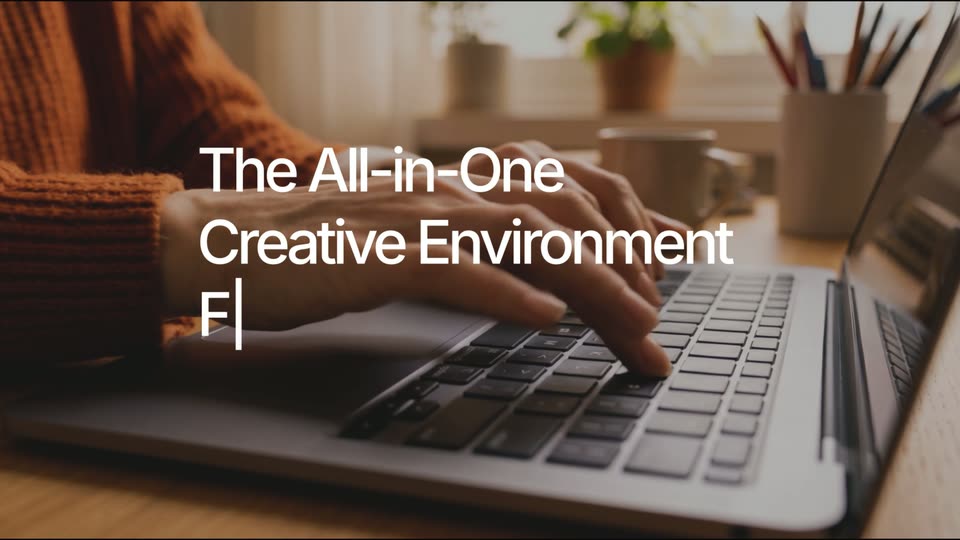
A close-up of hands typing on a laptop keyboard at a wooden desk. White text types out in the center of the frame, building a three-line headline over the footage.
On-screen text: “The All-in-One”, “Creative Environment”, “For Videos”
Techniques: Kinetic type
Camera: Static
28 · Feature reveal · 0:54–0:55
Three lines of white headline text sit left of center on a near-black background. The block slides slightly and then fades to black over the short clip, leaving an empty dark frame.
On-screen text: “The All-in-One”, “Creative Environment”, “For Videos”
Techniques: Kinetic type
Camera: Static
29 · Feature reveal · 0:55–0:56
A dark messaging screen fades in from black. A video player shows a person at a desk with playback controls, above a Download button. A Continue button and a message input field with plus, at, and send icons sit below.
Camera: Pull out
30 · Feature reveal · 0:56–0:58
The dark editor UI scales up from a small inset to fill the frame, dimming the preview of a girl writing at a desk. The top tabs Shot, Scene and Timeline pop into large pills as a cursor hovers over Scene.
Techniques: UI zoom, Cursor demo
Camera: Push in
31 · Feature reveal · 0:58–0:59
Three pill-shaped tabs, Shot, Scene, Timeline, sit on black. The magenta selection moves from Shot to Scene, which scales up, as the cursor clicks and drifts down; a Batch video creation button appears at the bottom left.
Techniques: Cursor demo
Camera: Static
32 · Feature reveal · 0:59–1:00
A magenta rounded badge with a clapperboard icon and the word Scene scales in at center. Below it a tilted 3D interface panel rises, revealing a Batch video creation button, a SCENE 1 prompt line, and three SHOT 1.1 thumbnails, with two cursor pointers hovering over the middle frame.
Techniques: Kinetic type, 3D mockup
Camera: Pan
33 · Feature reveal · 1:00–1:01
A dark storyboard interface scrolls vertically through scene rows, each with a title, description line and a strip of shot thumbnails. A pink Scene tag sits at the top and a Batch video creation label hovers over the first row while a cursor moves down the list.
On-screen text: “Scene”, “Batch video creation”
Camera: Pull out
34 · Feature reveal · 1:01–1:02
Three pill tabs sit centered on black, the middle Scene tab lit magenta. A white cursor arrow glides in from the right and rests over the Timeline tab, which scales up slightly.
Techniques: Cursor demo
Camera: Static
35 · Feature reveal · 1:02–1:03
On a black background, three pill buttons labeled Shot, Scene and Timeline sit in a row; the Timeline button pops to pink and scales up while the others fade, and a second row of action buttons appears below. A white cursor arrow hovers over the buttons.
Techniques: Cursor demo
Camera: Pull out
36 · Feature reveal · 1:03–1:05
A dark timeline panel slides in from the top left and centers, the magenta 'Timeline' tag sliding off frame. A cursor drags a video clip to a new slot; it takes a magenta outline, then its thumbnail switches to a 'Generating' state while the audio and caption tracks hold still.
On-screen text: “Timeline”
Techniques: Cursor demo
Camera: Pull out
37 · Feature reveal · 1:05–1:06
A video editor UI with a multi-track timeline and a preview of an animated girl drawing at a desk. A cursor hovers over the controls as a properties panel slides in from the right, showing volume and speed sliders, while a white arrow points across the preview.
Techniques: Cursor demo
Camera: Pan
38 · Feature reveal · 1:06–1:11
A dark editing UI shows a video player on the left and a Shot 1.1 panel on the right. A cursor drags the Volume and Speed sliders, then the view zooms into the top toolbar with Preview and Export buttons.
Techniques: Cursor demo, UI zoom
Camera: Push in
39 · Other · 1:11–1:12
An open sketchbook of pencil character drawings rests on a wooden desk. A small golden sun with a smiling face glows at the center, its bright rays expanding outward and flooding the pages with warm light.
Techniques: Light sweep
Camera: Static
40 · Other · 1:12–1:14
A 3D animated girl sits at a desk as golden light bursts from an open book, two glowing smiley orbs hover beside her, and the camera pulls back to reveal a light dragon, a robot holding a book, and a starry sky through a torn ceiling.
Techniques: Particles, Parallax
Camera: Pull out
41 · Other · 1:14–1:16
A woman in an orange cardigan and headphones sits at a desk in a sunlit room, typing on a laptop, while a ring of translucent UI cards and a glowing blue dragon orbit around her in 3D. The dragon drifts left across the frame.
Techniques: 3D mockup, Parallax
Camera: Static
42 · Other · 1:16–1:17
Close-up of a smiling woman in cream headphones, warm lamp-lit room behind her. Pill-shaped labels and small icons drift through the air around her head at different depths as she looks off camera.
Techniques: Parallax
Camera: Static
43 · Other · 1:17–1:19
Over-the-shoulder view of a woman in white headphones at a desk with a laptop. A blue 3D dragon with a spear-carrying rider flies across the room as dozens of translucent UI cards, play buttons and waveforms drift at different depths. The camera orbits her, parallaxing the floating layers.
Techniques: 3D mockup, Parallax
Camera: Push in
44 · Other · 1:19–1:21
A woman in an orange cardigan sits at a desk, then turns to face the camera smiling, while 3D UI cards, audio waveforms and a blue dragon orbit around her in a curved arc. A blurred prompt line rests along the bottom edge.
Techniques: 3D mockup, Parallax
Camera: Push in
45 · Social proof · 1:21–1:23
Top-down shot of a smiling man lying on a patterned rug amid guitar pedals and cables, holding a phone. Rounded stat cards for Instagram, SoundCloud, YouTube and Spotify hover around him as their figures count up, and a video thumbnail marked 1 MILLION+ VIEWS sits at his chest.
Camera: Static
46 · CTA · 1:23–1:31
Top-down view of a woman in white at a round table piled with crocheted pieces, yarn, blooms and shipping boxes; she sets her phone down and leaves the frame. The shot tightens on the laptop, whose black screen types out a white headline.
On-screen text: “Vibe Direct your videos”, “with OpenArt”
Techniques: Kinetic type
Camera: Push in