
1:31
Explore
00:00:00 / 02:58:17
- Length
- 2:58
- Scenes
- 58 · 3.1 s avg
- Product on screen
- 0:00
- Features shown
- 3
- Call to action
- 2:46 · 93%
- Voiceover
- Yes
- Views
- 16K on X
as of November 14, 2026
Gamma’s 2:58 launch film runs 58 scenes, about 3.1 s each. The product is on screen from the first frame and 3 features are revealed, with social proof. The call to action lands at 2:46 (93% in), over a voiceover. The video is built as a founder-led launch: a space title card, a cockpit interview, a problem montage, a product history with social proof, then three feature reveals (Agent, API, business) each opened by a starfield title card and closed by a logo, ending on the URL. Its signature moves are the deep blue starfield, the chrome-to-blue GAMMA wordmark, the recurring spacecraft motif, and the alternating locked-off interview with fast UI demos and 3D card animations.
Footage neededEstimated needs: 5 capture groups — your screens or recordings · 1 official logo — reused across the film · 16 filmed passages — shoot, supply or replace · 9 graphic passages — draw or supply · 7 3D passages — build or supply
Is this your launch? to your site or press kit.
More like this


Gamma - Gamma 3.0 is here, so we put our CEO in a spaceship. And it got mill, scene by scene
· 58 scenes as text
01 · Product intro · 0:00–0:01
A 3D render of Earth from orbit fills the frame, a small satellite drifting across the clouds. The white wordmark GAMMA sits centered over the planet, with the small numerals 09, 16 and 25 spaced beneath it. The background drifts slowly while the type stays locked.
On-screen text: “GAMMA”, “09”, “16”, “25”
Techniques: Parallax
Camera: Static
02 · Product intro · 0:01–0:02
A slow push-in on Earth's curved horizon from orbit, the thin blue atmosphere glowing at the limb. A small spacecraft glides left to right across the center, passing behind the large white GAMMA wordmark, with small numerals 09, 16 and 25 tucked under the letters.
On-screen text: “GAMMA”, “09”, “16”, “25”
Techniques: 3D mockup
Camera: Push in
03 · Product intro · 0:02–0:03
A dark angular spaceship flies left to right over a blue planet, passing in front of large white text.
On-screen text: “GAMMA”
Techniques: 3D mockup
Camera: Push in
04 · Problem · 0:03–0:04
A rapid lateral camera sweep blurs across a weathered metallic hull, settling on a man in dark clothing seated inside a recessed hexagonal cockpit window, hands resting on controls under a purple glow.
Camera: Push in
05 · Problem · 0:04–0:08
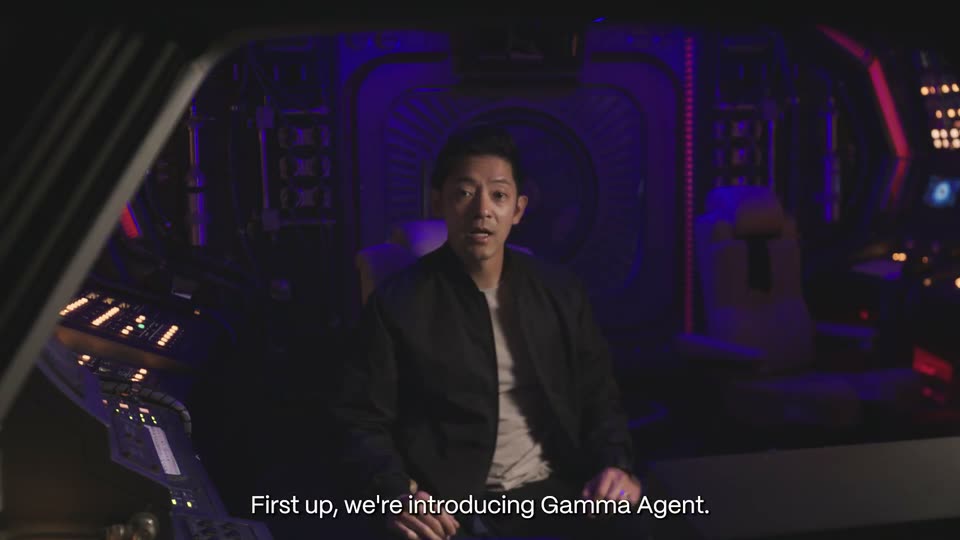
In a locked-off medium shot, a man in a black bomber jacket sits in a purple-lit sci-fi cockpit, hands resting on a glowing control panel. He looks up and addresses the camera with a slight smile as subtitles appear at the bottom.
On-screen text: “Oh, hey.”, “What's up?”
Camera: Push in
06 · Problem · 0:08–0:16
A man in a dark bomber jacket sits in a dim cockpit set with glowing red and purple control panels, speaking to camera. A white lower third with his name and title holds on the left while white subtitles change along the bottom. The frame stays locked off.
On-screen text: “What's up?”, “Grant Lee”, “Co-Founder and CEO”, “We started Gamma to make it easy”, “for you to share your ideas visually.”, “Because the old way of”, “creating presentations”, “well, sucked.”
Camera: Static
07 · Problem · 0:16–0:17
A PowerPoint window floats at a slight angle over a dark starry field, its slide showing empty title and subtitle placeholders. A white caption fades in along the bottom edge of the frame.
On-screen text: “Staring at the blank page and formatting slides for hours.”
Techniques: 3D mockup
Camera: Static
08 · Problem · 0:17–0:18
Close-up of a presentation app's insert-table dropdown. The cursor drags across a grid of squares, the blue highlight grows from a 2x3 to a 3x4 block and the label updates to match. A white caption with black outline sits at the bottom.
On-screen text: “Staring at the blank page and formatting slides for hours.”
Techniques: Cursor demo
Camera: Static
09 · Problem · 0:18–0:19
A presentation slide with a month-by-month table and a selected caption box holds, then cuts to a man in a purple-lit studio holding a microphone, who speaks to camera as a subtitle appears.
On-screen text: “Staring at the blank page and formatting slides for hours.”, “We all hated it.”
Camera: Static
10 · Demo · 0:19–0:24
A man in a dark bomber jacket sits in a dim cockpit set, red and purple control panels glowing behind him. He speaks to camera while white subtitles appear at the bottom of the locked-off frame.
On-screen text: “We all hated it.”, “So we built Gamma to tackle these problems.”
Camera: Static
11 · Demo · 0:24–0:27
A Gamma document page floats on a dark starry field, then the camera zooms into the black gamma wordmark, blurring the page until only the title and first paragraph remain on white.
On-screen text: “The first version of Gamma”, “was an alternative to PowerPoint.”
Techniques: UI zoom
Camera: Push in
12 · Demo · 0:27–0:28
A soft pink gradient screen holds the Gamma welcome view: a serif headline above a filled prompt field and a purple Generating button with a sparkle icon. A mouse cursor rests on the button as the field's focus ring fades. A caption line sits at the bottom edge.
On-screen text: “Then in 2023, we became the most popular”
Techniques: Cursor demo
Camera: Static
13 · Demo · 0:28–0:28
A dark navy screen on a pink gradient dotted with white sparkles shows a faint circular spinner with a four-pointed star at its center. The frame zooms in on the screen as a small blue Generating chip appears at the left edge. A white subtitle sits along the bottom.
On-screen text: “Then in 2023, we became the most popular”
Techniques: UI zoom
Camera: Static
14 · Demo · 0:28–0:29
A rounded slide on a pink background shows a 3D-rendered astronaut in a cave opening. Scattered pixel blocks dissolve away, revealing the full image with the title Building a Mars Colony and subtitle A new home for humanity.
On-screen text: “Then in 2023, we became the most popular”
Techniques: Particles
Camera: Pull out
15 · Social proof · 0:29–0:31
A close-up of a white article page with a dark headline and grey body copy; the phrase 50 million users is highlighted in yellow. The shot starts soft and snaps into focus as the camera pushes in slightly. A white caption sits at the bottom.
On-screen text: “Then in 2023, we became the most popular”
Camera: Static
16 · Social proof · 0:31–0:32
On a black field, the white Forbes wordmark fades in above a bold sans headline that scales up line by line: THE NEXT in white, BILLION-DOLLAR in red, STARTUPS in white. A small white caption line sits at the bottom edge.
On-screen text: “Forbes”, “THE NEXT”, “BILLION-DOLLAR”, “STARTUPS”, “AI presentation tool in the world.”
Techniques: Kinetic type
Camera: Pull out
17 · Social proof · 0:32–0:32
From a moving car, a highway billboard shows a black cat with dollar and gear eyes beside the headline on a blue field. A white caption lines the bottom edge as the frame drifts slowly past the overpass railing.
On-screen text: “AI presentation tool in the world.”, “Forbes”, “THE NEXT”, “BILLION-DOLLAR”, “STARTUPS”
Camera: Static
18 · Social proof · 0:32–0:33
Low-angle live-action shot of a glass bus shelter window displaying a colorful Gamma ad with a train on rainbow tracks and the headline “Where big ideas catch their ride.” A white caption “AI presentation tool in the world.” scales in at the bottom. The camera holds still.
On-screen text: “AI presentation tool in the world.”
Camera: Static
19 · Social proof · 0:33–0:33
Wide static shot of the New York Stock Exchange trading floor, the American flag hanging above the posts. Large screens on the trading desks show the white GAMMA logo on a purple to pink gradient with the words Intelligent Applications and 2025 WINNER.
Camera: Static
20 · Product intro · 0:33–0:35
A man in a dark jacket sits centered in a purple-lit spaceship cockpit, gesturing with one hand as he addresses the camera. Control panels with glowing buttons flank him on both sides. A white subtitle runs along the bottom edge.
On-screen text: “And today, we're launching Gamma 3.0.”
Camera: Static
21 · Product intro · 0:35–0:36
A black frame holds a 3D chrome wordmark with a blue gradient that forms the letters G and A on the left, while a white caption sits fixed at the bottom.
On-screen text: “And today, we're launching Gamma 3.0.”
Techniques: Kinetic type
Camera: Static
22 · Product intro · 0:36–0:41
A dark blue starfield with slowly drifting white dots. A large blue outlined 3.0 frames the white GAMMA wordmark, which scales up to center. White voiceover captions fade in one after another at the bottom.
On-screen text: “And today, we're launching Gamma 3.0.”, “A visual storytelling platform”, “for your ideas.”
Techniques: Kinetic type, Particles
Camera: Pull out
23 · Feature reveal · 0:41–0:46
Locked-off medium shot of a man in a black bomber jacket seated in a dark, purple-lit spaceship cockpit. He speaks to camera and flashes an OK gesture as white captions appear at the bottom; a large GAMMA title scales in at the end.
On-screen text: “I'm going to share three massive updates.”, “First up, we're introducing Gamma Agent.”, “GAMMA”
Techniques: Kinetic type
Camera: Static
24 · Feature reveal · 0:46–0:50
A deep blue starfield gradient fills the frame. The white title Gamma Agent fades in at center and holds. White subtitles appear at the bottom, then change to a second two-line caption.
On-screen text: “Gamma Agent”, “First up, we're introducing Gamma Agent.”, “We want Gamma to feel like you have your very own design partner.”
Camera: Pull out
25 · Feature reveal · 0:50–0:55
A man in a dark bomber jacket sits in a dim room lit by red and purple control panels, speaking to camera in a locked-off medium shot. White subtitles appear at the bottom as he talks.
On-screen text: “We want Gamma to feel like”, “you have your very own design partner.”, “And we built Agent to”, “intelligently edit with you.”
Camera: Static
26 · Feature reveal · 0:55–1:03
A screen recording of the Gamma editor scrolls down a dark, space-themed deck. A cursor opens the Agent menu, picks a redesign option, and the bullet slide rebuilds into a chart with a 63% growth figure while a chat panel slides in.
On-screen text: “You can ask Agent to make design improvements for you,”, “like reviewing your deck,”, “offering suggestions,”, “or just redesign the whole thing in one prompt.”
Techniques: UI zoom, Cursor demo
Camera: Pull out
27 · Feature reveal · 1:03–1:05
A dark space-themed Gamma editor fills the screen, with a slide of charts and a chat panel on the right. The canvas zooms out to reveal the full slide while a caption sits at the bottom and a cursor hovers at the left edge.
On-screen text: “Agent can also work with any content,”
Techniques: UI zoom, Cursor demo
Camera: Static
28 · Feature reveal · 1:05–1:06
A dark Gamma editor displays a holographic market slide. A tilted white table document slides in from the left and is dragged by a cursor toward the center, rotating slightly. A caption sits at the bottom.
On-screen text: “Agent can also work with any content,”
Techniques: Cursor demo
Camera: Static
29 · Feature reveal · 1:06–1:07
In the Gamma editor, a white adoption-journey table card rotates in 3D and settles over a dark space-themed slide. A chat panel with a drop-files box sits on the right, and a white caption appears at the bottom.
On-screen text: “so if you have a link or a screenshot,”
Techniques: 3D mockup
Camera: Static
30 · Feature reveal · 1:07–1:08
A dark blue presentation slide with a Venn diagram and a matrix is shown. A white document thumbnail is dragged from right to left across the screen. The view then zooms into a dark chat interface on the right, where a chat bubble and an upload button appear.
On-screen text: “so if you have a link or a screenshot,”, “ask Gamma to incorporate”, “Hi 👋 How can I help?”, “+ Upload”, “Chat with Agent”
Techniques: UI zoom, Cursor demo
Camera: Push in
31 · Feature reveal · 1:08–1:10
A dark Gamma workspace shows a blue 63% Growth Rate slide on the left and a chat panel on the right, where a prompt box types “Recreate this table to match my deck design” over an uploaded table. The frame eases out to reveal both, white captions at the bottom.
On-screen text: “ask Gamma to incorporate”, “and visualize them in your slides.”
Techniques: UI zoom
Camera: Pull out
32 · Feature reveal · 1:10–1:11
A screen view of the Gamma editor shows a dark, space-themed slide deck on the left and a chat panel on the right, with a blue prompt to recreate a table. A white caption sits at the bottom center.
On-screen text: “and visualize them in your slides.”
Camera: Pull out
33 · Feature reveal · 1:11–1:19
A dark slide interface shows a table filling in row by row beside a chat panel that logs a conversation with the Agent. The view zooms onto the chat as the agent returns a web search results list, while white subtitles run along the bottom.
On-screen text: “And of course, we've also built Agent to be connected to the web”, “so you can search the internet for any information you want cited in your gammas.”
Techniques: UI zoom
Camera: Push in
34 · Feature reveal · 1:19–1:24
A deep blue gradient starfield fills the frame. The word Visualizations in white bold sans fades in sharp at center, holds, then blurs out, while white outlined captions sit at the bottom.
On-screen text: “Visualizations”, “Agent can also use the full visual range of Gamma.”, “We've added an explosion of ways”
Camera: Pull out
35 · Feature reveal · 1:24–1:27
On a starry background, rounded panels fade in one by one to form a grid, each holding a blue 3D icon such as balloons, stacked cubes, a columned temple, or a timeline. Subtitle captions appear at the bottom.
On-screen text: “We've added an explosion of ways”, “to visualize your big ideas”
Camera: Pull out
36 · Feature reveal · 1:27–1:28
A four-blade blue pinwheel, each triangle carrying a small icon for people, a monitor, a globe and stacked layers, sits inside a rounded outline on a starry field, flanked by horizontal line bars. The frame slowly pushes in while a caption holds at the bottom.
On-screen text: “and we're constantly adding more.”
Camera: Static
37 · Feature reveal · 1:28–1:29
Three wireframe data-visualization panels float over a starry field: a vertical timeline with icon nodes on the left, a chain-link card and an iceberg diagram on the right. The timeline bar fills with bright blue as the right panels brighten. A white caption sits at the bottom.
On-screen text: “and we're constantly adding more.”
Camera: Static
38 · Feature reveal · 1:29–1:31
Two line-art interface cards float over a starry night sky, the top pairing a bullet list with four blue balloon shapes, the bottom an isometric layered stack. The cards drift left across the frame, revealing a third card, while a caption stays locked at the bottom.
On-screen text: “Each visualization adapts”
Camera: Static
39 · Feature reveal · 1:31–1:32
A starfield backdrop holds four glass panels of abstract infographics: a layered diamond, a dot grid, an isometric cube stack, and a columned building, all with placeholder bars. The panels scale up subtly while a white caption reads at the bottom.
On-screen text: “Each visualization adapts”, “to your content and style.”
Camera: Static
40 · Feature reveal · 1:32–1:48
A man in a dark bomber jacket speaks to camera in a dim control room lit by red and purple panels. The shot defocuses as three white checkmark bullets stack down the left side, then sharpens back. White subtitles run along the bottom.
On-screen text: “So with Agent, you can make sweeping design edits,”, “Design edits”, “turn any material into visuals,”, “Turn into visuals”, “Add context”, “and add context to your stories.”, “Altogether, this saves hours of dreaded manual work.”, “This is the kind of intelligence that can transform how we share ideas.”
Techniques: Kinetic type
Camera: Static
41 · Feature reveal · 1:48–1:49
A man in a dark jacket sits in a purple-lit spaceship cockpit, gesturing with his right hand while speaking to camera. The frame is locked off. A white caption at the bottom states the announcement.
On-screen text: “Second, Gamma API is officially live.”
Camera: Static
42 · Feature reveal · 1:49–1:52
A deep blue starfield gradient fills the frame as the white Gamma API wordmark fades in and scales up at center, with a white caption at the bottom that drops out near the end.
On-screen text: “Gamma API”, “Second, Gamma API is officially live.”
Techniques: Kinetic type, Particles
Camera: Pull out
43 · Feature reveal · 1:52–1:56
A slide card for a holographic homes market report scales up at center on a starry night sky, a white Translate pill button pops in below it, then the card multiplies into a grid of translated versions filling the frame. Subtitles run along the bottom.
On-screen text: “Let's say you have a deck”, “you absolutely love”, “and you want to crank out”, “100 more just like it.”
Camera: Push in
44 · Feature reveal · 1:56–1:57
A grid of multilingual report covers floats in a starry purple space, the central card showing a glowing night garden, while a white caption at the bottom swaps from one line to the next. The frame stays locked-off.
On-screen text: “100 more just like it.”, “But personalized to different”
Techniques: 3D mockup
Camera: Static
45 · Feature reveal · 1:57–2:00
A centered report card with a glowing blue border sits in a starry void. Its heading and side labels switch from Korean to French to Tagalog while the purple nebula drifts behind the static frame.
On-screen text: “But personalized to different”, “audiences around the world.”
Techniques: Morph
Camera: Static
46 · Feature reveal · 2:00–2:06
A phone mockup tilts from a 3D angle to face front, revealing a social post titled 5 Reasons to Invest in Holographic Homes Now. Two more phones slide in on either side, angled in perspective, showing slides 02 and 03 of the carousel against a starry night sky.
On-screen text: “Or better yet, what if instead of just a look you wanted to create documents and social assets all at once?”
Techniques: 3D mockup
Camera: Static
47 · Feature reveal · 2:06–2:07
Three app cards fan out in 3D against a starry nebula, the center card showing a holographic home and a large numeral 5. A blank blue card slides up from the bottom to take the center slot as the others rise.
Techniques: 3D mockup
Camera: Static
48 · Feature reveal · 2:07–2:19
A rounded dark-blue badge with the words GAMMA API wipes in on a starry field, then slides left as a grid of twenty app icons grows in on the right, linked by thin lines. Zapier and Make logos drop into the badge footer.
On-screen text: “GAMMA API”, “Gamma's new API completely”, “automates this for you.”, “Connect Zapier, Make, or any data source.”, “With our API, Gamma is now part of your workflow”, “seamlessly connected to your favorite tools.”
Techniques: Masking, Kinetic type, Light sweep
Camera: Pull out
49 · Feature reveal · 2:19–2:21
A man in a black bomber jacket sits centered in a dark cockpit set lit with purple and blue light, speaking to camera. The frame is locked-off. White subtitles appear at the bottom as he talks.
On-screen text: “And speaking of workflow,”, “Gamma is now open for business.”
Camera: Static
50 · Feature reveal · 2:21–2:25
A deep blue cosmic field with concentric ripple rings; rounded avatar and icon tiles orbit the center in 3D perspective, growing as they approach. The white headline Gamma for business scales up from a blur at center while subtitles caption the bottom.
On-screen text: “Gamma is now open for business.”, “Gamma for business”, “So, thousands of teams use Gamma already,”
Techniques: Kinetic type, Parallax
Camera: Push in
51 · Feature reveal · 2:25–2:26
A deep blue radial field with concentric rings and star dots. Rounded tiles holding face photos and line icons orbit and tilt in 3D depth around the center. The white headline Gamma for business scales up in the middle while subtitle captions swap at the bottom.
On-screen text: “Gamma for business”, “So, thousands of teams use Gamma already,”, “and we've now added”, “dedicated team and business plans.”
Techniques: Kinetic type, Parallax
Camera: Pull out
52 · Feature reveal · 2:26–2:28
A starry blue-violet gradient fills the frame while a white circle with a cross scales up at center, then morphs into a rounded square holding the blue Gamma mark. White subtitle captions sit at the bottom throughout the reveal.
On-screen text: “and we've now added”, “dedicated team and business plans.”, “Gamma for business”
Techniques: Morph
Camera: Pull out
53 · Feature reveal · 2:28–2:29
Three white logo cards for LumiiHaus, gibr, and Oblica sit stacked in the center over a blue starry gradient. They slide left as a dark theme card reading Holographic Technology Today slides in from the right. A white caption sits at the bottom.
On-screen text: “and we've now added dedicated team and business plans.”
Camera: Static
54 · Feature reveal · 2:29–2:38
Three logo buttons stacked on the left against a starry dark backdrop; as each highlights in turn, the three presentation slides on the right re-theme from dark blue to purple to light cream. White captions line the bottom.
On-screen text: “And with custom themes, every”, “Gamma is effortlessly on brand”, “every time.”, “Businesses of all sizes have access today.”
Camera: Static
55 · Other · 2:38–2:41
A man in a dark bomber jacket sits in a dim spaceship cockpit, speaking to the camera. Glowing control panels, amber buttons and red light strips fill the background. A white caption sits at the bottom of the frame. The shot is locked off.
On-screen text: “All this power now at your fingertips.”
Camera: Static
56 · Other · 2:41–2:46
A man in a black jacket sits in a purple-lit sci-fi cockpit, speaking to camera. A white subtitle line appears at the bottom as he talks, then the shot fades to black.
On-screen text: “So get your ideas out there, into the universe.”
Camera: Pull out
57 · CTA · 2:46–2:54
On a dark starfield with a blue glow at the bottom, the word GAMMA assembles letter by letter in rounded white-to-blue type, a glint sweeping across the letters. A large outlined 30 draws itself behind the word, then the URL gamma.app fades in below.
On-screen text: “GAMMA”, “30”, “gamma.app”
Techniques: Kinetic type, Light sweep
Camera: Pull out
58 · CTA · 2:54–2:58
A white gamma.app wordmark sits centered on a black starfield. A soft glow blooms around it at the start and fades to crisp white as the stars drift slowly.
On-screen text: “gamma.app”
Camera: Pull out