1:14
Explore
Introducing Galaxy Tab S12 Ultra | Samsung
Galaxy Tab S12 Ultra · Sep 2026 · 2:15 · AI-annotated
- Length
- 2:15
- Scenes
- 85 · 1.6 s avg
- Product on screen
- 0:12
- Features shown
- 8
- Voiceover
- Yes
- Views
- 22M on YouTube
as of November 22, 2026
00:00:00 / 02:15:23
- Length
- 2:15
- Scenes
- 85 · 1.6 s avg
- Product on screen
- 0:12
- Features shown
- 8
- Voiceover
- Yes
- Views
- 22M on YouTube
as of November 22, 2026
Galaxy Tab S12 Ultra’s 2:15 launch film runs 85 scenes, about 1.6 s each. The product shows up at 0:12 and 8 features are revealed. There is no explicit call to action; a voiceover carries the film. The film opens with a dark cinematic spec montage, names the tablet, then runs two parallel vignettes (a loft designer and a food truck chef) where each feature is announced with a short white caption and demoed in live action or 3D. Signature moves are locked-off macro stylus shots, whip pans between vignettes, and slow 3D product orbits against warm brown gradients.
Footage neededEstimated needs: 3 capture groups — your screens or recordings · 1 official logo — reused across the film · 64 filmed passages — shoot, supply or replace · 1 graphic passage — draw or supply · 16 3D passages — build or supply
Is this your launch? to your site or press kit.
More like this

1:15

Figma - Introducing Figma Sites Take your designs straight to the web. With
Figma · Design · May 2025
1:47

Yijie - Today I’m excited to announce the public release of Scend Over the l
Scend Ai · Aug 2026
Similar soundtrack
Films whose music sounds like this one, voice left out
0:50

TSM - INTRODUCING @OSUAIapp 👀 Our team has been hard at work on a desktop
osu.ai · Funk, Rock, Electronic
0:59

Introducing DJI Osmo Mobile 8, Phone Gimbal In Tune With Every Move
DJI · Upbeat instrumental funk-pop and electronic dance
0:38

Introducing Galaxy Tab S12 Ultra | Samsung, scene by scene
· 85 scenes as text
01 · Hook · 0:00–0:00
A black screen holds as a faint thin line draws a shallow curve across the lower frame. The line stays subtle and dark, with no text or product interface visible.
Camera: Static
02 · Hook · 0:00–0:01
The camera pulls back through a dark 3D chamber, revealing two horizontal slits of warm light on the side walls and a faint panel grid emerging on the floor.
Techniques: Parallax
Camera: Static
03 · Hook · 0:01–0:03
A hand descends from above toward a glossy black surface in a dark, angular space, fingers uncurling as it nears the touch. The hand's reflection shimmers on the surface while soft light strips line the walls.
Camera: Static
04 · Hook · 0:03–0:06
Two thin tablets float edge-on at a shallow angle in a dark void, a hand grips the left end of the lower one, and white spec labels slide in: 692 g at center and 5.1 mm at each right edge with measurement ticks.
On-screen text: “692 g”, “5.1 mm”
Techniques: 3D mockup, Kinetic type
Camera: Static
05 · Hook · 0:06–0:07
A hand lowers a white S Pen tip toward a dark tray in extreme close-up, the lens focusing on the metal point. The caption S Pen in box sits at right while the pen eases down and the frame holds still.
On-screen text: “S Pen in box”
Camera: Static
06 · Hook · 0:07–0:09
Macro close-up of a white stylus held between fingers against a dark blurred background. The camera slides along the barrel, bringing the embossed SAMSUNG wordmark into focus.
On-screen text: “S Pen in box”
Camera: Push in
07 · Hook · 0:09–0:11
A hand holds a white stylus and draws a diagonal line across a pink-purple gradient tablet screen in 3D perspective. The measurement 14.6 inches scales up beside the line as the stylus lifts.
On-screen text: “14.6in”, “Image simulated. Sequence shortened. Actual UX/UI may vary. Measured diagonally. Galaxy Tab S10 Ultra screen size is 14.6in in the flat rectangle and 14.5in for”, “accounting for the rounded corners. Actual visible area is less due to the rounded corners and the camera hole.”
Techniques: 3D mockup, Kinetic type
Camera: Pull out
08 · Hook · 0:11–0:12
A tablet lies flat on a dark stage, its screen lit by a soft pastel gradient, framed from a low three-quarter angle. The white headline hovers centered above the device while the angle eases open. A 14.6 inch figure scales in.
On-screen text: “Our largest display”, “14.6''”
Techniques: 3D mockup
Camera: Static
09 · Product intro · 0:12–0:16
A dark tablet back with two camera lenses and a flash orbits in 3D against a brown gradient. White left-aligned text reading 'Introducing Galaxy Tab S12 Ultra' stays fixed while the device turns from a top-edge close-up to a tilted side view.
On-screen text: “Introducing”, “Galaxy Tab S12 Ultra”, “Visit samsung.com for details.”
Techniques: 3D mockup
Camera: Static
10 · Product intro · 0:16–0:18
A dark tablet lies on a round wooden table with a stylus beside it. The camera orbits from a low front angle showing the screen to the back, revealing the dual camera lenses and logo, while two blurred figures stand in the studio background.
On-screen text: “Introducing”, “Galaxy Tab S12 Ultra”, “1”
Camera: Pull out
11 · Feature reveal · 0:18–0:20
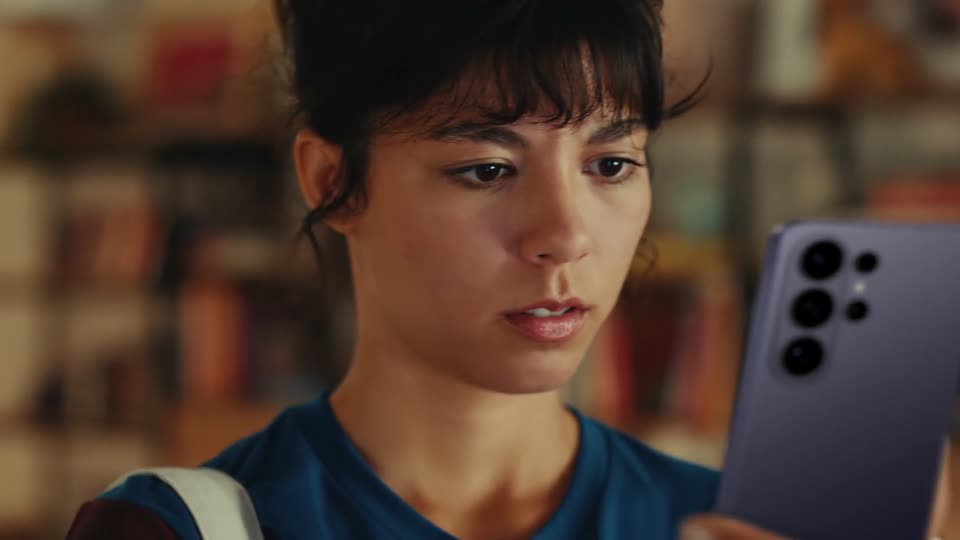
A woman with dark hair and bangs in a blue shirt holds a lavender triple-lens phone and speaks while looking at it. The shot opens on a soft crossfade, then settles into a tight close-up against a blurred, warm bookshelf background.
Camera: Pull out
12 · Feature reveal · 0:20–0:22
A hand with a ring holds a phone showing a chat app. The thumb swipes up to scroll the conversation, then the hand tilts the phone to angle the screen toward the camera.
On-screen text: “Image simulated. Sequence shortened. Actual UX/UI may vary.”
Camera: Static
13 · Feature reveal · 0:22–0:23
A hand holds a phone showing a script document; the page scrolls as a finger rests on the top edge, then the view cuts to a wider angle revealing the full device and the title SCRIPT: S3, EP1 COSMIC RACER.
Camera: Pull out
14 · Feature reveal · 0:23–0:26
A close-up of a tablet held by a person in an orange top shows a file list. A hand taps a PDF icon, and the screen switches to the opened script page. Shallow focus keeps the device sharp while the background blurs.
On-screen text: “Image simulated. Sequence shortened. Actual UX/UI may vary. Each device must be signed in to your Samsung Account and must have both Wi-Fi and Bluetooth turned.”, “Requires updated Galaxy phones and tablets with One UI 7 or above and kernel version 5.10 or above. Feature availability may vary by region and device model.”
Camera: Pan
15 · Feature reveal · 0:26–0:27
Over-the-shoulder view of a seated person holding a tablet across their lap and a phone in the other hand, both showing the same script document. A white italic headline sits in the upper left. The framing holds steady with only subtle hand movement.
On-screen text: “Galaxy Tab and phone, working as one”, “Image simulated. Sequence shortened. Actual UX/UI may vary. Each device must be signed in to your Samsung Account and must have both Wi-Fi and Bluetooth turned.”, “Requires updated Galaxy phones and tablets with One UI 7 or above and Internet version 5.1.0 or above. Feature availability may vary by region, and device model”
Camera: Static
16 · Demo · 0:27–0:30
A woman sits cross-legged in a mustard armchair in a sunlit studio, a dark tablet resting on her lap and a stylus in her hand as she looks down at the screen. The static shot frames her centered, with a drafting table and city windows in the background.
Camera: Static
17 · Demo · 0:30–0:31
Over-the-shoulder shot of a person holding a tablet in landscape, drawing a red line on a space suit sketch with a stylus. The white canvas shows the word Function circled in red and a speech bubble reading What does a sci-fi suit require? The frame stays locked off.
Camera: Static
18 · Demo · 0:31–0:33
A man in a blue top and rust trousers sits in a yellow armchair in a sunlit loft, tablet on his lap. He raises his right hand and points upward. The locked-off wide shot is framed through a frosted glass panel at the right.
On-screen text: “Function”, “What does a”, “sci-fi suit require?”
Camera: Static
19 · Demo · 0:33–0:34
A woman with a bun holds a tablet in one hand and a stylus in the other, glancing from the screen toward the camera with a skeptical look in a sunlit room with a city view.
Camera: Static
20 · Demo · 0:34–0:35
Extreme close-up of a person's eyes and nose, beginning soft and out of focus before pulling sharp. The dark eyes hold a steady gaze with a faint blue reflection, suggesting a screen just out of frame.
Camera: Pan
21 · Demo · 0:35–0:36
Over the shoulder, a person holds an unfolded foldable phone on their lap and sketches a spacesuit with a stylus. The screen then splits into two side-by-side panes, the drawing on the left and a web article on the right, as the hand lifts away.
Techniques: Split screen
Camera: Static
22 · Demo · 0:36–0:37
Tight locked-off close-up of a hand with a silver ring holding a white stylus, tracing the outline of a car on a tablet screen. The screen shows a technical blueprint sheet with numbered labels and small sketches, and the pen tip moves slowly along the drawing.
Camera: Static
23 · Demo · 0:37–0:38
A tight close-up of a woman with dark curly hair in a teal shirt, seen in profile as she looks down. The shot starts soft on a man in the foreground, then racks focus to her face while she holds a white stylus.
Camera: Pull out
24 · Demo · 0:38–0:39
A hand holds a white stylus over a tablet, the tip touching a dark mechanical render on the left half of the screen. The right half shows a white canvas with handwritten notes and a helmet sketch. A second tablet with the same layout rests behind, slightly out of focus.
Camera: Static
25 · Demo · 0:39–0:41
Over-the-shoulder, locked-off shot of a person holding an open foldable phone. The left half shows a handwritten note with suit sketches; the right half plays a sci-fi suit video above a webpage. A finger taps the note, then a white stylus draws a red arrow.
On-screen text: “Image simulated. Sequence shortened. Actual UX/UI may vary. Split view supported apps may vary. Contains AI generated images with edits.”
Camera: Static
26 · Demo · 0:41–0:42
A locked-off extreme close-up holds on a woman's eyes in profile, with warm side light, fine skin detail, and a soft blue background. A small caption remains still in the frame.
On-screen text: “Syls Refaence”
Camera: Static
27 · Demo · 0:42–0:43
A woman in a blue top holds a tablet at chest height in a warm, dimly lit room, smiling as she watches a video of a person on the screen. Side close-up with shallow depth of field; the device tilts slightly as she looks on.
On-screen text: “Image simulated. Sequence shortened. Actual UX/UI may vary. Contains AI-generated images with edits.”
Camera: Pull out
28 · Demo · 0:43–0:44
A person in a striped shirt sits on a chair mounted to a hoverboard, reading a newspaper while the seat spins in place. The wide static frame shows a sunlit kitchen and living room behind them, with an aquarium on a cart to the left.
On-screen text: “Image simulated. Sequence shortened. Actual UX/UI may vary. Contains AI-generated images with edits.”
Camera: Static
29 · Demo · 0:44–0:45
A hand rests a white stylus along the top edge of a black tablet, its back facing the lens. The shot then racks focus to a young person's face, eyes fixed downward on the screen, in warm indoor light.
Camera: Static
30 · Demo · 0:45–0:46
A white stylus tip taps the Photoshop icon on a tilted tablet screen, and a white tooltip reading Photoshop pops up just above it. Shallow depth of field over a purple wallpaper, locked-off frame.
Camera: Static
31 · Demo · 0:46–0:46
Extreme close-up at a low angle across a tablet screen, the black bezel and a purple edge glow fill the lower frame. A stylus hovers above the top edge as the app toolbar with colored icons racks into focus.
Techniques: 3D mockup
Camera: Static
32 · Demo · 0:46–0:48
A young person in a blue shirt holds a silver tablet, turning it from its back to the glowing screen. The shot cuts to a close-up of two hands using a stylus on the landscape screen, set against a warm, blurred window.
On-screen text: “Image simulated. Sequence shortened. Actual UX/UI may vary.”
Camera: Push in
33 · Feature reveal · 0:48–0:50
A hand holds a white stylus over a tablet, sketching a cityscape and a character. A vertical stack of tool labels fades in from faint to full opacity beside the drawing, while the white title Quick Tools holds still at right. The camera stays locked off.
On-screen text: “Quick Tools”
Camera: Static
34 · Feature reveal · 0:50–0:51
Close-up, locked-off shot of a hand holding a white stylus over a tablet. The screen shows a pencil sketch of a city skyline with palm trees. As the stylus tip crosses a tower, its interior fills with solid blue.
Camera: Static
35 · Feature reveal · 0:51–0:52
Extreme close-up of a hand holding a silver stylus over a tablet, drawing a line-art cityscape with palm trees. The stylus fills one skyscraper with flat blue, then the hand lifts away leaving the colored tower on screen.
Camera: Static
36 · Feature reveal · 0:52–0:53
A tight profile of a dark-haired person with closed eyes purses their lips and blows gently on a thin white stick held between two fingers. The warm interior stays softly blurred behind the face.
Camera: Static
37 · Feature reveal · 0:53–0:57
Close-up of a tablet screen: “Change the helmet color to blue” is typed into the AI Assistant input, then a finger taps send. The camera pulls back to the full tablet in a hand, showing the motorcycle artwork left and the chat panel right.
Techniques: UI zoom
Camera: Pull out
38 · Feature reveal · 0:57–0:59
A hand holds a tablet on a wooden desk showing Photoshop with an anime rider on a motorcycle; the helmet in the artwork shifts from yellow to blue as the AI Assistant panel fills with a reply and suggestion chips, then the tablet tilts into a 3D angle.
Techniques: 3D mockup
Camera: Pull out
39 · Feature reveal · 0:59–1:00
A person cradles a tablet in their lap, sketching an anime character with a stylus. The camera swings from a side angle to a top-down view as new strokes appear on the canvas. A drawing app toolbar and a sample-art tag frame the illustration.
On-screen text: “Image simulated. Sequence shortened. Actual UX/UI may vary. S Pen included.”
Camera: Pan
40 · Feature reveal · 1:00–1:03
A woman walks into a sunlit loft, sits on a beige sofa, then hops up onto the window ledge above it. Static white text holds centered over the living room the whole time as she moves across the frame.
On-screen text: “One charge.”, “23 hours.”
Camera: Push in
41 · Feature reveal · 1:03–1:04
Close-up of a woman in a blue shirt holding a white stylus, then lowering it and sliding it into the side edge of a dark tablet. The motion is slow and deliberate, lit with soft warm light against a muted blue background.
On-screen text: “One charge.”, “23 hours.”
Camera: Pan
42 · Feature reveal · 1:04–1:06
Over-the-shoulder view of a person holding a tablet on a beige couch, its screen playing an anime rider speeding through a neon city. White headline text sits at the top. The camera drifts slightly forward.
On-screen text: “Dynamic”, “AMOLED 2X display”
Camera: Push in
43 · Feature reveal · 1:06–1:08
A tablet lies angled on a brown woven surface, its screen showing an email draft with an attached artwork. A finger taps the blue Send button, the draft clears, and an envelope icon with a check badge appears above the word Complete.
On-screen text: “Dynamic”, “AMOLED 2X display”
Techniques: UI zoom, Morph
Camera: Static
44 · Other · 1:08–1:09
A woman seated at a wooden table stretches her arms overhead, eyes closed, in a warm home interior with a lit terrarium behind her. A tablet lies flat on the table in front of her, its screen showing a grid of images.
On-screen text: “Image simulated. Sequence shortened. Actual UX/UI may vary. Split view supported apps may vary”
Camera: Static
45 · Other · 1:09–1:11
A woman at a dining table pulls off her white shirt, revealing a blue top, then turns and moves out of frame. The camera whip-pans right, blurring past a bookshelf with books and a red flower.
On-screen text: “Image simulated. Sequence shortened. Actual UX/UI may vary. Split view supported apps may vary.”
Camera: Pan
46 · Problem · 1:11–1:14
A man in a white shirt, brown apron and backwards cap walks to a blue and white food truck and pulls open the side service window awning. The camera tracks him with a quick pan, settling on the open window.
Camera: Pan
47 · Problem · 1:14–1:15
A man in a white shirt, brown apron and backwards cap stands in a blue-lit food truck kitchen, head down on a phone. He shifts his weight as he reads the screen. Shelves of jars, a stand mixer and a metal door fill the frame.
Camera: Static
48 · Problem · 1:15–1:17
A young man in a black cap and brown apron stands inside a blue metal food truck, holding up a lavender phone. He stares at the screen, then scrunches his face in confusion. Static medium close-up with a cool teal grade.
Camera: Push in
49 · Problem · 1:17–1:17
A hand grips a phone against a blurred interior; the thumb swipes up, scrolling a review feed of food photos, star ratings and a user comment. The bottom bar with back, home, star and bell icons stays fixed.
On-screen text: “Image simulated. Sequence shortened. Actual UI/UX may vary.”
Camera: Static
50 · Problem · 1:17–1:19
A hand holds a tilted phone showing a five-star food review with two dish photos. The card slides up into place while a finger rests on the right edge. Soft teal blur fills the background.
On-screen text: “Image simulated. Sequence shortened. Actual UI/UX may vary.”
Techniques: 3D mockup
Camera: Static
51 · Problem · 1:19–1:22
A man in a backwards cap holds a phone in profile, smiling, then lowers it out of frame while a customer review slides in over the cool-toned blurred interior.
On-screen text: “Jamie R.”, “★★★★★”, “Wish there was something sweet to finish with”
Camera: Push in
52 · Problem · 1:22–1:23
In a medium close-up, a man in a white shirt and brown apron holds bread in one hand and spreads white cream onto it with a spoon. A bowl of green and white filling sits on the counter before him in a dim kitchen.
Camera: Static
53 · Problem · 1:23–1:24
A bearded man in a white shirt and brown apron holds a small filled taco, examines it, then raises it to his mouth for a bite. A blurred kitchen with a stand mixer sits behind him. His free hand gestures near the food.
Camera: Pan
54 · Problem · 1:24–1:25
A person in a white shirt with orange trim holds a slice of bread topped with dark spread and white cream, turning it slightly. The dark kitchen background shows stainless steel pots on a stove. The camera stays close on the hand and bread.
Camera: Push in
55 · Problem · 1:25–1:26
A low close-up holds on a dark reflective table holding a metal sieve, scattered white powder and a small white mound with a hint of orange. A blurred figure in a dark shirt sits behind the set. The frame ends with a sudden motion blur as the camera whips away.
Camera: Pan
56 · Problem · 1:26–1:26
A hand grips a yellow loofah sponge at chest height, squeezing it so a thin stream of white liquid drips down. The person wears a pale shirt and brown overalls with metal clasps against a soft teal background.
Camera: Pan
57 · Problem · 1:26–1:28
A close-up of a man in a backwards cap and white t-shirt leans forward, staring down with a focused expression. The frame remains tight on his face against a blurred, cool-toned background.
Camera: Static
58 · Demo · 1:28–1:29
A hand reaches into a crowded shelf of squeeze bottles, jars and a striped towel, grips a closed dark laptop resting on the surface, and lifts it out of frame.
Camera: Static
59 · Demo · 1:29–1:31
A man in a white shirt and brown apron stands in a stainless steel kitchen, sets a tablet flat on the counter, then lifts it and reads the screen. Shelves of jars and a coffee machine fill the background as he moves.
Camera: Static
60 · Demo · 1:31–1:32
Close-up of two hands typing on a dark laptop keyboard, the screen edge and a wristwatch at the frame's edges, against a dark blurred background. Fingers press keys in a steady rhythm while the camera holds still.
On-screen text: “Image simulated. Sequence shortened. Actual UI/UX may vary. Split view supported apps may vary. Pro Keyboard Cover sold separately.”, “The products are available for Galaxy Tab S10 Series. Features and keyboard layout may vary by country, language, and device model. Contains AI-generated images”
Camera: Static
61 · Demo · 1:32–1:33
A tablet screen sits at a steep 3D angle, filling the frame in soft focus. Inside the search field, the query types out character by character until the full sentence reads, while the Model pill slides in beneath it and a red audio waveform pulses in the dock.
Techniques: 3D mockup, Kinetic type
Camera: Pan
62 · Demo · 1:33–1:36
A tablet in 3D perspective rests on a dark desk, its screen split between a dessert-taco note and an AI panel. The right panel fills in with a whipped-cream recipe and photos while the Model tab slides into place.
Techniques: 3D mockup
Camera: Static
63 · Demo · 1:36–1:37
A tight close-up of a man's face in profile, his eyes downcast and focused on something below the frame. The background is a soft, blurred cool blue. The camera holds steady on his concentrated expression with shallow depth of field.
Camera: Push in
64 · Demo · 1:37–1:38
A man in a white shirt and leather apron sits at a dim cafe table, side profile, looking down at a laptop. He holds a tablet in one hand and writes on a notepad with a pen. A brief crossfade opens the shot.
Camera: Push in
65 · Demo · 1:38–1:38
A close-up of a hand with white nail polish scrolls a list on a tilted tablet screen. The interface is angled in perspective with a shallow depth of field, the list drifting upward as the finger taps.
Camera: Static
66 · Demo · 1:38–1:40
A dark tablet with a keyboard case fills the foreground on a counter. The camera tilts up from the back of the device to reveal a man in a gray cap, his eyes shifting as he reads the screen, set against a blue-lit food truck interior.
Camera: Push in
67 · Demo · 1:40–1:41
A tilted tablet in 3D perspective shows a split view of a document and a frosted browser. A finger taps the screen, the frost clears, and a browser grid of dessert-taco search cards expands across the display as the finger swipes.
Techniques: 3D mockup, Masking
Camera: Static
68 · Feature reveal · 1:41–1:43
A tablet on a stand shows three app windows: a recipe document, a video of dough balls, and a grid of recipe photos, while a hand types on the keyboard below. White caption sits at the lower right.
On-screen text: “3-way multitasking”
Camera: Static
69 · Feature reveal · 1:43–1:44
A man in a backwards cap and apron sits at a counter in a cool-lit coffee shop, typing on a tablet with keyboard. He looks up and smiles as the camera drifts around him.
Camera: Pan
70 · Feature reveal · 1:44–1:46
A tablet on a desk in a soft-focus kitchen displays a two-pane view: a recipe document on the left, a food blog with photos on the right. The angled framing eases to a straight-on angle.
On-screen text: “Image simulated. Sequence shortened. Actual UX/UI may vary. S10 view supported apps may vary. Pro Keyboard Cover sold separately. The products are available for”
Techniques: 3D mockup, Split screen
Camera: Static
71 · Feature reveal · 1:46–1:48
Close-up of a tablet showing a recipe note. A finger taps the body text and a dropdown menu pops up with options such as Summarize and Translate, then closes. White overlay text sits on the left. The hand moves slowly across the screen.
On-screen text: “Notes summarized instantly”
Techniques: Cursor demo
Camera: Pan
72 · Feature reveal · 1:48–1:49
A tablet in 3D perspective shows a notes document as a hand works the keyboard; the long body text condenses into a short highlighted summary. A white three-line headline holds at the left.
On-screen text: “Notes summarized instantly”
Techniques: 3D mockup
Camera: Static
73 · Feature reveal · 1:49–1:50
A tablet angled in 3D against a soft green backdrop shows a document with a Summary panel of recipe bullet points. The camera pushes in toward the screen, sharpening focus on the interface text.
Techniques: 3D mockup, UI zoom
Camera: Static
74 · Feature reveal · 1:50–1:51
A barista in a backwards cap and apron leans on a cafe counter, then lifts a tablet and turns to read it. The camera holds a medium shot from behind the bar under cool blue light, with an espresso machine and stocked shelves in the background.
Camera: Push in
75 · Feature reveal · 1:51–1:52
A tablet lies flat on a dark reflective bar counter, its glossy screen mirroring a glass of water and a chrome faucet. A bartender works in the soft-focus background under cool teal light. The low camera holds a static close view of the device.
Camera: Pull out
76 · Feature reveal · 1:52–1:55
A man in a white shirt and cap leans over a stainless steel counter, pouring a glass of water onto a tablet lying flat. The locked-off kitchen shot shows a faucet and sink behind him. White text reads IP68 Water and dust resistant at lower left.
On-screen text: “IP68”, “Water and dust resistant”
Camera: Static
77 · Feature reveal · 1:55–1:56
A locked-off close-up of a young man in a backwards cap looks down with a slight smile, the background blurred by shallow focus. A static spec caption states the water and dust resistance rating.
On-screen text: “IP68”, “Water and dust”, “resistant”
Camera: Push in
78 · Other · 1:56–1:58
A chocolate shell dessert filled with cream and whole strawberries sits on a small wire stand over a brushed steel counter. A blue rail and wooden beam blur in the background as the camera drifts in slowly.
Camera: Static
79 · Other · 1:58–2:00
A static wide shot of an outdoor food court. A blue and white food truck with AQUERIA lettering serves customers at its window while people sit at wooden tables in the foreground. A man in a blue shirt and white cap walks past the hatch.
Camera: Static
80 · Other · 2:00–2:01
At a busy food truck, a blonde woman in a black and white top smiles up at a man who hands her a donut covered in strawberries. A queue of customers waits behind her as the camera tilts up to follow her gaze.
Camera: Pull out
81 · Other · 2:01–2:03
A vendor in a white shirt leans over a hot dog counter and hands a customer a hot dog, then turns and walks away through the back. The white tagline fades in over the kitchen shelves.
On-screen text: “Unlock your capability”
Camera: Push in
82 · Other · 2:03–2:04
A black tablet stands propped on a cafe counter as a barista in an apron moves behind it, a red neon sign glowing on the wall. The white headline “Unlock your capability” holds centered over the static shot.
On-screen text: “Unlock your capability”
Camera: Pan
83 · Other · 2:04–2:05
In a sunlit loft, a woman in a white hoodie lifts a colorful poster with a robot illustration behind a desk holding a tablet on its keyboard. The white caption stays centered over the shot as she raises the poster.
On-screen text: “Unlock your capability”
Camera: Pull out
84 · Outro · 2:05–2:09
A tablet with a flowing blue and pink wallpaper, a white stylus on its edge, stands on a wooden desk before a blurred room; the camera slowly trucks right, the headline stays fixed top left, and a scaling title appears at the end.
On-screen text: “Galaxy Tab S12 Ultra”, “Galaxy AI”, “Unlock your capability”, “COSMIC”, “RACER”
Techniques: 3D mockup, Kinetic type
Camera: Push in
85 · Outro · 2:09–2:15
A white SAMSUNG wordmark sits centered on a black field, holds steady, then fades out to leave the frame fully black for the remainder of the clip.
On-screen text: “SAMSUNG”
Camera: Static