0:45

Dia - Complex Skills, simple words. Create expert-level prompts with the r
The Browser Company · Productivity · Oct 2025
Mistral AI · May 2025 · 0:31 · Full motion · AI-annotated
Mistral AI’s 0:31 launch film runs 17 scenes, about 1.9 s each. The product shows up at 0:04 and 2 features are revealed. The call to action lands at 0:26 (84% in), over a voiceover. The video alternates cream text cards and dark 3D interface demos in short beats, driven by a catchy sung voiceover and a typewriter caret that builds each line. Its signature moves are white cards tilting in 3D over a charcoal grid, the pixel-art M avatars, and warm yellow-to-red bar wipes that bridge every section.
Is this your launch? to your site or press kit.
The Browser Company · Productivity · Oct 2025
Pitch · Productivity · Mar 2020
Character.ai · Apr 2026
Films whose music sounds like this one, voice left out
Samsung · Funk/Disco
Loom · Modern funk, jazz fusion, and electronic dance music
Wispr Flow · Modern electronic and funk
On a cream grid background, a line types out with a cursor: “Your instructions + Your data”, then “= Your most useful productivity tool”. The line slides left until only “ever” sits centered, completing the sentence.
On-screen text: “Your instructions + Your data”, “= Your most useful productivity tool”, “ever”
Techniques: Kinetic type
Camera: Static
A white agent-creation card floats in 3D over a dark grid, rotating from a blurred tilt into a flat angled view. The pixel avatar, title and red Save button hold place while a caret types into the description field.
Techniques: 3D mockup
Camera: Pull out
A white agent-creation form on a dark grid background types out the title Marketing Documentation Agent, a hand cursor clicks the orange Save button, then the form shrinks and orange agent cards slide up from the bottom.
Techniques: Cursor demo
Camera: Pull out
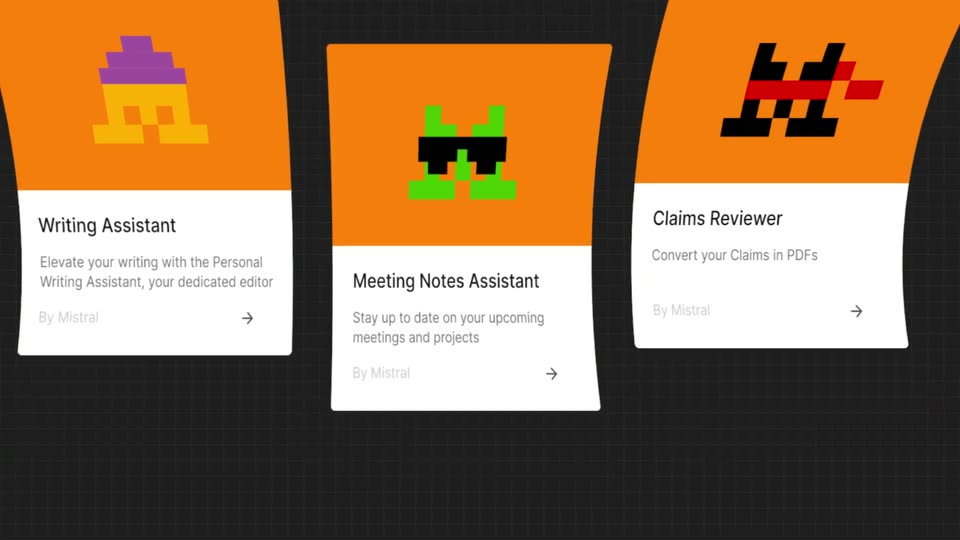
Three curved assistant cards float on a dark grid, each pairing an orange header with a pixel-art avatar and a white body of title and copy. They straighten and drift upward at offset speeds, revealing a fourth card below.
Techniques: 3D mockup, Parallax
Camera: Pan
Three warped feature cards, each with an orange pixel-art header and a white text panel, float in a dark gridded 3D space. The cards drift and shift in depth as the camera moves past them, the smaller middle card sitting farther back than the two larger side cards.
Techniques: 3D mockup, Parallax
Camera: Pan
Three orange-and-white assistant cards with pixel-art avatars float on a dark grid in 3D perspective, bending slightly as the frame drifts upward. A red and yellow block shape slides in from the bottom right corner.
Techniques: 3D mockup
Camera: Pan
Colorful vertical bars slide out to reveal a cream grid. The headline sits in a thin outlined box, the last word fading in from gray to black.
On-screen text: “Automate routine tasks”
Techniques: Kinetic type
Camera: Static
Centered phrases swap in sequence on a cream grid background, each set on a white card: 'Automate routine tasks,' then 'with agent templates,' then 'and customizable rules.' The final beat shows a checkerboard of cream, gray, and orange squares.
On-screen text: “Automate routine tasks”, “with agent templates”, “and customizable rules”
Camera: Static
Cream and orange pixel squares on a dark charcoal field drift apart and thin out, leaving a small white dot fixed at the center. A still caption remains in the frame while the squares disperse.
On-screen text: “and customizable rules”
Camera: Static
A white rounded bar rests at the center of a dark field. A thin gray rounded-rectangle outline draws in around it, framing the bar as a minimal card.
Camera: Static
A white agent settings card sits centered on a near-black background. The card scales up and extends downward, revealing rows for guardrails, tone, and knowledge, each paired with small Google Drive and Gmail icons.
Camera: Push in
A white agent editor card on a dark backdrop types its title, then the frame zooms and scrolls down past the instructions list to the Adjust Tone and Include Knowledge rows while a cursor arrow drifts downward.
Techniques: Cursor demo, UI zoom
Camera: Static
A white Tone settings card opens on a dark background, filling with a grid of preset chips under the Default and Personality tabs. The card tilts into 3D perspective as Custom activates, and a text field types out a custom instruction.
Techniques: 3D mockup, Kinetic type
Camera: Static
A flat white settings card on a dark ground shows a Tone row with Default, Personality and Custom tabs plus a line of body copy. A row of warm red, orange and yellow bars, centered on a cream bar, rises from the bottom edge and grows until it fills the whole frame, hiding the card.
Camera: Static
On a near-black field, the white line 'Available in Le Chat' scales in at center. A yellow bar with a cream square leaves the top edge, and yellow, orange and dark-red blocks slide in along the left.
On-screen text: “Available in Le Chat”
Techniques: Kinetic type
Camera: Static
Five horizontal bars in a yellow to red gradient sit on a dark field, their stepped right edges extending and shifting across the frame. The caption “Available in Le Chat” scales in over the bars.
On-screen text: “Available in Le Chat”
Camera: Static
A yellow-to-red gradient bar sweeps in from the left, its pixels assembling into the Mistral M mark. The mark resolves into an orange rounded square with a white pixel M, and the URL mistral.ai sits centered below on a dark background.
On-screen text: “mistral.ai”
Techniques: Morph
Camera: Static