
0:40
Explore
00:00:00 / 01:33:25
- Length
- 1:33
- Scenes
- 6 · 15.6 s avg
- Product on screen
- 0:00
- Features shown
- 2
- Call to action
- 1:22 · 88%
- Voiceover
- Yes
- Views
- 31K on YouTube
as of November 27, 2026
Microsoft’s 1:33 launch film runs 6 scenes, about 16 s each. The product is on screen from the first frame and 2 features are revealed. The call to action lands at 1:22 (88% in), over a voiceover. The video bookends two feature demos with the same locked-off title card: a desktop cursor walkthrough of My Day, then a mobile typing demo of natural language task creation. Motion stays minimal with slide-in detail panels, a rising keyboard, and simple fade-ins over a white field with Segoe UI type and Microsoft blue accents.
Footage neededEstimated needs: 2 capture groups — your screens or recordings · 1 official logo — reused across the film · 1 filmed passage — shoot, supply or replace
Is this your launch? to your site or press kit.
More like this
0:53


Your 24/7 personalized health companion | Illume Labs (YC S26)
Illume Labs · Healthcare · Jul 2026
1:12
Similar soundtrack
Films whose music sounds like this one, voice left out
3:08

Vybe Demo - Build internal apps 10X faster
Vybe · Upbeat electronic
1:11

Tejas AI Launch Video
Elip AI · Modern electronic
2:30
Introducing NVIDIA Alpamayo 2 Super
NVIDIA · Technical presentation with electronic background music
What’s new in Microsoft To Do, scene by scene
· 6 scenes as text
01 · Product intro · 0:00–0:18
A static title card on white: the Microsoft logo sits top-left, the black headline and presenter name fill the left half, and a blue gradient checkmark icon rests in the lower-left corner. The locked-off frame holds with no motion.
On-screen text: “What's New in Microsoft To Do”, “Charlie Tran”
Camera: Static
02 · Feature reveal · 0:18–0:45
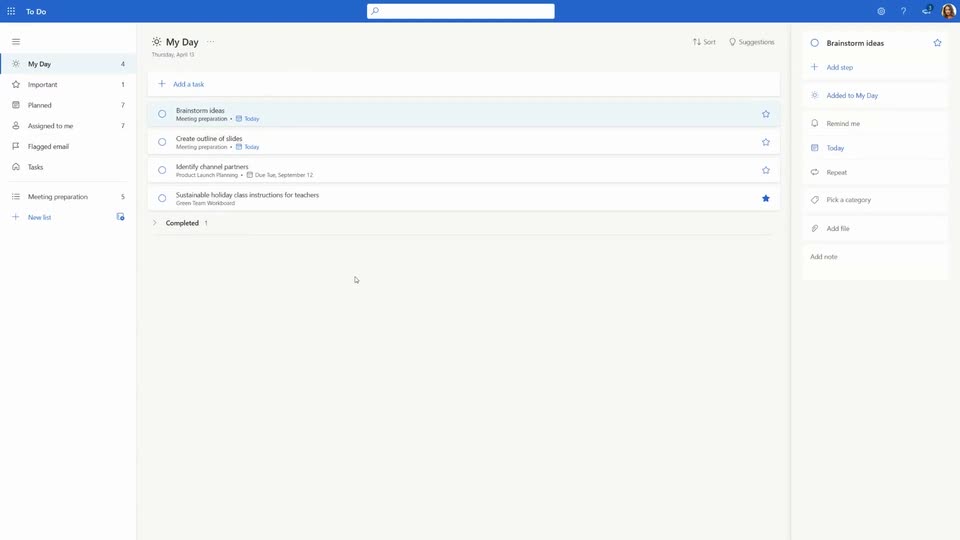
A flat To Do app window shows the My Day task list. The cursor drifts down to the Brainstorm ideas row and clicks it, and a detail panel slides in from the right edge listing task options while the row highlights blue.
Camera: Static
03 · Feature reveal · 0:45–1:14
A vertical To Do app screen sits centered on a white background. The empty Tasks view with a gold sun, star and checkmark icon holds, then a keyboard slides up and “Buy groceries today” is typed, and the new task card appears at the top of the list.
Techniques: Cursor demo
Camera: Static
04 · Other · 1:14–1:22
A static title card on a near-white background. The Microsoft logo sits top left, the headline reads below it, the presenter name under that, and a blue two-tone checkmark icon anchors the lower left. The frame stays locked off with no motion.
On-screen text: “What's New in Microsoft To Do”, “Charlie Tran”
Camera: Static
05 · CTA · 1:22–1:30
Split layout, locked off: left white panel holds a black headline and three green subheads each with a URL; right shows a still photo of a smiling man in a light shirt at a desk, typing on a laptop that displays a video call, with two monitors behind him.
On-screen text: “Learn more about Project, Planner, and Tasks”, “Try Project for the web today!”, “aka.ms/tryprojectnow”, “Learn more or download the To Do App”, “aka.ms/microsofttodo”, “Give us feedback on the Feedback Portal”, “aka.ms/ProjectonFeedbackPortal”, “aka.ms/Planner_on_FeedbackPortal”
Techniques: Split screen
Camera: Static
06 · Outro · 1:30–1:33
The four-square Microsoft mark sits centered on a white field. The gray wordmark fades in to its right, then the full lockup holds still.
Camera: Static