1:02
Constor YC26
Constor · Nov 2026
Elip AI’s 1:11 launch film runs 32 scenes, about 2.2 s each. The product shows up at 0:58 and 3 features are revealed. The call to action lands at 1:02 (88% in), over a voiceover. The video moves from an abstract data hook into scrolling bank documents, then into a series of product UI demos, and finishes with a 3D logo reveal and URL. Its signature motion language is brisk modal and metric-card transitions, persistent presenter inset, scrolling data tables, and spinning map-textured 3D objects.
Is this your launch? to your site or press kit.
Constor · Nov 2026
Finto · B2B · Jul 2025
YugaByte · Oct 2026
Films whose music sounds like this one, voice left out
Vybe · Upbeat electronic
Microsoft · Upbeat electronic
Warp · Corporate electronic
White squares drift over a dark grid, then settle into orbit around a small blue-white sphere as concentric rings form. The rings tilt into 3D perspective and spin, while a circular webcam inset of the presenter stays in the bottom right corner.
Techniques: Parallax, Speed ramp
Camera: Pull out
A dense spreadsheet of loan records fills the frame, rows of numbers and names scrolling upward at a steady pace. A circular headshot of a man stays pinned in the bottom-right corner, partly overlaid by the data columns.
Camera: Push in
A dense white data table of loan records scrolls upward, rows of small black numbers filling the frame. A circular portrait of a bearded man stays fixed in the bottom right corner.
Camera: Pan
A white table document scrolls upward, rows of black text sliding down the frame, while a small circular webcam of a man in a green shirt stays fixed in the bottom right corner.
Camera: Pan
A dense loan policy document fills the frame, its section headings and a parameter table overlapping as the page scrolls, conveying volume. A small circular clip of a presenter in a green shirt is pinned to the bottom-right corner.
Camera: Push in
A dense white table of loan-eligibility rules scrolls downward through rows on income, FOIR and co-applicant criteria, with a small circular webcam of a man in a green shirt pinned to the bottom right corner.
Camera: Pan
A four-by-four grid of flat illustrations fades in on a pale gray field, each tile showing a person at a desk with a monitor. A small circular live-action clip of a bearded man in a green shirt holds the bottom right corner as the numeral 7 slides in.
On-screen text: “7”
Camera: Static
A gray grid of identical flat illustrations shows a worker at a desk with a laptop, repeated across sixteen tiles. A circular face-cam of a bearded presenter sits in the corner. The view zooms into one tile, blurring the grid and revealing a dense KYC document table.
Techniques: UI zoom
Camera: Static
A low-poly 3D figure sits at a desk facing three monitors in a dim blue office, while a dense bank credit policy document scrolls up across the right side of the frame. A small circular live-action feed of a man's head sits in the bottom-right corner.
Techniques: 3D mockup
Camera: Pull out
White text types in word by word on a black background, the word billions set in bold, then the line slides off to the right. A small circular webcam of a bearded man in a green hoodie stays in the bottom right corner.
On-screen text: “... and it's costing billions in lost opportunities and rising defaults.”
Techniques: Kinetic type
Camera: Static
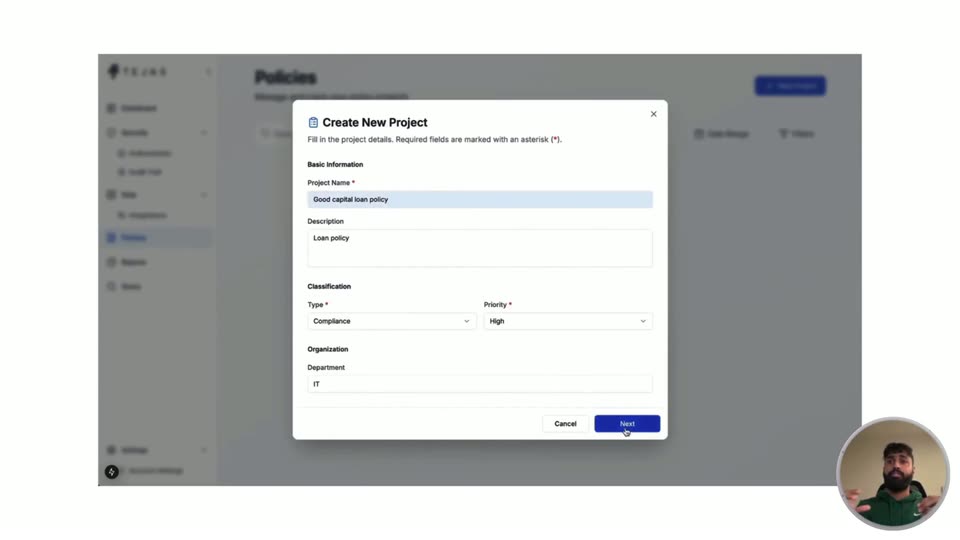
A blurred dashboard sits behind a Create New Project dialog with its fields filled in; a cursor clicks through and the dialog switches to a Create New Document step with two file drop zones. A small circular webcam of the presenter stays in the bottom-right corner.
Techniques: Cursor demo
Camera: Static
A macOS file picker over a dimmed dashboard shows four files, then closes to reveal an Upload Documents modal with two drop zones. A presenter's webcam overlay sits in the bottom right corner.
Techniques: Cursor demo
Camera: Static
A centered 'Upload Documents' modal sits over a dimmed dashboard. The policy file list collapses to one PDF, a red 'Remove File' bar appears, and the upload bar fills from 8% to 74% as a cursor moves. A circular webcam of a presenter sits in the corner.
Techniques: Cursor demo
Camera: Static
A dimmed dashboard sits behind a centered white modal titled Generate Portfolio Suggestions. The Target and Parameters fields fill with text and swap focus, a mouse pointer rests on the blue Generate button, and a circular webcam of a gesturing presenter holds the bottom-right corner.
Techniques: Cursor demo
Camera: Static
A white report page scrolls down past bold section headings and grey body text, while a small circular webcam of a gesturing man stays fixed in the lower right corner.
Camera: Static
A light product screen titled Optimize Processing Efficiency shows two recommendation cards, each with an expanded View Reasoning panel of explanatory text. A cursor rests on a Show Impact button while a circular presenter video sits bottom right, and the reasoning text cross-fades between two states.
Techniques: Cursor demo
Camera: Static
A white modal titled Analyzing Impact centers over a blurred rules list, five steps checked in green and a final step pending. A small circular webcam of a bearded man gesturing sits in the bottom corner. The cursor drifts in the background.
Camera: Static
A white Impact Analysis modal over a dimmed dashboard scrolls down through metric cards, each pairing a two-bar chart with Previous, Current and Change values. A cursor hovers over the list while a circular webcam feed of a man holds the bottom right corner.
Techniques: Cursor demo
Camera: Push in
A light dashboard listing processing-efficiency recommendations dims to a gray overlay, revealing a rounded + Project pill at the bottom right beside a circular webcam avatar of a bearded man. A mouse cursor drifts toward the new button while the frame stays locked off.
On-screen text: “+ Project”
Techniques: Cursor demo
Camera: Static
On a dark screen, a rounded input field at the bottom types out two what-if queries in white text, then resets to a placeholder. A circular webcam feed of a bearded man in a green shirt gestures in the bottom right corner.
Camera: Static
A presenter in a small circular webcam at the bottom right narrates over an analytics dashboard. Metric cards for loan size and approval rate slide into place side by side, a tooltip pops over the approval chart, and the layout reflows as the view updates.
Camera: Static
Impact Analysis panels on a loan dashboard crossfade through metrics (Approval Rate, NPA Amount Approved, Average Loan Size), each with a two-bar Previous and Current chart and a change badge flipping between green and red. A circular webcam of a gesturing presenter sits in the bottom right corner.
Camera: Static
A white dashboard shows two overlapping metric cards; the 'Approval Rate' card fades out as the 'NPA Amount Approved' card with a two-bar chart and three stat tiles settles into place. A circular webcam inset of the presenter gesturing stays in the bottom right corner.
Camera: Static
A black cube caps a map-textured cone in a white 3D space; diagonal grid lines sweep past as the camera orbits, while a bearded presenter in a green hoodie gestures inside a circular inset at bottom right.
Techniques: Parallax
Camera: Push in
A black cube floats above a cone whose surface shifts from purple, streaked with scrolling digits, to green, patterned with small icons. Diagonal lines frame the object in 3D space, and a circular webcam inset of the presenter holds the bottom-right corner.
Techniques: 3D mockup, Morph
Camera: Static
A dark map surface printed with green and blue route data hangs from a black clip, drifting to reveal street labels, while thin diagonal poles cross a white background. A circular webcam of a bearded man sits in the lower right corner.
Techniques: 3D mockup
Camera: Static
A triangular pennant wrapped in a street-map texture spins on a white field as gray diagonal streaks slide past. The map shifts from warm tones to purple mid-rotation. A small circular webcam of a bearded presenter holds the bottom-right corner.
Camera: Static
A 3D cone wrapped in a starry cosmic texture, capped by a black cube on a thin white stem, spins and glitches through yellow and green color shifts on a white field. A small circular webcam of a bearded presenter in a green hoodie sits in the lower right corner.
Techniques: 3D mockup
Camera: Static
A flag-like abstract shape with a black cube at its corner drifts over a white field crossed by thin gray lines. Its surface cycles from blue network to yellow heatmap to dark navy as it shrinks to a thin blade. A circular inset of a bearded man in green sits bottom-right.
Techniques: Morph
Camera: Static
A 3D map interface with colorful data points and text labels rotates. The view shifts to reveal a green surface with a city map texture and purple lines, with a black cube at the edge.
Techniques: 3D mockup
Camera: Pan
A black flag-shaped sheet printed with green and red data text spins in 3D over a white perspective grid, turning to show a map surface with red dots. A circular webcam of a bearded presenter stays in the bottom-right corner.
Techniques: 3D mockup
Camera: Static
A 3D black mark with a blue dot spins and flattens into the TEJAS logo on white. The tagline types in below, then swaps to a URL. A small circular webcam of a presenter sits in the corner. A black grid of white squares closes the scene.
On-screen text: “The AI Risk Decisioning Platform for Banks”, “Visit us at: https://www.trytejas.ai”
Techniques: Morph, Kinetic type
Camera: Push in