1:43
Explore
LottieFiles - Day 1 is in motion: Lottie AI is live. 🚀 Describe an animation. Get
LottieFiles · Nov 2026 · 1:13 · AI-annotated
- Length
- 1:13
- Scenes
- 41 · 1.8 s avg
- Product on screen
- 0:08
- Features shown
- 5
- Call to action
- 1:06 · 90%
- Voiceover
- No
00:00:00 / 01:13:33
LottieFiles’s 1:13 launch film runs 41 scenes, about 1.8 s each. The product shows up at 0:08 and 5 features are revealed. The call to action lands at 1:06 (90% in). A launch film for Lottie AI, an AI motion tool that turns text prompts into lightweight, editable vector animation written in the Frolic language. The video opens on a black field of drifting game-art tiles and the line “Builders, meet motion that never pixelates,” then moves through “It all starts with a prompt,” an “Introducing” card, and a wireframe morph into the Lottie AI logo. It demos the workflow: a prompt card types a beach banner, a “Working...” ring resolves into the studio interface,
No filming indicatedEstimated needs: 5 capture groups — your screens or recordings · 1 official logo — reused across the film · 13 graphic passages — draw or supply · 3 3D passages — build or supply
Is this your launch? to your site or press kit.
More like this
1:01

Mistral AI - Introducing 20+ connectors powered by MCP and a fully controllable Me
Mistral AI · AI · Sep 2025
1:12

Introducing our Shopify Integration
Lovable · Developer tools · Oct 2025
LottieFiles - Day 1 is in motion: Lottie AI is live. 🚀 Describe an animation. Get, scene by scene
· 41 scenes as text
01 · Hook · 0:00–0:00
A square frame with green corner handles on black holds flat 2D shapes, a red starburst and a dark toggle, that morph into an isometric 3D room with a white oval stage on brown floor; a green gift box with a bow pops in as the view orbits.
Techniques: Morph
Camera: Static
02 · Hook · 0:00–0:01
On black, four green corner markers hold a square frame while small illustrations swap in the center: a blue tile with a white jelly character, a smiling pink and yellow flower, then a gray rocket. The pace is quick, one icon per beat.
Camera: Static
03 · Hook · 0:01–0:02
A swarm of small square image tiles on black starts spread out and spirals inward, condensing into a tight circular cluster at the center of the frame. The tiles are colorful game screenshots with tiny coordinate labels, and the whole group spins as it compresses.
Techniques: Particles
Camera: Static
04 · Hook · 0:02–0:04
A tight blob of small image tiles on black bursts outward into a loose circular cloud, a thin dotted ring tracing its edge. The tiles drift apart and rotate, faint coordinate labels floating between them.
Techniques: Particles
Camera: Push in
05 · Hook · 0:04–0:08
A black field ringed by slowly drifting game screenshots, pixel art and 3D thumbnails. In the center the word “Builders” types in, then expands into the full line “Builders, meet motion that never pixelates.”, flanked by two small green square markers.
On-screen text: “Builders”, “Builders, meet motion that never pixelates.”
Techniques: Kinetic type
Camera: Push in
06 · Product intro · 0:08–0:10
On a black background, the phrase “It all starts” scales in at center. The words are white with the final letters and three trailing dots in green, appearing in sequence.
On-screen text: “It all starts”
Techniques: Kinetic type
Camera: Static
07 · Product intro · 0:10–0:12
A 3D-rendered green hillside under a cloudy sky holds the centered line “It all starts” with three green dots. Thin gray crosshair lines draw across the frame and a white pill briefly frames the text as it scales down to the intersection.
On-screen text: “It all starts”
Techniques: Kinetic type
Camera: Static
08 · Product intro · 0:12–0:14
A blurred sky-and-field gradient fills the frame while a design-grid marquee with green corner handles frames the headline. The white prompt bar fades out to reveal the full line, and the grid dissolves into drifting green squares.
On-screen text: “It all starts”, “with a prompt”
Techniques: Kinetic type, Particles
Camera: Static
09 · Product intro · 0:14–0:16
A selection box with green corner handles settles in the center of a dark, green-lit frame as “Introducing” fades in with a white-to-green gradient. Small green squares drift slowly across the background.
On-screen text: “Introducing”
Techniques: Kinetic type, Particles, Light sweep
Camera: Static
10 · Product intro · 0:16–0:20
On a dark green grid, a thin white wireframe of overlapping circles morphs into a fan of ellipses, while small green squares and faint star sparkles drift across the frame.
Techniques: Morph, Particles
Camera: Static
11 · Product intro · 0:20–0:22
On a pale gradient fading from white to green at the bottom, a mark of curved teal strokes and a teal oval forms at center-left, then the dark wordmark Lottie AI appears to its right and holds still.
Camera: Static
12 · Feature reveal · 0:22–0:27
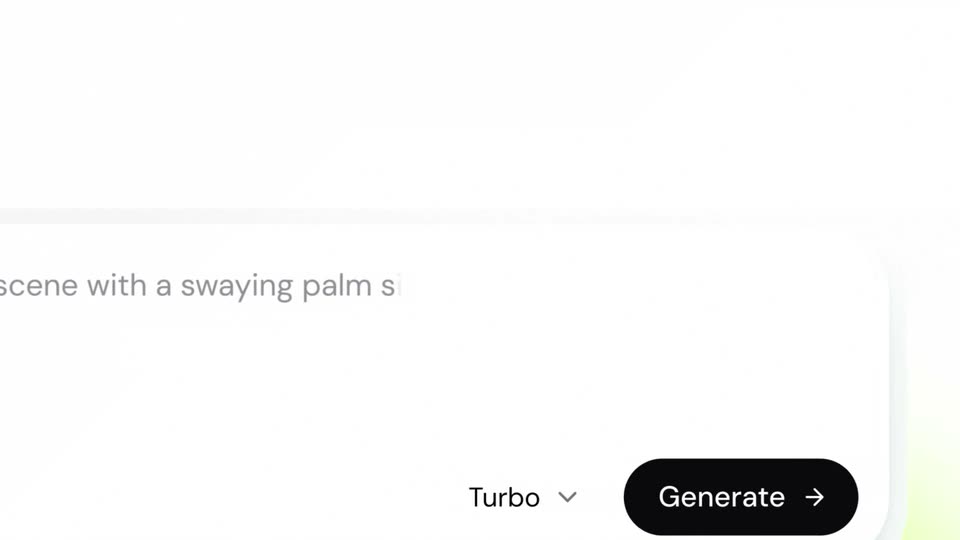
A white-to-green gradient holds a centered headline that slides in. A white prompt card rises from below, the view zooms into the field as the beach prompt types in, and a green cursor moves to the black Generate button before the frame darkens.
On-screen text: “From prompt to lightweight,”, “production-ready animation”
Techniques: Kinetic type, UI zoom, Cursor demo
Camera: Push in
13 · Feature reveal · 0:27–0:29
A dark green field holds a ring of small green squares that drift slowly around a central selection box with corner handles. Inside the box, the word Working... types in letter by letter, then holds. The frame stays locked off.
On-screen text: “Working...”
Techniques: Kinetic type
Camera: Static
14 · Feature reveal · 0:29–0:30
On a dark screen, a ring of small green squares orbits a centered Working... label held in a thin selection box, then the blurred Lottie AI studio interface fades in behind it at a slow pace.
Camera: Static
15 · Feature reveal · 0:30–0:32
The Lottie AI studio interface sits on a soft green gradient. A folk-art peacock illustration fills the center canvas, flanked by a chat panel on the left and an objects and controls panel on the right. The whole mockup eases slightly smaller over the shot.
Camera: Static
16 · Feature reveal · 0:32–0:33
A square flat illustration of a blue bird among pink flowers and clouds sits centered in a white rounded card with a soft green glow at the base. The card dissolves and the illustration scales up and tilts, floating on a plain off-white background.
Camera: Static
17 · Feature reveal · 0:33–0:34
Three framed tiles fade and scale into a white canvas: a flat peacock illustration at left, a ring of gradient 3D capsules on a dark dot grid at top, and a line-art girl with headphones at right. Each tile settles with a small green icon and a two-line caption.
On-screen text: “Peacock in Motion”, “Quality • Lottie AI”, “Hypnotic capsule ring”, “Quality • Lottie AI”, “Girl character listening to music”, “Turbo • Lottie AI”
Camera: Static
18 · Feature reveal · 0:34–0:35
Three labeled illustration cards sit on a light gray field: a peacock, a colorful capsule ring, and a girl with headphones. The peacock card scales up and centers as its caption moves onto the image, while the other two fade out.
On-screen text: “Hypnotic capsule ring”, “Quality • Lottie AI”, “Peacock in Motion”, “Quality • Lottie AI”, “Girl character listening to music”, “Turbo • Lottie AI”
Camera: Push in
19 · Feature reveal · 0:35–0:36
A flat illustration of a blue peacock among pink clouds slides up from the bottom edge to the center of a white field. A faint crosshair marks its position as a gray caption appears above it.
On-screen text: “It's a vector.”
Camera: Static
20 · Feature reveal · 0:36–0:37
A gray crosshair grid crosses a white field, the black caption held still above it. In a pale panel below, a bird is sketched from overlapping circles and curves. Green corner handles and the guides slide, resizing the panel as the bird's head takes shape.
On-screen text: “It's a vector.”
Camera: Static
21 · Feature reveal · 0:37–0:40
A wireframe vector illustration of flowers in a pot sits on a white grid canvas under a gray caption. It fills with flat color and the view zooms in as the caption switches to a black line on the right.
On-screen text: “It's a vector.”, “Zoom all you like.”
Techniques: UI zoom
Camera: Push in
22 · Feature reveal · 0:40–0:43
On a black field dotted with small green squares, the white text 'It's code.' types in with a blinking cursor, then the frame cuts to a flat lime-green rectangle with selection handles at its corners, holding a black pixel logo.
On-screen text: “It's code.”, “Zoom all you like.”
Techniques: Kinetic type
Camera: Static
23 · Feature reveal · 0:43–0:43
A light green panel with a pixelated black logo and small green corner handles sits centered on a black background. The panel scales up steadily, the logo growing with it, until the green fills the frame edge to edge.
Camera: Static
24 · Feature reveal · 0:43–0:44
A black frolic wordmark and icon hold center on a pale green grid of small squares. The squares light up in a radial wave that expands from the middle and fades, while the logo stays still.
Camera: Static
25 · Feature reveal · 0:44–0:47
On a green gradient field dotted with a static grid of small dark squares, a black waveform of vertical bars morphs into the rounded Frolic wordmark. The wordmark then clears to reveal the centered caption “A motion-trained language.”
On-screen text: “A motion-trained language.”
Techniques: Morph
Camera: Static
26 · Feature reveal · 0:47–0:47
A green gradient fills the frame over a faint grid of small squares. Centered dark-gray text reads “A motion-trained language.” A translucent square panel slides in from the left, partially covering the line as the background deepens and a few squares glow brighter.
On-screen text: “A motion-trained language.”
Camera: Static
27 · Feature reveal · 0:47–0:50
A dark grid void holds two floating panels side by side. On the left, a 3D ring of gradient capsule shapes rotates inside a brown square; on the right, a rounded code card types out a shape-layer script, joined by a thin curved line.
Techniques: Split screen, 3D mockup
Camera: Push in
28 · Feature reveal · 0:50–0:53
The line “It's editable.” fades in from light gray to black on a near-white background with a soft green glow below, then the LottieAI studio interface fills the frame, a cursor resting on the Color mood control next to the blue Jelo jellyfish card.
On-screen text: “It's editable.”
Techniques: Cursor demo
Camera: Static
29 · Feature reveal · 0:53–0:53
A white web-app interface for Lottie AI Studio fills the frame as the view zooms in from a small bordered window. The central jellyfish character on the canvas shifts from blue to magenta, and a cursor hovers over the color controls on the right panel.
Techniques: UI zoom, Cursor demo
Camera: Push in
30 · Feature reveal · 0:53–0:54
A design tool interface shows a magenta canvas with a 3D jelly blob and the word Jelo on the left, a controls panel on the right. A cursor drags the Color mood slider from 110 to 150, shifting the blob's hue.
Techniques: Cursor demo
Camera: Static
31 · Feature reveal · 0:54–0:56
A design tool interface splits the screen: a green jelly character labeled Jelo bounces on the left canvas while a cursor drags the Color mood slider in the right-hand controls panel. As the slider moves, the canvas tint shifts from bright green to teal.
Techniques: Cursor demo
Camera: Static
32 · Feature reveal · 0:56–0:59
Two lines of gray text sit centered on a white-to-pale-green gradient. The lines fade in from faint to full opacity, then hold still on a locked-off frame.
On-screen text: “Every animation gets its own controls.”, “No keyframes needed.”
Camera: Static
33 · Feature reveal · 0:59–1:01
A dark field of drifting green squares opens from a black circular mask, and a selection box with corner handles scales up in the center, revealing the headline Experience 2 modes... in white and pale green.
On-screen text: “Experience 2 modes...”
Techniques: Masking, Particles, Kinetic type
Camera: Static
34 · Feature reveal · 1:01–1:02
On a dark field, the headline “Experience 2 modes...” sits inside a thin green selection box while small green particles drift. A green glow then blurs the frame and a black cursor arrow slides in from below.
On-screen text: “Experience 2 modes...”
Techniques: Particles, Light sweep
Camera: Static
35 · Feature reveal · 1:02–1:05
On a green gradient, a white pill toggle offers Turbo and Quality. A black cursor with a green edge slides right and flips it to Quality, while the white tagline updates from 'for quick sketches' to 'for when you ship'.
On-screen text: “for quick sketches”, “for when you ship”
Techniques: Cursor demo
Camera: Static
36 · Feature reveal · 1:05–1:06
A tight cluster of small image tiles on black bursts outward to fill the frame, brightening as it spreads. A green ring flashes at the center, then the headline Turbo Quality and the larger line for when you ship scale in over the tiled field.
On-screen text: “Turbo”, “Quality”, “for when you ship”
Techniques: Particles, Kinetic type
Camera: Push in
37 · CTA · 1:06–1:07
A green fan-shaped logo mark draws in at center of a black field as the wordmark Lottie AI types on to its right, while small animated character thumbnails drift around the edges.
On-screen text: “Lottie AI”
Techniques: Kinetic type
Camera: Static
38 · CTA · 1:07–1:09
On a black background, the line “Motion generated as editable vector code.” types out character by character, with “code.” in olive green, then a thin caret blinks at the end of the line.
On-screen text: “Motion generated as editable vector code.”
Techniques: Kinetic type
Camera: Static
39 · CTA · 1:09–1:11
A single line of text fades in at the center of a black background, the word ship highlighted in light green. A thin cursor sits after the period as the line settles into place.
On-screen text: “Built at the speed you ship.”
Techniques: Kinetic type
Camera: Static
40 · CTA · 1:11–1:12
On a black background, the white wordmark lottie.ai types itself out letter by letter, ending with a green blinking caret.
On-screen text: “lottie.ai|”
Techniques: Kinetic type
Camera: Static
41 · CTA · 1:12–1:13
A black frame holds the centered white wordmark lottie.ai. A thin green vertical caret sits just to the right of the text and blinks, marking the sign-off.
On-screen text: “lottie.ai”
Camera: Static