1:15

Ctrl+Z for AI: the motion design video we made for Aokumo
Aokumo · Nov 2026
Constor’s 1:02 launch film runs 32 scenes, about 2.0 s each. The product shows up at 0:23 and 1 feature is revealed. The call to action lands at 0:55 (90% in), over a voiceover. The video opens with a glitch-distorted $89 billion claim, then builds the problem as short caption beats over a cream dotted grid before revealing the logo and demoing the estimating workflow in live UI. Signature moves are the isometric plan stack, red pulse highlights and word-by-word caption builds, cut at a brisk but even pace.
Is this your launch? to your site or press kit.
Aokumo · Nov 2026
TagadaRx · Nov 2026
Hyperagent · Nov 2026
Films whose music sounds like this one, voice left out
Melius · Upbeat electronic
Visually · Modern, upbeat electronic
PromptQL · Modern electronic
A warped newspaper front page with the headline $89 BILLION cuts to a monitor showing a breaking-news browser window with the same figure. Both screens curve in 3D and are covered in scanlines and red-blue chromatic aberration.
On-screen text: “$89 BILLION”, “Lost every year to bad information”
Techniques: 3D mockup
Camera: Static
A dark, curved arrival board filled with scrambled rows of text shows the headline $89 BILLION in the center, rendered with heavy glitch and chromatic aberration. The frame then cuts to a bright white oval on a red static field, the same text outlined in white with colored fringes.
On-screen text: “$89 BILLION”
Camera: Static
A night city facade, framed with a curved CRT border and VHS scanlines, shows a glowing red billboard with $89 BILLION in white letters. Rain streaks down as pedestrians walk past the lit storefront below.
On-screen text: “$89 BILLION”
Camera: Pull out
A black field of scattered red and white code fragments hosts a centered headline that builds word by word, then a second line slides in below as the background crossfades to a lit nighttime construction site with cranes.
On-screen text: “Lost every year to bad information”, “in the construction industry”
Techniques: Kinetic type
Camera: Pull out
A locked-off dusk shot of a construction site, cranes silhouetted over a lit concrete building under construction with an orange city skyline on the horizon. A white caption slides down into the center of the frame and settles.
On-screen text: “in the construction industry”
Techniques: Kinetic type
Camera: Static
An isometric stack of five plan layers floats on black; the red top layer morphs from a cross grid to a framed panel while status chips stack up on the right. The shot cuts to a dusk construction site with cranes and workers as a caption slides in.
On-screen text: “Day 12 · Built”, “Day 15 · Torn out”, “Day 19 · Rebuilt”, “Rework #3”, “in the construction industry”
Techniques: 3D mockup, Morph
Camera: Static
A dusk construction site with cranes and a concrete frame, workers on the deck, a faint grid lines the sky. Small dark captions appear and clear, then the headline scales up at center as the frame flashes white.
On-screen text: “Day 12· Built”, “Day 15 · Torn out”, “Rework #3”, “The construction”, “industry runs on”
Techniques: Kinetic type
Camera: Static
Two centered lines of dark gray text sit over a faint grid with a washed-out construction site fading in below. The text scales gently while the frame stays locked off.
On-screen text: “The construction”, “industry runs on”
Techniques: Kinetic type
Camera: Static
A pale grid field holds scattered architectural plan sheets that drift and rearrange. The black headline Knowledge & practices sharpens in at center, then a gray line That never make it onto paper fades in at the lower left.
On-screen text: “Knowledge”, “& practices”, “That never make it onto paper”
Techniques: Kinetic type
Camera: Pull out
A flat HVAC floor plan on a white grid slides left across the frame while red pill callouts with warning icons drift at a slower speed. Below, the caption 'That never make it onto paper' appears word by word in large black type.
On-screen text: “+10% on elbows”, “Check the risers”, “Order 2 weeks early”, “That never make it onto paper”
Techniques: Kinetic type, Parallax
Camera: Push in
A 2D line-art floor plan on a light grid sits flat as a red radar ring pulses at a duct-beam intersection. A red tooltip labeled Clash - duct vs beam slides in from the right, and the caption Plans have mistakes fades up at the bottom.
On-screen text: “Plans have mistakes”
Techniques: Kinetic type
Camera: Pan
A white HVAC specification sheet sits on a faint grid background, angled slightly with a soft shadow. Red dashed boxes mark empty fields like [ not specified ]. On the right, the headline builds line by line while the sheet eases left.
On-screen text: “Specs leave things out”
Techniques: Kinetic type
Camera: Pan
Three silhouetted men stand on a construction site at sunset as the camera pans right, opening the sky. “What to trust” fades in small on the right. A cut to a man in a suit pointing up as the larger “What to question” scales in.
On-screen text: “What to trust”, “What to question”
Techniques: Kinetic type
Camera: Push in
A silhouetted man in a suit stands at left against a peach sunset sky, pointing right. The headline scales down and drifts up as a second line fades in near the horizon.
On-screen text: “What to question”, “How to fill”
Techniques: Kinetic type
Camera: Push in
A hazy orange sunset fills the frame over a skyline of construction cranes and soft mountains. The title How to fill the gaps scales up from a blurred state at the center, settling into sharp focus.
On-screen text: “How to fill the gaps”
Techniques: Kinetic type
Camera: Pull out
On a plain white field, two red rounded arcs and two small red squares drift and rotate from a loose spread, snapping together into a centered logo mark.
Camera: Static
A red C-shape and four-square plus logo sits centered on white, then the frame fills with scattered colored HVAC labels while the black headline Give frontier models appears in the middle.
On-screen text: “Give frontier models”
Camera: Pull out
A white field holds a drifting cloud of small colored HVAC terms around a central red glowing badge with a white connector glyph. The badge sharpens from a soft blur and the black headline fades in beneath it.
On-screen text: “Practical understanding”
Camera: Static
On a light dotted grid, an isometric stack of white planes builds up layer by layer at left, each marked with red line traces and small square nodes. A red circular chip icon glides down beside a two-line caption, the second line sliding in.
On-screen text: “they need to work in the”, “construction industry.”
Techniques: Kinetic type
Camera: Pull out
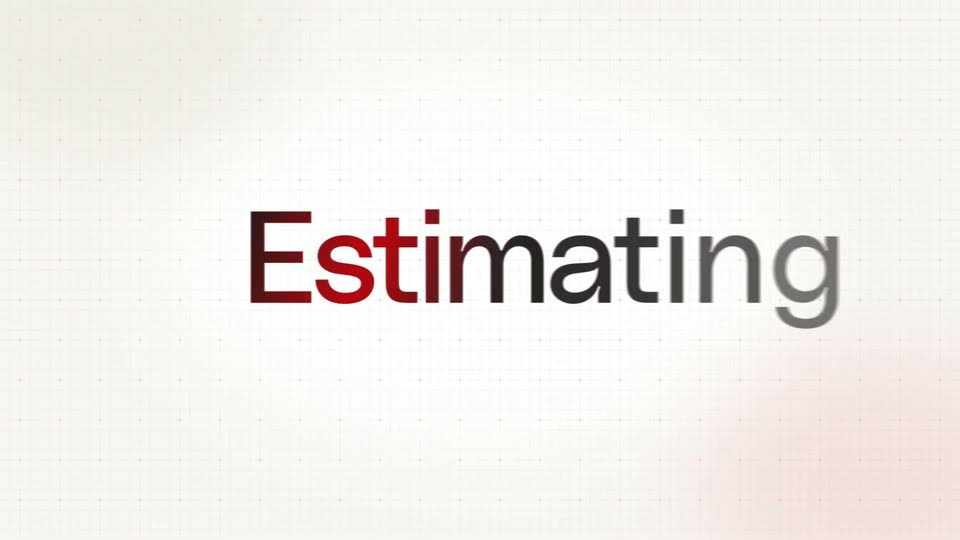
On a white dotted grid, a red circular icon and a stack of isometric task cards sit beside a gray sentence that slides away. The large word Estimating then locks in at center, its first letters black and the rest dark red.
On-screen text: “they need to work in the”, “construction industry.”, “Estimating”
Techniques: Kinetic type
Camera: Pan
The word Estimating sits centered on a cream dotted-grid background, then a tilted architectural blueprint sheet rises into the lower frame in 3D perspective.
On-screen text: “Estimating”
Techniques: 3D mockup
Camera: Pan
A mechanical blueprint on a grid tilts into perspective as the view pushes in. Red markers count five items, a line measures the floor, and a dimension points to a price. Day badges stack on the right; a large headline drops in on top.
On-screen text: “Day 1 - Counting”, “Day 2 - Measuring”, “140'-0''”, “$3,444”, “Day 3 - Pricing”, “Will we win the job?”
Camera: Push in
A dashboard card fades in on a dotted grid background. Stats count up from 22 to 28 drawings, then the camera zooms into the drawing list where a cursor hovers over the M-201 row, and a caption slides in.
On-screen text: “Will we win the job?”
Techniques: UI zoom, Cursor demo, Kinetic type
Camera: Push in
A dark Overview pill and a red Detect all pill sit on a plain gray field, then a faint CAD floor plan fades in behind them. The pills reflow into a top toolbar, and the view zooms into the upper-right ducts as a cursor hovers the red button.
Techniques: UI zoom, Cursor demo
Camera: Push in
A white stopwatch icon sits at the center of a gray CAD floor plan while a red progress ring fills clockwise around it. The viewport zooms out to reveal the full plan and a top toolbar with a red button. A white caption sits below the icon.
On-screen text: “DETECTING 8 NETWORKS...”
Techniques: UI zoom
Camera: Pull out
A BIM floor plan with colored piping networks fades into focus on a light background. A white Takeoff Report card slides in from the right over a red-tinted half, listing lengths and item counts. A static caption reads DETECTING 8 NETWORKS.
On-screen text: “DETECTING 8 NETWORKS.”
Camera: Static
A white takeoff report card with totals and a network list slides in over a 2D floor plan of colored pipe runs. A cursor clicks the red Done button and the card exits to the right, revealing the full plan.
Techniques: Cursor demo
Camera: Push in
A blueprint floor plan with multicolored pipe lines fills the background as two white cards slide in from the edges. The left card shows a quantity takeoff sheet with a red cost figure; the right card shows an export dialog with a red Export button. Cursor hovers near the button.
Techniques: Cursor demo
Camera: Pull out
A floor plan schematic with colored pipe lines sits behind two white panels, a quantity takeoff sheet and an export dialog with a cursor on the red Export button. The panels fade out to reveal the full plan.
Techniques: Cursor demo
Camera: Static
A multicolored CAD floor plan of Constor Tower Level 2 fills the frame. A white annotation card floats at center, its label changing from Duct to Exhaust air and a length value flashing red. The plan zooms in as the card updates.
Techniques: UI zoom
Camera: Pan
A multicolored CAD piping diagram fills the left half, its red selection box glowing, while the panel scales down. A white card slides in from the right, a red circular icon forming, revealing the caption.
On-screen text: “Learned · applied to the next drawings”
Techniques: UI zoom
Camera: Pull out
On a cream dotted-grid background, the red Constor mark assembles and scales up into the full wordmark. The black tagline slides in beneath it, then a red Book a demo pill and a Backed by Y Combinator badge fade in, holding before a cut to black.
On-screen text: “Constor”, “The AI-native OS for construction.”, “Book a demo”, “Backed by”, “Combinator”
Techniques: Kinetic type
Camera: Static