1:19
Graphify: The Knowledge Graphs Layer for Claude Code & AI Coding Agents | YC S26
Graphify Labs · B2B · Aug 2026
Aokumo · Nov 2026 · 1:15 · AI-annotated
studio 1600.agency
Aokumo’s 1:15 launch film runs 33 scenes, about 2.3 s each. The product shows up at 0:27 and 2 features are revealed, with social proof. The call to action lands at 1:07 (90% in), over a voiceover. The video is a before/after story: a dark 2 a.m. incident on a 3D desk rewinds into a bright sky world where flat glass UI cards float and demo the product. Signature moves are the rewinding desk clock, the hard cut from red alert to blue sky, and white panels drifting over the clouds.
Is this your launch? to your site or press kit.
Graphify Labs · B2B · Aug 2026
TagadaRx · Nov 2026
Hyperagent · Nov 2026
Films whose music sounds like this one, voice left out
YNS · Electronic, promotional
Gojiberry AI · Electronic
Mentlio · Modern electronic, cinematic tech
A dim home office desk with a closed MacBook, lamp, plants and a clock reading 2:07 AM; the word Okay fades in on the wall behind, then the laptop lid opens while the first letters of the word fade out.
On-screen text: “Okay”
Techniques: Kinetic type
Camera: Pull out
A dim desk with a MacBook showing a monitoring dashboard. The lights and screen flash red, then settle back to the dark UI with an incident banner. The camera pushes in on the screen as the caption “Then it stopped...” fades in above the laptop.
On-screen text: “Then it stopped...”
Techniques: 3D mockup
Camera: Push in
A laptop on a dim wooden desk shows a dark monitoring dashboard with charts. Red glowing pill-shaped error labels float in the air around it and fade in one by one. A digital clock reads 3:15 AM. The camera slowly pulls back, widening the desk.
On-screen text: “failed to fetch customer status=503”, “slow query detected duration=4.8s”, “database connection retry failed”, “context deadline exceeded”, “status:500 10.12.34.54:5432 con”, “active connectio”, “failed dependency=postgres”, “database unavailable”, “retrying database connection attempt=3/3”, “connection pool exhausted cannot acquire connection”
Techniques: Parallax
Camera: Pull out
A dark rounded chat field fills the frame as “How should I fix payments-api?” types out letter by letter with a blinking caret. The camera pulls back to reveal a dim room with a warm desk lamp and framed photo, and a white cursor drifts below the field.
Techniques: Kinetic type, UI zoom, Cursor demo
Camera: Static
A translucent dark search bar over a blurred framed photo holds the query ending in “api?” with a white up-arrow button. A cursor glides in and presses the button, which flashes red on the click.
Techniques: Cursor demo
Camera: Static
A chat panel floats over a dark desk. A question bubble slides up while the agent's reply types in, ending on a red Execute button that a cursor clicks as the frame zooms in.
Techniques: Cursor demo, UI zoom
Camera: Push in
On a black background, a chat exchange builds line by line. The question about fixing payments-api slides in, then the prompt and the AI reply scale in, ending on the word Execute.
On-screen text: “HowshouldIfixpayments-api?”, “AskyourAlagent...”, “Ican reset the production database and restart”, “payments-api.”, “Execute”
Techniques: Kinetic type
Camera: Static
A static 3D desk at night: a laptop shows a multi-pane terminal that updates in place, a warm lamp glows left, a digital clock reads 6:00 AM right.
Techniques: 3D mockup
Camera: Push in
A dim home office desk at night centers an open laptop showing a multi-column terminal. A warm desk lamp, potted plants, a phone, a notebook and a digital clock reading 6:00 AM frame the machine. The wide shot holds static on the laptop.
Camera: Static
A dim desk set holds a laptop showing a dense terminal grid; a lamp, plants, and a 6:00 AM clock sit beside it. A slow push-in centers the laptop as the terminal remains still.
Camera: Static
A dim home-office desk holds a laptop showing a dense data table, flanked by a lamp, plants and a clock reading 6:00 AM. The frame shrinks into a centered rectangle with a brief white edge glow, then a white cursor appears on the laptop screen.
On-screen text: “W”
Techniques: Cursor demo
Camera: Pull out
A dim desk with a laptop showing code, a white circle and cursor on the screen. The view zooms into the laptop as the clock rewinds from 6:00 to 3:15 AM, red error lines glow, and a panel prompts to ask the AI agent about payments-api.
Techniques: UI zoom, Cursor demo
Camera: Static
A laptop on a warm-lit desk beside a glowing digital clock. Its screen cuts from a dark trading dashboard to a bright sky wallpaper, and a small white circular logo mark appears at the center.
Camera: Static
A bright blue sky with drifting white clouds fills the locked-off frame. The white aokumo wordmark and round icon reveal in the center, the letters settling from a distorted state into the final lockup.
Camera: Pull out
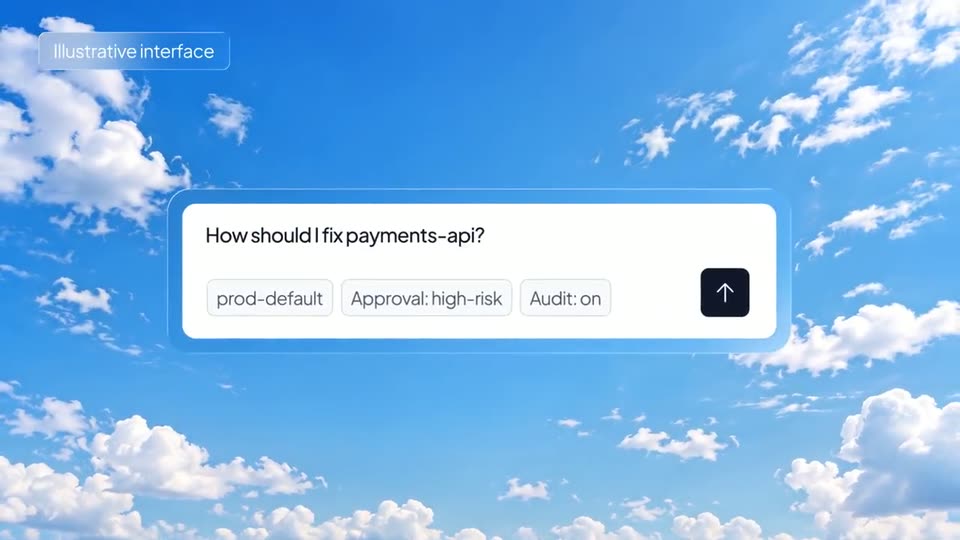
A white chat input box floats centered against a blue sky with drifting clouds. The query types out letter by letter, then a dark square send button with an up arrow pops in at the right edge. A translucent 'Illustrative interface' tag sits in the top-left corner.
On-screen text: “Illustrative interface”
Techniques: Kinetic type
Camera: Static
A white input card floats over a blue sky. The typed question lifts out and rises while the field resets to a placeholder. The cursor clicks the dark send button, which spins, and a red banner slides in above.
On-screen text: “Illustrative interface”
Techniques: Cursor demo
Camera: Pull out
A flat chat interface floats over a static blue sky. The message bubble, red warning banner and input bar drift down into place as a duplicate line of text fades out, while a cursor rests on the send button.
On-screen text: “Illustrative interface”
Camera: Static
A white rounded card floats over a blue sky with drifting clouds. Inside, four action lines with circular icons swap into three service names with check and info icons on a dashed line. A row of pill labels and a dark up-arrow button stays at the bottom.
On-screen text: “Illustrative interface”
Camera: Pull out
A white interface card listing services and tags floats in a 3D space against a blue sky with clouds. Faint white labels like 'Kubernetes cluster' and 'load balancer' fade in around it, creating a sense of depth.
On-screen text: “Illustrative interface”, “recent infrastructure changes”, “autoscaling”, “Kubernetes cluster”, “RDS/database”, “load balancer”, “your whole”
Techniques: 3D mockup, Parallax
Camera: Static
A bright blue sky with soft clouds fills the frame. Centered white text reads “your whole cloud” with a small 3D cloud icon between the words. Thin outlined tags (Kubernetes cluster, load balancer, VPC, autoscaling) drift at different depths as the view slowly pulls back.
On-screen text: “your whole cloud”
Techniques: Parallax
Camera: Pull out
A bright blue sky with drifting clouds fills the frame. White labels for Kubernetes cluster, RDS / database, load balancer, VPC, autoscaling and recent infrastructure changes float around the centered headline. The sky blurs out of focus as a frosted glass panel with three pill buttons and an arrow button scales in at the center.
On-screen text: “your whole cloud”, “Kubernetes cluster”, “RDS / database”, “load balancer”, “VPC”, “autoscaling”, “recent infrastructure changes”, “prod-default”, “Approval: high-risk”, “Audit: on”
Camera: Static
A white rounded panel floats against a blue sky with clouds. Four timestamped log lines with checkmarks type in and settle, the last reading Root cause confirmed. Pill buttons and a dark arrow button line the bottom. The panel carries a layered offset border.
On-screen text: “Illustrative interface”
Camera: Static
A white rounded log card, tilted in 3D with a layered glass edge, floats against a blue sky with clouds. Four timestamped, check-marked entries sit still while the panel slowly drifts upward.
On-screen text: “Illustrative interface”
Techniques: 3D mockup
Camera: Pull out
A white rounded checklist card fades in over a blue sky with drifting clouds. Three completed fix rows carry Undo buttons that flash blue once, while a fourth row stays unchecked above a row of status tags.
On-screen text: “Illustrative interface”
Camera: Pull out
A close-up of a white settings panel with two Undo buttons floats over a blue sky with drifting clouds. The top Undo button releases from a blue pressed state to white as the panel drifts slowly right.
On-screen text: “Illustrative interface”
Camera: Pull out
A 3D interface floats against a blue sky with clouds. A white list panel on the left shows overlapping action names, while a detail card on the right reads Restart postgres-primary with metadata rows and two buttons. A cursor hovers by the Reject button as the composition drifts slowly.
On-screen text: “Illustrative interface”
Techniques: 3D mockup, Cursor demo
Camera: Pull out
A white rounded notification card floats over a blue sky with drifting clouds. The checkmark fills in and the status line types out to read Restart completed, while a corner tag reads Illustrative interface.
On-screen text: “Illustrative interface”
Techniques: Kinetic type
Camera: Pull out
A white action-log card floats over a blue sky. The camera zooms into the card as a cursor clicks a green Undo button, then pulls back as the third row's text updates to confirm the revert.
On-screen text: “Illustrative interface”
Techniques: UI zoom, Cursor demo
Camera: Pan
A white checklist card with three ticked actions drifts downward over a blue sky with clouds. Behind it the large white headline Governed Execution scales in, while a small Illustrative interface label stays fixed top left.
On-screen text: “Illustrative interface”, “Governed Execution”
Techniques: Kinetic type
Camera: Pull out
A blue sky with drifting clouds fills the frame as white text builds in the center: “In production, incidents that took”, then a large “now take 2min” drops in. A horizontal timeline with minute labels and a sliding knob runs beneath the text.
On-screen text: “In production, incidents that took”, “now take 2min”
Techniques: Kinetic type
Camera: Pull out
A blue sky with drifting clouds fills the frame behind a horizontal timeline slider marked in minutes, with the word now above and take 12min below fading in from transparent.
On-screen text: “now”, “take 12min”
Camera: Static
A dim desk holds an open MacBook showing the aokumo logo on a cloudy sky wallpaper, framed by a warm lamp and a digital clock. The laptop lid then closes flat, leaving the empty desk.
Camera: Static
A blue sky with drifting clouds holds a small white dot that morphs into the aokumo logo. The tagline types in below it, then a button outline with its label and the URL Aokumo.ai type on at the bottom while a cursor arrow hovers by the button.
On-screen text: “2:19AM”, “aokumo”, “The undo button for Al in production”, “Start with a free environment assessment”, “Aokumo.ai”
Techniques: Morph, Kinetic type
Camera: Pull out