1:31


Alloovium: Construction paperwork that finally works for your team
Alloovium · Real Estate and Construction · Jul 2026
Hyperagent · Nov 2026 · 1:16 · AI-annotated
Hyperagent’s 1:16 launch film runs 44 scenes, about 1.7 s each. The product shows up at 0:12 and 7 features are revealed. The call to action lands at 1:14 (97% in), over a voiceover. A founder-to-camera hook and problem give way to a fast-cut chain of feature demos, each a flat UI panel that pops in, animates and collapses on light gray or dark fields, synced to a steady mid-tempo beat. Signature moves are the black caption pills, the Sizzle chef mascot and cursor badge, and the recurring wall of product screenshots that bookend the showcase.
Is this your launch? to your site or press kit.
Alloovium · Real Estate and Construction · Jul 2026
Reconero · Government · Oct 2026
Wato · B2B · Jun 2026
A bearded man with glasses in a brown jacket sits in a room with framed posters, holding a small black microphone. The words we never stop shipping. appear one by one on the left. Then video player cards with play buttons pop in and float around him on both sides.
On-screen text: “we never”, “stop”, “shipping.”
Techniques: Kinetic type
Camera: Static
A man in a brown shirt talks to camera in a room with framed posters, gesturing with his hands. A white setup panel on the left checks its boxes and starts a progress bar. A chat window with a REC timer slides in on the right.
Techniques: Cursor demo
Camera: Static
A man in a brown jacket and glasses speaks to camera, gesturing with a handheld mic, while a demo setup panel and a chat thread window float over the shot. A red REC timer counts in the top right corner.
On-screen text: “REC 1:05:20”
Techniques: Cursor demo
Camera: Static
A man in glasses and a brown shirt speaks to camera, holding a small device, surrounded by flat UI mockups: a setup card, a video editor with an export dialog, and a chat panel. A red REC timer counts up in the top corner.
Camera: Static
A bearded man in glasses and a brown jacket sits at a desk with his hand to his chin, speaking to camera in front of framed posters. On the left, caption text builds line by line, with 'never' in red and 'again.' in large bold.
On-screen text: “I'm”, “screen recording”, “never”, “again.”
Techniques: Kinetic type
Camera: Static
A man with glasses and a brown jacket sits in a room, speaking to a locked-off camera and gesturing with one hand. Framed travel posters hang on the wall behind him. White subtitle captions appear at the bottom of the frame as he talks.
On-screen text: “So we built an agent to”, “solve this problem for ourselves.”
Camera: Static
A man in a brown jacket and glasses talks to camera in a room with framed travel posters. A white card with a cartoon chef icon and the name Sizzle appears at left, while caption pills roll along the bottom.
On-screen text: “solve this problem for ourselves.”, “It's called Sizzle,”, “Sizzle”, “Product demos”, “and it's the best way that”, “we've found to create demo videos”
Camera: Static
A light product page shows a 3D model of a green desk monitor with a probe, viewed in perspective on a gridded canvas. A rounded top piece lifts away above the body while a file list sits to the right and a caption bar reads at the bottom.
On-screen text: “we've found to create demo videos”
Techniques: 3D mockup, Morph
Camera: Static
A flat dashboard titled Running scenarios fills the frame with a grid of e-commerce UI screenshots, a green progress grid, and a pass and bug counter. A black caption bar at the bottom updates from we've found to create demo videos to for startups who ship fast.
On-screen text: “we've found to create demo videos”, “for startups who ship fast.”
Camera: Static
A laptop screen shows the instaplay interface: a chat panel left, a settings panel right, and a fruit-matching grid in the center. The side panels drift inward while a cursor hovers over the sliders, and a caption sits at the bottom.
On-screen text: “for startups who ship fast.”
Techniques: Parallax, Cursor demo
Camera: Pull out
A chat view shows a message from Pixel, a raccoon avatar, with a card holding three Riverbend ad creatives, each pairing a buildwise headline with a small UI panel. A black caption at the bottom reads “for startups who ship fast.”
On-screen text: “for startups who ship fast.”
Camera: Static
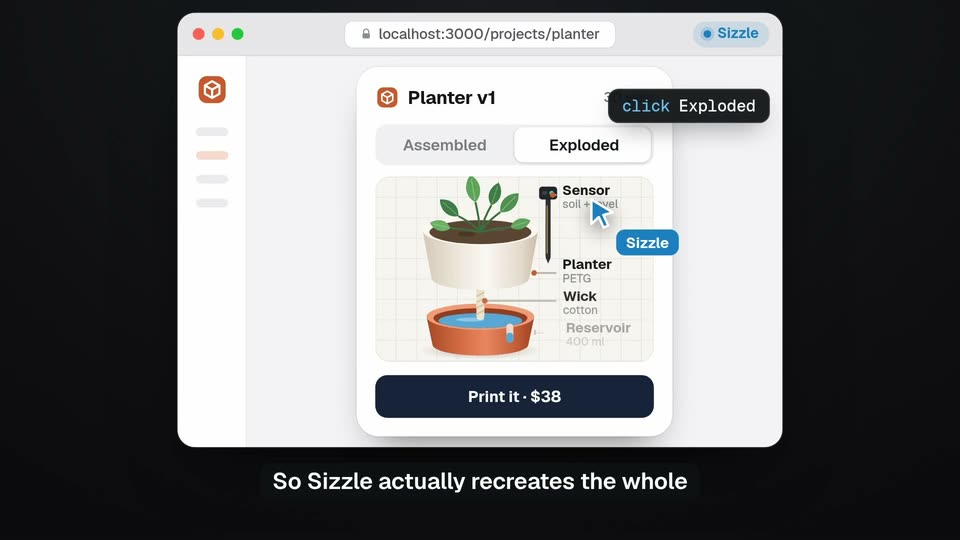
A flat browser window shows a planter design app. A cursor clicks the Exploded tab, a click tooltip pops, and the assembled pot separates into labeled parts as two Sizzle cursors drift. A caption runs along the bottom.
On-screen text: “So Sizzle actually recreates the whole”, “click”
Techniques: Cursor demo
Camera: Static
A flat browser window on a dark background shows a planter product page. A cursor carrying a Sizzle badge moves to the Assembled tab and clicks it, and the labeled exploded diagram switches to the stacked assembled pot. Small tooltips annotate the agent's actions.
On-screen text: “product by using it on its”, “It runs in the cloud,”, “and then it builds demo videos”
Techniques: Cursor demo
Camera: Static
A dark terminal window on a blue gradient types out capture and render commands, a checkmark line confirming 14 screens and 1800 frames, then a blue progress bar fills to 528/1800 frames. A black pill caption reads below the window.
On-screen text: “and then it builds demo videos”
Techniques: Kinetic type
Camera: Static
A dark terminal window shows render output with a progress bar; a chat window with three landscaping ad cards pops in front of it. A bottom caption reads “and then it builds demo videos” then “that show the product doing something.”
On-screen text: “and then it builds demo videos”, “that show the product doing something”
Camera: Push in
A product feed shows an AI agent post named Funnel above three Hartwell Landscaping ad cards laid out side by side. The row shifts slightly left so the third card becomes fully visible. A black caption box sits along the bottom edge.
On-screen text: “that show the product doing something”
Camera: Static
A messaging app view shows an AI agent named Funnel posting three landscaping ad cards side by side, each with a photo, headline and orange button. A black caption bar at the bottom updates with the narration.
On-screen text: “that show the product doing something”, “amazing. And it looks like the”
Camera: Static
A white product card showing a potted plant in a 3D view sits left of a dark code editor titled PartViewer.tsx. A small code chip with a Header tag slides from the card's header across into the editor's empty function body.
Techniques: Split screen
Camera: Static
Two panels on a dark background: a product card with a 3D potted plant, and a code editor. A blue highlight ring moves down the card from the view tabs to the button as the code types out line by line.
On-screen text: “real thing because it's extracted directly”, “from the front-end code.”
Techniques: Split screen, Kinetic type, 3D mockup
Camera: Static
A dark recording toolbar with icons, an Options menu and a Record button floats on a light gray background. A cursor glides up to its left icon as the bar dims and shrinks, while a black caption at the bottom reads You don't need to screen record.
On-screen text: “You don't need to screen record”
Techniques: Cursor demo
Camera: Static
A flat chat app mockup sits centered on a light gray background. A message to Owen Brooks types itself into the input field, then clears to an empty box, while a dark caption pill at the bottom swaps lines. A mouse cursor rests at the left edge of the field.
On-screen text: “You don't need to screen record”, “anything, you don't need to bug”, “designers for UI assets,”
Techniques: Cursor demo
Camera: Static
A dark video editor window on a light gray background shows a preview of a 3D printed tool head, a file list and a multi track timeline with blue clips and green waveforms. The timeline collapses and the window shrinks to a smaller centered panel.
On-screen text: “and you don't need to look”, “at a video editing timeline again.”
Camera: Pull out
A chat app thread with an avatar sidebar scrolls upward as a message is sent. The embedded video thumbnail re-renders from a dark theme to a light theme with new headlines, and a black caption bar at the bottom cycles through lines.
On-screen text: “Change your mind,”, “and Sizzle switches back”, “and Sizzle switches up the content.”
Camera: Pan
A dark code editor and a light interface mockup float side-by-side in 3D perspective. The code scrolls rapidly up the left panel as a black caption box at the bottom updates its text.
On-screen text: “It's all just code.”, “The whole video is just code.”
Techniques: Split screen, 3D mockup, Kinetic type
Camera: Static
Two rounded panels sit side by side on a light gray field: a product page with a 3D plant monitor left, a talking speaker with a chat widget right. Black labels name each panel as a white caption on a black pill rolls along the bottom.
On-screen text: “Product clip”, “Speaker edit”, “It can do a couple different”, “styles. It can do just a”
Techniques: Split screen, 3D mockup
Camera: Static
A product viewer interface shows a green 3D moisture-monitor device; the view switches to an exploded layout, stacking the shell, board, battery, screen and probe with leader-line labels, while a faded duplicate of the panel sits behind.
On-screen text: “clean shots can do just a”, “shots showing the product in”, “or it can edit a video with”
Techniques: 3D mockup
Camera: Push in
A bespectacled man in a patterned shirt gestures to camera in a bright cafe as an iMessage thread from Sizzle floats on the right, showing a video thumbnail and a blue reply bubble. Black pill captions carry his lines inside the frame and below it.
On-screen text: “I just text it back.”, “action, or it can edit a”, “I say the change”, “video with a speaker like the”
Camera: Static
A man with glasses and a beard, wearing a brown jacket, sits centered in a room and gestures with both hands while speaking. Framed travel posters hang on the wall behind him. White subtitles on black boxes appear at the bottom of the locked-off medium shot.
On-screen text: “video with a speaker like the”, “one you're watching.”
Camera: Static
A dense wall of small product interface screenshots fills the frame and drifts slowly across the view. A white subtitle on a black rounded bar sits at the bottom center, swapping line by line.
On-screen text: “We've been getting so much value”, “out of Sizzle internally,”, “and so now we want to”, “one you're watching.”
Camera: Pull out
A browser window shows the Hyperagent marketplace page with a grid of agent cards. The frame zooms in toward the Sizzle card and the 'Hire your team of agents' heading. A black caption pill at the bottom updates to match the voiceover.
On-screen text: “give it away as a template”, “that you can use on Hyperagent.”
Techniques: UI zoom
Camera: Push in
A light team-chat screen for the #launch channel fills the frame. The message list scrolls up as new posts from people and AI agents stack in above the input box. A black rounded caption bar at the bottom cycles through the voiceover line.
On-screen text: “What's unique about Hyperagent is that”, “everyone on my team can also”, “use Sizzle with their own agents.”
Camera: Pan
A chat app screen shows an AI agent, Sizzle, posting a 30-second video in a #launch channel. The view zooms in and scrolls as a user types a request, then Victoria asks Sizzle to make a clip and the agent replies it is building it. Subtitles run at the bottom.
On-screen text: “use Sizzle with their own agents.”, “So if Victoria needs a product”, “asset for guides,”
Techniques: UI zoom
Camera: Static
A light chat screen scrolls up through the #launch channel. The Sizzle agent posts a 12 second clip with a small embedded preview of a holiday-launch thread, then the Creative agent asks for a 9:16 cut. White captions on a black bar update at the bottom.
On-screen text: “asset for guides, in”, “Sizzle can spin that up in”, “a few minutes.”, “If Bronwen needs an asset for”
Camera: Pan
A messaging chat shows the Creative agent's message tagging Sizzle in blue. Above it, a floating video preview card morphs from a desktop window into a smartphone showing the same thread, while the black caption pill at the bottom swaps its phrase.
On-screen text: “social, her agents can tag Sizzle”, “and ask for it.”
Techniques: Morph
Camera: Static
A dark task board with three columns of task cards sits in 3D perspective on a solid orange background, tilting gently as it rotates. A white caption, “Just for fun,” rests at the bottom center of the frame.
On-screen text: “Just for fun,”
Techniques: 3D mockup
Camera: Static
A code review panel with red and green diff lines scrolls up to reveal a green circuit board layout with red traces and purple pads. A black caption box at the bottom swaps its line as the view pans.
On-screen text: “Just for fun,”, “we asked Sizzle to create demos”
Camera: Static
A black caption pill, 'we asked Sizzle to create demos', sits at the bottom over two product screens. First a light interface listing matched users and draft emails, then a cut to a dark dashboard table of satellite signal values.
On-screen text: “we asked Sizzle to create demos”
Camera: Pull out
A floor plan editor shows a chat prompt and a pointing-hand cursor over a hatched outdoor zone, then cuts to a flight-simulator map with a 3D airplane and instrument readouts. A black caption pill runs along the bottom of each frame.
On-screen text: “we asked Sizzle to create demos”, “for a bunch of YC companies”
Camera: Pull out
A white THEO'S NOTES feed card on a yellow background cuts to a CAD workspace, where a 3D cloud-shaped enclosure holding a red circuit board rests in the canvas. A black caption pill reading for a bunch of YC companies sits at the bottom throughout.
On-screen text: “for a bunch of YC companies”
Techniques: 3D mockup
Camera: Pan
A 3D point-cloud model of an industrial plant sits in a viewer beside a chat panel, then the frame cuts to a design tool showing a pricing page and a session-timer dialog. A white caption reads 'for a bunch of YC companies' along the bottom.
On-screen text: “for a bunch of YC companies”
Techniques: 3D mockup
Camera: Pan
A desktop tool view with a phone mockup on the right reframes into a tight zoom on the phone, revealing a flow diagram of colored boxes. A black caption pill sits at the bottom throughout.
On-screen text: “as part of this launch.”
Techniques: UI zoom
Camera: Pull out
A fruit match-three game board fills the frame on a green background, a grid of bananas, grapes, strawberries and watermelons. A yellow 'x4 CHAIN! +101' label pops at the center of the grid. A white caption on a dark pill sits at the bottom, the frame locked off.
On-screen text: “Those are all below.”
Camera: Static
A dense grid of product screenshots, dashboards, maps and mobile screens fills the frame and scrolls slowly upward. A white caption on a black rounded bar sits at the bottom center.
On-screen text: “Those are all below.”
Camera: Static
A light off-white card shows a rounded app icon of a cartoon chef in a white hat and red neckerchief, the bold black word Sizzle, and on the right the Hyperagent name, a black Join the list pill button, and a gray URL. The frame stays static.
On-screen text: “Sizzle”, “Hyperagent”, “Join the list →”, “hyperagent.com/sizzle”, “Those are all below.”
Camera: Static