1:33

Kimi.ai - Meet Kimi K3.1 Pro, our most capable 3T-class model.
Moonshot AI · Oct 2026
Melius · Jul 2026 · 1:51 · AI-annotated
Melius’s 1:51 launch film runs 48 scenes, about 2.3 s each. The product is on screen from the first frame and 6 features are revealed. The call to action lands at 1:33 (83% in), over a voiceover. Founder-led launch film that alternates locked-off couch shots with fast pans across a dark node-graph canvas, cutting at about five cuts per minute to a mid-tempo pulse. Signature moves include named collaborator cursors traveling glowing connector lines, 3D card fly-throughs, and red caption pills that subtitle every line.
Is this your launch? to your site or press kit.
Moonshot AI · Oct 2026
Spline · Design · Apr 2025
Kiwi · B2B · Oct 2026
Three men stand arm-in-arm with poster cards, name tags and cursor icons composited around them, under the Melius logo and headline AI CREATIVE HARNESS. It cuts to a room shot: the trio by a red sofa, center man gesturing, logo and caption Introducing Melius overlaid.
On-screen text: “Mark”, “Greg”, “AI CREATIVE HARNESS”, “Introducing Melius”
Camera: Pull out
Three co-founders sit on a red couch in a daylight room as the orange Melius logo and wordmark hold in the lower center. Name and title lower thirds fade in beside each man, a caption line at the bottom cycles the intro, and the shot ends in a soft defocus.
On-screen text: “Melius”, “Introducing Melius”, “Young Kim”, “Co-Founder”, “Joonwon Kim”, “Co-Founder”, “Arnav Ramu”, “Co-Founder”, “the world's”, “first creative canvas”
Camera: Pull out
A dark Briefing card snaps into focus, its prompt text legible, as a thin green line curves away from the right edge and a cursor hovers the red Greg button. A white caption on a black box sits at the bottom.
On-screen text: “for statics”, “With just one prompt,”
Techniques: Cursor demo
Camera: Pull out
A dark dotted canvas shows a node graph of video and image cards linked by thin red and teal curves. The camera pans across the map as a bottom caption cycles: “With just one prompt,” “videos, animations,” “statics and much more.”
On-screen text: “With just one prompt,”, “you and your team”, “can create”, “videos, animations,”, “statics and much more.”
Camera: Pull out
A dark dotted canvas holds a node graph of media cards, each pairing a thumbnail with a generation prompt and a model tag, linked by glowing orange lines. The cards slide into place while a white caption rests at the bottom.
On-screen text: “statics and much more.”
Camera: Static
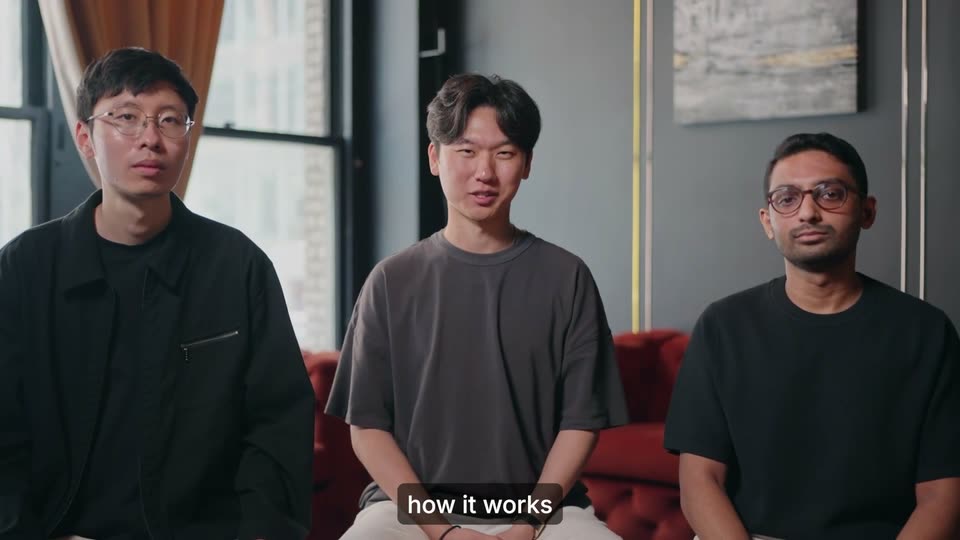
Three men sit on a red sofa in a bright office with tall windows, the center one speaking to camera. The locked-off medium shot starts soft and racks into focus while bottom captions subtitle his line, and small labels slide in near the end.
On-screen text: “statics and much more.”, “Let me show you”, “how it works”, “Image”, “Image”, “Grok Imagine”
Camera: Static
Two men stand behind a closed silver laptop on a glass table in a bright office, a plant and window behind them. The man on the left gestures as he talks while the other listens. White caption lines appear in a black box at the bottom.
On-screen text: “how it works”, “Let's say”, “you're an e-commerce brand”
Camera: Static
A dark chat screen on a dotted grid shows a prompt being typed into the input box while a Product Brief card expands above it. The cursor drifts toward an orange Greg tag and the bottom caption switches from and you need to product photos.
On-screen text: “you're an e-commerce brand”, “and you need”, “product photos”
Techniques: Cursor demo
Camera: Static
A dark chat interface shows a Product Brief card on the left. A hand cursor tagged Greg drags a green connector line rightward as the view reframes to reveal a grid of Branding cards in a generating state.
On-screen text: “product photos”
Techniques: Cursor demo, UI zoom
Camera: Pull out
A dark node-graph canvas shows four LUMEN BLUE cosmetic image cards linked by curves to a right-side node. The view pulls back to reveal a Video node and UGC Video card as a cursor tagged Greg hovers. A bottom caption swaps from product photos to UGC videos.
On-screen text: “product photos”, “UGC videos”
Techniques: UI zoom, Cursor demo
Camera: Pan
A dark dashboard grid of UGC video thumbnails fills the frame as the view zooms onto three portrait cards of women holding skincare products. A white caption sits at the bottom while a named collaborator cursor drifts across the cards.
On-screen text: “UGC videos”, “and hundreds”
Techniques: UI zoom, Cursor demo
Camera: Pull out
A dark 3D canvas of product-image cards linked by glowing lines pulls back from a close cluster to reveal the whole network. White caption phrases appear at the bottom center as a Greg collaborator tag drifts right.
On-screen text: “and hundreds”, “other assets”, “every month”
Techniques: 3D mockup, UI zoom, Parallax
Camera: Push in
A dark interface shows a Product Brief card typing a skincare prompt while a teal line with a moving glow links it to a Product Shot card loading on the right. The frame pans right, revealing a person at a laptop on the left; a Greg cursor travels the line.
On-screen text: “every month”, “with product photography”
Camera: Pull out
Split screen: a man talks at a laptop on the left while the Melius canvas on the right zooms out from one Product Shot card into a wide node graph of generated skincare images, a cursor tagged Greg moving along glowing connectors. Subtitles swap at the bottom.
On-screen text: “with product photography”, “Every week,”, “our customers use Mel”, “to generate”, “entire product shoots”
Techniques: Split screen, Cursor demo, UI zoom
Camera: Pull out
A man at a laptop anchors the left half while a node-based canvas fills the right, its product-shot cards linked by glowing lines. The right panel zooms out to reveal the full graph as a bottom caption reads from just one prompt.
On-screen text: “like this one”, “from just one prompt.”
Techniques: Split screen, UI zoom
Camera: Pull out
A dark node-based canvas fills the screen, its cards of LUMEN BLUE product shots linked by glowing lines. The view zooms out to reveal the full graph while a cursor tagged Greg drifts across it, and a white caption at the bottom reads the sentence in sequence.
On-screen text: “Every decision Mel makes”, “is mapped out on a node”, “based canvas,”
Techniques: UI zoom, Cursor demo
Camera: Pull out
Split screen: the left half shows a dark node editor where a second node loads a generated product photo from a dot grid, while the right half shows a presenter at a laptop. A cursor opens a menu as the canvas reframes.
On-screen text: “making sure each rule”, “you set for”, “assets is followed,”, “which eliminates”, “AI slop completely”
Techniques: Split screen, UI zoom, Cursor demo
Camera: Push in
Two generation panels, orange and teal, sit on a dark dotted canvas, each holding video and image cards. A cursor with a red Greg tag moves across them as the view zooms into a prompt, lines highlighted in orange, then reframes on the GPT Image 2 header.
On-screen text: “Melius allows you”, “a swarm of agents”, “on a single canvas”, “the intent behind”, “each prompt”, “the best generative”
Techniques: Cursor demo, UI zoom
Camera: Push in
A dark interface close-up holds on a model dropdown that scrolls through provider names as a cursor clicks the field; a second panel lists Seedance options while a red Greg tag drifts across. Bottom captions read the best generative, then AI seedance.
On-screen text: “GPT Image 2”, “the best generative”, “AI seedance”
Techniques: Cursor demo
Camera: Pan
A dark provider dropdown overlays a scrolling model list; a white cursor glides down the rows, highlighting Bytedance then Kuaishou, a red Greg tag trailing it. Captions appear at the bottom. The frame pulls back to reveal two LUMEN BLUE serum photos generating below.
On-screen text: “like Seedance,”, “Kling, Veo”, “and many more.”
Techniques: Cursor demo, UI zoom
Camera: Pull out
A dark interface grid of generation panels (logo, LUMEN BLUE product images, UGC video clips) blurs and floods with a red wash. A white cursor hovers over a Cancel button. The caption and many more. stays at the bottom as the view dissolves toward a cut to two men at a table.
On-screen text: “and many more.”, “Now, let's say”
Camera: Pull out
Two men sit at a table behind a laptop. The shot tilts and shrinks into a yellow-framed 3D card on the left as a dark Slack interface slides in from the right. White subtitles read at the bottom.
On-screen text: “Now, let's say”, “we want to make”
Techniques: 3D mockup
Camera: Pull out
A chat window floats in 3D perspective over a warm orange and purple gradient, then the camera dives into the Lumen thread as messages from Lenna, Daniel and the Mel bot appear, including two skincare ad cards, while caption pills narrate the steps at the bottom.
On-screen text: “to minor edits”, “to create variations”, “directly in slack”, “We'll modify the headline in step”, “three to bolder copy”, “and step six”, “to include a promo”, “for our summer sale.”
Techniques: 3D mockup, UI zoom
Camera: Push in
Split screen: the dark Melius canvas zooms onto a LUMEN BLUE branding card as a cursor moves across it and a red outline highlights it, while two men sit at a laptop on the right. White captions in a black bar at the bottom state the issue.
On-screen text: “But there's an issue”, “Melius hallucinated”, “and used a font outside”, “of your brand guidelines.”
Techniques: Split screen, UI zoom, Cursor demo
Camera: Push in
Two men sit at a table with a laptop while a chat panel on the left scrolls LUMEN BLUE brand cards upward. A translucent stack of logo and moodboard cards drifts over the right side, and a bottom caption reads of your brand guidelines.
On-screen text: “of your brand guidelines.”
Camera: Pull out
A dark node-based design canvas displays branding cards for the Lumen Blue skincare line, joined by teal and orange connector lines, with a product-shots panel and a UGC video tile on the right. A white caption Mel selfcorrects sits at the bottom center over a cursor tagged Greg.
On-screen text: “Mel selfcorrects”
Camera: Pull out
A dark node canvas shows generated Lumen Blue skincare cards linked by glowing orange lines. A red Greg cursor chip clicks a branding card, then the view pulls back across UGC video and social asset groups while bottom captions narrate the sequence.
On-screen text: “Mel self-corrects”, “and automatically changes”, “in just a few minutes”, “Our product shoot is ready”, “with characters”, “and assets,”, “and Mel is working on”
Techniques: Cursor demo, UI zoom
Camera: Pull out
A cursor with a red Greg tag drags a Product Brief card leftward across the red dotted canvas as the brief text types in. A white caption reads and Mel is working on at the bottom.
On-screen text: “and Mel is working on”
Techniques: Cursor demo
Camera: Static
A dark node-graph canvas zooms out to reveal connected image cards and prompt nodes, while a red cursor tag labeled Greg drifts across the graph. A bottom caption reads the line about Mel working on three other projects.
On-screen text: “and Mel is working on”, “three other projects”, “in the background,”
Techniques: Cursor demo, UI zoom
Camera: Pull out
A dark collaborative canvas shows two node-graph panels of sneaker and showroom image cards linked by glowing lines, while labeled cursors for Greg and Mel hover over cards. A white caption reads in the background, in a black pill at the bottom.
On-screen text: “in the background,”
Techniques: Cursor demo
Camera: Pan
The camera pans across a dark node graph of generated showroom images and reframes onto a Slack panel showing a team chat thread, where a red Greg presence cursor hovers over the messages. A bottom caption swaps from “with assets” to “delivered straight”.
On-screen text: “with assets”, “delivered straight”
Techniques: UI zoom
Camera: Pull out
Two tilted browser windows of a purple Slack-style chat overlap on a dark dotted grid with colored lines. The right window's thread updates to show a message with three attached product photos, while a caption reads to slack at the bottom.
On-screen text: “to slack”
Techniques: 3D mockup
Camera: Pan
A purple-themed Slack window fills the right of a dark screen, its message list with three product images drifting slowly, while thin colored flowchart lines with circular nodes sit on the left. A dark pill caption reading to slack holds at the bottom center.
On-screen text: “to slack”
Camera: Static
A Slack-style window sits left of a white Claude conversation panel, framed by a node graph of colored lines and dots. The left window slides off left as the right panel drifts right and its text updates; the caption and claude stays at the bottom.
On-screen text: “and claude”
Camera: Pan
A white chat interface panel slides out to the left, revealing a large red circle and a dark bowtie-shaped element on a dotted black background, as the caption swaps to “Melius is the harness.”
On-screen text: “and claude”, “Melius is the harness”
Camera: Push in
A black bow-tie shape on an orange dotted field morphs into a flowing dark ribbon as a blue-purple gradient circle carrying the Melius wordmark drifts left and dissolves into a thin wavy line with a red dot. A white caption pill at the bottom reads the voiceover.
On-screen text: “Melius is the harness”, “for your team to deploy”
Techniques: Morph
Camera: Static
On a dotted orange field, a blue-to-red gradient tube flows into a 3D circle labeled Your team. Six colored name tags, each with a black cursor arrow, burst out to the right. A caption reads agent swarms at the bottom.
On-screen text: “for your team to deploy”, “agent swarms”
Techniques: 3D mockup
Camera: Push in
A red dotted 3D space holds floating name tags, each pointed at by a white arrow cursor, beside a purple your_team oval. The camera sweeps past to reveal three dark laptops in perspective, their screens showing code and a city photo.
On-screen text: “agent swarms”, “across your brand's”
Techniques: 3D mockup, Parallax
Camera: Pull out
A 3D stack of design cards and UI mockups floats over a red dotted grid, each tagged with a colored name pill and a cursor arrow. The camera drifts through the arrangement so the cards shift in parallax, while a black caption bar reads “entire creative stack” at the bottom.
On-screen text: “Sarah”, “Emily”, “Willian”, “Josh”, “John”, “Arnold”, “entire creative stack”
Techniques: 3D mockup, Parallax
Camera: Pan
KYVEN brand guideline cards float in 3D over an orange dotted grid, then the shot cuts to three men in black shirts seated at a table in a brick-walled room.
On-screen text: “entire creative stack”, “To celebrate this launch,”
Techniques: 3D mockup
Camera: Pan
Three men sit on a red couch in a bright office; the center man speaks while the others look at camera. A static medium shot holds them, with white subtitles on a dark bar at the bottom.
On-screen text: “To celebrate this launch,”, “we're giving away”
Camera: Static
A Google Sheets document titled 1000_AI_Video_Editors rotates from a tilted 3D angle into a flat full-screen view, then zooms into the Rate column where a cursor hovers. White caption phrases swap at the bottom.
On-screen text: “we're giving away”, “a mega spreadsheet of 1000”, “editors trained”, “on AI video”, “generation for hire.”, “This sheet has”
Techniques: 3D mockup, UI zoom, Cursor demo
Camera: Push in
A table of hourly rates and portfolio links sits in focus against blurred rows; a cursor clicks a View portfolio link and a white card with three thumbnails pops up in the center. A gray pill caption reads their rate portfolio at the bottom.
On-screen text: “their rate portfolio”
Techniques: Cursor demo
Camera: Static
A white portfolio card with a photo grid and the title Daniel Cage Portfolio pops into the center over a blurred list of rates and links. A cursor hovers over the view portfolio links while a gray caption at the bottom reads their rate portfolio.
On-screen text: “their rate portfolio”
Techniques: Cursor demo
Camera: Static
A blurred spreadsheet of hourly rates and interview links fills the background while a white Meet video-call card with a red-haired man speaking floats in the center. A black cursor points at a link, and a dark caption bar carries the line along the bottom.
On-screen text: “and even an interview recording”
Techniques: Cursor demo
Camera: Pull out
A dark social media post by joowon, showing a clip of three men on a red sofa, fades and scales in at the center of a black background while two cursor arrows point at it. A white caption sits along the bottom edge.
On-screen text: “comment what your company does”
Techniques: Cursor demo
Camera: Push in
A dark social app UI shows a video player over a comment field; a cursor taps the Reply button and the view reframes into a two-comment thread, a reply appearing beneath the original. Bottom subtitles caption the voiceover.
On-screen text: “comment what your company does”, “you want to hire,”, “and I'll send you”
Techniques: Cursor demo, UI zoom
Camera: Pan
A two-tweet thread on a dark gradient shows a red bowtie logo between the posts. The tweets dim and the gradient fades to black, leaving the red Melius logo and wordmark centered and static.
On-screen text: “Melius”
Camera: Static