1:08

Best Motion Graphics Explainer Video for AI Platform | 1Deploy
1Deploy · Sep 2026
Kiwi · Oct 2026 · 1:27 · AI-annotated · YC Fall 2026
The film interleaves a live-action presenter against a dark brick wall and green bamboo with flat cream motion graphics, carrying her face through the graphics as a yellow-rimmed circular inset. Pacing is slow and deliberate (about 1.4 cuts per minute) with signature moves like counting-up metrics, dotted particle streams into the yellow cylinder, and pixel type shattering to punctuate each claim.
1Deploy · Sep 2026
TagadaRx · Oct 2026
Anthropic · AI · Oct 2026
A woman with dark hair peeks out from behind a white wall, partly hidden by bamboo in front of a dark brick wall. She leans into frame from the right edge as she speaks to camera.
Camera: Static
A woman with dark hair and glasses peeks from behind bamboo against a brick wall, waves, then steps forward to stand centered and smile. The right half is a white panel holding the Kiwi logo and wordmark, which fade out at the end.
On-screen text: “Kiwi”
Techniques: Split screen
Camera: Pull out
A dissolve from the presenter's live-action shot lands on a flat cream illustration of four stylized people at a laptop table. Role labels in white pills fade in above them, a circular presenter cam holds the bottom right, then the frame zooms onto the two middle figures.
On-screen text: “Your sales team”, “SDR”, “AE · Jordan”, “CSM”, “Sales lead”
Camera: Push in
A flat “Your agents” window fills with cards as the counter ticks from 1 to 20, beside a circular video of a woman speaking. Red alert badges pop on cards while teammate messages stack on the right, then the window crossfades to a cartoon man under “GTM roadmap · this quarter”.
On-screen text: “GTM roadmap · this quarter”
Camera: Static
A frowning GTM ops staffer at a laptop anchors a cream field as request bubbles pop in one by one and a roadmap bar creeps 12% to 26%. Counters tick up right, a red 'pace slowing' tag drops in, and the circular presenter inset expands to full frame.
On-screen text: “GTM roadmap · this quarter”, “GTM ops”, “my agent emailed the wrong contact”, “why is my pipeline report wrong?”, “Agents”, “Apps”, “Open asks”, “can you build me an agent for renewals?”, “which version of the prompt is live??”, “the dashboard says $0 in pipeline', '↓ pace slowing', 'need another app for QBRs, today', 'it's wrong again', 'Kiwi is the data engineer for your GTM agents”
Techniques: Kinetic type, Morph
Camera: Static
A woman with black hair and glasses speaks to camera in front of green bamboo and a brick wall. A white caption pill at the bottom holds the line, while a yellow underline highlights data engineer.
On-screen text: “Kiwi is the data engineer for your GTM agents”
Camera: Static
A woman with glasses and a beige top speaks before a brick wall and bamboo. A white caption bar reads the line at the bottom, then fades as the frame dims and a small yellow-bordered circle of her appears in the lower right.
On-screen text: “Kiwi is the data engineer for your GTM agents”
Camera: Static
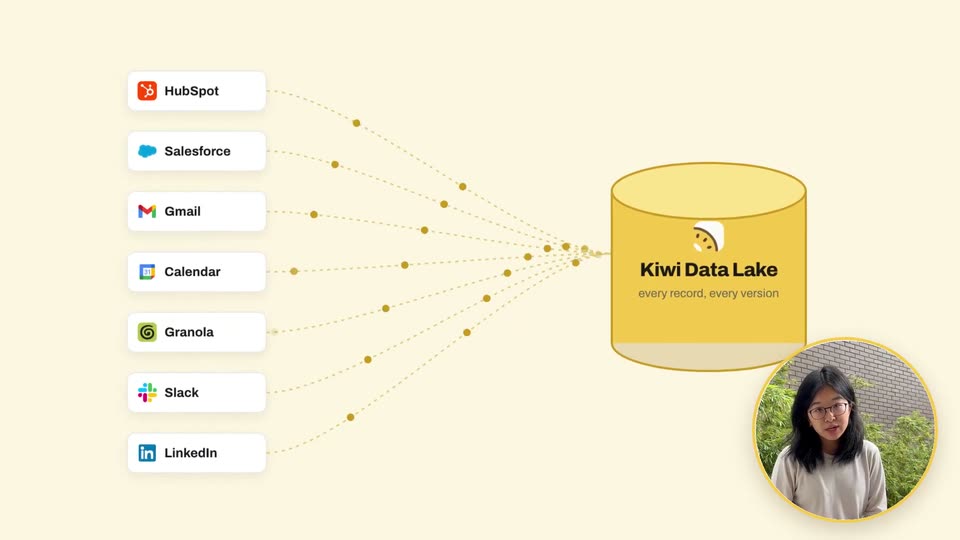
A column of app chips on the left streams dotted particle lines into a yellow cylinder titled Kiwi Data Lake. A circular video inset of a woman at bottom right grows to a full-frame shot as a checklist card fades in on the left.
On-screen text: “Kiwi Data Lake”, “every record, every version”, “Complete”, “Consistent”, “Correct”
Techniques: Particles, Morph
Camera: Pull out
A woman with glasses in a beige sweater speaks in front of a brick wall and bamboo. A clipboard graphic at left lists Complete, Consistent, Correct, and a green checkmark ticks each box in turn.
On-screen text: “Complete”, “Consistent”, “Correct”
Camera: Static
A woman with glasses and a beige sweatshirt sits before a brick wall and green plants, speaking to camera. A brown clipboard graphic with three green checkmarks and the words Complete, Consistent, Correct holds on the left.
On-screen text: “Complete”, “Consistent”, “Correct”
Camera: Static
A light product dashboard for an Account prep agent fills the screen, with a circular video of a presenter in the bottom-right corner. The view zooms in on the steps list as a cursor glides to the highlighted checkpoint row.
Techniques: Cursor demo, UI zoom
Camera: Push in
A light agent page titled Account prep shows a step list. The view zooms into the yellow checkpoint box, then pans right to the runs panel as a cursor clicks the yellow Run it button. A circular presenter video sits in the lower right corner.
Techniques: UI zoom, Cursor demo
Camera: Pull out
A product interface shows a modal form, Account prep · before it starts, over a dimmed, blurred list of agent steps and SQL code. A cursor moves into the checkpoint field as the Account field fills with Vantage Compute. A circular video of a woman presenter sits in the bottom-right corner.
Techniques: Cursor demo, UI zoom
Camera: Pull out
A product form modal with a yellow Start the run button closes, revealing a white checkpoint card with an Approve button on a cream background. A yellow 3D cylinder labeled Decision database sits to the right while a presenter talks in a circular inset.
Techniques: Cursor demo
Camera: Static
A checkpoint card with an Approve button and cursor sits beside a yellow 3D database cylinder as decision tags pop on and the count ticks up. The card crossfades into a YOUR CHANGE card with struck-through text and an input field, next to a presenter in a circular inset.
Techniques: Cursor demo, 3D mockup
Camera: Static
A white card shows a struck-through red line and a new instruction typed letter by letter. It slides up-left as a second card enters from the right, its grid filling and a percentage ticking from 81% to 91%, with a circular presenter video in the corner.
Techniques: Kinetic type
Camera: Static
An eval card replays 248 past runs: a grid of squares fills green as the after-score counts up to 97%, beside a prompt-diff card. A suggestion card slides in, then a crossfade reveals an accuracy-by-version bar chart with rising yellow bars. A presenter talks in a circular inset.
Techniques: Split screen, Kinetic type
Camera: Push in
On a cream background, the pixelated word HALLUCINATION spans the frame as a bar-chart card fades out behind it. The left edge of the word breaks into scattered squares. A circular portrait of a woman with glasses sits in the lower right corner.
On-screen text: “HALLUCINATION”
Techniques: Kinetic type, Particles
Camera: Pull out
The word HALLUCINATION in black pixel font sits on a cream background as its left half breaks apart into drifting black squares. A small circular inset with a yellow rim in the lower right shows a woman with glasses speaking.
On-screen text: “HALLUCINATION”
Techniques: Particles
Camera: Pan
Gray square particles sweep in and assemble five flat avatars at laptops under a progress card counting up 26% to 82%, its yellow bar filling as green checks pop above each head. A circular presenter inset sits bottom right, then a cut to her full-frame before a white brick wall.
On-screen text: “GTM roadmap · this quarter”, “26%”, “↑ back on track”, “82%”
Techniques: Particles
Camera: Pan
A woman with glasses and shoulder-length dark hair speaks to camera in front of a brick wall and bamboo. White all-caps labels ENABLEMENT and ACCURACY pop in on either side of her, then TRYKIWI.NOW appears above her head. Locked-off medium shot.
On-screen text: “ENABLEMENT”, “ACCURACY”, “TRYKIWI.NOW”
Camera: Static
On a cream background, the Kiwi logo holds above the tagline, which fades in from pale gray to black with GTM in gold and a yellow bar sliding under data engineer. A yellow pill button reading trykiwi.now then pops in below.
On-screen text: “Your GTM agent's favorite data engineer”, “trykiwi.now”
Techniques: Kinetic type
Camera: Static