0:35

Viral SaaS Product Launch Video Idea | Commas Webinar
Commas · Sep 2026
Visually · Oct 2026 · 1:15 · AI-annotated
studio ObiN Studio
A founder-led launch video that opens with a bold claim and a credibility montage, names the cost and friction of the old workflow, then introduces Visually and walks the dark green interface from pasted URL to rendered clip, including a per-scene refine step, before closing on a sign-up line and the URL card. The style is a fast-cut mix of live action, white-stage 3D product renders, and clean UI screens, unified by a green-and-black palette, a soft green glow, and a light geometric sans-serif,
Commas · Sep 2026
Framer · Design · Nov 2025
Sovera · May 2026
A man in a beige jacket sits in a studio with a plant and checkered panels, gesturing as he talks. Huge white text, “After Effects Era is Over”, scrolls left across the frame in front of him, then a lower-third with his name and title appears at bottom left.
On-screen text: “After Effects Era is Over”, “Elias Gustafsson”, “CEO & Founder – Visually”
Techniques: Kinetic type
Camera: Pan
A young man in a beige jacket stands before a pleated curtain, hands clasped, speaking. A large 3 graphic fills the left, thin outline circles drift on the right, and Years scales in beside him as his name and title lower-third appear.
On-screen text: “3”, “Years”, “Elias Gustafsson”, “CEO & Founder – Visually”
Techniques: Kinetic type
Camera: Static
White stage: the avail logo floats among spinning branded goods, a large 'Years' word scales in, then a 3D card of black JBL earbuds tilts in with its title sliding left, a blurred duplicate card behind.
On-screen text: “Years”, “avail”, “JBL Headphones”, “Tech”, “Headphones”
Techniques: Kinetic type, 3D mockup, Parallax
Camera: Pull out
On a flat yellow background, a stack of white paper with a wooden stylus, a black spray bottle, and a white paper roll fly in from a motion blur and settle into a scattered arrangement.
On-screen text: “JBL Headphones”, “Tech”, “Headphones”
Techniques: 3D mockup
Camera: Static
Top-down view of an open shipping box on a white background. The camera pulls back to reveal bubble wrap, a lime green zip pouch, a signed letter and a black device with icon buttons. The letter's paper ripples in a slow wave.
Camera: Pull out
A man in an olive jacket sits in a chair and speaks to camera, gesturing with his hands, in front of a potted plant, checkered acoustic panels and beige curtains. The caption “Dear Kevin,” scales in over the locked-off shot.
On-screen text: “Dear Kevin,”
Techniques: Kinetic type
Camera: Static
On a white background, 3D avatar heads, a blue backpack, and a tan hoodie fly in from the edges and settle into place around a centered headline that completes word by word, while notification cards stack up in the lower left.
On-screen text: “how to make a product look great”
Techniques: Kinetic type, 3D mockup
Camera: Static
A white chat screen fading to green at the bottom. A right-aligned bubble types out a client's message, then a left bubble from Sam, Motion Designer, slides in and types 'Below is the timeline:'.
Techniques: Kinetic type
Camera: Static
A white chat interface shows a received message asking for a timeline and a reply from Sam. The view slides up as two timeline rows fade in below.
Camera: Static
A light workflow timeline scrolls upward on a pale gray field. Step labels such as Script, Design review, Animation, First Draft and Revisions pass by with day ranges in rounded pills on the right, while active rows turn dark and extend thin green connector lines.
On-screen text: “Hi, l’ve an idea of a launch video : )”, “Please provide us the timeline”, “Read”
Techniques: Kinetic type
Camera: Pan
A man in a beige jacket speaks and gestures to camera. The frame pulls back, shrinking his clip into a rounded card at the center of a dark workspace, ringed by small revision labels and app icons.
On-screen text: “Still”, “Still too Complicated”, “Waiting for first draft”, “Few more changes”, “Revisions”, “Script ch”, “Revisions V5”
Techniques: Kinetic type
Camera: Pull out
A man in an olive shirt talks inside a centered video-call frame on a dark green gradient. Floating white labels and app icons (After Effects, Illustrator, Figma, document) drift around it while the camera zooms into the call frame. The caption 'Still too Complicated' sits over the man.
On-screen text: “Waiting for first draft”, “Few more changes”, “Revisions V5”, “Still too Complicated”, “Script ch”, “Revisions V5”
Camera: Push in
A man in a beige shirt sits in a chair and speaks to camera, gesturing with his hands, in a room with a checkered wall panel and a curtain. White subtitles appear at the bottom of the frame, changing with his speech.
On-screen text: “But what if you could turn”, “turn that idea into a”, “thirty-to-sixty-second video”
Camera: Static
A man in a tan jacket speaks before beige curtains. A large green dollar sign scales in behind him on the left as two white caption lines fade in on the right, framed by thin outline arcs.
On-screen text: “without spending”, “thousands on production”
Camera: Static
A man in a tan jacket sits in a chair before a checkered wall and beige curtains, speaking to the camera and gesturing. White caption phrases appear around him in time with the voiceover, flowing across the frame from right to left.
On-screen text: “without spending”, “thousands on production”, “or hours switching”, “between tools?”
Techniques: Kinetic type
Camera: Static
A green gradient field with faint grid lines; the word “Introducing” scales up from small and blurred to large and sharp at center frame, while two smaller lines of text sit still.
On-screen text: “or hours switching”, “between tools?”, “Introducing”
Techniques: Kinetic type
Camera: Static
On a near-white background with a soft green glow along the top edge, the word Introducing fades in at center, then gives way to Visually emerging letter by letter from the left in pale green.
On-screen text: “Introducing”, “Visually”
Techniques: Kinetic type
Camera: Static
The 'Visually' wordmark reveals letter by letter from left to right over a soft green-to-black gradient. The pale-green letters fade in and settle into a centered lockup, then hold static through the end of the clip.
On-screen text: “Visually”
Techniques: Kinetic type
Camera: Static
A man in a beige jacket sits in a chair, gesturing as he speaks, with a potted plant and beige curtains behind him. Light green sans-serif text scales in at upper left and lower right, a green highlight block trailing the last letters of each word.
On-screen text: “Visually”, “Your idea”, “Your brand”
Techniques: Kinetic type, Masking
Camera: Static
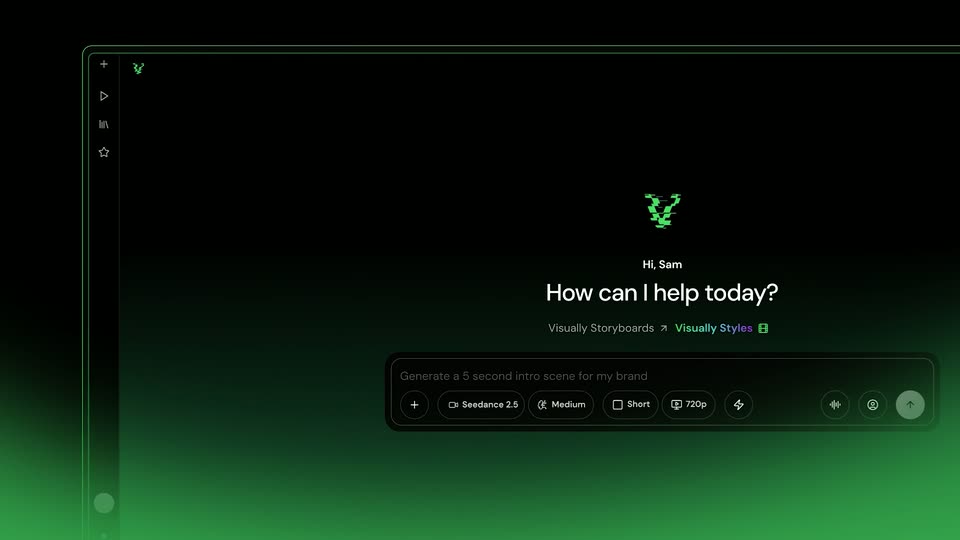
A dark product interface fills the frame, a green V logo centered above the greeting 'Hi, Sam' and 'How can I help today?', with a prompt bar and a row of control chips below. The view holds steady with a faint green glow rising from the bottom edge.
Camera: Static
A white panel holding three pill buttons, a black 'From URL' pill and two light gray pills reading 'From device' and 'Your website link', slides horizontally inside a thin green outline. A black arrow cursor drifts up toward the bar over a soft green-to-white gradient.
Techniques: Cursor demo
Camera: Static
A light interface shows a black From URL pill and a From device pill beside a link field. The frame zooms into the field as the URL https://www.upwork.com types in letter by letter.
Techniques: UI zoom, Kinetic type
Camera: Static
Close-up of a white interface with a green rounded outline around a NanoBanana Pro field and a Create storyboard button. A cursor hovers on the button as it shifts from black to dark green and the doubled text sharpens into clean labels.
Techniques: Cursor demo
Camera: Static
A green ring spinner rotates beside the gray text 'Building storyboard...' at center, over a pale green field of soft, blurred shapes that drift slowly.
On-screen text: “Building storyboard...”
Techniques: Kinetic type
Camera: Static
A white panel lists three loading steps with green icons. The heading slides into place, the “Gathering fonts” spinner fills into a checkmark, and the third row fades in.
Techniques: Kinetic type, Morph
Camera: Static
A centered white dialog on a dark green gradient shows a storyboard progress state. A progress bar fills green while a checklist of steps, each marked with a green check, updates in place. The top row holds a URL field and three dropdowns.
Camera: Pull out
A black interface displays three rounded white-outlined labels stacked vertically, with a green button to the right; a white cursor enters and hovers over the green button.
Techniques: Cursor demo
Camera: Static
A dark green gradient with a soft glow fills the frame while a white word types out letter by letter, growing from “Cr” to “Creati”, a thin green caret marking the end of the line.
On-screen text: “SaaS Explainer”, “Cinematic”, “Use this style”, “Product Explainer”
Techniques: Kinetic type
Camera: Static
A dark chat input field sits centered over a soft green glow. The prompt line types itself in, then two tag pills, Cinematic and Upwork, pop in beneath it. A row of setting chips and a highlighted send button line the bottom edge.
Camera: Static
A dark toolbar holds three circular buttons: a waveform, a profile, and a green send button with an up arrow. A white cursor slides in and presses the green button, which compresses and its arrow shifts, while a green glow rises along the bottom edge.
Techniques: Cursor demo
Camera: Static
A dark green rounded screen on a pale gradient shows a circular clapperboard icon above the still text “Rendering video...” and a subline. A thin progress bar at the bottom right fills from left to right across the shot.
Camera: Pull out
A 3D render inside a rounded frame on a green gradient, badged top-left. It starts on a green phone resting on a stone, then pulls back and sharpens into a desk with monitor, keyboard, mouse, mug and lamp.
On-screen text: “Generated with Visually”
Camera: Static
A 3D-rendered desk with a monitor, lamp, keyboard, and mug sits in a rounded frame on a green gradient. The monitor screen lights up from black to a white-green gradient as the words “How work gets down” fade in, and the framed scene drifts up.
On-screen text: “Generated with Visually”, “How work gets down”
Techniques: 3D mockup
Camera: Push in
A rendered desk with a lamp, keyboard, and mug frames a monitor showing a green gradient. The headline “How work gets down” on the screen is swapped for the Upwork logo. A “Generated with Visually” badge sits in the top-left corner.
On-screen text: “Generated with Visually”, “How work gets down”
Techniques: 3D mockup
Camera: Static
A dark smartphone lies flat on a wooden desk in 3D perspective, its white screen reading Find talent. The camera drifts slowly to the right while a green badge in the top-left corner reads Generated with Visually.
On-screen text: “Generated with Visually”
Techniques: 3D mockup, Parallax
Camera: Static
A dark video-generation interface settles into place as doubled panels fade and the layout scales down slightly. A central preview card shows the Upwork logo and tagline on a green gradient, with a prompt bar and settings chips below and a status line above.
On-screen text: “Generated with Visually”
Camera: Pull out
A man in a tan jacket sits center frame before a checkered wall, gesturing with both hands while speaking. A potted plant and a curtain flank the shot. A small static Upwork wordmark and tagline overlay the frame.
On-screen text: “Upwork”, “A new way to work”
Camera: Static
Dark UI panel with a green gradient card and partial logo in the lower left. Above it sit a prompt line and a Completed row. A white cursor glides to the Select & Edit button on the card and clicks.
Techniques: Cursor demo
Camera: Static
A dark editing panel shows a video preview of a green Upwork key above a timeline. A white cursor drags the right edge of the green selection window to widen it, then clicks the green Confirm button, which turns into a Completed badge.
Techniques: Cursor demo
Camera: Pull out
A tight crop on a dark input field zooms out to reveal the full prompt box, where green text types in the instruction to refine the scene. A cursor glides to the green send button.
Techniques: UI zoom, Cursor demo
Camera: Static
A dark editor screen frames a green-to-teal gradient preview card on black. The Upwork logo and tagline 'A new way to work' hold the center as the 'Generated with Visually' badge scales in at the top left and a 'Scene changed' pill sits top right.
Camera: Static
A light green card on a dark green field shows the black heading 'Built on people'. A white card with an upward green line chart and skill labels scales in over it, blurring the original text. A top status bar reads 'Refining the opening scene'.
Camera: Static
A dark bar reads “Refining the opening scene” over a green panel tagged “Generated with Visually”. A dashboard card inside updates: the “Built on people” headline fades out while a green line chart draws upward with an arrow and table rows fill in.
On-screen text: “Generated with Visually”, “Built on people”
Camera: Static
A locked-off product editor shows a top bar reading 'Refining the opening scene' above a rounded canvas. Inside, a green analytics dashboard with a rising line chart dissolves into a photo of a phone on a wooden desk beside a mug. Green corner badges mark the generation and scene change.
Techniques: 3D mockup
Camera: Push in
A smartphone lies flat on a wooden desk beside a notebook and a coffee mug, its screen showing a webpage reading 'Design & creative'. A green 'Generated with Visually' badge sits in the top-left corner. The locked-off shot softens in focus toward the end.
On-screen text: “Generated with Visually”
Camera: Static
A soft green gradient fills the frame as the centered stat $3.8B earned sits in dark bold type, sharpening into focus over the short shot. A small rounded badge labeled Generated with Visually stays pinned to the top-left corner.
On-screen text: “Generated with Visually”, “$3.8B”, “earned”
Camera: Static
A green smartphone stands upright on a white desk showing an AI & automation app, a second phone lying face-down beside it. The white headline 'Experts, amplified' floats in the air around the phone as the camera drifts, with a potted plant and brush cup blurred behind.
On-screen text: “Generated with Visually”, “Experts, amplified”, “$3.8B”, “earned”
Techniques: 3D mockup
Camera: Pull out
A phone mockup stands on a dark desk before a dim curtain, its screen showing a gradient app with a 2.9M reviews counter. The device rotates to face front while a Generated with Visually badge holds top-left.
On-screen text: “Generated with Visually”
Techniques: 3D mockup
Camera: Static
A tablet stands upright on a stone desk, its white screen showing 'Work together' in bold dark type. The camera pans to a phone lying flat on a wooden table, its screen soft and blurred with a green button at the bottom.
On-screen text: “Generated with Visually”
Techniques: 3D mockup
Camera: Static
A tablet rests on a concrete desk, its green screen filling with a circular grid of bright dots that contracts to a single glowing point. A thin white ring glows around the device. A coffee mug and notebook sit blurred at the edges.
On-screen text: “Generated with Visually”
Techniques: 3D mockup, Morph
Camera: Static
A tablet stands on a concrete desk showing a white screen with a card and a green checkmark; a glass panel with blurred type, a mug and a notebook sit behind and beside it. A Generated with Visually badge holds in the top-left corner on a locked frame.
On-screen text: “Generated with Visually”
Techniques: 3D mockup
Camera: Static
Front-facing all-in-one monitor on a dark reflective surface; the screen flares from dim to a bright green glow, and the gray headline brightens to white. A small badge sits in the top left corner.
On-screen text: “Generated with Visually”, “Get great work done”
Techniques: 3D mockup
Camera: Static
A 3D-tilted capture of the Visually editor sits on a green backdrop with outlined lettering. A chat prompt and a generating progress bar frame a 3D monitor previewing the line Get great work done, while a bottom toolbar lists generation options. The frame slowly pushes in.
On-screen text: “Generated with Visually”
Techniques: 3D mockup
Camera: Push in
A man in a beige jacket speaks before tan curtains as white text 'It's time for a change' scales in over grid lines and a green glow. Cut to him with arms crossed at a window; a green gradient washes the right edge as 'Bring your brand' types in.
On-screen text: “It's time”, “for a change”, “Bring your brand”
Techniques: Kinetic type
Camera: Static
A static shot of a young man in a beige jacket sitting in a chair, talking and gesturing, with a potted plant and curtains behind him. Large white text “It's time for a change” scales in centered, then “Bring your brand to life with Visually” appears, with “Visually” in green.
On-screen text: “It's time”, “for a change”, “Bring your”, “brand to life”, “with Visually”
Techniques: Kinetic type
Camera: Static
A green gradient background, dark at the top and bright at the bottom, holds the centered line “Try it out today.” The line starts in a dark olive tone, then brightens to white and stays locked off.
On-screen text: “Try it out today.”
Camera: Static
On a white field, a green W logo forms from horizontal bars that glitch and snap into alignment. A pale green triangle fades in at the center as the bars settle, with a few segments offset to the right.
Camera: Static
A light green “Visually.se” wordmark holds centered on a soft green gradient. The gradient fades from bright mid-green to deep green and the text dims slightly as the shot closes.
On-screen text: “Visually.se”
Camera: Static
A black background holds the white URL Visually.se centered in the frame. The text stays locked and still for the duration, serving as a quiet sign-off with no motion.
On-screen text: “Visually.se”
Camera: Static