0:25

Sky Yang - Introducing the new @imagineagi. Check it out: We made new logo, new
Imagine AI · B2B · Aug 2026
Microsoft · Aug 2020 · 0:45 · AI-annotated
Microsoft’s 0:45 launch film runs 22 scenes, about 2.0 s each. The product shows up at 0:03 and 9 features are revealed, with social proof. There is no explicit call to action. The video resolves a 3D word cloud into the To Do logo, then runs a fast tour of nine captioned features, each paired with a phone mockup on a pale blue stage. The layout holds a left caption and right device, moving between features with quick wipes, crossfades, and device slides over faint line-art backdrops.
Is this your launch? to your site or press kit.
Imagine AI · B2B · Aug 2026
Reception (by ElevenLabs) · Sep 2026
Microsoft · AI · Oct 2026
Feature labels float in a 3D word cloud over a pale background. The camera pushes forward, so the front row (Integrated, Intelligent, Focus and productive, Automation, Habit) blurs and recedes while a second row (Intelligent reminders, Too many tasks) sharpens into focus.
On-screen text: “Integrated”, “Intelligent”, “Focus and productive”, “Automation”, “Habit”, “Intelligent reminders”, “Planning”, “Too many tasks”
Techniques: Parallax, Kinetic type
Camera: Pull out
A blurred cluster of gray words (Balance, Habit, Intelligent reminders, Too many tasks) floats on white. Two small blue chips appear in the middle, then the outer words sharpen and a thin blue word slides in from the left edge.
On-screen text: “Balance”, “Intelligent reminders”, “Habit”, “Too many tasks”
Techniques: Kinetic type
Camera: Pull out
Blurred gray taglines defocus and fade away, leaving the gray Microsoft To Do wordmark above the blue checkmark logo, centered on a pale field. The frame then holds still on the lockup.
On-screen text: “Microsoft To Do”
Camera: Pull out
The Microsoft To Do wordmark and blue checkmark sit centered on a pale blue field, then the view zooms into the checkmark until its blue arms fill the frame and the gray text fades behind them.
On-screen text: “Microsoft To Do”
Camera: Static
A faint grid of seated person silhouettes sits on a white background as two centered lines of text fade in: '5M+ Downloads' and 'Free to download and use', with 'Free' in yellow.
On-screen text: “Microsoft To Do”, “5M+ Downloads”, “Free to download and use”
Techniques: Kinetic type
Camera: Static
Faint line-art figures with laptops and phones scatter a white background behind two centered lines of text. The frame stays locked, holding the static copy in place for the full shot.
On-screen text: “5M+ Downloads”, “Free to download and use”
Camera: Static
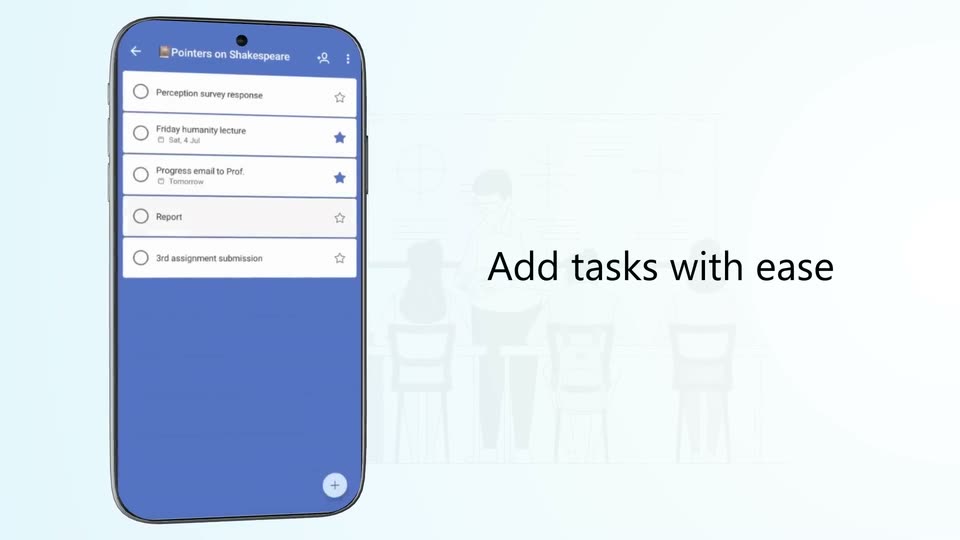
A flat phone mockup on a pale blue background holds a to-do list titled Pointers on Shakespeare. A blue vertical bar wipes right, clearing the old Downloads headline and revealing the caption Add tasks with ease, then the phone centers and its screen fades to blank.
On-screen text: “5M+ Downloads”, “Free to download and use”, “Add tasks with ease”
Techniques: Masking
Camera: Static
A 3D phone on the right shows a task screen; the Add file row highlights and a bottom sheet slides up with upload options while the caption Add attachments fades in over a faint classroom line drawing.
On-screen text: “Add attachments”
Techniques: 3D mockup
Camera: Pan
A 3D-tilted phone on the right steps through a task app: a task menu, a file browser with a PDF, then the task showing the PDF attached. A black headline 'Add attachments to your tasks' sits left over a faint line-art office scene.
On-screen text: “Add attachments to your tasks”
Techniques: 3D mockup
Camera: Static
A phone mockup on the right types sub-steps into a Wedding shoot task list, one word at a time, beside a black headline that crossfades in on a pale blue background with a blurred photo. The phone then slides left as a second phone enters from the right.
On-screen text: “Add attachments to your tasks”, “Add steps to your tasks”
Techniques: 3D mockup
Camera: Static
A phone mockup on a pale blue background shows the scrolling list view beside the headline “Organize your tasks in lists”. The phone slides to the center as a dark lock screen wipes in, and the headline becomes “Reminders for your tasks”, split around the device.
On-screen text: “Organize your tasks in lists”, “Reminders for your tasks”
Techniques: Kinetic type, Masking
Camera: Pan
A front-facing smartphone mockup sits on the right over a pale blue background with faint blurred icons. A dark notification card labeled Meditation fades in beneath the 07:00 AM lock screen while black text reads Reminders for your tasks on the left.
On-screen text: “Reminders for your tasks”
Techniques: 3D mockup
Camera: Push in
A phone mockup on the right shows an orange task list that reveals a share-list panel, while the black headline on the left crossfades from Reminders for your tasks to Share your tasks over faint gray clock and calendar icons.
On-screen text: “Reminders for your tasks”, “SUNDAY 28 JUNE”, “07:00 AM”, “Share your tasks”
Techniques: 3D mockup, Kinetic type
Camera: Static
On a pale blue field, a faint line-art clock and calendar sit behind a black headline reading Share your tasks on the left. A 3D iPhone mockup on the right shows a to-do list and a share panel. The composition holds still.
On-screen text: “Share your tasks”
Techniques: 3D mockup
Camera: Static
A light blue backdrop with faint clock and calendar line art holds the black caption on the left. A phone mockup slides in from the right, its screen showing a task list and a share sheet with app icons.
On-screen text: “Share your tasks”
Techniques: 3D mockup
Camera: Static
A tilted phone on the right closes its share sheet to reveal a My Day list over a mountain wallpaper. Dark gray text builds line by line on the left over a faint clock and calendar line drawing.
On-screen text: “Organize your day with intelligent suggestions”
Techniques: 3D mockup, Kinetic type
Camera: Static
A 3D iPhone on the right shows a task app reordering items as a black headline sits left over faint line icons. The phone then joins a laptop on the left as the text fades.
On-screen text: “Organize your day with intelligent suggestions”
Techniques: 3D mockup
Camera: Static
A light blue background holds a black headline above and a platform caption below. A MacBook and an iPhone sit side by side, each showing the same My Day task list, and settle into place with a quick fade at the start.
On-screen text: “Use and manage across devices”, “Available on the following platforms: Android, Windows, iOS, Mac, and Web”
Camera: Static
A light blue stage holds an angled laptop left and a phone right showing a calendar, with Outlook, Office and Teams icons between them. The laptop slides off left as a central headline appears and the phone switches to a list view, dashed lines linking the icons to it.
On-screen text: “Use and manage across devices”, “Available on the following platforms: Android, Windows, iOS, Mac, and Web”, “Integrated with Microsoft 365 applications”
Techniques: 3D mockup
Camera: Static
A light blue slide pairs a black headline on the left with three circular app icons (Outlook, Office, Microsoft Teams) linked by dashed lines to a phone mockup on the right. The camera zooms in, reframing onto the phone, which shows a task list app screen with dated entries.
On-screen text: “Integrated with Microsoft 365 applications”, “Outlook”, “Office”, “Microsoft Teams”
Techniques: UI zoom
Camera: Push in
A 3D phone mockup showing a task list dissolves out on a pale gray field as the Microsoft To Do wordmark and four-color M logo fade in at center.
On-screen text: “Microsoft To Do”
Techniques: 3D mockup
Camera: Static
The Microsoft 365 logo, four colored squares beside a gray wordmark, holds centered on a plain white field. The 365 then drops away, leaving the Microsoft logo alone in the same position.
Camera: Static