1:12


Instance - Automated evals for robot policies
Most Robotic · Industrials · Jul 2026
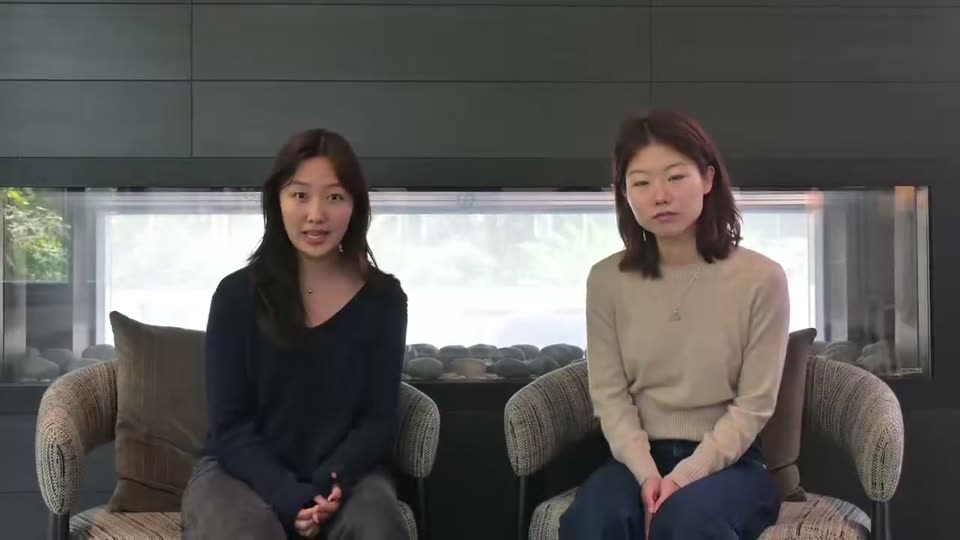
Instance’s 1:12 launch film runs 11 scenes, about 6.6 s each. The product is on screen from the first frame and 1 feature is revealed. The call to action lands at 1:03 (88% in), over a voiceover. Founder-led interview framing alternates with split-screen phone-plus-laptop demos of the Instance dashboard, cut at a steady conversational pace of about seven cuts per minute. Signature moves are the pop-in rounded lower-third cards, monospace label bars, and the crossfade from product UI back to the seated founders.
Is this your launch? to your site or press kit.
Most Robotic · Industrials · Jul 2026
Webflow · Design · Jul 2026
Archal · B2B · Aug 2026
Films whose music sounds like this one, voice left out
Most Robotic · Corporate / Tech Launch
ByteAsk
Ekpa · Spoken word / Tech tutorial
Two women sit in woven armchairs before a dark wall and a bright window, speaking to camera and waving in turn. White rounded lower-third cards pop in at the bottom to name each co-founder and then the brand Instance.
On-screen text: “Claire”, “co-founder - instance”, “Lucy”, “co-founder · instance”, “Instance vc s26”
Camera: Static
A black robotic arm places a small black object on a white target card, then retracts as a woman in a beige sweater watches, chin in her hands. The shot cuts to two women in armchairs in a bright room, one gesturing as she speaks.
Camera: Static
Two women sit in armchairs before a dark wall and bright window, talking to camera. Near the end, a white rounded bar fades in at the bottom with 'success verifier' and a blue 'today' tag, then an arrow points to 'automated evals' before the bar fades out.
On-screen text: “success verifier”, “today”, “automated evals”
Camera: Static
A split screen pairs a phone on the left with a laptop on the right. The phone switches from its app home screen to a dark camera view, while the laptop holds the Instance web page showing a heading, body copy and a QR code.
Techniques: Split screen
Camera: Static
A split view shows a phone on the left cycling from a blurred camera feed to a Live rollout capture page with a Record button, while the right holds a static laptop interface with the same headline, a QR code and a cursor. The phone panel sharpens and reflows as the laptop stays still.
Techniques: Split screen
Camera: Static
Phone and desktop app sit side by side. The phone's camera view shows a permission prompt, then switches to live footage of a table as a robot arm places a gear on a yellow square and a timer counts up. The desktop page stays static.
Techniques: Split screen
Camera: Static
A light dashboard shows a live task capture. A cursor clicks the play button on an embedded video of a robotic arm moving gears, while a caption bar below types live descriptions and the verdict panel switches from analyzing to complete.
Techniques: Cursor demo
Camera: Static
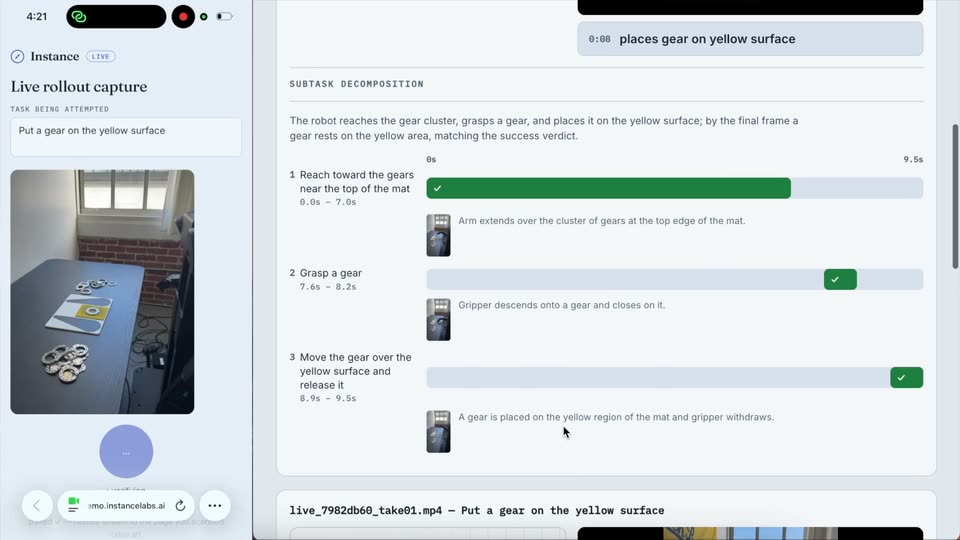
A light dashboard shows a green PASS verdict and a video player, then scrolls down to a subtask list where green bars fill and checkmarks appear; a cursor hovers over the rows.
Techniques: Cursor demo
Camera: Pan
A product UI screen showing a subtask decomposition list with green progress bars holds for a beat, then crossfades into a shot of two women seated in an office, one speaking. The interface text fades out as the live-action frame fades in.
Camera: Static
Two women sit in woven armchairs before a bright window, one in a dark top, one in a beige sweater. The left one speaks as a white caption box with a blue email fades in at lower center, holds, then fades out. The frame stays locked off.
On-screen text: “[email protected]”
Camera: Static
On a static pale field, a blue compass ring draws itself around a needle, then the serif wordmark Instance and a monospace tagline sharpen from a blur, and an email line fades in beneath.
On-screen text: “Instance”, “success detection for robot learning”, “[email protected]”
Camera: Static