2:02

Launch YC: Harbera
Harbera · Healthcare · Feb 2025
Mastra · Feb 2025 · 3:25 · Full motion · AI-annotated
Mastra’s 3:25 launch film runs 26 scenes, about 7.9 s each. The product is on screen from the first frame and 6 features are revealed. There is no explicit call to action; a voiceover carries the film. A dark, code-forward launch video built as one continuous screen-recording walkthrough: a hero title card, then terminal, dashboard, chat and editor views chained by fast blur-zoom cuts, with a fixed circular presenter webcam anchoring the corner throughout. The signature moves are the typed-in commands and code, the blur-zoom transitions between surfaces, and the pulsing wireframe panels behind the opening title, all held to a steady, low-cut rhythm.
Is this your launch? to your site or press kit.
Harbera · Healthcare · Feb 2025
Airtable · Productivity · Oct 2026
Infera · Healthcare · Jun 2026
A dark hero screen shows a large white headline and gray subhead above a centered command pill. Faint wireframe panels with colored labels pulse behind it. A cursor clicks the copy icon, which becomes a checkmark as the border glows. A circular webcam of the presenter sits bottom right.
On-screen text: “The TypeScript Agent Framework”, “From the team that brought you Gatsby: prototype and productionize AI features with a modern JS/TS stack.”, “$ npx create-mastra@latest”
Techniques: Cursor demo
Camera: Static
A dark macOS terminal fills the frame, a small circular webcam feed of a man pinned in the lower right. Typed commands and CLI prompts fill in line by line as the Mastra scaffolder names a project, installs dependencies, and prints the dev server log.
On-screen text: “The TypeScript”, “Agent Framework”, “From the team that brought you Gatsby: prototype and productionize Al features with a modern JS/TS stack.”
Camera: Pull out
The Mastra dashboard fades in over a dark field: a left sidebar lists Agents, Tasks and Workflows, while the main panel shows a Weather Agent row with its description and an Offline status. A circular presenter video sits in the lower right corner.
Camera: Pull out
A dark chat UI in a browser; the presenter types “What is the weather in Sioux Falls?” and sends it. The view zooms in on the chat area as the agent's reply bubble appears. A circular webcam of the presenter sits bottom-right.
Techniques: Cursor demo, UI zoom
Camera: Push in
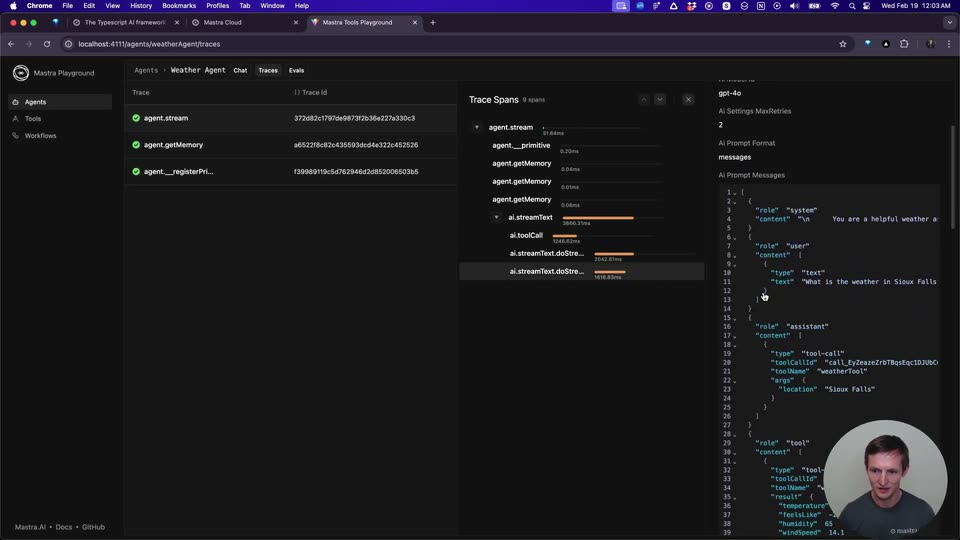
A dark web dashboard fills the frame on a locked-off screen. A cursor clicks through a trace list and a span tree, swapping the JSON detail panel on the right, while a small circular webcam feed of a presenter sits in the bottom-right corner.
Techniques: Cursor demo
Camera: Static
A dark workflows list fills the screen with a single row, weather-workflow. A cursor travels from the left sidebar to the View Workflow button and clicks it. A circular webcam of a presenter sits in the bottom right corner.
Techniques: Cursor demo
Camera: Static
A dark workflow editor in a browser shows two connected nodes. A cursor clicks the City field, types Sioux Falls, picks it from a dropdown, then clicks Submit as a spinner loads. A circular webcam of the presenter sits in the corner.
Techniques: Cursor demo
Camera: Pull out
A dark macOS terminal fills the frame, monospace log lines scroll upward as a weather report for Sioux Falls streams in, while a small circular webcam feed of the presenter sits in the bottom-right corner.
Camera: Pan
A code editor fills the screen, zooming into a TypeScript file that defines a weather tool. The view scrolls past API calls, then a fast blur cut lands on a second file showing a two-step workflow; a small webcam of the speaker sits in the bottom-right corner.
Techniques: UI zoom, Speed ramp, Cursor demo
Camera: Push in
A dark code editor fills the screen, file tree left, TypeScript file center. A cursor types an import line, an autocomplete menu pops up, then the cursor moves down to add a spread into the tools array. A circular webcam of a presenter sits bottom right.
Techniques: Cursor demo
Camera: Static
A dark web app zooms into its right-hand Instructions panel; the cursor types a comment, clicks Enhance, and the prompt text rewrites itself. The frame then zooms into the chat input, where a question is typed and sent as a reply starts to appear.
Techniques: UI zoom, Cursor demo
Camera: Pull out
Dark chat interface in a browser with a circular presenter webcam bottom-right. The frame pulls back from a close-up of the company list to the full app, scrolls the list, then a question about OpenAI is typed into the input bar and sent, and a numbered answer appears.
Techniques: UI zoom, Cursor demo
Camera: Pull out
A dark code editor displays a TypeScript file as new import and metric lines type in, autocomplete lists pop up, and red error highlights flash. A small circular webcam of the presenter stays in the corner, then a blurred zoom transition closes the shot.
Techniques: Cursor demo, UI zoom
Camera: Push in
A dark chat interface fills the screen with a circular webcam feed of a man in the bottom right. The view zooms into the input bar as a query is typed, then pulls back to reveal the sent message bubble and a new entry in the chat history.
Techniques: UI zoom, Cursor demo
Camera: Static
A dark chat interface fills the frame, with a small circular webcam of a man at the lower right. The view reframes down to the input bar, where a follow-up question is typed letter by letter and sent as a message bubble.
Techniques: UI zoom
Camera: Push in
A dark browser window shows the Matra Playground interface: a weather-agent chat thread in the center, a details panel on the right, and the presenter's headshot in a circle at bottom right. Chat bubbles and a floating note settle into place over the clip, frame locked off.
Camera: Pull out
A dark web app fills the frame, with a circular webcam of a man in the corner. The cursor clicks Evals and the chat panel swaps to an evals table; a metric row expands into two scored entries, then the frame blurs into a zoom.
Techniques: Cursor demo, UI zoom
Camera: Push in
The screen sharpens from a blur onto the Mastra Tools Playground app, showing the Chat with Weather Agent page with an endpoint list on the right. The cursor moves down the list and hovers the generate row, highlighting it. A circular presenter video sits bottom right.
Techniques: Cursor demo
Camera: Pull out
A dark terminal window fills the frame, log lines and JSON blocks in white, green, and amber scrolling past. A circular headshot of a man in a dark shirt stays fixed in the lower right corner. The log text updates in place.
Camera: Pull out
A dark terminal window fills the frame, showing a curl command and a JSON weather query, with a circular webcam of a man in the lower right corner. The command executes and a dense block of JSON response floods the screen.
Camera: Static
A dark terminal runs a curl command against a local API, printing a JSON weather response. The text smears into horizontal glitch streaks, then snaps back and the screen clears to an empty prompt. A circular webcam of a presenter stays in the bottom-right corner.
Camera: Static
A dark macOS terminal fills the frame as git commands type themselves line by line, from git init to git push, with commit and push output scrolling in. A small circular webcam of the speaker sits in the bottom-right corner.
Camera: Pull out
A dark Mastra projects dashboard shows a grid of repository cards. A cursor clicks Add new, opening an Import Git repository modal, and types show into the search field until one result appears. A circular webcam of a man sits in the corner as the view zooms in.
Techniques: Cursor demo, UI zoom
Camera: Push in
A dark deployment modal fills the frame while a cursor types OPENAI_API_KEY and a masked value fills the field. The cursor clicks Deploy Project, the button reads Deploying, then the view reframes to the full browser window showing a deploying row. A small circular webcam sits bottom right.
Techniques: Cursor demo, UI zoom
Camera: Pull out
A dark Mastra Cloud dashboard, showing a project named show-hn with a deploying status, fades to black. A small circular face-cam of the presenter remains in the bottom-right corner throughout.
Camera: Static
A black end card inside a thin rectangular frame with corner marks. The Mastra logo and wordmark sit center-left with the tagline beneath, the monospace command below, and small URLs at bottom right. The whole card fades in from black and holds still.
On-screen text: “npm create mastra”, “MASTRA.AI”, “GITHUB.COM/MASTRA-AI/MASTRA”
Camera: Static