1:53
Orchestrator.inc - https://t.co/JOaE2ABlJC v0.14.3 is out. Artifacts: everything your a
Orchestrator.inc · Oct 2026
Builder.io · Sep 2026 · 3:47 · AI-annotated
Builder.io’s 3:47 launch film runs 16 scenes, about 14 s each. The product shows up at 3:02 and 4 features are revealed. The call to action lands at 2:54 (76% in), over a voiceover. Built as one continuous locked-off screen capture with a fixed corner webcam, the video walks through four apps (mail, calendar, slides, design) inside a persistent agent chat panel, letting the cursor perform each action live. Pacing is steady around 103 bpm with sparse cuts, and bold bottom subtitles carry the presenter's conversational narration.
Is this your launch? to your site or press kit.
Orchestrator.inc · Oct 2026
A dark chat window holds two agent summaries, calendar and inbox, in a locked-off frame. A bearded man in headphones talks and gestures in the lower right while white subtitles cycle at the bottom and the feed scrolls up briefly.
On-screen text: “I love having”, “agents do as much”, “work for me as”, “they possibly can.”, “But outside of”, “coding, walls of text”, “is not my preferred”, “way of working”, “So let me show”, “you a skill to take”
Camera: Pan
A dark chat interface fills the frame, listing a calendar review and an inbox summary, while a bearded man in headphones occupies the bottom right corner and speaks. A white caption stays locked along the bottom edge.
On-screen text: “you from this to”
Camera: Static
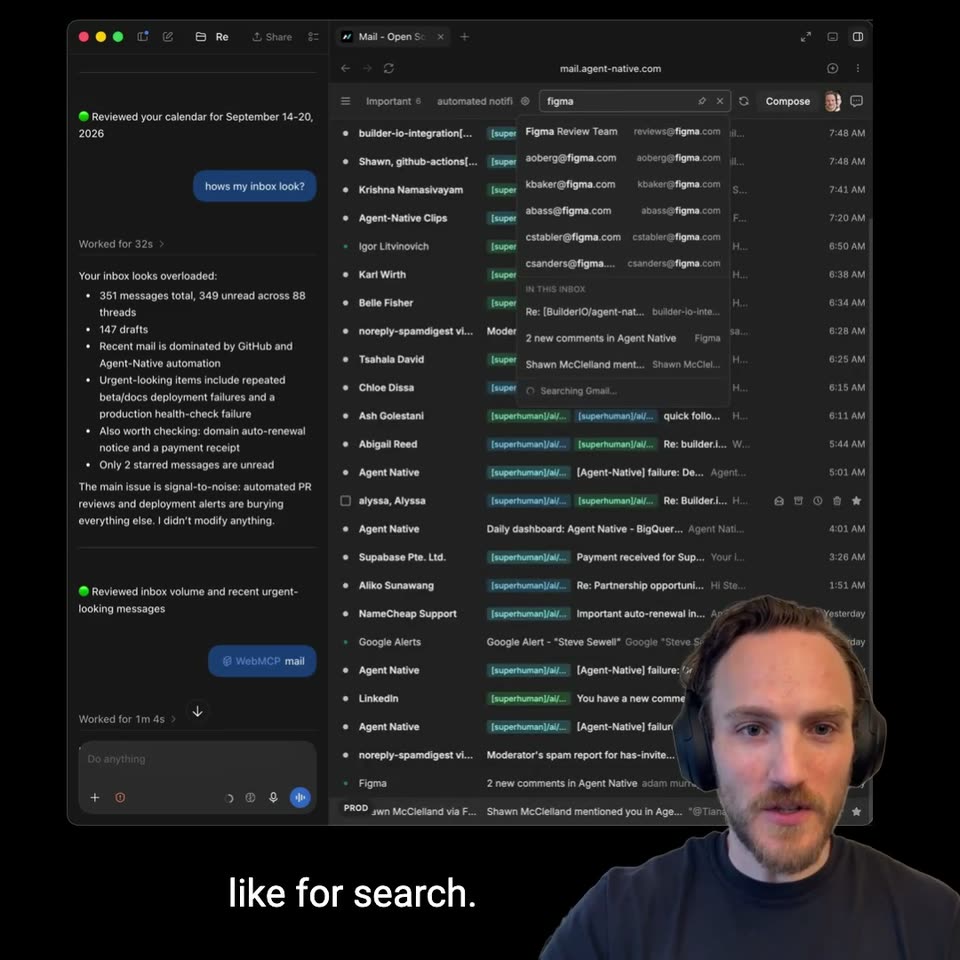
A dark mail client fills the frame beside a headset-wearing presenter in the corner. The cursor opens an email, types a search query, and scrolls the inbox list while white subtitles caption the voiceover.
On-screen text: “this.”, “If I want my agent to”, “manage my inbox, I”, “would like to be able”, “to see my inbox.”, “Where I can use the”, “UI when it's easier,”, “like for search.”, “I can use keyboard shortcuts.”
Techniques: Cursor demo
Camera: Static
A locked-off screen recording of a dark email client fills the frame, an AI chat panel on the left and a Figma email thread on the right, with a bearded man in headphones as a rounded webcam overlay bottom right. The chat logs a drafted reply, the thread scrolls to a reply box that is typed into, sent, and undone, while a slash-command dropdown opens. White subtitles run along the bottom.
On-screen text: “I could tell it to reply,”, “archive, or whatever”, “to one or many”, “emails at a time.”, “And I don't have”, “to worry about the”, “agent just sending”, “stuff without”, “It'll show up as”, “a draft in the UI. I can look it over and edit because directly typing can be a lot faster than asking the AI to make those edits. Click or use shortcut to send”
Techniques: Cursor demo
Camera: Static
A split view shows an AI agent chat panel on the left and a dark week-view calendar in a browser on the right, with a small webcam of a man in headphones in the corner. A cursor moves through the calendar as the agent opens an event dialog, types commands in the chat, and HOLD blocks appear then vanish across the week.
On-screen text: “in my calendar Drive it with keyboard”, “shortcuts, edit visually, or say”, “something like, 'I need focus”, “time next week.”, “Put a hold on my calendar”, “every day from 3:00 to 5:00 PM.”, “I can have it draft events that I can”, “visualize and approve move events, et”, “cetera, and I can see what it's doing”, “visually in real time i can have it draft events that I can visualize and approve move events, etcetera, and I can see what it's doing visually in real time i t”
Techniques: Split screen, Cursor demo
Camera: Static
A screen capture shows a dark slides app beside an agent chat panel; the deck list scrolls as a cursor hovers the cards, a presenter in headphones talks in the bottom-right corner, and white captions run along the bottom.
On-screen text: “to view, create, and”, “manage slide decks.”, “When I open one up”
Techniques: Cursor demo, Kinetic type
Camera: Static
A dark slides editor fills the frame with a chat panel on the left and a headset-wearing presenter in the bottom-right corner. The agent restyles the open deck to a black background with cyan accents, then the cursor drags the slide title, opens a color picker to recolor it, and two new dark slides appear in the thumbnail rail.
On-screen text: “When I open one up”, “I get AI editing as well as visual editing”, “So I get full control.”, “If I want to move things around, I can just drag to move it”, “to change the styling of the entire deck all at once”, “The agent also knows what slide I have open, what I have selected.”, “It's fully in sync all the time”, “styling, and I can see which slider the AI is editing like a collaborator”, “And again, it knows everything about me.”, “But I don't have to build in the dark and then just get a PDF export by I could be editing in real time side by like maybe I prefer this text to be a different,”
Techniques: Cursor demo
Camera: Static
Screen recording of a dark browser app: an agent chat panel on the left types a request to find and open a saved design, beside a grid of design project thumbnails. A man with headphones speaks in the lower right corner as white subtitle lines swap at the bottom.
On-screen text: “If I'm lazy, I can just”, “tell it what design”, “I want it to find”, “and open for me”, “or of course”, “generate designs.”, “if you're curious what”, “just saying Slides”, “or Mail or Calendar”, “or other shorthands”
Camera: Static
A screen recording of a design tool shows two mobile e-commerce mockups on a dark canvas, with a chat panel on the left. A presenter in headphones sits in the bottom-right corner as a cursor selects a frame and the view zooms in.
On-screen text: “Here's my design I generated”, “yesterday with this”, “You can edit just like using”
Techniques: Cursor demo, UI zoom
Camera: Static
A dark design-tool screen fills the frame with a chat panel left, a webpage mockup center, and a properties panel right. A man wearing headphones sits in the bottom-right corner, speaking. White captions appear along the bottom edge.
On-screen text: “You can edit”, “just like using”, “tools like Figma”
Camera: Static
A screen recording of a design tool shows an agent chat panel on the left, a webpage canvas in the center, and a properties panel on the right, while a man in headphones talks and gestures in the bottom-right corner. White captions fade in at the bottom.
On-screen text: “do further”, “refinements with”, “the chat too.”
Techniques: Kinetic type
Camera: Static
A dark GitHub repository page scrolls down from the file list to the README, where a cursor clicks the copy button on the install command. A man with headphones speaks in the lower right corner, and a handwritten URL sits above the window.
On-screen text: “github.com/BuilderIO/agent-native”, “the chat too.”, “You can grab the skill over on my”, “GitHub Just run the command to”, “install or just link this to an agent and”, “tell them to install the WebMCP skill”, “And if you want to know how I built all”, “these Agent-Native applications, it”
Techniques: Cursor demo
Camera: Pan
A macOS desktop in a browser shows a mountain wallpaper and an 8:18 clock as the address bar holds agent-native.com with an autocomplete list; the page brightens and the URL turns to a blue selection. A man with headphones speaks in the lower right corner above a white caption.
On-screen text: “was all using the Agent-Native”
Camera: Static
A browser window scrolls the Agent-Native website from its hero headline past app cards to a diagram linking UI, Agent Chat and HTTP API to MCP and A2A around a code block. A presenter with a headset talks in the bottom-right corner as white captions roll along the bottom.
On-screen text: “It's a framework for building these types of applications where everything you can do in the UI, automatically any agent can drive any part of the UI as well. 1”, “It's fully automatic using this action system. 1”, “And it's easy to prompt to build your own apps, so you could have agentic apps working side by side with your agents to automate more of your work with side-by-”
Techniques: Cursor demo
Camera: Static
A dark browser window displays the Agent-Native apps page, which scrolls down a grid of app cards (Clips, Design, Slides, Analytics, Calendar, Mail) as the cursor hovers. A presenter in headphones talks in the bottom right corner, with white subtitles at the bottom.
On-screen text: “There's also a bunch of apps that”, “I have built with my team some of”, “which you saw and a bunch of others”, “that are 100% free, 100% open source,”
Techniques: Split screen, Cursor demo
Camera: Pan
A dark browser window shows the Agent-Native apps grid; the cursor hovers over cards as the page scrolls, then loads the Clips page with its recorder panel. A presenter in headphones talks in the lower-right corner while white captions run along the bottom.
On-screen text: “that are 100% free,”, “100% open source,”, “so you can fork,”, “customize, self-host,”, “whatever you want,”, “or just launch right”, “into them using”, “the /webmcp”, “skill or opening”, “them directly. You can check all that out on agentnative.com. If you try it out, I'd love to know your feedback, and especially hear about your workflows. What ”
Techniques: Cursor demo
Camera: Static