1:17

Introducing Amplitude CDP
Amplitude · May 2022
Infera’s 0:34 launch film runs 15 scenes, about 2.3 s each. The product is on screen from the first frame and 4 features are revealed. There is no explicit call to action. The video is built as four numbered chapters, each opened by a large purple numeral and word sliding in over a blurred, tilted app frame, then cut to a locked-off interface demo with a persistent 01 to 04 step rail. Pacing holds a steady 128 bpm with quick cuts, and the signature moves are blur-to-focus reframes, sliding title cards, and cursor-driven UI tours on a near-black navy field.
Is this your launch? to your site or press kit.
Amplitude · May 2022
Airtable · Productivity · Oct 2026
Constellation Space · B2B · Nov 2026
Films whose music sounds like this one, voice left out
Stripe · Electronic, Future Garage, Trap
Anthropic · Lo-fi hip-hop
Lamina Labs · Modern electronic corporate background music
On a dark navy field, a blue stick figure between angle brackets forms the logo mark in the center, briefly wrapped in a thin circle. The word INFERA then types out letter by letter to its right, ending on a blinking underscore.
On-screen text: “INFERA”
Techniques: Kinetic type
Camera: Static
A dark web interface shows an 'Experiments' dashboard with a list of items. A cursor hovers over the 'New Experiment' button.
Techniques: Cursor demo
Camera: Static
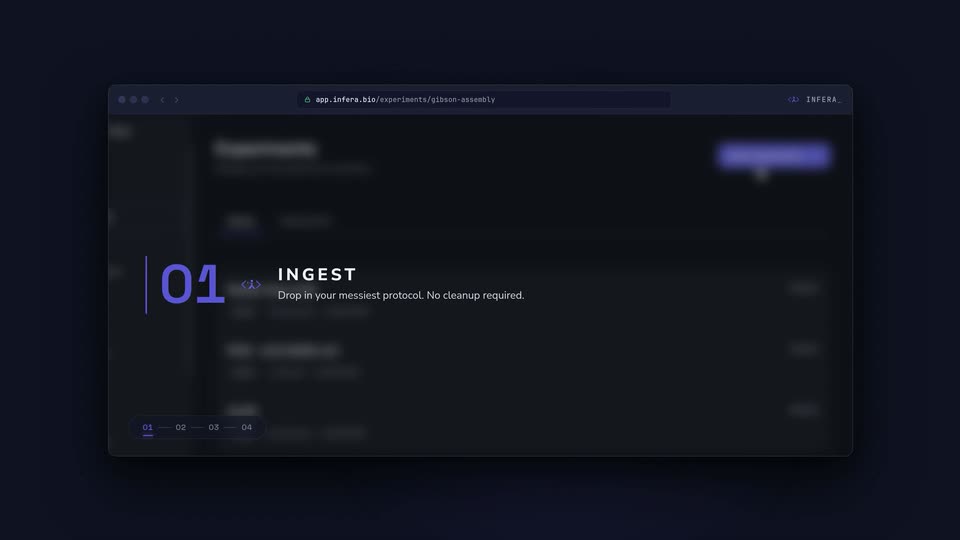
A blurred product interface sits inside a tilted 3D browser frame on a dark field. A purple numeral 01 and the white word INGEST hold still on the left while the caption below scales in.
On-screen text: “01”, “INGEST”, “Drop in your messiest protocol. No cleanup required.”
Techniques: 3D mockup, Kinetic type
Camera: Static
A dark browser window of the Infera app sits on a near-black backdrop, locked off. The Experiments page shows a list of drafts while a cursor hovers over the open New Experiment dropdown, resting on the Upload PDF(s) option. A step indicator 01 to 04 sits at the bottom left.
On-screen text: “INGEST”, “Drop in your messiest protocol. No cleanup required.”
Techniques: Cursor demo
Camera: Static
A browser window showing a document editor slides left across a dark background, a faint second window behind it, while a large purple 02 and a white DISAMBIGUATE label slide in on the left.
On-screen text: “02”, “DISAMBIGUATE”
Techniques: Kinetic type
Camera: Static
A flat dark browser window sits centered on a navy field, its code interface blurred behind a left-aligned overlay: a purple 02, a scaling <x> tag, the white heading DISAMBIGUATE and a one-line caption. A step bar reading 01 02 03 04 rests at the bottom left.
On-screen text: “02”, “<x>”, “DISAMBIGUATE”, “Anything vague gets flagged. You fill the gap, not us.”
Camera: Static
A dark browser window holds a protocol document titled Gibson Assembly and Transformation Protocol, with a numbered protocol list on the left and a body of text on the right. The right panel then swaps to a Compilation view listing Parsing Protocol and Protocol Steps, while the body text changes to a Step 4 passage.
On-screen text: “02”, “DISAMBIGUATE”, “<x>”, “Anything vague gets flagged. You fill the gap, not us.”
Camera: Static
A dark INFERA protocol editor fills the frame on a navy backdrop. A cursor clicks icons in the right rail, swapping the side panel from a reagents list to a plates list while the protocol steps remain in view.
Techniques: Cursor demo
Camera: Static
A dark browser window displays a lab-automation interface. The right panel transitions from a Protocol Steps list to a Resolve Deck grid of plate slots, the left sidebar list shifts, and a cursor hovers over the content.
Techniques: Cursor demo
Camera: Static
A dark browser window mockup of the app sits on a near-black background, its interface blurred. On the left, a large purple 03 with a small code icon and the white label VALIDATE hold still, while the gray subtitle sharpens and scales into place.
On-screen text: “03”, “VALIDATE”, “Dead ends caught before they cost you a run.”
Camera: Static
A dark lab-automation dashboard fills a browser window on a navy field. The camera reframes onto the deck grid and the step-by-step transfers as a hand cursor clicks through slots, one turning red. A small caption scales in at the close.
On-screen text: “VALIDATE”, “Dead ends caught before they cost you a run.”
Techniques: UI zoom, Cursor demo, Kinetic type
Camera: Pull out
A dark browser window of the Infera app. A card about grouped pipette steps slides away as the cursor clicks the Execution Record tab, revealing a list of protocol groups and a steps panel. The frame then reframes slightly to include the left sidebar.
Techniques: Cursor demo, UI zoom
Camera: Pull out
A browser window holds a dark checklist modal; a cursor ticks items and clicks Confirm & Run. The interface then blurs back as a large indigo 04 and a white EXECUTE headline appear at left with a small caption, holding on a locked-off frame.
On-screen text: “04”, “EXECUTE”, “<x>”, “It runs on your instruments. Every step signed.”
Techniques: Cursor demo
Camera: Static
A dark app window on black. A 'Confirm Workspace Setup' modal with a step flow and 'Confirm & Run' button fades out as the cursor clicks it, revealing the Execution Record with a running timer. The view darkens and reframes onto an 'Add Gibson assembly mix' card.
On-screen text: “EXECUTE”, “It runs on your instruments. Every step signed.”
Techniques: Cursor demo, UI zoom
Camera: Static
A dark browser window showing the Infera interface, with a left sidebar and a list of rows, sits centered on a near-black background. The window is softly out of focus, then the whole frame dims and fades to black.
Camera: Static