1:04

Introducing Booko
Booko · B2B · Feb 2026
Linzumi’s 1:15 launch film runs 36 scenes, about 2.1 s each. The product shows up at 0:10 and 3 features are revealed, with social proof. The call to action lands at 1:11 (95% in), over a voiceover. A dark, cinematic product film that alternates live-action presenter shots (industrial hall, car, city overlook) with 3D-tilted interface cards and serif headline cards, building from a hook about agent decisions into named feature reveals (Decisions, mobile control, multiplayer collaboration) and closing on a logo-plus-URL CTA card. Its signature moves are the slow 3D tilt-and-drift of dimmed UI panels, line-by-line serif text reveals, and a recurring teal-and-purple icon swarm that visualizes
Is this your launch? to your site or press kit.
Films whose music sounds like this one, voice left out
Warp · Upbeat electronic, lo-fi hip-hop
Extent · Modern electronic
Logical · Upbeat electronic
A man in a grey shirt stands in an industrial hall, machinery blurred behind him, gesturing as he talks. White serif text reading Your agents work 24/7, topped by a clock icon, fades in centered over his torso.
On-screen text: “Your agents”, “work 24/7”
Camera: Push in
A man in a gray shirt gestures while speaking in an industrial hall, a large yellow wheel blurred behind him. White serif text sits over his chest with a thin arc above it. A dark agent panel slides in from the right at the end.
On-screen text: “Your agents”, “work 24/7”
Camera: Static
A man speaks in a workshop while translucent 3D chat panels and a terminal card float and drift around him at different depths. A large white serif headline, “Your agents work 24/7,” stays fixed across the lower frame.
On-screen text: “Your agents”, “work 24/7”
Techniques: 3D mockup, Parallax
Camera: Static
A blurred live-action shot of a man gesturing in an industrial set sits behind a 3D ring of floating dark UI cards (code diffs, URL cards, request and decision panels) that orbit a central scales logo and the gray headline 'Your agents work 24-7'.
On-screen text: “Your agents work 24-7”
Techniques: 3D mockup
Camera: Push in
Interface cards with code diffs, URLs and dialogs float in 3D perspective around a teal glow, drifting at different depths. The white headline AGENT NEEDS YOUR DECISION fades in at center with a balance icon.
On-screen text: “AGENT NEEDS YOUR DECISION”
Techniques: 3D mockup, Parallax, Kinetic type
Camera: Static
A blurred dark interface fills the frame as the headline “Your attention” fades in at center in white serif type, holds briefly, then fades out, leaving only the out-of-focus screen.
On-screen text: “Your attention”
Techniques: Kinetic type
Camera: Pull out
A centered white serif line reads Your attention over a black field of tilted UI cards in 3D perspective. The line fades as the camera drifts through the cards, bringing code snippets and dialogs into focus.
On-screen text: “Your attention”
Techniques: 3D mockup, Parallax
Camera: Static
A man in a gray shirt stands in a dim industrial hall, talking and gesturing as white serif headline lines slide in over him. The circular Linzumi logo and wordmark then scale in at center over his chest.
On-screen text: “Your attention is the”, “most critical asset”, “in your entire company”, “Linzumi”
Techniques: Kinetic type
Camera: Push in
A white circular emblem holding a mushroom and rabbit silhouette sits left of the wordmark on a dark teal gradient. The lockup scales gently into place on a static frame as the brand sign-off.
Camera: Static
Two stacked chat-interface windows slide apart on a dark green field, the front dropping and the back rising, clearing the frame for a serif headline that appears line by line.
On-screen text: “The command center for”, “Human-Agent Work”
Techniques: Kinetic type
Camera: Push in
A white serif headline reads over a dark teal gradient as a dark messaging interface scrolls up from the bottom, bringing a user message and an embedded link card into view.
On-screen text: “The command center for”, “Human-Agent Work”
Camera: Push in
A dark task-list panel is centered on black. The camera zooms in and the list scrolls up, revealing new task rows while the red status dots on the right turn teal one after another.
Techniques: UI zoom
Camera: Push in
A dark task list with teal toggle switches slides to the right, while a Decisions row with a box icon slides in from the left edge.
Camera: Pan
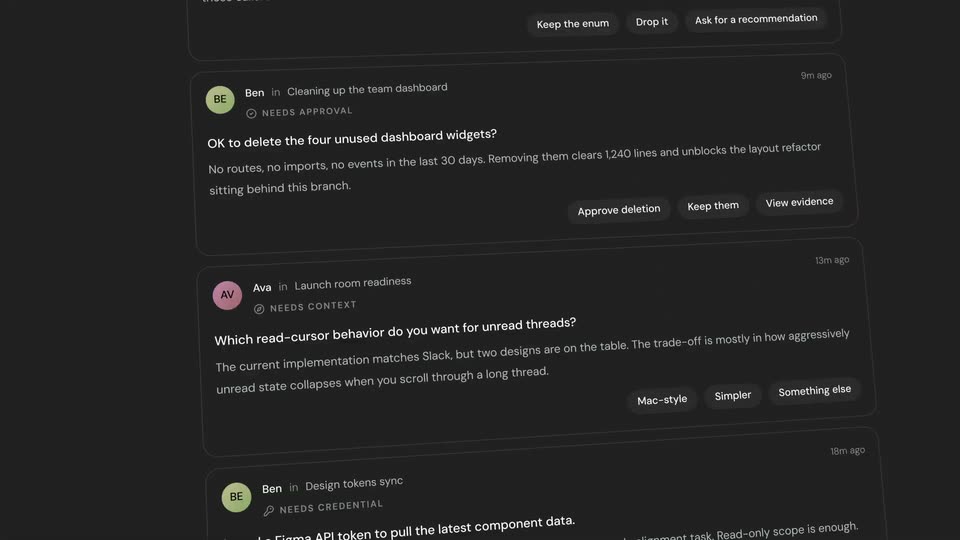
A dark app screen shows a large 'Decisions' label centered over a dimmed list; the view tilts into 3D perspective, then flattens to a scrolling list of decision cards. A hand cursor hovers over a button on one card.
On-screen text: “Decisions”
Techniques: Kinetic type, 3D mockup, UI zoom, Cursor demo
Camera: Push in
On a dark teal field a dimmed chat window sits behind a centered modal that scales in. The shield-titled Port access dialog slides its text in while a white hand cursor glides right and presses the white Approve button.
Techniques: Cursor demo
Camera: Pull out
A dimmed chat and terminal interface sits in the background while three approval cards pop in over it, each with a title, prompt and action buttons; a white hand cursor taps Approve, then Redirect, then Dark launch.
Techniques: Cursor demo
Camera: Push in
A dimmed chat interface fills the frame behind a foreground modal titled Pick a rollout strategy, listing three buttons. A white hand cursor hovers over the first button, then the camera pulls back to widen the view as the cursor drifts to the lower right.
Techniques: Cursor demo, UI zoom
Camera: Static
A darkened chat screen zooms toward a single message, revealing a man driving a car in the footage playing behind the translucent interface.
Techniques: UI zoom
Camera: Push in
A man drives a car, talking and gesturing to the camera as the vehicle moves past houses. On the left, a teal cloud logo and the white serif headline appear line by line, followed by three small colored circular icons.
On-screen text: “Direct your agents from anywhere”
Techniques: Kinetic type
Camera: Push in
A man in a grey polo sits in the driver's seat of a car, gesturing with both hands as he speaks. A smartphone app screen titled Decisions scales in on the right, listing pending decisions with avatars and action buttons.
Camera: Static
A man in a grey shirt sits in the driver's seat, gesturing with both hands toward a floating 3D phone on the right. The phone shows a dark Decisions list, then the frame zooms into the interface to isolate the Ava decision card.
Techniques: 3D mockup, UI zoom
Camera: Static
A dark decision-card interface, at first overlaid on a dim car interior with a seated person, tilts into full 3D perspective against a dark green field as a second panel drifts in behind it.
Techniques: 3D mockup
Camera: Push in
Tilted chat and code windows drift through a dark teal 3D space, slowly rotating as the viewpoint pans past them. A large white serif caption builds word by word to read 'You're not just coding anymore', then swaps to 'You're orchestrating'.
On-screen text: “You're not just coding anymore”, “You're orchestrating”
Techniques: Kinetic type, 3D mockup, Parallax
Camera: Pull out
Overlapping app windows, chat threads and a project board tilt in 3D perspective on a near-black background, drifting slowly. Centered, the headline reads You're orchestrating, then a second line, an entire AI workforce, fades in below it.
On-screen text: “You're orchestrating”, “an entire AI workforce”
Techniques: 3D mockup, Kinetic type
Camera: Static
A man in a car's driver's seat holds a coffee cup and gestures while speaking to the camera. Teal circular icons with white line symbols float and drift around him, some blurred in the foreground. A dark interface panel rises along the bottom edge.
On-screen text: “You're orchestrating”, “Roc”, “pockage in the description (before and wftar)”, “an entire AI workforce”
Techniques: Particles
Camera: Pull out
A dark chat interface slides up from the bottom edge into frame against a teal gradient. The left sidebar lists channels and the main pane shows the user-experience channel header with a message from Gabriel.
Camera: Static
A dark collaboration app interface floats in 3D perspective against a teal gradient, its left sidebar listing channels and its main panel showing a message thread. The window eases slightly smaller over the shot.
Techniques: 3D mockup
Camera: Pull out
A dark chat interface sits centered in a black void as circular avatar photos and colored chat-bubble icons drift around it at varying depths. A white serif headline reads Human-Agent Collaboration along the bottom edge while the window brightens from dim to full.
On-screen text: “Human-Agent Collaboration”
Techniques: Parallax
Camera: Static
A dark chat interface window floats in a black-green void, ringed by drifting chat-icon badges and two human avatars with green presence dots, all sliding at different speeds. A large white serif headline stays locked in the foreground.
On-screen text: “Multiplayer”, “Human-Agent Collaboration”
Techniques: Parallax
Camera: Static
A dark Activity feed fills the frame, its header and filter tabs in close-up, then the view pulls back to reveal the full message list and the channel sidebar. The flat interface tilts into a 3D perspective against a teal backdrop as new activity rows slide in.
Techniques: UI zoom, 3D mockup
Camera: Pull out
A user avatar labeled You and the teal Linzumi logo sit on a dark teal field, joined by a dashed line with a counter climbing from 83 to 800 Active Agents. Purple chat-bubble badges pop in and multiply into a radial swarm as the camera pulls back.
On-screen text: “You”, “Linzumi”, “83 Active Agents”, “Mention in wkandan-bug-reports”
Camera: Pull out
A starburst of purple agent icons surrounds a “You” avatar and the teal Linzumi logo. The camera pushes in as a green counter between them ticks from 934 to 964 agents.
On-screen text: “You”, “Linzumi”, “934 agents”, “964 agents”
Camera: Push in
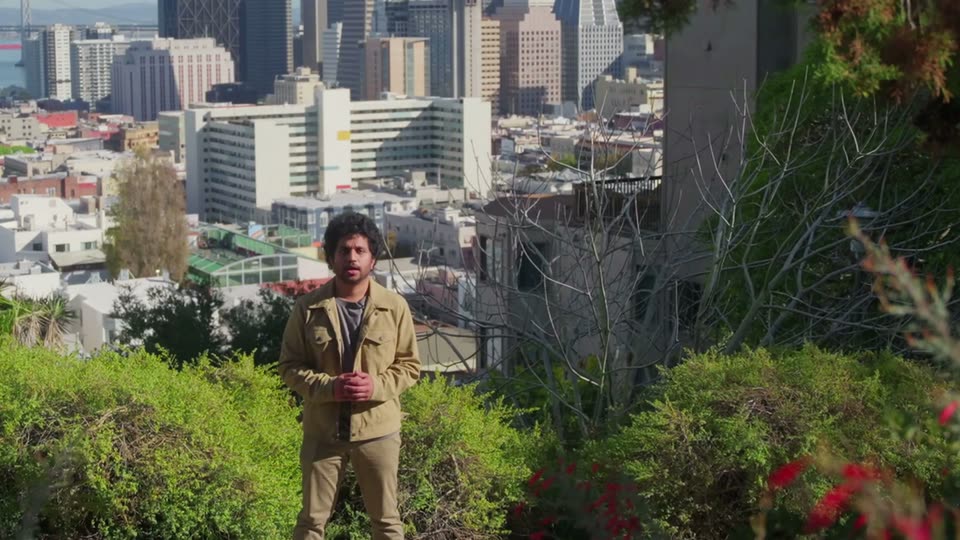
A man in a gray shirt sits on a rocky outcrop above a hazy city skyline, gesturing as he speaks. A white serif headline builds line by line on the left while the camera drifts right; a white circular logo with a cloud and mouse pops in at the end.
On-screen text: “CEO”, “of your own”, “10,000 Agent”, “Company”
Techniques: Kinetic type
Camera: Push in
Over a dimmed, blurred chat interface, the white Linzumi mark, a circle holding a cloud and a rabbit, scales up at center while the serif wordmark Linzumi resolves to its right.
On-screen text: “Linzumi”
Camera: Static
A dimmed chat interface sits in the background while the white Linzumi cloud logo and serif wordmark hold center stage. The lockup scales down and the teal Try it now button settles into the middle as the URL anchors the bottom.
On-screen text: “Linzumi”, “Try it now →”, “linzumi.com”
Camera: Static
A dimmed, blurred chat interface fills the background. Centered over it, the white Linzumi cloud-and-creature logo sits beside a large white serif wordmark. A teal Try it now button and the teal linzumi.com URL hold below, all static.
On-screen text: “Linzumi”, “Try it now →”, “linzumi.com”
Camera: Static