0:18

SideShift - LAUNCH ALERT: NEVER PAY FOR A BOTTED VIEW AGAIN. Bot Detection is no
SideShift · Oct 2026
Loom’s 0:55 launch film runs 23 scenes, about 2.4 s each. The product shows up at 0:14 and 1 feature is revealed. The call to action lands at 0:46 (83% in), over a voiceover. The piece cuts between a live-action presenter and a pale blue grid canvas, where UI cards slide, swap, and tilt in 3D while hand-drawn blue annotations mark the feedback. Pacing is steady and conversational, with the presenter's on-camera beats bookending the demo and a clean monospace end card closing the loop.
Is this your launch? to your site or press kit.
SideShift · Oct 2026
Grade · Fintech · Feb 2026
Simular AI · Nov 2026
Films whose music sounds like this one, voice left out
Atlassian · Modern electronic
Canva · Upbeat electronic dance music
Organizely · Upbeat corporate electronic
A man in a blue jacket and white round glasses holds a small black rounded object near his chest and gestures while talking to camera in a bright living room. The shot opens blurred and tight, then settles into a steady medium frame as a name caption and subtitles appear.
On-screen text: “I just turned a 30-second Loom”, “Axel Sooriah”, “Product Management Evangelist”, “Atlassian”, “into context for my AI agent without typing a single bullet.”, “Here's the setup.”
Camera: Pull out
A man in white round glasses holds a small component between his fingers in a sunlit home interior. A light-blue grid panel then wipes across the frame from the right, covering him and leaving a white box at the edge.
On-screen text: “Here's the setup.”
Techniques: Masking
Camera: Static
A white document card on a light blue grid fills in with a heading, a paragraph, and a three-column icon table. A yellow outline highlights the PNG column. A black caption box with white text sits at the bottom.
On-screen text: “Our design doc says one thing,”
Camera: Static
A design doc card with a yellow-highlighted icon table holds the left; a browser card of the floating-homes site slides in on the right. A black caption bar at the bottom swaps its line.
On-screen text: “Our design doc says one thing,”, “the build says something else.”
Techniques: Split screen
Camera: Static
On a pale blue grid, a design doc of outline property icons sits left of a browser window showing a floating-homes site, a dark hashtag mark between them. A black caption bar at the bottom swaps its white text as the clip runs.
On-screen text: “the build says something else.”, “Normally, that's screenshots,”
Techniques: Split screen
Camera: Push in
On a pale blue grid, three interface windows, a Figma icon sheet, a browser view of a floating-homes site with a chat panel, and a Slack-style thread, slide to new positions. A black caption pill at the bottom follows the voiceover.
On-screen text: “Normally, that's screenshots,”, “a Slack thread, then a ticket.”
Camera: Static
Four interface panels (a design doc, a Slack thread, a ticket, and a property listing page) sit on a light blue grid and slide into a two-by-two layout while the ticket title and description type out. A black caption bar at the bottom swaps its line.
On-screen text: “a Slack thread, then a ticket.”, “It's a massive context switch.”
Techniques: Split screen
Camera: Push in
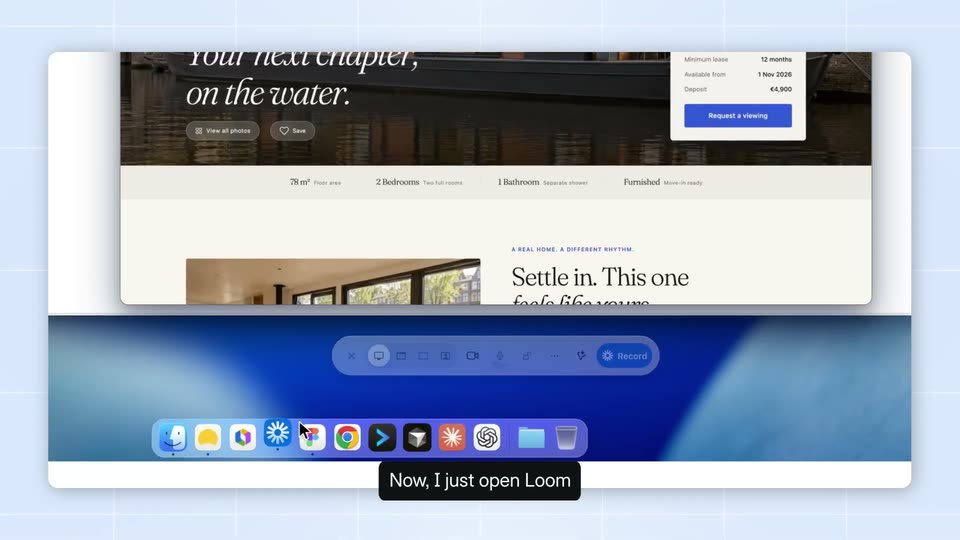
A desktop screen shows stacked property-listing windows over a blue wallpaper. The view zooms in as the cursor moves down to the dock and clicks the Loom icon.
On-screen text: “It's a web page to edit.”, “Now, I just open Loom”
Techniques: UI zoom, Cursor demo
Camera: Push in
A macOS screen shows a real-estate listing in a browser over a blue desktop and a dock. A floating toolbar hovers in the middle; a cursor clicks the Record for agent button, which lights up and starts a red 0:00 timer.
On-screen text: “Now I just open Loom”, “and hit Record for Agent.”
Techniques: Cursor demo
Camera: Pan
A browser window with a houseboat rental site sits on a light blue grid desktop, angled in 3D. It rotates flat as the view zooms into the page, and a blue hand-drawn circle marks the Request a viewing button while a cursor hovers the record bar.
On-screen text: “and hit Record for Agent.”, “I'm briefing a teammate.”, “This button should be red and say Bookings.”
Techniques: 3D mockup, Cursor demo, UI zoom
Camera: Push in
A flat rental-listing mockup on a pale blue grid gets hand-drawn annotations: a blue circle around the CTA button, then a blue arrow drawing down the right edge as the hero image stretches taller. Black caption bubbles at the bottom quote the feedback.
On-screen text: “This button should be red”, “The hero is too tall,”, “and, ”
Camera: Push in
A 3D-tilted mockup of a canal-houses real estate site floats on a blue grid canvas, marked with blue dimension arrows and hand-drawn circles around the request button. The page scrolls to reveal listing stats as a black caption box sits at the bottom.
On-screen text: “and, “These stats need the icons from our design doc.””
Techniques: 3D mockup
Camera: Pull out
A flat browser window shows a real estate listing with blue hand-drawn annotations circling the stats row and the viewing button, plus a down arrow. A Loom recording bar with a red timer sits below, and a black caption box at the bottom shows the speaker's words, switching text mid-scene.
On-screen text: “and, “These stats need the icons from our design doc.””, “Loom picks up what I say”
Camera: Pull out
A white document card with a property icons table sits on a blue grid canvas. A hand-drawn blue circle is sketched around the table, then the view zooms out to reveal the card as a window inside a larger browser window.
On-screen text: “looms up what I say”, “and what's on my screen”, “and turns it into a prompt.”
Techniques: UI zoom
Camera: Pull out
A 3D-tilted app mockup on a pale blue grid shows a video thumbnail beside an agent prompt panel. A cursor moves to the Send to agent button and a dropdown of AI tools opens, while a black caption at the bottom swaps from the first line to the tool names.
On-screen text: “Then I hand it to my agent,”, “Claude Code, Cursor, Codex, Figma Make, whatever you use.”
Techniques: 3D mockup, Cursor demo
Camera: Push in
A Figma window showing a canal-house rental page scales up to fill the frame over a pale blue grid. A black caption box listing agent names stays pinned at the bottom throughout.
On-screen text: “Claude Code, Cursor, Codex, Figma Make, whatever you use.”
Camera: Pull out
A design-tool window shows an AI chat panel beside a live preview of a houseboat listing page. The chat fills with checkmarks and a change list while the preview's button flips from blue to red. The frame then pushes down onto a selected facts band.
On-screen text: “Claude Code, Cursor, Codex, Figma Make, whatever you use.”, “Your agent can pick up your”, “changes straight away”, “and work on the next iteration.”
Techniques: UI zoom
Camera: Static
A white card on a grid pairs a Record for agent badge with a headline swapping from Ship a UI change to Prototype an idea. Its browser mockup cuts from a floating-homes site to a booking form with a red Bookings button. A black caption pill stays locked below.
On-screen text: “With Record for agent, ship a UI change”, “Ship a UI change”, “Prototype an idea”
Camera: Static
A 3D card stack rests on a light grid. The front card shows an agent prompt list, then its content swaps to a generated spec with a goal and bulleted requirements. A black caption box sits at the bottom.
On-screen text: “prototype an idea, or create a spec.”
Techniques: 3D mockup
Camera: Static
A white spec document card, titled Spec: Listing page updates, sits centered on a pale grid. It shrinks and drifts up, blurring, as a man in a blue shirt emerges behind it. A black caption reads prototype an idea, or create a spec, then Stop typing your prompts.
On-screen text: “prototype an idea, or create a spec.”, “Stop typing your prompts.”
Camera: Pan
A man in a blue jacket and white round glasses stands in a bright living room, holding a small lavalier microphone and gesturing as he speaks to the camera. Subtitles appear centered at the bottom of the locked-off frame.
On-screen text: “Stop typing your prompts.”, “Start showing them.”
Camera: Push in
A man in white-framed glasses holds a fuzzy lavalier mic to his chest and speaks to camera in a bright room with shelves and plants. White captions in a black pill appear at the bottom, then the shot cuts to a plain off-white frame.
On-screen text: “Start showing them.”, “Loom Record for Agent is in open beta now.”, “Try it today.”
Camera: Pull out
A light gray end card holds the centered Atlassian hexagon logo, the ATLASSIAN wordmark, the product name Rovo, and a monospace URL. All elements fade in from low opacity to full over the first second, then hold locked off.
On-screen text: “Rovo”, “atlassian.com/loom-for-agents”
Camera: Static