1:17
Explore
LFM-Audio-1.5B Release Video
Liquid AI · Sep 2025 · 2:00 · Full motion · AI-annotated
- Length
- 2:00
- Scenes
- 30 · 4.0 s avg
- Product on screen
- 0:00
- Features shown
- 5
- Voiceover
- Yes
- Views
- 3.1K on YouTube
as of November 28, 2026
00:00:00 / 02:00:10
- Length
- 2:00
- Scenes
- 30 · 4.0 s avg
- Product on screen
- 0:00
- Features shown
- 5
- Voiceover
- Yes
- Views
- 3.1K on YouTube
as of November 28, 2026
Liquid AI’s 2:00 launch film runs 30 scenes, about 4.0 s each. The product is on screen from the first frame and 5 features are revealed. There is no explicit call to action; a voiceover carries the film. The video is built as a five-feature tour with a fixed left-hand feature menu that bolds the active topic, each section shifting the pastel gradient hue and alternating between 3D device mockups and flat 2D chat or pipeline graphics. Its signature moves are the slow drifting gradient, the pulsing center audio waveform, the line-by-line typing of transcripts, and the closing radial burst of feature labels around the droplet logo.
No filming indicatedEstimated needs: 2 capture groups — your screens or recordings · 1 official logo — reused across the film · 9 graphic passages — draw or supply · 8 3D passages — build or supply
Is this your launch? to your site or press kit.
More like this


Similar soundtrack
Films whose music sounds like this one, voice left out
0:36
Best SaaS Product Video | AutoHDR
AutoHDR · Upbeat electronic
3:02
Kesava Kirupa Dinakaran - Today, we’re excited to introduce @luminai Topology. In healthcare,
Luminai · Modern corporate electronic
0:55
Cohere - Introducing North Automations Use plain language to design automated
North Automations · Upbeat corporate electronic
LFM-Audio-1.5B Release Video, scene by scene
· 30 scenes as text
01 · Product intro · 0:00–0:03
A soft pastel gradient of pink, purple and orange drifts slowly across the frame while the black text INTRODUCING LFM2-AUDIO stays locked in the center.
On-screen text: “INTRODUCING LFM2-AUDIO”
Camera: Static
02 · Feature reveal · 0:03–0:04
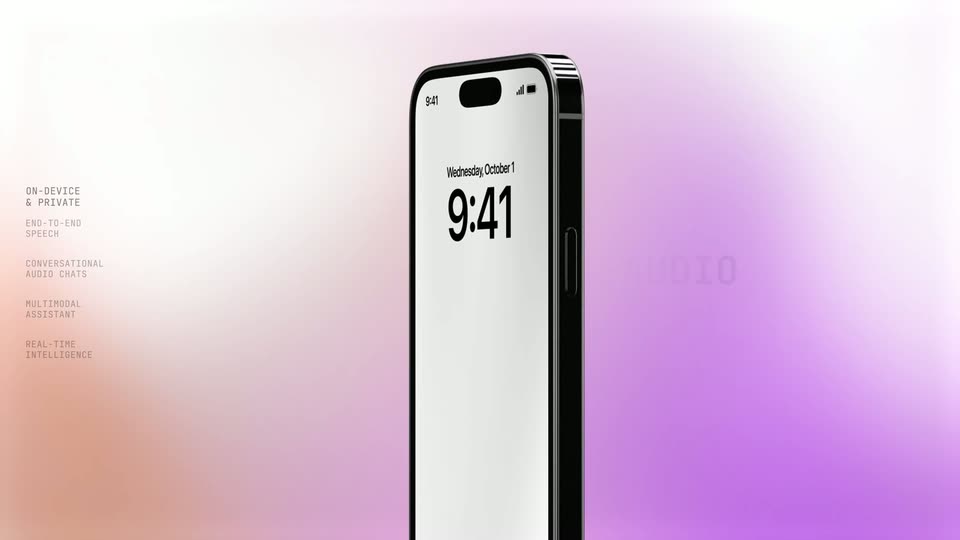
A soft white-to-purple gradient holds the centered title INTRODUCING LFM2-AUDIO. The title fades out as a 3D phone mockup settles into the center on a lock screen, while a vertical feature list fades in along the left edge.
On-screen text: “INTRODUCING LFM2-AUDIO”, “ON-DEVICE & PRIVATE”, “END-TO-END SPEECH”, “CONVERSATIONAL AUDIO CHATS”, “MULTIMODAL ASSISTANT”, “REAL-TIME INTELLIGENCE”
Techniques: 3D mockup
Camera: Static
03 · Feature reveal · 0:04–0:05
A black smartphone hovers at a slight angle on a pale gray backdrop, its lock screen reading 9:41 and Wednesday, October 1. The phone eases into a more frontal tilt beside a static black headline and four gray feature lines fixed on the left.
On-screen text: “ON-DEVICE & PRIVATE”, “END-TO-END SPEECH”, “CONVERSATIONAL AUDIO CHATS”, “MULTIMODAL ASSISTANT”, “REAL-TIME INTELLIGENCE”
Techniques: 3D mockup
Camera: Static
04 · Feature reveal · 0:05–0:09
On a light gray backdrop, a 3D iPhone mockup shows the Control Center; the panel fades in as the airplane-mode tile turns orange, then the display switches to the lock screen while the device scales down to full view. Left-aligned caption text stays static.
On-screen text: “ON-DEVICE & PRIVATE”, “END-TO-END SPEECH”, “CONVERSATIONAL AUDIO CHATS”, “MULTIMODAL ASSISTANT”, “REAL-TIME INTELLIGENCE”
Techniques: 3D mockup
Camera: Static
05 · Feature reveal · 0:09–0:10
A 3D iPhone lock screen sits on a soft purple gradient beside a left-side feature menu. It cuts to a flat pipeline diagram: a waveform box, a speech-to-text box, and a text question, with the menu item bolding to the active topic.
On-screen text: “ON-DEVICE & PRIVATE”, “END-TO-END SPEECH”, “CONVERSATIONAL AUDIO CHATS”, “MULTIMODAL ASSISTANT”, “REAL-TIME INTELLIGENCE”, “OTHER AUDIO SOLUTIONS PIPELINE MANY MODELS TOGETHER IN SEQUENCE”, “SPEECH TO TEXT”, “TEXT QUESTION”, “WHAT IS THE CAPITAL OF FRANCE?”
Techniques: 3D mockup
Camera: Static
06 · Feature reveal · 0:10–0:15
A lavender gradient carries the headline 'OTHER AUDIO SOLUTIONS PIPELINE / MANY MODELS TOGETHER IN SEQUENCE'. A row of seven boxes assembles left to right, linking waveform, speech to text, text question, LLM, text answer, text to speech, waveform. Below, '× Slow', '× Expensive' and '× Limited' appear in turn.
On-screen text: “OTHER AUDIO SOLUTIONS PIPELINE”, “MANY MODELS TOGETHER IN SEQUENCE”, “ON-DEVICE & PRIVATE”, “END-TO-END SPEECH”, “CONVERSATIONAL AUDIO CHATS”, “MULTIMODAL ASSISTANT”, “REAL-TIME INTELLIGENCE”, “SPEECH TO TEXT”, “TEXT QUESTION”, “WHAT IS THE CAPITAL OF FRANCE? (WHAT IS THE CAPITAL OF FRANCE?) (WHAT IS THE CAPITAL OF FRANCE?) (WHAT IS THE CAPITAL OF FRANCE?) (WHAT IS THE CAPITAL OF FRANCE”
Techniques: Kinetic type
Camera: Static
07 · Feature reveal · 0:15–0:17
On a purple gradient, a horizontal pipeline of labeled boxes (speech to text, LLM, text to speech) sits under a two-line title, with three crossed-out drawbacks below and a feature list on the left. The diagram shrinks and dims as the large title LFM2-AUDIO fades in at center.
On-screen text: “ON-DEVICE & PRIVATE”, “END-TO-END SPEECH”, “CONVERSATIONAL AUDIO CHATS”, “MULTIMODAL ASSISTANT”, “REAL-TIME INTELLIGENCE”, “OTHER AUDIO SOLUTIONS PIPELINE”, “MANY MODELS TOGETHER IN SEQUENCE”, “x Slow”, “x Expensive”, “x Limited”
Camera: Static
08 · Feature reveal · 0:17–0:23
On a lavender gradient, an LFM2-AUDIO diagram links two text-or-audio cards with waveforms to a central white tile holding a black flame logo. Checkmark labels Fast, Expressive and Flexible appear in sequence, then the diagram fades into a full-width white audio waveform with a person icon and a caption line.
On-screen text: “LFM2-AUDIO”, “ON-DEVICE & PRIVATE”, “END-TO-END SPEECH”, “CONVERSATIONAL AUDIO CHATS”, “MULTIMODAL ASSISTANT”, “REAL-TIME INTELLIGENCE”, “TEXT OR AUDIO”, “WHAT IS THE CAPITAL OF FRANCE?”, “TEXT OR AUDIO”, “PARIS', 'Fast', 'Expressive', 'Flexible', 'Hi Lili, I wanted to introduce you to some new friends.”
Techniques: Kinetic type
Camera: Static
09 · Feature reveal · 0:23–0:24
A soft pink-to-peach gradient fills the frame while a glowing white audio waveform pulses across the center around a rounded pill and a person icon. Stacked feature labels sit at left and a caption line sits at the bottom.
On-screen text: “ON-DEVICE & PRIVATE”, “END-TO-END SPEECH”, “CONVERSATIONAL AUDIO CHATS”, “MULTIMODAL ASSISTANT”, “REAL-TIME INTELLIGENCE”, “Hi Lili, I wanted to introduce you to some new friends.”
Camera: Static
10 · Feature reveal · 0:24–0:27
On a peach gradient, a white pill in the center fills with an animated audio waveform while a person icon badge sits to its right and a horizontal waveform strip pulses behind it. Left-aligned feature labels stay fixed, and a bottom caption swaps from a greeting to a prompt.
On-screen text: “ON-DEVICE & PRIVATE”, “END-TO-END SPEECH”, “CONVERSATIONAL AUDIO CHATS”, “MULTIMODAL ASSISTANT”, “REAL-TIME INTELLIGENCE”, “Hi Lili, I wanted to introduce you to some new friends.”, “Tell us about yourself.”
Camera: Static
11 · Feature reveal · 0:27–0:28
On a soft peach gradient, a white rounded pill in the center holds an audio waveform that builds up from a flat line, beside a circular user icon. A column of monospace feature labels sits at left with a bold headline, and a caption reads at the bottom.
On-screen text: “ON-DEVICE & PRIVATE”, “END-TO-END SPEECH”, “CONVERSATIONAL AUDIO CHATS”, “MULTIMODAL ASSISTANT”, “REAL-TIME INTELLIGENCE”, “Tell us about yourself.”
Camera: Static
12 · Feature reveal · 0:28–0:42
A flat 2D layout on a peach gradient: two rounded chat bubbles with pulsing waveform lines, the lower marked by a black flame logo, the upper by a person icon. A white waveform band animates across the middle while left-side labels and bottom captions update with the voiceover.
On-screen text: “ON-DEVICE & PRIVATE”, “END-TO-END SPEECH”, “CONVERSATIONAL AUDIO CHATS”, “MULTIMODAL ASSISTANT”, “REAL-TIME INTELLIGENCE”, “Hey there, I'm Lily, your edge focused voice assistant,”, “and I'm here to chat whenever you're ready.”, “I can answer questions, give advice, and help you plan things, all right on your device.”, “What would you like to start with?”
Camera: Static
13 · Feature reveal · 0:42–0:49
A gradient background shifts from pink to purple as a 3D laptop mockup rises and straightens at center, its screen showing a PDF. The camera zooms into the document, where a cursor hovers an 'explain it' chip beside a highlighted formula. Five feature labels sit in a left column.
On-screen text: “ON-DEVICE & PRIVATE”, “END-TO-END SPEECH”, “CONVERSATIONAL AUDIO CHATS”, “MULTIMODAL ASSISTANT”, “REAL-TIME INTELLIGENCE”
Techniques: 3D mockup, UI zoom, Cursor demo
Camera: Push in
14 · Feature reveal · 0:49–0:50
A 3D tablet on the right edge shows a PDF page and slides out to the right as the gradient backdrop flattens. Floating chat bubbles hold a formula, while a logo icon and an empty input field rise into view below them; a static feature list stays fixed on the left.
On-screen text: “ON-DEVICE & PRIVATE”, “END-TO-END SPEECH”, “CONVERSATIONAL AUDIO CHATS”, “MULTIMODAL ASSISTANT”, “REAL-TIME INTELLIGENCE”
Techniques: 3D mockup
Camera: Static
15 · Feature reveal · 0:50–0:59
On a soft purple gradient, a white audio waveform pulses across the center above a pill input field, with chat bubbles on the right showing a prompt and an entropy formula. A static left column of feature labels frames the scene, and a bottom caption swaps to follow the voiceover.
On-screen text: “ON-DEVICE & PRIVATE”, “END-TO-END SPEECH”, “CONVERSATIONAL AUDIO CHATS”, “MULTIMODAL ASSISTANT”, “REAL-TIME INTELLIGENCE”, “Entropy is a measure of a system's disorder or randomness,”, “so higher entropy means more possible microstates.”, “Does that help?”
Camera: Static
16 · Feature reveal · 0:59–1:20
Voice chat mockup on a purple gradient: three pill bubbles with animated waveforms, AI logo left, user avatar right, a white waveform strip pulses across the center. Left feature list stays still, bottom subtitles swap. Ends on a fade to a blurred purple-orange gradient.
On-screen text: “ON-DEVICE & PRIVATE”, “END-TO-END SPEECH”, “CONVERSATIONAL AUDIO CHATS”, “MULTIMODAL ASSISTANT”, “REAL-TIME INTELLIGENCE”, “Can you give me an example from everyday life?”, “Sure, imagine you leave your bedroom untouched for a week.”, “Over time, dust, clutter and stray items pile up,”, “making the space feel messy and chaotic.”, “That extra mess is a clear sign of entropy,, the natural tendency for things to become more disordered.”
Camera: Static
17 · Feature reveal · 1:20–1:20
A closed laptop lies edge-on over a soft pink and purple gradient, then rotates open to reveal a dark interface with a bottom toolbar. A thin white audio waveform runs across the middle behind it, while a column of small feature labels and a bold title stays fixed at left.
On-screen text: “ON-DEVICE & PRIVATE”, “END-TO-END SPEECH”, “CONVERSATIONAL AUDIO CHATS”, “MULTIMODAL ASSISTANT”, “REAL-TIME INTELLIGENCE”
Techniques: 3D mockup
Camera: Static
18 · Feature reveal · 1:20–1:24
A laptop mockup sits centered on a pink-to-purple gradient, its screen showing a two-tile video call with one tile outlined in yellow. A monospace feature list stands on the left, an audio waveform pulses on the right, and the frame blurs out at the end.
On-screen text: “ON-DEVICE & PRIVATE”, “END-TO-END SPEECH”, “CONVERSATIONAL AUDIO CHATS”, “MULTIMODAL ASSISTANT”, “REAL-TIME INTELLIGENCE”, “Let's mark QA and UAT as immovable milestones,”
Techniques: 3D mockup
Camera: Push in
19 · Feature reveal · 1:24–1:29
A centered white card shows a live transcript typing out line by line, with an animated waveform pulsing behind it on a shifting pink and purple gradient. Static feature labels and a bold heading sit at the left; a caption at the bottom updates with the speech.
On-screen text: “ON-DEVICE & PRIVATE”, “END-TO-END SPEECH”, “CONVERSATIONAL AUDIO CHATS”, “MULTIMODAL ASSISTANT”, “REAL-TIME INTELLIGENCE”, “everything else is flexible,”, “exactly, let's set a decision checkpoint.”
Techniques: Kinetic type
Camera: Pull out
20 · Feature reveal · 1:29–1:33
Two flat product cards float on a pink-to-purple gradient: a transcription panel with a waveform and an action-item panel where Sophia's text types out line by line. Small feature labels and a bold REAL-TIME INTELLIGENCE headline anchor the left; a black caption reads the voiceover at the bottom.
On-screen text: “ON-DEVICE & PRIVATE”, “END-TO-END SPEECH”, “CONVERSATIONAL AUDIO CHATS”, “MULTIMODAL ASSISTANT”, “REAL-TIME INTELLIGENCE”, “If we don't have all specs by the end of this week,”, “we'll escalate to the client and propose trade-offs.”
Camera: Pull out
21 · Feature reveal · 1:33–1:35
Three white interface panels fade in over a pink-purple gradient, the rightmost filling with meeting status text. A left column of feature labels and a bold headline stay fixed, while a subtitle line updates at the bottom.
On-screen text: “ON-DEVICE & PRIVATE”, “END-TO-END SPEECH”, “CONVERSATIONAL AUDIO CHATS”, “MULTIMODAL ASSISTANT”, “REAL-TIME INTELLIGENCE”, “we'll escalate to the client and propose trade-offs.”, “Good call.”
Camera: Static
22 · Feature reveal · 1:35–1:37
A flat three-panel composition on a pink-to-purple gradient: a feature list and bold headline on the left, two translucent transcript cards in the middle, and a white meeting summary card on the right that fills in line by line. A caption types in at the bottom in sync with the voiceover.
On-screen text: “ON-DEVICE & PRIVATE”, “END-TO-END SPEECH”, “CONVERSATIONAL AUDIO CHATS”, “MULTIMODAL ASSISTANT”, “REAL-TIME INTELLIGENCE”, “Good call.”, “That way we're not scrambling at the last minute.”
Camera: Static
23 · Feature reveal · 1:37–1:40
On a pink-to-purple gradient, three flat panels sit side by side; the right Meeting Summary card types out its text line by line while the left holds a static monospace feature list and the bold title REAL-TIME INTELLIGENCE. A caption reads at the bottom.
On-screen text: “ON-DEVICE & PRIVATE”, “END-TO-END SPEECH”, “CONVERSATIONAL AUDIO CHATS”, “MULTIMODAL ASSISTANT”, “REAL-TIME INTELLIGENCE”, “That way we're not scrambling at the last minute.”
Techniques: Kinetic type
Camera: Static
24 · Feature reveal · 1:40–1:41
A warm orange gradient background shifts to pink as the right-hand white card fades in to full opacity. The two overlapping feature cards in the center and the left feature labels dim and recede, leaving the black headline and the summary card in focus.
On-screen text: “ON-DEVICE & PRIVATE”, “END-TO-END SPEECH”, “CONVERSATIONAL AUDIO CHATS”, “MULTIMODAL ASSISTANT”, “REAL-TIME INTELLIGENCE”
Camera: Static
25 · Feature reveal · 1:41–1:42
A pink-to-purple gradient frame holds a sharp white meeting-summary card on the right with a flame icon and body copy. On the left, a column of feature labels and a bold pixel title fade in over ghosted, blurred UI panels.
On-screen text: “ON-DEVICE & PRIVATE”, “END-TO-END SPEECH”, “CONVERSATIONAL AUDIO CHATS”, “MULTIMODAL ASSISTANT”, “REAL-TIME INTELLIGENCE”
Techniques: Kinetic type
Camera: Static
26 · Feature reveal · 1:42–1:43
Two document cards, one titled Meeting Summary and one Live Action Item Collection, float over a purple-to-orange gradient and fade out until only the gradient remains.
Camera: Static
27 · Other · 1:43–1:46
A black angular logo in a white circle sits at the center of a swirling particle cloud over an orange-to-purple gradient. Five black label boxes with white text fly in from scattered, tilted positions and settle into a radial layout around the logo.
On-screen text: “ON-DEVICE & PRIVATE”, “CONVERSATIONAL AUDIO CHATS”, “END-TO-END SPEECH”, “REAL-TIME INTELLIGENCE”, “MULTIMODAL ASSISTANT”
Techniques: Kinetic type, Particles
Camera: Pan
28 · Other · 1:46–1:50
A black droplet logo in a white circle anchors a circular particle cloud on an orange-to-purple gradient, ringed by five drifting black pill labels. Near the end the labels and circle fade, leaving the small logo mark on the gradient.
On-screen text: “ON-DEVICE & PRIVATE”, “CONVERSATIONAL AUDIO CHATS”, “END-TO-END SPEECH”, “MULTIMODAL ASSISTANT”, “REAL-TIME INTELLIGENCE”
Techniques: Particles, Parallax
Camera: Push in
29 · Outro · 1:50–1:54
The black Liquid logo, a faceted droplet mark beside the wordmark, sits centered on a soft pastel gradient. It fades in from gray to solid black while the orange and purple background blobs drift slowly.
On-screen text: “Liquid”
Camera: Static
30 · Outro · 1:54–2:00
The black Liquid wordmark and droplet mark hold centered on a soft gradient of orange, purple and pink. The logo stays locked while the blurred background colors slowly drift and shift hue.
On-screen text: “Liquid”
Camera: Static