1:13

Suno Studio – The first-ever generative audio workstation
Suno · AI · Sep 2025
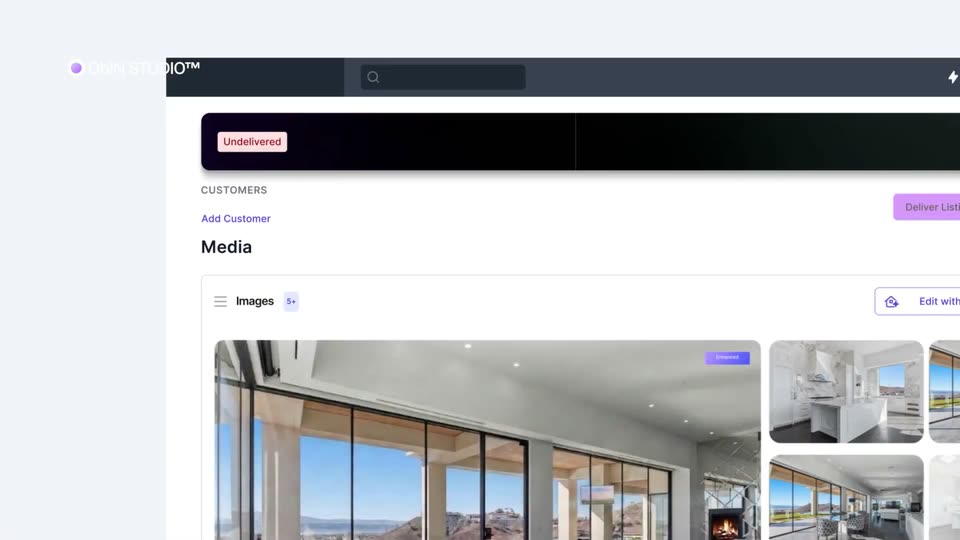
The video runs as a four-beat arc: a branded title card, the manual photographer workflow played as the problem, a continuous 3D-tilted tour of the Aryeo interface from upload through AI edits to delivery, and a hero house shot carrying the glowing wordmark. Pacing is fast at roughly 27 cuts per minute over a driving beat, with blur-to-focus reveals, a white hand cursor guiding every click, and toggle-driven edit reveals as the signature moves.
Suno · AI · Sep 2025
Luma AI · Mar 2026
Rive · Design · Jan 2026
On a black background with a teal glow at the bottom, the AutoHDR icon and wordmark scale in at center while the headline 'What separates the biggest' slides in word by word beneath it. A thin purple rectangular border draws itself around the frame.
On-screen text: “AutoHDR”, “What separates the biggest”
Techniques: Kinetic type
Camera: Pull out
A dark gradient holds a light serif headline and a stat counting up from 298 to 300 over 'Shoots/month'. Four cards labeled Booking, Shoot, Edit and Deliver sit on a diagonal, each with a dot and cyan underline, drifting left.
On-screen text: “Real Estate Photography Business”, “300+”, “Shoots/month”, “Booking”, “Shoot”, “Edit”, “Deliver”
Techniques: Kinetic type
Camera: Pull out
Black layout split into two columns. Left shows a gray headline, a large white 300+ stat, and four white step pills with cyan underlines drawing in. Right fades in a video of a photographer walking with gear, overlapped by two notification cards.
On-screen text: “Real Estate Photography Business”, “300+”, “Shoots/month”
Techniques: Split screen
Camera: Pull out
A week-view calendar interface floats on a dark teal gradient, header reading January 2026 with the Week tab highlighted in red. Event blocks for photo shoots and a talk sit in the grid. The Obi'n STUDIO logo sits top-left; the panel settles with a slight scale-down.
Camera: Pull out
A dark scheduling app interface dissolves in from a ghosted offset copy, showing a confirmed appointment with address and a time tooltip above a numbered task list. The ObiN Studio logo rests top left on a teal gradient.
On-screen text: “ObiN STUDIO™”
Camera: Static
A file manager window fades in from blur over an autumn lake backdrop, tilted in 3D perspective. A white hand cursor hovers over a photo thumbnail, enlarging it with a blue outline while a grid of image thumbnails labeled Frame loads in.
Techniques: 3D mockup, Cursor demo
Camera: Static
A white file-sharing window tilted in 3D over a soft house exterior shows a grid of interior thumbnails labeled Frame. A blue cursor moves to the link icon and clicks, opening a Copy link dialog that confirms the link was copied.
Techniques: 3D mockup, Cursor demo
Camera: Pan
A Gmail compose window floats over a blurred spreadsheet. A white 'Link Copied!' callout with a blue cursor arrow appears at the left, then clears, revealing a blue hyperlink in the email body as the cursor hovers over it.
On-screen text: “Link Copied!”
Techniques: Cursor demo
Camera: Pan
A tablet angled in 3D perspective displays the Gmail inbox, where an email from Editor titled Raw Photos for Editing sits at the top. A blue rounded frame outlines the device, and a dock at the bottom shows the active Email app and the time.
Techniques: 3D mockup
Camera: Static
A Gmail inbox interface fills the frame behind a blue notification banner showing a date and time. The banner clears, revealing the inbox, and a new email row with a photo thumbnail appears at the top. A blue cursor glides from the lower left to point at the row.
Techniques: Cursor demo
Camera: Static
A product media library screen slides in with a brief echo of its headings, then a blue cursor glides right across interior photo thumbnails as the frame settles.
Techniques: UI zoom, Cursor demo
Camera: Static
A defocused close-up of a blue interface bar racks into focus on a white pill button labeled “Edit with AI,” with a cartoon hand cursor hovering over the label as it scales slightly.
Techniques: Cursor demo
Camera: Pull out
A blue gradient toolbar with an Edit with AI pill button; a large white cartoon cursor clicks it, and the button scales up as a white panel with an Aiyoo checkbox and Upload Photos text slides in from below. The ObiN STUDIO logo sits top left.
On-screen text: “ObiN STUDIO™”
Techniques: Cursor demo, UI zoom
Camera: Static
A white 'Aryeo' upload panel with a 'Drop files here' zone and a right-hand source list sits on a dark perspective grid. The panel begins heavily blurred and pulls into focus while scaling up slightly.
Camera: Static
Three glowing rounded frames of interior renders line up on a black field; the camera punches into the middle frame, which fills the screen while the other frames shrink to thin outlines.
On-screen text: “ObiN STUDIO™”
Techniques: UI zoom
Camera: Push in
A rounded video frame on a dark teal grid shows a modern living room; a flame ignites in the fireplace as the view reframes toward it. A white status pill below reads “Adding fire in fireplace” with a check icon, and the ObiN STUDIO logo sits top-left.
Camera: Push in
A rounded card holds a 3D interior of a glass-walled modern room that pans right, a TV screen settling onto the far wall. A white pill with a checkmark and the words Adding TV screen glows below the card on a dark teal field.
Techniques: 3D mockup
Camera: Pan
A rounded video frame plays a modern house's glass door swinging open onto a green lawn and lake, a purple selection box marking the grass at first. Beneath it, a task list of edit rows with checkmarks stacks up and trims down.
Camera: Static
A flat white card with a purple border floats over a faded aerial drone shot of a coastal neighborhood. The card holds a sharper aerial photo above an Exterior Model label and a Fluffy + Wispy toggle, while the ObiN STUDIO logo sits in the top-left corner.
On-screen text: “Adding green grass”
Camera: Static
A white card floats over a washed-out backdrop of the same house. Inside the card, a render of a modern home with a lit pool crossfades from dark night to pink twilight as a toggle labeled Twilight Midnight flips from white to purple.
On-screen text: “ObiN STUDIO™”
Camera: Static
A white photo card floats over a blurred white interior. The hand reflection in the pool water vanishes as the Reflection removal toggle flips purple, the sky turns to sunset, and a small label scales in.
On-screen text: “Twilight Midnight”
Camera: Static
A tilted 3D view of the ObiN STUDIO media screen straightens and pushes in to a frontal close-up of the customer media grid and photo thumbnails. Static feature captions sit over the dark teal gradient.
On-screen text: “Exterior Model”, “Reflection removal”
Techniques: 3D mockup, UI zoom
Camera: Static
A 3D-tilted view of the ObiN STUDIO interface rotates gently as a white hand cursor glides across the panel, pointing at the Deliver Listing, Download and Add buttons.
Techniques: 3D mockup, Cursor demo
Camera: Pan
A modern two-story house is built from glowing cyan binary digits against a black night sky, mirrored in a still pool. The interior lights switch on, filling the rooms with warm orange light, while star glints flare at the pool edges.
On-screen text: “ObiN STUDIO™”
Techniques: Light sweep
Camera: Pull out
A 3D render of a warm-lit modern glass house at night sits behind a still pool that mirrors it. Blue edge lighting fades as a glowing AutoHDR title scales in above the roofline, then a Now integrated in Aryeo caption appears at the base as the camera pulls back.
On-screen text: “ObiN STUDIO™”, “AutoHDR”, “Now integrated in”, “Aryeo”
Techniques: 3D mockup, Kinetic type
Camera: Pull out