1:57
Explore
Shashank Kumar - AI agents are changing how we work and collaborate, but documents are
Razorpay · Oct 2026 · 1:17 · AI-annotated
- Length
- 1:17
- Scenes
- 26 · 3.0 s avg
- Product on screen
- 0:01
- Features shown
- 5
- Voiceover
- No
00:00:00 / 01:17:00
Razorpay’s 1:17 launch film runs 26 scenes, about 3.0 s each. The product shows up at 0:01 and 5 features are revealed. There is no explicit call to action. A launch video for SlashDocs by Razorpay built as a chain of single-word feature cards (Ship, Share, Iterate) each paired with a tight UI or terminal demo, over a soft blue gradient field. Pacing is steady at about 89 bpm with quick 3D mockup drifts, typing cursors and named collaborator pills as the recurring signature moves, closing on a crossfading attribute list and the brand lockup.
No filming indicatedEstimated needs: 6 capture groups — your screens or recordings · 4 3D passages — build or supply
Is this your launch? to your site or press kit.
More like this



Shashank Kumar - AI agents are changing how we work and collaborate, but documents are, scene by scene
· 26 scenes as text
01 · Hook · 0:00–0:01
A soft blue gradient fills the frame while the word Introducing in white scales up from a faint size to full height at the center. The camera stays locked off as the text settles into place.
On-screen text: “Introducing”
Techniques: Kinetic type
Camera: Static
02 · Product intro · 0:01–0:07
A blue gradient background holds faint binary digits and drifting white squares as the SlashDocs logo and Razorpay wordmark slide in, then the frame dissolves and a typing cursor writes the tagline letter by letter.
On-screen text: “the workspace for agentic organisations”
Techniques: Particles, Kinetic type
Camera: Static
03 · Product intro · 0:07–0:08
Centered white text reads “the workspace for agentic organisations” on a blue gradient, framed by two small white squares. A blue bar and a faint interface mockup fade in along the bottom while the frame stays locked.
On-screen text: “the workspace for”, “agentic organisations”
Camera: Static
04 · Feature reveal · 0:08–0:10
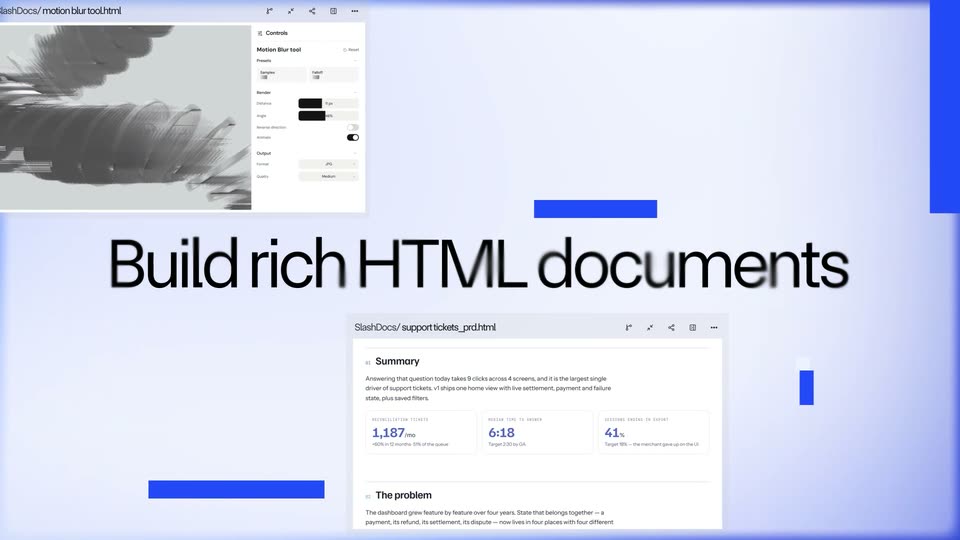
Two tilted browser mockups, a sales dashboard on top and an ASCII video generator panel below, drift across a pale lavender field in opposite directions. A large black headline, Build rich HTML documents, holds the center of the frame throughout.
On-screen text: “Build rich HTML documents”
Techniques: 3D mockup, Parallax
Camera: Push in
05 · Feature reveal · 0:10–0:11
A static headline 'with any AI agent' sits on a pale lavender field. A dark macOS terminal window slides up from the bottom, expanding to reveal a Claude Code greeting and a typed prompt line.
On-screen text: “with any AI agent”
Camera: Static
06 · Feature reveal · 0:11–0:12
A light gradient backdrop holds a two-tone headline, black “with any” and blue “AI agent you work with”, that snaps into place as a dark terminal window slides up from below. The terminal shows a Claude Code welcome line and a typed prompt.
On-screen text: “with any AI agent you work with”
Techniques: Kinetic type
Camera: Static
07 · Feature reveal · 0:12–0:13
A dark macOS terminal window slides up into place over a soft blue-white gradient. The window shows traffic-light dots, a title bar, a claude tab, and a welcome line with a typed prompt, all in monospace.
Camera: Static
08 · Feature reveal · 0:13–0:14
A dark terminal window with red, yellow and green dots sits on a light blue backdrop. The camera pans right across its tab bar, revealing claude, codex, gemini and cursor-agent tabs, while the body shows a welcome line and a user prompt.
Camera: Pan
09 · Feature reveal · 0:14–0:16
On a soft lavender gradient, the line “and many more” holds center while white UI cards, tilted in 3D, slide in from the edges and settle around it, their forms and charts softly blurred.
On-screen text: “and many more”
Techniques: 3D mockup
Camera: Static
10 · Feature reveal · 0:16–0:20
On a pale lavender field, the headline “Publish to One Hub” centers as blurred app cards sharpen and fan out into a ring. The line swaps to “where agents and humans collaborate.”, a yellow highlight slides behind “humans”, and two comment pills pop in. The collage slowly pushes in.
On-screen text: “Publish to One Hub”, “where agents and humans collaborate.”, “SNEHA'S AGENT”, “Arjun Gupta”
Techniques: Kinetic type
Camera: Pan
11 · Feature reveal · 0:20–0:22
A browser window displaying a documents interface scales up and sharpens against a light purple gradient. The page features a grid of document cards with thumbnails and titles.
Camera: Static
12 · Feature reveal · 0:22–0:23
On a black background, the white word SHIP types in letter by letter at center, flanked by two small square dots, on a locked-off frame.
On-screen text: “SHIP”
Techniques: Kinetic type
Camera: Static
13 · Feature reveal · 0:23–0:25
A dark terminal window with macOS dots sits centered over a blue floor glow. The white word SHIP holds the middle flanked by two small squares, then clears as a command line types a sentence at the bottom and the window drifts upward.
On-screen text: “SHIP”
Camera: Static
14 · Feature reveal · 0:25–0:27
A dark terminal card above a blue gradient zooms in on the line below a divider as 'and publish it to SlashDocs' types out character by character behind a blinking cursor.
Techniques: Kinetic type, UI zoom
Camera: Static
15 · Feature reveal · 0:27–0:29
A flat browser window mockup sits on a blue gradient, showing a Documents page with three document cards. The window eases upward, the third card slides in, then a blue cursor arrow moves onto it and a blue author pill pops in beside the name.
Techniques: Cursor demo
Camera: Static
16 · Feature reveal · 0:29–0:30
A documents page with a URL bar and three file cards fades and zooms out, isolating a single floating document card on a soft blue gradient. The card shows a Sales Analysis bar chart and a blue author badge with a pointer.
Techniques: UI zoom
Camera: Static
17 · Feature reveal · 0:30–0:32
A tilted 3D dashboard with sales stat cards and bar charts floats on a blue gradient. A blue cursor tagged Arjun Gupta hovers over the revenue card while the camera zooms and rotates into the top-right corner near the export button.
Techniques: 3D mockup, UI zoom
Camera: Push in
18 · Feature reveal · 0:32–0:38
A flat analytics dashboard sits beneath a centered SHARE heading. A blue cursor clicks the share icon, opens the Share document panel, types an email address, and presses Share as blue and green name tags pop up over the charts.
On-screen text: “SHARE”
Techniques: Cursor demo
Camera: Static
19 · Feature reveal · 0:38–0:42
A light-gray sales dashboard tilts in 3D perspective over a blue gradient. Blue, green and yellow named cursors glide across it, opening a Weekly dropdown and redrawing the bar charts. ITERATE fades in at the top.
On-screen text: “ITERATE”
Techniques: 3D mockup, Cursor demo
Camera: Static
20 · Feature reveal · 0:42–0:48
A dashboard page titled Your Sales Analysis sits slightly tilted on a blue gradient under the label ITERATE. A yellow Sneha Jain cursor opens a dark comment box, the view reframes onto it as a prompt is typed, and the cursor taps the send button.
On-screen text: “ITERATE”
Techniques: UI zoom, Cursor demo
Camera: Pan
21 · Feature reveal · 0:48–0:55
A flat macOS terminal window sits centered over a blurred blue documentation app, with the white headline ITERATE above it. Monospace CLI text types out line by line, pulling a tracker and resolving a comment, while the background stays still.
On-screen text: “ITERATE”
Techniques: Kinetic type
Camera: Static
22 · Feature reveal · 0:55–0:56
A black terminal window with monospaced commands fades out, defocusing into a sharp blue dashboard titled Your Sales Analysis. A blue pointer and two colored name pills pop in near the top right while the white ITERATE headline above disappears.
On-screen text: “ITERATE”
Camera: Static
23 · Feature reveal · 0:56–0:58
A light analytics dashboard sits in a browser window over a blue gradient. A blue user pill, a yellow name highlight and a dark agent tooltip float over the stat cards. The page title and the tooltip fade in during the first half second, then the layout holds still.
Camera: Static
24 · Demo · 0:58–1:03
A dark rounded panel on a blue gradient types a monospace access sentence, while a large white headline sits at the bottom. The panel lowers near the end, overlapping the headline.
On-screen text: “Collaboration has never been easier.”
Techniques: Kinetic type
Camera: Static
25 · Demo · 1:03–1:09
A dark terminal window on a soft blue gradient types out a document-sharing log line by line in white monospace, finishing with a green success block and a blinking caret.
Techniques: Kinetic type
Camera: Static
26 · Outro · 1:09–1:17
A soft blue gradient holds behind centered white text. “It’s” stays fixed as the following word crossfades from Open-source to Self-hosted to Agent-agnostic, then the line gives way to the SlashDocs wordmark, with the BY Razorpay logo fading in to its right.
On-screen text: “It's Open-source”, “It's Self-hosted”, “It's Agent-agnostic”
Techniques: Kinetic type
Camera: Static