0:38
Onur Aslan - creavit studio v4.0 is now live on product hunt! 🚀 the new version i
Creavit Studio · Nov 2026
Legora’s 1:06 launch film runs 31 scenes, about 2.2 s each. The product is on screen from the first frame and 1 feature is revealed. The call to action lands at 0:59 (90% in). The film intercuts the jazz quartet with white UI cards on soft gradient fields, using split screens and mask wipes to cut on the music's rhythm. Serif title cards open and close over live action, and the workflow demo builds step by step from a green creation field to an orange results field.
Is this your launch? to your site or press kit.
Creavit Studio · Nov 2026
Ramp · Finance · Sep 2026
Riverside · Jun 2024
Films whose music sounds like this one, voice left out
Notion · Bebop jazz
Rhem Labs · Upbeat instrumental jazz
A hazy, dimly lit stage holds a jazz band: a pianist at a grand piano, a saxophonist in tan trousers, a hatted bassist and a drummer. Blurred warm lights line the foreground. A centered white serif headline reads Introducing Workflows, then changes to The orchestration layer for legal work.
On-screen text: “Introducing Workflows”, “The orchestration layer for legal work”
Camera: Static
A woman in headphones sits at a mixing console in a dim studio, adjusting faders while racks of audio gear glow behind her. White serif text sits centered over her.
On-screen text: “The orchestration layer for legal work”
Camera: Static
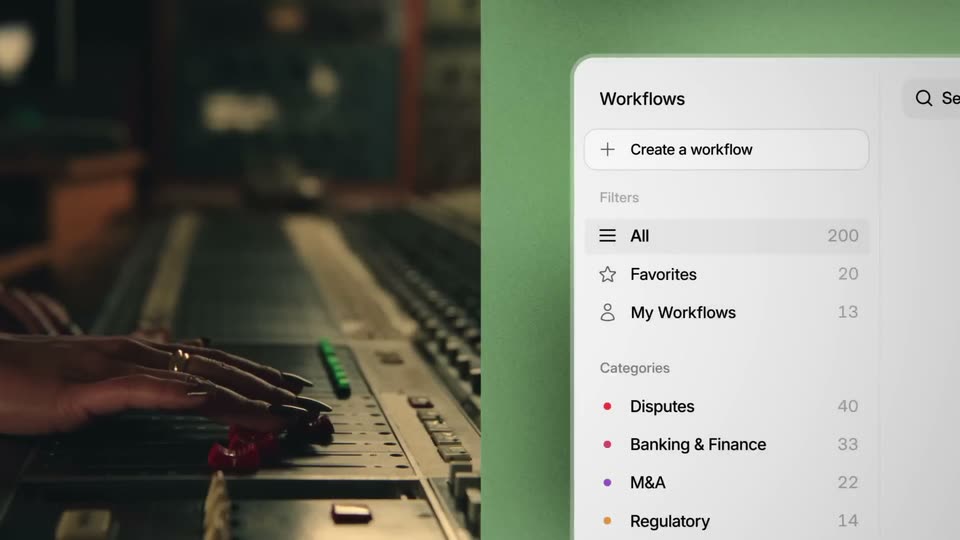
A dark close-up of hands operating an audio mixing console. The frame splits vertically, revealing a white workflows interface panel on the right against a green background.
Techniques: Split screen
Camera: Pan
A split screen shows a hand gripping a vertical pole on the left and a workflows interface on the right, where a cursor moves to the create button.
Techniques: Split screen, Cursor demo
Camera: Static
Split screen: a bassist in a green hat and jacket plays an upright bass in a dim, warm-lit room on the left; on the right, a white workflow form on a green gradient dissolves in from a list view, and its title field types out Customer Agreement Review.
Techniques: Split screen
Camera: Push in
A black cursor taps a white Add step pill on a blurred green field. A Tools panel scales open above it, listing tool options with small icons. The cursor drifts up and rests on Search Legal Sources, which highlights in gray.
Techniques: Cursor demo
Camera: Static
A white tools menu card floats on a green gradient. A cursor rests on the highlighted row Run Tabular Review. The row then slides up to the top of the card, the cursor follows, and the remaining rows fade as the list collapses to two lines.
Techniques: Cursor demo
Camera: Static
A white workflow card scales up over a blurred green background. A cursor clicks Add step, and Step 2 and Step 3 rows appear. The card then slides left into a split screen with live-action drumming on the right.
Techniques: UI zoom, Cursor demo, Split screen
Camera: Pan
A white workflow card slides in from the left over a green field, its Publish button flipping to a checkmarked Published, while the right half holds a top-down view of hands striking a snare drum.
Techniques: Split screen
Camera: Pull out
A split screen pairs a workflow UI card on a green panel at left with a top-down view of hands playing a drum kit at right. The green panel slides out left, masking open to the full drum kit.
Techniques: Split screen, Masking
Camera: Pull out
A bearded man in a dark beanie and glasses plays drums in a dim, warm-lit room. He strikes a cymbal on the left with one stick while holding the other raised, captured in a medium shot.
Camera: Push in
A saxophonist plays in a dark, hazy room lit by one overhead spotlight. The right half of the frame wipes open to a white panel holding a UI card with a play icon and a user row, forming a split screen.
Techniques: Split screen
Camera: Pan
Split screen: a saxophonist plays in a dim room on the left while white UI cards slide left across a beige backdrop on the right. The Customer Agreement Review card scales up to center, then a Use Workflow card fades in as the left panel narrows.
Techniques: Split screen, UI zoom
Camera: Static
A white workflow panel floats over a blurred tan background. A cursor drops a stack of file chips into the Files row, which compress into labeled tags with a +49 counter, then a dark Run workflow button slides in below as the cursor rests on it.
Techniques: Cursor demo
Camera: Pan
A split screen shows a workflow panel on the left, its title and file tabs sliding into place, while the right holds a top-down shot of a bald man playing a grand piano.
Techniques: Split screen
Camera: Push in
Overhead locked-off shot of a bald man in a brown shirt playing a black grand piano in dim warm light. His hands move across the keys while a small white interface card at the left edge slides out of frame.
Camera: Push in
A bald man in a dark sweater smiles in profile, rim-lit by warm backlight against a dim, hazy background. The wordmark SHINWA scales in over the locked-off shot.
On-screen text: “SHINWA”
Camera: Static
A white Customer Agreement Review workflow card on an orange gradient grows downward as its steps check off, then tag chips and a data table slide in, filling with document rows and green No badges. The Arc logo sits below the card.
Camera: Pull out
A white rounded table card floats on an orange gradient. Columns read Document, Change of control, Effective date, Limitation of liability, Governing law. Rows fade in from top to bottom, green and red pills marking Yes or No. A small circular spinner sits near the lower middle.
Camera: Static
A person in a green jacket and red trousers bends forward, holding a small red object in one hand, face hidden behind a patterned overlay. A large dark round hat swings across the frame in heavy motion blur, passing in front of the subject.
Camera: Pull out
Close-up of hands playing a piano in near-darkness. Warm low-key light catches the fingers as they press the keys, and a faint sign reading MOUNTAIN & SONS blurs in the background. Shallow focus keeps the hands sharp while the keyboard falls soft.
Camera: Push in
A tilted 3D mockup of a legal-review app floats on an orange gradient. The left panel builds a workflow list and a report where findings type out line by line; the right panel keeps a static table of documents with green and red status pills.
Techniques: 3D mockup
Camera: Static
An app UI with a workflow panel and a document list opens; the panels slide apart and a white report card settles on the left, its findings scrolling from item one to five, while a woman handling gold bars plays on the right.
Techniques: Split screen
Camera: Pull out
A close-up of a man with long hair plays a brass saxophone, cheeks puffed and eyes half closed. A warm backlight rims his hair and face against a dark, hazy wall while his head sways slightly.
Camera: Static
Overhead top-down view of a red and white drum kit in warm dim light. A drummer's hands enter from below, striking the snare, toms and a large cymbal with wooden sticks. The framing stays fixed above the kit as the hands move in a steady rhythm.
Camera: Pull out
A high-angle wide shot shows a jazz quartet in a dark room: a pianist at a grand piano, a drummer, a standing saxophonist, and an upright bassist. Slanted warm light cuts across the floor, casting long shadows. The camera drifts slowly.
Camera: Pull out
A split screen shows a white report card on a peach gradient on the left, where dense body text collapses and the title Key Findings and Recommendations slides in, while a band plays on a dim stage on the right. A cursor rests on the Send button.
Techniques: Kinetic type, Cursor demo, Split screen, Morph
Camera: Static
Split screen: a white report card reading Key Findings and Recommendations with a Sent pill slides left off an orange gradient, while a band plays on a dimly lit stage on the right.
Techniques: Split screen
Camera: Pan
A jazz quartet plays on a hazy stage lit by a single overhead beam, seen through a row of blurred warm lights in the foreground. The saxophonist stands center while the pianist, bassist and drummer hold their spots, the frame staying still.
Camera: Static
A centered dark serif headline on a beige field; the last word fades in, then the line slides left as 'legora.com' and a small dark flower mark appear, then it all fades out.
On-screen text: “Let your legal work flow”, “legora.com”
Techniques: Kinetic type
Camera: Static
On a flat beige field, a small black five-petal flower mark holds left of center while the black serif word legora.com holds right of center. The locked-off frame stays perfectly still for the whole shot.
On-screen text: “legora.com”
Camera: Static