2:03
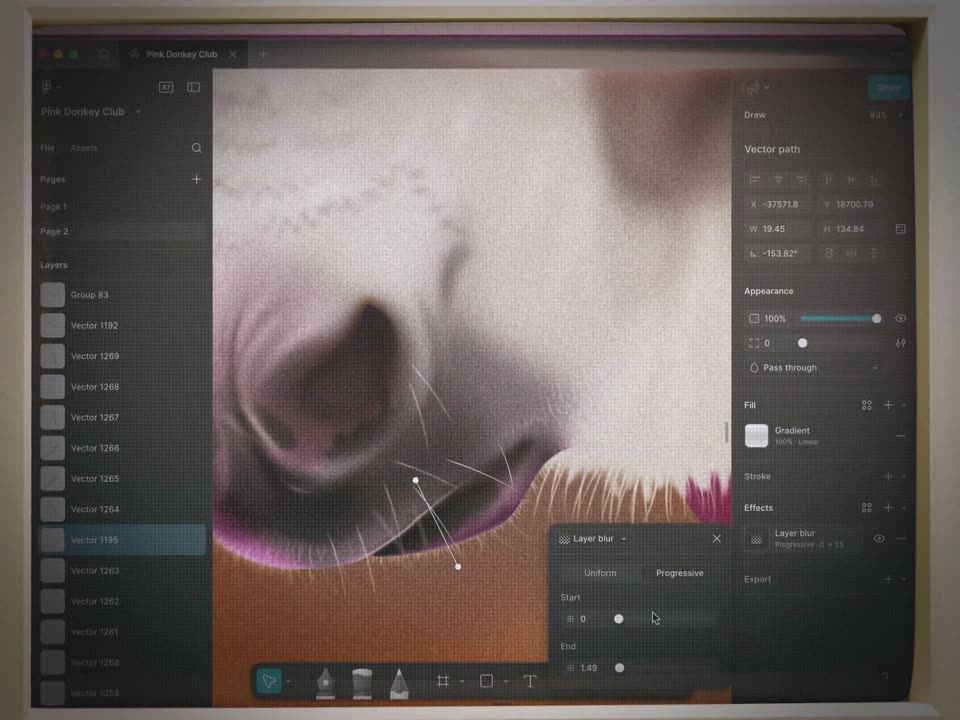

Figma - PSA: Don’t let your loved ones be the last to know about Figma Draw #
Figma · Design · May 2025
Kite · Aug 2023 · 0:59 · Full motion · AI-annotated
Kite’s 0:59 launch film runs 39 scenes, about 1.5 s each. The product shows up at 0:09 and 4 features are revealed. The call to action lands at 0:56 (94% in). The video stitches full-frame gradient title cards that build one sentence across cuts with 3D-tilted device mockups that push and pull over the editor and the demo app. Signature moves: scale-in headlines with a slight overshoot, hard flips between electric blue and coral gradients, and camera moves on tilted screens to sell the world-premiere feel.
Is this your launch? to your site or press kit.
Figma · Design · May 2025
Samsung · Nov 2026
Wondering · Consumer · Jul 2026
Films whose music sounds like this one, voice left out
Strawberry · Electronic dance music with house, nu-disco, and electro influences
Moonshot AI · Modern funk, nu-disco, and electro house
Fireflies · Funk, Disco, Electronic Dance
A solid orange gradient fills the frame as the white headline Hey Product Hunt scales up from a small, faint size to full opacity in the center. The camera stays locked off.
On-screen text: “Hey Product Hunt”
Techniques: Kinetic type
Camera: Static
A pink to orange gradient background holds the white text “So you launched...” in the center, which fades in from a low opacity state to full visibility.
On-screen text: “So you launched...”
Techniques: Kinetic type
Camera: Static
On a blue gradient, white text scales in and out, then a second line holds and fades. A tilted 3D Chrome browser mockup of the Product Hunt page slides up from the bottom edge and settles into frame.
On-screen text: “So you launched...”, “But getting attention is...”
Techniques: Kinetic type, 3D mockup
Camera: Static
A MacBook in 3D perspective on a blue field rotates from a tilted angle toward the camera as the Product Hunt page scrolls and a video-call window with a woman pops into the lower corner.
On-screen text: “But getting attention is...”
Techniques: 3D mockup
Camera: Pull out
A blue gradient fills the frame while a large white lowercase word sits left of center. After the word, small dots appear one by one to form an ellipsis, then hold.
On-screen text: “tough...”
Camera: Static
A magenta-to-orange gradient fills the frame while a centered white headline fades in from transparent to full opacity, then holds on a static, locked-off shot.
On-screen text: “Let's try something new”
Camera: Static
A close-up of the app preview shows Kite on a blue gradient, then the view pulls back to reveal the full editor on a laptop, with a left panel and timeline below.
On-screen text: “Let's try something new”, “Kite”
Techniques: UI zoom
Camera: Pull out
A blue gradient fills the frame as the white headline builds word by word from the left: The, app, that, makes, your, app, look. The Kite logo then scales in. The camera stays locked off.
On-screen text: “The app that makes your app look”, “Kite”
Techniques: Kinetic type
Camera: Static
On a warm orange-to-red gradient, the lowercase word “fire” fades in large at center. A smaller line of text then slides in above it, completing the sentence.
On-screen text: “fire”, “The app that makes your app look”
Techniques: Kinetic type
Camera: Static
A blue gradient fills the frame as the centered headline fades in from dim to full light blue, then holds still.
On-screen text: “Take a screen recording”
Camera: Static
A video editor interface fills the frame. A left panel shows a grid of color swatches and a Shots settings list, a large blue preview canvas sits center, and a bottom timeline holds a blue clip, transport controls and an audio waveform. A cursor drifts from the canvas down to the Add product shot button.
Techniques: Cursor demo
Camera: Push in
A dark editing timeline shows a blue video clip above an audio waveform, with a transport bar and time ruler on top. A white cursor hovers over the 'Add product shot' button inside the clip while the playhead sits centered.
Techniques: Cursor demo
Camera: Push in
A close-up of a video editor timeline and play controls; a cursor hovers over the Add product shot button, then the view zooms out to the full laptop screen showing the editor with a blue preview and a Start recording dialog.
Techniques: Cursor demo, UI zoom
Camera: Pull out
A blue gradient background holds the white phrase Make it look centered in frame. The text starts small and faint, then scales up to full size and crisp white over the first third of the clip before holding still.
On-screen text: “Make it look”
Techniques: Kinetic type
Camera: Static
On a white background, the line like a f*ing Apple ad in black sans-serif starts faint and small, then scales up with a slight overshoot to fill the center, settling at full size while the static line Make it look holds above.
On-screen text: “Make it look”, “like a f*ing Apple ad”
Techniques: Kinetic type
Camera: Static
A blue gradient holds the white caption “in minutes” as a tilted browser window rises into frame, revealing the Flume finance page with the headline “Inbox Zero for finances”. The caption “like a f*ing Apple ad” scales in over the blue field.
On-screen text: “in minutes”, “like a f*ing Apple ad”
Techniques: 3D mockup
Camera: Static
A browser view of the flume landing page zooms out from the headline to reveal the full page with tagline, Get Started button and transaction table. The frame then holds, showing a large “in minutes” caption.
On-screen text: “in minutes”
Techniques: UI zoom
Camera: Pull out
A blue gradient field holds centered white text reading “Give every feature”, which is replaced by “a world premiere” in the second half. The frame stays locked off throughout.
On-screen text: “Give every feature”, “a world premiere”
Camera: Static
A dark Chrome window shows a finance app with a merchant detail dialog open in the center. The cursor clicks the Update button, the dialog closes, and the view zooms into the left-hand transaction list as it scrolls.
Techniques: Cursor demo, UI zoom
Camera: Push in
A dark list of transactions fills the frame with a cursor hovering mid-list, then the view zooms out to reveal the full app: a left sidebar, a search bar, and column headers above the table.
Techniques: UI zoom
Camera: Pan
A dark transactions table in a browser fills the frame, then the whole window tilts into a 3D perspective with a rounded device bezel against a solid blue background. The list of dates and merchants stays legible through the move.
Techniques: 3D mockup
Camera: Pan
A laptop in 3D perspective on a blue background shows a dark finance app. A transactions list transitions to a summary view with a large -$115.75 figure and a partial pie chart, while a cursor moves across the screen.
Techniques: 3D mockup, Cursor demo
Camera: Pull out
A dark finance dashboard on a screen tilted in 3D perspective against a blue background. A donut chart draws itself, its colored segments filling in, as the view eases from a side angle to a front view.
Techniques: 3D mockup
Camera: Static
A line of white text scales up and brightens against a static blue gradient, fading from a dim state to full opacity.
On-screen text: “with camera moves on”
Techniques: Kinetic type
Camera: Static
A diagonal pink-to-coral gradient fills the frame. The white lowercase word autopilot sits centered and stays still for the whole clip, no other element moves.
On-screen text: “autopilot”
Camera: Static
On a blue gradient background, white words flash in sequence: “autopilot”, “and”, a large centered “AI”, “well. uh.”, then “Al coming soon . . .” with trailing dots at the left.
On-screen text: “autopilot”, “and”, “AI”, “well. uh.”, “Al coming soon . . .”
Techniques: Kinetic type
Camera: Static
A dark video-editor interface zooms and pans left over a blue clip on the timeline; the play button and 38:19 timecode settle at the lower right as a project list with durations slides in from the left, the app dock visible along the bottom at first.
On-screen text: “AI coming soon . . .”
Techniques: UI zoom
Camera: Pan
A dark music library panel fills the left of the frame beside a solid blue screen. A hand cursor hovers over the purple Beat Sync button while the view reframes slightly wider to reveal the top menu bar.
Techniques: Cursor demo, UI zoom
Camera: Pan
A blue gradient field holds the phrase Everything you need at center. The line fades in and scales up from a small, faint size to full size over the second, on a locked-off frame.
On-screen text: “Everything you need”
Techniques: Kinetic type
Camera: Static
A laptop screen in 3D perspective shows a video editor with a gradient picker panel on the left and a pink preview where the word Text scales up. The timeline below holds pink clips labeled Everything you need and Text plus an audio waveform, while a date tag slides in at the bottom left.
Techniques: 3D mockup
Camera: Pan
A close-up of a video editor interface: a dark left panel lists gradient swatches under a Background section, while a purple gradient canvas on the right displays the word Text in white. A cursor hovers over a swatch and a timeline with a play button sits below. The view holds steady.
Camera: Static
A tilted screen in 3D perspective shows a dark editor panel with a gradient swatch grid beside a green canvas holding the word Text. A cursor rests on an orange swatch as the camera reframes tighter on the interface.
Techniques: 3D mockup, Cursor demo
Camera: Static
A dark product window shows a Shots panel with a gradient swatch grid and a 45° angle control, beside a coral canvas with white Text. A cursor moves from a swatch to the left sidebar as the frame pulls back slightly.
Techniques: Cursor demo
Camera: Static
A tilted tablet in 3D perspective on an orange field shows a dark editor. The left panel switches from a gradient color grid to a music library list, while large white lettering fills the orange canvas on the right.
Techniques: 3D mockup, UI zoom
Camera: Push in
A dark music library panel on the left scrolls its track list upward while a cursor hovers near the Beat Sync button. On the right, an orange panel holds a large white Text heading that slides into frame as the view reframes rightward.
Techniques: UI zoom
Camera: Static
White phrases fade and scale in one by one on a blue gradient: for studio-grade, Launch videos, Social videos, Pitch videos, Landing page videos, Demo videos, (no studio required). It ends on a cut to an editor timeline showing the blue clip on a track.
On-screen text: “for studio-grade”, “Launch videos”, “Social videos”, “Pitch videos”, “Landing page videos”, “Demo videos”, “(no studio required)”
Techniques: Kinetic type
Camera: Static
A 3D-tilted video editor sits on a blue gradient. A cursor taps the Export button, opening a dark export dialog. The view zooms in and flattens onto the dialog, ending on the blue Export video button as the cursor hovers it.
Techniques: 3D mockup, UI zoom, Cursor demo
Camera: Push in
On a pink-to-orange gradient, large white words appear one after another, centered, reading “And yeah,” then “entire.”
On-screen text: “And yeah,”, “entire”
Techniques: Kinetic type
Camera: Static
A blue gradient background fills the frame. The wordmark kite.video fades in from a dark tone to bright white at the center, then holds steady.
On-screen text: “kite.video”
Camera: Static