1:13
Explore
Kimi.ai - Say hi to OK Computer, Kimi's agent mode 🤖🎸 Your AI product & eng
Kimi · Sep 2025 · 1:02 · AI-annotated
- Length
- 1:02
- Scenes
- 32 · 2.0 s avg
- Product on screen
- 0:00
- Features shown
- 3
- Call to action
- 0:55 · 88%
- Voiceover
- No
00:00:00 / 01:02:28
Kimi’s 1:02 launch film runs 32 scenes, about 2.0 s each. The product is on screen from the first frame and 3 features are revealed. The call to action lands at 0:55 (88% in). The video opens with a retro computer boot sequence in a black void, then settles into a flat pale-gray stage where each feature is announced by a bold headline and shown as a panel that morphs from typed code into a rendered mockup. Signature moves are typewriter text, 3D-tilted cards that rotate flat toward the camera, and pixel-style branding accents that bookend the piece.
No filming indicatedEstimated needs: 3 capture groups — your screens or recordings · 1 official logo — reused across the film · 8 3D passages — build or supply
Is this your launch? to your site or press kit.
More like this
Kimi.ai - Say hi to OK Computer, Kimi's agent mode 🤖🎸 Your AI product & eng, scene by scene
· 32 scenes as text
01 · Product intro · 0:00–0:00
A 3D render of a vintage beige computer with a pixelated smiley face on its screen sits on the right. White text reading 'Introducing Kimi OK Computer' is displayed on the left against a black background.
On-screen text: “Introducing Kimi OK Computer”
Techniques: 3D mockup
Camera: Static
02 · Product intro · 0:00–0:00
A black pinstriped frame holds white monospace text that types out line by line like a terminal boot log. After a date and time, the lines naming KIMI K2 and a version tag appear, fading from dim gray to solid white.
On-screen text: “Date is Mon 22/09/2025”, “Time is 11:00”, “OK Computer - Powered by KIMI K2 Agentic Model”, “Version 0905 - Moonshot AI Experimental Build”
Techniques: Kinetic type
Camera: Static
03 · Product intro · 0:00–0:02
A beige CRT monitor sits in 3D perspective on black, its curved screen showing a retro terminal. A monospace boot log types out line by line, an ASCII logo, and a KIMI K2 boot sequence ending with Now Playing.
Techniques: 3D mockup, Kinetic type
Camera: Pull out
04 · Product intro · 0:02–0:02
A retro Macintosh sits at the center of a black 3D void, surrounded by floating windows: a dark slide titled Journey Through Deep Time, a webpage, and a 3D city view. The camera pulls back from a blurry close-up to reveal the full layout, while small white squares drift.
Techniques: Particles, 3D mockup
Camera: Static
05 · Product intro · 0:02–0:03
A vintage Macintosh sits at the center of a black 3D space as dozens of browser windows float around it at varying depths. The camera drifts forward through the field while small gray dots scatter the void.
Techniques: 3D mockup, Parallax
Camera: Pull out
06 · Product intro · 0:03–0:04
A large smiley face built from image tiles shrinks and simplifies into a small pixel logo on the left. To its right, the serif italic headline appears word by word on a plain white background.
On-screen text: “Kimi's agent mode”
Techniques: Kinetic type
Camera: Static
07 · Product intro · 0:04–0:05
A small pixelated black smiley icon sits to the left of the centered headline on a plain white background. Both the icon and the text hold completely still for the duration of the shot.
On-screen text: “Kimi's agent mode”
Camera: Static
08 · Feature reveal · 0:05–0:09
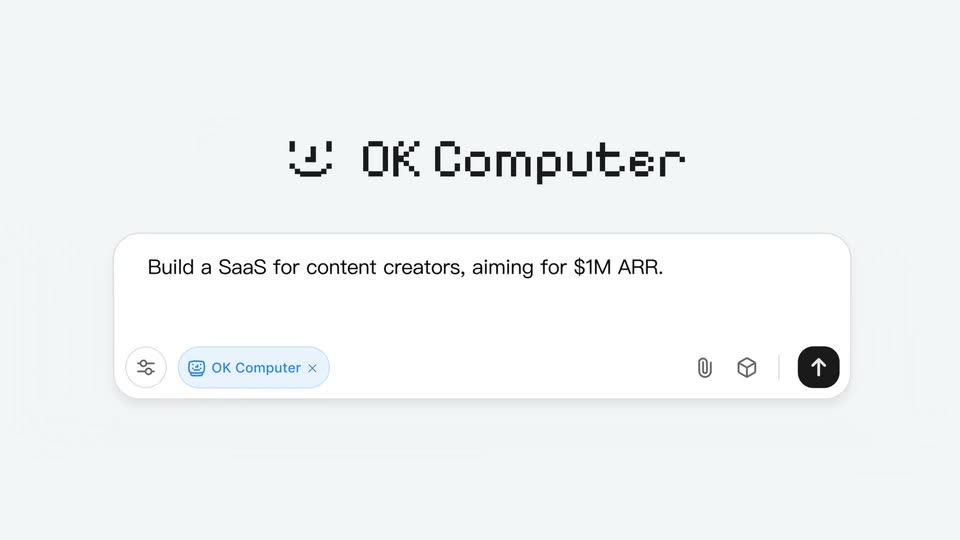
A blurred macro of the white input field pulls back to a flat front view under the pixel OK Computer logo. The prompt types out character by character, then the field morphs into a compact card reading Executing task with a pulsing green dot.
On-screen text: “Kimi's agent mode”
Techniques: UI zoom, Kinetic type, Morph
Camera: Pull out
09 · Feature reveal · 0:09–0:11
A white to-do card lists six tasks under an 'OK Computer' header on a light gray field. A toast with a retro computer icon and 'Executing task...' appears, then vanishes as the first task gets a green check. 'List To-Do First' fades in word by word on the left.
On-screen text: “List To-Do First”
Techniques: Kinetic type
Camera: Static
10 · Feature reveal · 0:11–0:15
Left: a pixel smiley logo and PM badge above the headline Write Proposals, words swapping in, with a red monospace caption below. Right: a file card types markdown code, then a white panel wipes across to reveal a tilted 3D dashboard with a content calendar.
On-screen text: “Write Proposals”, “### Component 1: Smart Calendar”
Techniques: Kinetic type, Masking, 3D mockup
Camera: Push in
11 · Feature reveal · 0:15–0:19
A split screen pairs a left label, a pixel smiley logo with a gold Strategist chip and a bold Plan Pricing title above a typing markdown snippet, with a right panel that morphs from a file editor into a browser mockup, zooming into a three-column pricing page.
On-screen text: “Strategist”, “Plan Pricing”
Techniques: Split screen, Morph, UI zoom
Camera: Static
12 · Feature reveal · 0:19–0:24
A left column pairs a pixel logo and a red Designer badge with a bold headline, while a right panel types a design file, then morphs into a rendered website with a typing headline. A blue Engineer badge appears and the panel becomes a code editor.
On-screen text: “Designer”, “Create UI”, “Typewriter animation for main headline”, “Engineer”, “Code a multi-page website”
Techniques: Kinetic type, Morph
Camera: Static
13 · Feature reveal · 0:24–0:25
On a light gray field, a pixel smiley and a blue-highlighted “Engineer” label sit above a large black headline. To the right, file-interface cards with a dark code editor stack up as new cards labeled with HTML filenames slide in behind the front card.
On-screen text: “Engineer”, “Code a multi-page website”
Camera: Static
14 · Feature reveal · 0:25–0:27
A white file-list panel on a pale gray background shows the heading All Files of the Task with a download and a close icon at the top right. The rows of HTML, JS and Markdown files, plus a folder, slide upward at offset speeds and settle into place.
Techniques: Parallax
Camera: Static
15 · Feature reveal · 0:27–0:28
The headline “Richly functional” fades in sharp at the top of a light gray background. A tilted ContentFlow AI dashboard mockup rises from the bottom and rotates flat toward the camera, revealing stat cards, charts and a calendar.
On-screen text: “Richly functional”
Techniques: 3D mockup
Camera: Static
16 · Feature reveal · 0:28–0:29
A ContentFlow AI dashboard, tilted in 3D perspective on a pale background, sits beneath the headline Richly functional. The interface shows stat cards, a line chart and a donut chart. The camera slowly pushes in on the panel.
On-screen text: “Richly functional”
Techniques: 3D mockup
Camera: Static
17 · Feature reveal · 0:29–0:31
A black-outlined phone tilts in 3D as its screen scrolls through a ContentFlow AI article, a stats card and a calendar. The words Mobile and Friendly flank the device in gray, then snap to bold black as the phone scales down.
On-screen text: “Mobile”, “Friendly”
Techniques: 3D mockup
Camera: Pull out
18 · Feature reveal · 0:31–0:35
A bold title sits above the product's white input bar on a light gray field. A green spreadsheet icon with a cursor arrow lands in the bar's center, then slides up as a red Python icon takes its place, while the file caption below switches names with each swap.
On-screen text: “Analyze Diverse Files”, “Sales Data.xlsx”, “strategy_compare.xlsx”, “equity_curve.csv”
Techniques: Cursor demo
Camera: Static
19 · Feature reveal · 0:35–0:36
A light data table of job titles and salaries scrolls upward through the frame while the centered headline fades in from low opacity to full. The rows keep moving steadily behind the static text.
On-screen text: “Process Up to 1 Million Rows of Data at Once”
Camera: Static
20 · Feature reveal · 0:36–0:43
A white analysis webpage scrolls steadily downward through metric cards, line charts and a performance table. Large black captions 'Generate charts' and 'Download source data' appear at the left and bottom edges as their sections pass.
On-screen text: “Generate charts”, “Download source data”
Camera: Pull out
21 · Feature reveal · 0:43–0:44
A slide-generation view crossfades from a mythologies title card to a Greek Mythology slide. The Draw slides heading fades in above as the body paragraph and three labeled columns type out beneath the title.
Techniques: UI zoom
Camera: Push in
22 · Feature reveal · 0:44–0:46
A pale slide under the black label “Draw slides” shows a teal panel of a robed woman beside the heading “Norse Mythology” and body copy drawing in letter by letter; the card then cuts to “Arthurian Legend” with a two-column knight list, text drawn on again.
On-screen text: “Draw slides”
Techniques: Kinetic type
Camera: Static
23 · Feature reveal · 0:46–0:46
Under the heading Draw slides, a presentation slide crossfades from a Journey to the West layout to an Arabian Nights one. The ornate illustration shifts from an oval to a circular frame while the body text types itself in line by line.
On-screen text: “Draw slides”
Techniques: Kinetic type
Camera: Static
24 · Feature reveal · 0:46–0:47
A dark Art Nouveau illustration of a robed woman with a sword and snake fills the frame. The view zooms in as a text toolbar with font and size controls appears at the top and a selection box with handles frames the white serif title.
On-screen text: “MYTHOLOGIES”, “OF THE WORLD”, “Five Eternal Stories That Shaped Human Consciousness”
Techniques: UI zoom
Camera: Push in
25 · Feature reveal · 0:47–0:49
A floating text toolbar hovers over an ornate mythological illustration. The font dropdown opens and the headline MYTHOLOGIES OF THE WORLD switches from a light serif to a heavier one, then the bold button highlights and the type thickens. The subhead stays static below.
Camera: Static
26 · Feature reveal · 0:49–0:50
A black headline “Edit online” holds above a slide-editor window. The window's left rail lists five numbered thumbnails while the main canvas displays an Art Nouveau slide titled MYTHOLOGIES OF THE WORLD with a red-haired figure. The frame is static.
On-screen text: “Edit online”
Camera: Pull out
27 · Feature reveal · 0:50–0:51
A close-up of a light toolbar showing Save, Play and a black Download button. A large white cursor arrow slides in from the bottom right and clicks Download, then a small red PowerPoint file icon pops in at the top right. The frame stays locked off.
Techniques: Cursor demo
Camera: Static
28 · Feature reveal · 0:51–0:53
A white download card with a red PowerPoint icon and file name sits top right on a light gray field, popping in with a slight scale. Below it the bold caption “Export locally” holds, then a lighter gray word “Your” slides in from the left, overlapping it.
On-screen text: “Export locally”, “Your”
Techniques: Kinetic type
Camera: Static
29 · Other · 0:53–0:55
A dark sans-serif line scales up from a small “Your”, then scrolls left across a pale background, ending on “are, AI Ops” with a light gray circle behind “AI”.
On-screen text: “Your AI product & engineering teams are, AI Ops”
Techniques: Kinetic type
Camera: Static
30 · CTA · 0:55–0:56
A light gray field holds a vertical stack of outlined “All in One” rows with one solid black row at the center. A faint caption slides out to the left, then “Try it out at kimi.com” fades in across the middle of the stack.
On-screen text: “All in One”, “Try it out at kimi.com”
Techniques: Kinetic type
Camera: Pull out
31 · CTA · 0:56–0:57
A single line of black text sits centered on a flat light-gray field, the phrase Try it out at kimi.com easing from a soft blur into a sharp, locked-off frame.
On-screen text: “Try it out at kimi.com”
Camera: Static
32 · Outro · 0:57–1:02
A pixel smiley and the 8-bit wordmark OK Computer build up letter by letter at center on a pale gray field, then lock in place. A small gray Powererd by KIMI line appears beneath.
On-screen text: “OK Computer”, “Powererd by KIMI”
Techniques: Kinetic type
Camera: Static