1:45
Explore
CapCut - Introducing CapCut Design Studio 2.0. A reimagined experience for De
CapCut · May 2026 · 1:13 · AI-annotated
- Length
- 1:13
- Scenes
- 27 · 2.7 s avg
- Product on screen
- 0:00
- Features shown
- 4
- Voiceover
- No
00:00:00 / 01:13:10
CapCut’s 1:13 launch film runs 27 scenes, about 2.7 s each. The product is on screen from the first frame and 4 features are revealed. There is no explicit call to action. The video opens with a logo sting, then chains bold headline cards that snap into cyan selection frames, each introducing one in-app feature demo in turn. Signature moves are hands manipulating fuzzy 3D objects in a white void, a teal cursor driving annotation prompts, and a wall of posters orbiting the closing line.
Footage neededEstimated needs: 5 capture groups — your screens or recordings · 1 official logo — reused across the film · 3 filmed passages — shoot, supply or replace · 1 graphic passage — draw or supply · 8 3D passages — build or supply
Is this your launch? to your site or press kit.
More like this

CapCut - Introducing CapCut Design Studio 2.0. A reimagined experience for De, scene by scene
· 27 scenes as text
01 · Product intro · 0:00–0:03
On a pale blue-gray field, the black 'Design Studio' wordmark with a small image icon sits centered, then scales up fast while a cyan '2.0' fades in beside it. The scale crops the line to 'udio 2.0' before the tagline 'The Easier Way to De' slides in from the right.
On-screen text: “Design Studio”, “2.0”, “The Easier Way to De”
Techniques: Kinetic type, Masking
Camera: Static
02 · Product intro · 0:03–0:04
A bold black headline sits centered on a light gray field. A cyan selection box with square corner handles snaps around the text, which scales up slightly, then the box disappears, leaving the enlarged line in place.
On-screen text: “The Easier Way to Design”
Techniques: Kinetic type
Camera: Static
03 · Product intro · 0:04–0:04
Dark bold headline “The Easier Way to Design” scales inside a cyan selection frame on a pale gray field, then cuts to a 3D laptop on a wooden desk, its screen showing a gridded canvas with color-tinted photo tiles and a hand on the keyboard.
On-screen text: “The Easier Way to Design”
Techniques: Kinetic type, 3D mockup
Camera: Pull out
04 · Demo · 0:04–0:05
A laptop on a wooden desk shows a white grid of colorful 3D model thumbnails that shuffle and rearrange. The right hand leaves the mouse, reaches up and taps a thumbnail on the screen.
Camera: Push in
05 · Demo · 0:05–0:06
A hand points to a green fuzzy letter A card at the center of a grid of 3D fashion renders on a white board. The A card slides as the layout shifts, revealing more character cards around it.
Camera: Push in
06 · Demo · 0:06–0:07
A green furry jacket floats in a white void. Two hands enter from the bottom corners, pinch the garment, and shrink it to a miniature between the palms. Faint dust motes drift in the background.
Techniques: Particles
Camera: Pull out
07 · Demo · 0:07–0:10
A green fuzzy 3D letter A floats on a pale gray void. Two hands enter from the corners, the letter slides to the left edge, then returns to center and grows, and a fingertip taps its middle.
On-screen text: “A”
Techniques: 3D mockup
Camera: Push in
08 · Feature reveal · 0:10–0:12
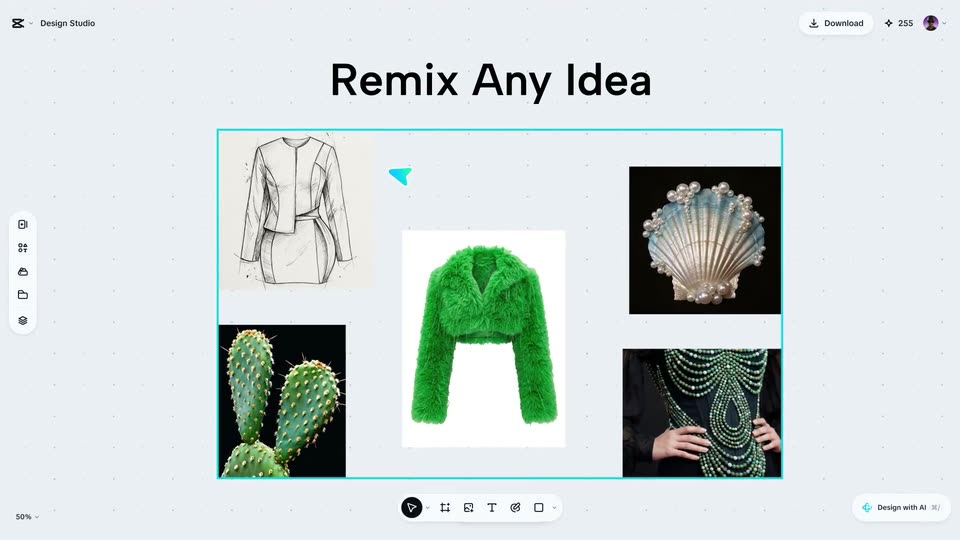
A design canvas holds five reference images (a dress sketch, a green fuzzy jacket, a pearl shell, a cactus, a beaded gown) while the headline scales in at the top. A teal selection box draws out around the group as a cursor hovers over the pieces.
On-screen text: “Remix Any Idea”
Techniques: Kinetic type, Cursor demo
Camera: Push in
09 · Feature reveal · 0:12–0:17
A faint 'Remix Any Idea' headline scales in above a dotted canvas as a cursor draws a cyan box around reference images. Numbered note badges pop in on each image, then the canvas clears into a prompt card of labeled chips and a text prompt.
On-screen text: “Remix Any Idea”
Techniques: Cursor demo
Camera: Push in
10 · Feature reveal · 0:17–0:29
A dotted design canvas shows a green fuzzy top in a cyan selection frame. A teal plus button appears; the cursor clicks it, and a row of outfit images slides in, then tilts into a 3D card carousel of green dresses, ending on a new board with a model photo.
On-screen text: “Good Vibe? Get One More”, “More Inspiration In One Click”
Techniques: UI zoom, Cursor demo, 3D mockup, Parallax
Camera: Push in
11 · Feature reveal · 0:29–0:31
A light gray dotted canvas holds a cyan selection frame. Inside, a close-up portrait of a pink-haired woman in glasses dissolves into a full-body cutout of the same figure, now in a green ruffled top, patterned skirt and silver boots, standing on white.
Camera: Static
12 · Feature reveal · 0:31–0:33
A light search card floats over a blurred standing figure. The top field reads “Creative portrait ideas” and a second field types “Cr”, then a grid of ten portrait thumbnails, one a purple leopard, loads below.
Camera: Static
13 · Feature reveal · 0:33–0:37
A design-studio canvas shows a selected model in a green jacket and purple dress morphing between a human face and a purple leopard head, with reference cards at the edges. It cuts to a hand with AI DESIGN inked on the palm beside a small model.
On-screen text: “Creative portrait ideas”, “AI DESIGN”
Techniques: Morph
Camera: Push in
14 · Feature reveal · 0:37–0:38
A vertical fashion poster of a model in a green puffer jacket and silver boots on a cyan-to-red gradient sits centered on a pale dotted canvas. It opens soft and out of focus, then snaps sharp, revealing the design studio top bar and left toolbar around it.
Camera: Static
15 · Feature reveal · 0:38–0:40
In the Design Studio, an empty dotted canvas is filled by a poster of a woman in a green jacket and white sunglasses, with teal serif 'AI DESIGN' and black graffiti text. A teal cursor hovers as a floating toolbar of editing icons slides up beneath the artwork.
Techniques: Cursor demo
Camera: Static
16 · Feature reveal · 0:40–0:51
A design-tool canvas shows a punk poster of a woman in white sunglasses. A cursor drives annotation prompts that recolor the layout and swap the title via a translate menu, then the canvas splits into a grid of variations.
On-screen text: “Draw It. Prompt It. Change It.”, “Change text to “Design Studio””, “Change background to yellow”
Techniques: Cursor demo, UI zoom, Split screen
Camera: Pull out
17 · Demo · 0:51–0:53
A design tool canvas shows a pink poster with a model in a green jacket seated on a chrome chair and large black display type. The view zooms in from a wider artboard that includes a living room render, and cyan selection handles frame the headline and graffiti text.
Techniques: UI zoom
Camera: Push in
18 · Demo · 0:53–0:57
A design tool interface scrolls a horizontal strip of canvas cards left, past a pink poster, a living room, a dog in a beanie and a street sign. A teal selection box with handles frames the living room photo as a teal cursor arrow hovers near it.
Techniques: Cursor demo
Camera: Pull out
19 · Demo · 0:57–0:58
Three vertical panels separated by white gutters pan left as one strip. The left panel holds a warm 3D interior with pendant lamps and a sofa, the center a white dog in a Christmas-tree hat and pink sunglasses, the right a billboard mockup on a brick wall reading MOCK Series.
Techniques: Split screen
Camera: Pan
20 · Demo · 0:58–0:59
A 3D billboard mockup on a brick wall displays a coffee ad with a large MOCKTAILS headline and an iced drink; the camera orbits it while a small white dog figure in a teal hat floats in front.
Techniques: 3D mockup
Camera: Pull out
21 · Demo · 0:59–1:01
A 3D tablet mockup of a Mocktails poster rests on a light blue grid, captioned below. The view pulls back to a wall of design posters while the black headline types in at center.
On-screen text: “Brand New Mocktails Sustaination”, “Stop Te”
Techniques: 3D mockup, Kinetic type
Camera: Pull out
22 · Other · 1:01–1:02
A ring of assorted design posters and graphic covers, in pink, blue, black and white, orbits slowly around a static black headline centered on a light gray background.
On-screen text: “Stop Templating.”
Camera: Pan
23 · Other · 1:02–1:03
A ring of colorful magazine covers floats in 3D perspective around a white void, drifting slowly. In the center the black headline reads “Stop Templating.” while “Start Designing.” types out letter by letter behind a cursor.
On-screen text: “Stop Templating. Start Designing.”
Techniques: 3D mockup, Kinetic type
Camera: Pull out
24 · Other · 1:03–1:04
A loose cluster of magazine cover mockups floats in 3D perspective on a pale background, drifting past the lens as the black headline holds center; a green-jacketed cover rises to overlap the words.
On-screen text: “Stop Templating. Start Designing.”
Techniques: 3D mockup, Parallax
Camera: Pull out
25 · Other · 1:04–1:08
Shot from a low angle, a woman in a lime fuzzy jacket and white sunglasses sits at a glass desk, typing on a laptop before pumping her fist and smiling. Colorful design posters float around her in 3D space, drifting past at different depths.
On-screen text: “UNLMASHED”
Techniques: Parallax
Camera: Static
26 · Other · 1:08–1:10
On a light gray field, the headline types itself in, with “Creative” set in script inside a blue selection box and “Than” on a mint highlight. The box then clears and a blue pen-tool icon pops in beside the line.
On-screen text: “You're More Creative”, “Than You Think”
Techniques: Kinetic type
Camera: Static
27 · Outro · 1:10–1:13
A black image icon and the words Design Studio, the first word boxed in cyan, sit on a pale background, then give way to the centered CapCut logo with the tagline Design Studio 2.0 below it.
On-screen text: “Design Studio 2.0”
Camera: Static