
1:55
Explore
00:00:00 / 01:15:14
- Length
- 1:15
- Scenes
- 46 · 1.6 s avg
- Product on screen
- 0:02
- Features shown
- 5
- Call to action
- 1:13 · 97%
- Voiceover
- Yes
- Views
- 706 on YouTube
as of November 23, 2026
Samsung’s 1:15 launch film runs 46 scenes, about 1.6 s each. The product shows up at 0:02 and 5 features are revealed. The call to action lands at 1:13 (97% in), over a voiceover. A warm lifestyle monologue interleaves five feature reveals, each introduced by a left-anchored white headline and a hand-drawn thought bubble or emoji sticker that punctuate the narrator's lines. The pacing cuts between locked-off macro pen shots, shallow-focus interface close-ups and soft talking-head frames at a steady brisk tempo, closing on a clean white product card and a black URL/logo card.
Footage neededEstimated needs: 3 capture groups — your screens or recordings · 1 official logo — reused across the film · 40 filmed passages — shoot, supply or replace · 1 3D passage — build or supply
Is this your launch? to your site or press kit.
More like this


Similar soundtrack
Films whose music sounds like this one, voice left out
1:34

Introducing Gmail for mobile 2.0
Google · Upbeat electronic pop
1:57

Nim Ravid - Introducing Aidan, your newest AI employee Aidan is the first comput
Sable · Upbeat electronic
0:46

Galaxy Tab S10 Lite | Samsung, scene by scene
· 46 scenes as text
01 · Hook · 0:00–0:02
A woman with long brown hair sits in a sunlit living room, holding a gray tablet and a white stylus. She frowns at the screen, then breaks into a small smile. Behind her, framed abstract art, a glowing lamp, a curtained window and a houseplant stay softly out of focus.
Camera: Push in
02 · Product intro · 0:02–0:03
A white stylus tip glides leftward across a dark, out-of-focus tablet surface in a locked-off macro shot. The title Galaxy Tab S10 Lite sharpens into view at center, and the word Balance appears smaller beneath it.
On-screen text: “Galaxy Tab S10 Lite”, “Balance”
Camera: Static
03 · Product intro · 0:03–0:03
A hand holds a tablet at an angle, its screen showing a colorful mood board collage; a finger taps the display while a white stylus is gripped in the same hand. The white title “Galaxy Tab S10 Lite” is locked in the center, a small caption appears at the bottom.
On-screen text: “Galaxy Tab S10 Lite”, “Balance”, “sounds like having”
Camera: Pull out
04 · Product intro · 0:03–0:04
A woman in a navy cardigan sits at a table in a warm living room, smiling down at a tablet, then resting her chin on a pen. The white product title sits centered over her while captions run along the bottom. A soft dissolve lingers at the left edge.
On-screen text: “Galaxy Tab S10 Lite”, “sounds like having”, “everything figured out”
Camera: Push in
05 · Product intro · 0:04–0:05
A tilted tablet is held in one hand against a warm blurred room, its screen showing a drawing app with a watercolor portrait and reference photos. A second hand holds a stylus and taps the screen. White centered text shows the product name, with a small caption below.
On-screen text: “Galaxy Tab S10 Lite”, “everything figured out”
Camera: Static
06 · Product intro · 0:05–0:05
Close-up of a hand holding a white stylus, writing cursive notes on a tablet screen. The locked-off shot keeps shallow focus on the pen tip as it adds a word to a highlighted list of plant care notes.
On-screen text: “Galaxy Tab S10 Lite”, “everything figured out”
Camera: Push in
07 · Problem · 0:05–0:08
A woman in a navy cardigan sits at a table, holding a tablet in one hand and gesturing with a stylus in the other. She speaks to camera against a soft-focus living room with a red sofa and curtained window. White subtitles caption her line at the bottom.
On-screen text: “But for me”, “it's about making space”, “for what I want to do”
Camera: Static
08 · Problem · 0:08–0:14
Close-up of a woman's face, the camera pulls back to a medium shot as she holds a tablet. Hand-drawn white thought bubbles pop in one by one around her, each holding a photo of an item: passport, sneakers, latte, jacket, sunglasses. White subtitles run along the bottom.
On-screen text: “for what I want to do”, “Some days”, “I sit down with one thought”, “and suddenly”, “there are ten”
Camera: Pull out
09 · Feature reveal · 0:14–0:15
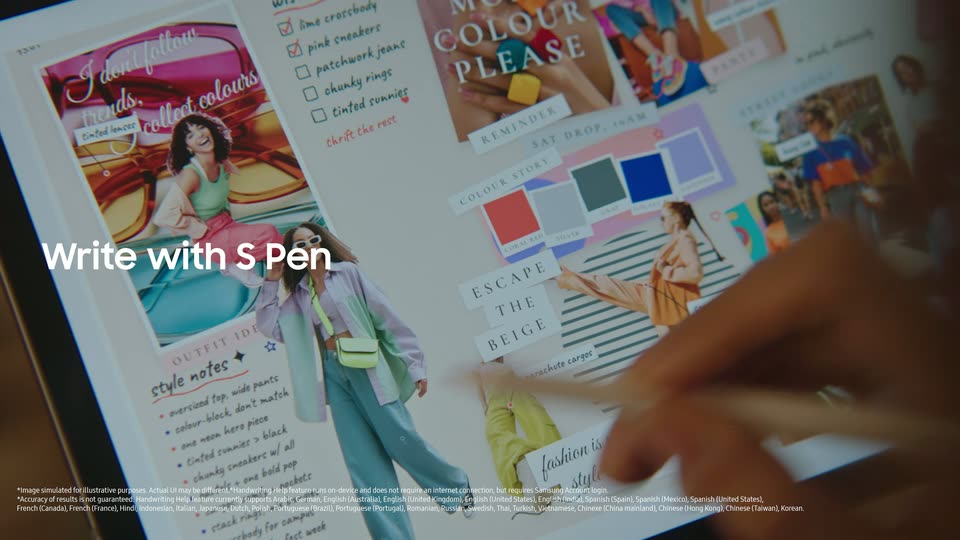
A tilted close-up of a tablet screen showing a fashion-magazine collage with handwritten notes. A hand holding a stylus taps the page on the right while a white headline builds word by word on the left.
On-screen text: “Write with S Pen”
Techniques: Kinetic type
Camera: Static
10 · Feature reveal · 0:15–0:16
A hand holds a white S Pen over an angled tablet showing a fashion collage, drawing a red circle around a pink sneaker. The white headline sits at left while the caption fades in at the bottom right.
On-screen text: “Write with S Pen”, “Ideas I want to follow”
Camera: Static
11 · Feature reveal · 0:16–0:16
A hand holds a white S Pen, drawing on a tablet showing a sketch of a woman in a pink jacket. A star-eyed laughing emoji in a scalloped outline fades in on the right. White text “Write with S Pen” sits left, “Ideas I want to follow” below.
On-screen text: “Write with S Pen”, “Ideas I want to follow”
Camera: Static
12 · Feature reveal · 0:16–0:17
Close-up of a tablet running a notes app, a hand guides the S Pen to write a handwritten title and a short list beside a Santorini photo. The view reframes onto the list while the white caption at the bottom switches from one phrase to the next.
On-screen text: “Write with S Pen”, “Ideas I want to follow”, “Things I want to figure out”, “*Image simulated for illustrative purposes. Actual UI may be different. *Handwriting Help feature runs on-device and does not require an internet connection, ut”
Techniques: UI zoom
Camera: Static
13 · Feature reveal · 0:17–0:17
A hand holds a tablet displaying a colorful mood board collage and taps the screen with a finger while gripping an S Pen. The white headline on the left slides out of frame as the shot holds on the device.
On-screen text: “Write with S Pen”, “Things I want to figure out”
Camera: Push in
14 · Feature reveal · 0:17–0:18
A tight close-up shows a hand holding a beige stylus, drawing a line across a tablet screen filled with a collage of fashion photos and handwritten notes. Shallow depth of field keeps the stylus tip in focus while the screen blurs. A white caption sits at the bottom.
On-screen text: “Things I want to figure out”, “*Image simulated for illustrative purposes. Actual UI may be different. Handwriting Help feature runs on-device and does not require an internet connection, but”, “requires Samsung Account login.”, “*Accuracy of results is not guaranteed. Handwriting Help feature currently supports Arabic, English (Australia), English (India), English (Singapore), English (”, “Spain), English (United States), English (Canada), Spanish (Mexico), Spanish (Spain), Spanish (United States), French (Canada), French (France), Hindi, Indone”, “sian, Italian, Japanese, Dutch, Polish, Portuguese (Brazil), Portuguese (Portugal), Romanian, Russian, Swedish, Thai, Turkish, Vietnamese, Chinese (China main”, “land), Chinese (Hong Kong), Chinese (Taiwan), Korean.”
Camera: Static
15 · Feature reveal · 0:18–0:18
Close-up of a hand holding a white stylus, drawing dark hair strands on a tablet that fills the frame with a digital portrait. The stylus tip rests on the screen as black strokes extend. A small white disclaimer caption runs along the bottom edge.
On-screen text: “*Image simulated for illustrative purposes. Actual UI may be different.* Handwriting Help feature runs on-device and does not require an internet connection,但”, “*Accuracy of results is not guaranteed. Handwriting Help currently supports Arabic, German, English (Australia), English (United Kingdom), English (United, 0),”
Camera: Static
16 · Demo · 0:18–0:20
A young woman holds a tablet and looks down at it in a warm living room. A hand-drawn cloud thought bubble pops in at left, showing a purple check icon with the label Assignment Submission and 15:35. A subtitle reads And somewhere in there.
On-screen text: “And somewhere in there”, “Assignment Submission”, “15:35”
Camera: Static
17 · Demo · 0:20–0:22
A woman in a navy cardigan sits at a desk in a living room, gesturing with a pen as she speaks. A hand-drawn cloud bubble with a purple checkmark and the text Assignment Submission 15:35 hovers at left, while white subtitles run along the bottom.
On-screen text: “Assignment Submission”, “15:35”, “an assignment”, “I actually need to finish”
Camera: Static
18 · Demo · 0:22–0:23
A hand holds a tablet at an angle, showing a presentation slide with a campus photo. A finger taps the screen as a yellow circle and small weather and photo widgets overlay the slide, then the widgets clear and the hand rotates the tablet upright to face the camera.
On-screen text: “I actually need to finish”
Camera: Push in
19 · Demo · 0:23–0:24
A locked-off medium close-up of a woman with long brown hair, smiling and looking down while holding a pen between her fingers; she drifts slightly out of focus. A large static headline, Designing a Greener Campus, sits over the shot.
On-screen text: “Designing a”, “Greener Campus”
Camera: Push in
20 · Problem · 0:24–0:25
A hand holds a white stylus, its tip touching a reflective tablet surface and drawing a thin line. Tight macro framing with shallow depth of field and a soft, blurred background. The caption sits low and centered while the stylus makes contact.
On-screen text: “The problem is”
Camera: Static
21 · Problem · 0:25–0:26
A hand grips a white stylus and writes a small bullet on a tablet screen covered in cursive notes. The shot is a tight close-up, slightly angled. A white caption line sits at the bottom center, changing from one phrase to the next.
On-screen text: “The problem is”, “I am curious”
Camera: Push in
22 · Problem · 0:26–0:28
A young woman in a living room holds a tablet and stylus, thinking; a thinking-face emoji in a white thought bubble floats beside her head. She lifts the tablet to eye level and reads it. White captions read “I am curious,” then “about pretty much everything.”
On-screen text: “I am curious”, “about pretty much everything”
Camera: Push in
23 · Problem · 0:28–0:31
A pair of hands holds a tablet on a pale table, the right hand gripping a white stylus. The screen shows a note titled Vertical Forest Buildings with three photos of green buildings. The camera drifts in slowly as small white captions scale in at the bottom.
On-screen text: “about pretty much everything”, “One little thing catches”, “my eye”
Camera: Push in
24 · Feature reveal · 0:31–0:32
Close-up of a tablet showing a photo of a forested building. A hand holds a white stylus that presses a small circle icon on the screen. The headline slides in on the left while a bottom caption swaps from one phrase to the next.
On-screen text: “Circle to Search”, “my eye”, “and I have to know more”, “Samsung promotes responsible use of AI features”
Techniques: Kinetic type
Camera: Push in
25 · Feature reveal · 0:32–0:33
A hand holds a tablet at an angle on a desk while another hand draws a circle with a white stylus around a photo of a green building on the screen. The headline Circle to Search sits at left, and a caption scales in at the bottom.
On-screen text: “Circle to Search”, “and I have to know more”, “Samsung promotes responsible use of AI features”
Camera: Static
26 · Feature reveal · 0:33–0:35
A hand holds a tablet at an angle showing the Circle to Search interface, a photo of a tree building on the left and a grid of search results on the right, while a stylus scrolls the results. The shot cuts to a woman at a desk holding the stylus, looking at the tablet.
On-screen text: “Circle to Search”, “Then there's always”
Techniques: Cursor demo, Kinetic type
Camera: Pull out
27 · Problem · 0:35–0:37
A woman in a navy shirt sits at a white table in a warm living room, tapping a white stylus against her chin with a puzzled look while a tablet rests before her. The camera slowly pushes in as subtitles appear at the bottom.
On-screen text: “Samsung promotes responsible use of AI features”, “Then there's always”, “that one bit”
Camera: Push in
28 · Problem · 0:37–0:39
Close-up of a hand holding a white stylus writes a calculation on a tablet displaying architectural sketches and notes, a small caption sits at the bottom.
On-screen text: “that one bit”, “a little figuring out”
Camera: Push in
29 · Feature reveal · 0:39–0:40
A hand holds a white stylus above a tablet on a beige surface, tapping the 'Turn on Maths solver' row in an open notes menu. A white 'Solve Math' headline fades in at left while small disclaimer text sits along the bottom edge.
On-screen text: “Solve Math”, “*Image simulated for illustrative purposes. Actual UI may be different.”, “*Solve Math feature runs on-device and does not require an internet connection, but requires Samsung Account login. Incorrect handwriting recognition may lead t”, “*Solve Math usage requires turning on the feature in Samsung Notes app. To turn on, select 'More Options' menu, then tap Turn on Math Solver.”
Camera: Static
30 · Feature reveal · 0:40–0:42
Close-up of a tablet screen filled with handwritten notes. A hand holding a white stylus writes a figure on the line, then a blue result, = 106.416, fades in beside it. The white title Solve Math holds at left.
On-screen text: “Solve Math”
Camera: Static
31 · Demo · 0:42–0:43
A woman holds a gray tablet, back facing the camera, with a white stylus in her hand, looking down at the screen in a softly lit room. The shot is a close-up with shallow depth of field. A white subtitle sits at the bottom.
On-screen text: “And once I'm in the flow”
Camera: Push in
32 · Demo · 0:43–0:44
Over-the-shoulder view of a person holding a tablet and stylus, sketching a courtyard plan. The app zooms into the hand-drawn layout as the user's fingers trace the screen.
On-screen text: “And once I'm in the flow”, “I just want to keep going”
Techniques: UI zoom
Camera: Push in
33 · Demo · 0:44–0:45
A hand holds a tablet in landscape and writes on a design document with a white stylus, the screen showing a courtyard title, photos and sketches. The tablet tilts and shifts toward the camera as the pen moves across the page.
On-screen text: “I just want to keep going”
Camera: Static
34 · Demo · 0:45–0:45
A close-up over-the-shoulder shot shows hands holding a tablet displaying a slide with greenery photos and handwritten notes. The right hand grips a white stylus and taps the screen while the left hand steadies the device. The frame is locked off.
On-screen text: “I just want to keep going”
Camera: Push in
35 · Demo · 0:45–0:50
A woman in a navy top sits at a desk holding a tablet and stylus, speaking to the camera in a living room with a red sofa. White subtitles appear at the bottom, and a sticker-style emoji pops in on the right, then shrinks and fades.
On-screen text: “Because getting everything”, “done also means”, “the night is mine”
Camera: Pull out
36 · Demo · 0:50–0:52
A woman in a dark sweater sits on a red couch at night, a tablet resting on her lap. She taps the screen with one finger while the dim room glows warm. The medium close-up holds on her face as she looks down at the device.
Camera: Push in
37 · Feature reveal · 0:52–0:54
A close-up of a tablet's quick-settings panel sits slightly out of focus against a blurred warm background. The white headline '8,000 mAh Battery' holds on the left while a green battery icon reading 71% pops in on the right inside a white scalloped badge.
On-screen text: “8,000 mAh Battery”
Camera: Static
38 · Demo · 0:54–0:56
A woman in a dim living room sits on a red couch smiling at a tablet, then the cut shows her at a counter with a bowl of snacks, still holding the tablet. White captions sit at the bottom center, swapping from one line to the next as the voiceover plays.
On-screen text: “Something good to eat”, “something even better to watch”
Camera: Push in
39 · Demo · 0:56–0:57
A woman sits on a couch in warm low light, holding a tablet in one hand and reaching into a bowl of popcorn with the other. She smiles as she looks at the tablet. A caption stays fixed at the bottom of the frame.
On-screen text: “something even better to watch”
Camera: Static
40 · Feature reveal · 0:57–0:58
Over-the-shoulder shot of a person holding a tablet whose screen plays a game with a flying ship over rocky desert peaks. A bold white '90 Hz Refresh Rate' headline sits at left while small white subtitles caption the voiceover along the bottom.
On-screen text: “something even better to watch”, “90 Hz Refresh Rate”, “and absolutely”
Camera: Push in
41 · Feature reveal · 0:58–1:00
A tablet held in two hands, tilted in 3D perspective, plays a clip of two orange-suited astronauts crossing rocky ground. A white feature label sits at left while a small caption runs along the bottom edge.
On-screen text: “90 Hz Refresh Rate”, “and absolutely”, “nothing left on my list”
Techniques: 3D mockup
Camera: Push in
42 · Feature reveal · 1:00–1:01
A woman reclines on a red sofa in a dim living room, holding a tablet on her lap and eating popcorn from a bowl. She watches the screen and lifts her hand to her hair as a caption about the refresh rate appears.
On-screen text: “nothing left on my list”, “90 Hz Refresh Rate”
Camera: Push in
43 · Other · 1:01–1:02
A pair of hands holds a tablet steady against a dark red backdrop. The screen shows a pale blue abstract image with a dark lens-like object at its center and radial streaks. The frame stays locked off.
On-screen text: “Maybe that's balance”
Camera: Push in
44 · Other · 1:02–1:10
A woman in a navy cardigan sits on a red couch in a dim living room, speaking to camera. White subtitles swap in at the bottom, and at 6.5s a hugging-face emoji sticker with hearts pops in on the right.
On-screen text: “Maybe that's balance”, “Making time for everything”, “I want to do”, “and still”, “having a little time”, “just for me”
Camera: Pull out
45 · Outro · 1:10–1:13
A dark gray tablet floats in 3D perspective with a white stylus across its screen, which splits into a beach photo and a colorful FRAME MAKERS poster. Colorful abstract blobs sit on the white background beside a black headline on the left. The frame stays static.
On-screen text: “Galaxy Tab S10 Lite”, “Your personal AI learning partner”
Techniques: 3D mockup
Camera: Static
46 · CTA · 1:13–1:15
On a black background, the white lowercase URL samsung.com holds center, then the bold uppercase SAMSUNG wordmark takes its place in the same locked-off frame.
On-screen text: “samsung.com”, “SAMSUNG”
Camera: Static