
0:46
Explore
Introducing Gmail for mobile 2.0
Google · Oct 2008 · 1:34 · AI-annotated
- Length
- 1:34
- Scenes
- 36 · 2.6 s avg
- Product on screen
- 0:00
- Features shown
- 3
- Call to action
- 1:25 · 91%
- Voiceover
- Yes
00:00:00 / 01:34:00
Google’s 1:34 launch film runs 36 scenes, about 2.6 s each. The product is on screen from the first frame and 3 features are revealed. The call to action lands at 1:25 (91% in), over a voiceover. The video alternates locked-off host cutaways with tight close-ups of the phone screen, each feature opened by a single voiceover line and shown through sliding side menus, typed text, and highlighted rows. Pacing is steady at about 100 bpm with quick cuts, using a white studio base, occasional live-action backdrops, and yellow arrow callouts to draw the eye to key UI states.
Footage neededEstimated needs: 2 capture groups — your screens or recordings · 1 official logo — reused across the film · 16 filmed passages — shoot, supply or replace
Is this your launch? to your site or press kit.
More like this
0:54

Linear: release 392A 438E 9EE7
Linear · Productivity · Sep 2024
1:20

Healthcare Product Explainer Video | American Heart Association x MotionCue
American Heart Association · Jul 2026
Introducing Gmail for mobile 2.0, scene by scene
· 36 scenes as text
01 · Product intro · 0:00–0:03
A static title card on a plain white background. Centered black text states the product name across three lines, with the multicolor Google wordmark logo positioned below. The frame is locked off with no motion.
On-screen text: “Gmail for mobile 2.0”, “for J2ME and”, “BlackBerry® phones”
Camera: Static
02 · Product intro · 0:03–0:09
A man with short dark hair, glasses and a light blue checkered shirt stands centered against a plain white backdrop. He faces the camera in a locked-off medium close-up and speaks, his mouth moving and head tilting slightly as he talks.
Camera: Static
03 · Product intro · 0:09–0:12
A hand holds a BlackBerry phone steady against a plain white background. The screen shows the home screen with a grid of app icons, then switches to a Gmail inbox list with sender names and timestamps.
Camera: Static
04 · Problem · 0:12–0:14
A man in a dark hooded jacket and glasses speaks to camera against a blue snowy forest backdrop. The close-up dissolves into a wider shot of him standing in the snow, hands in red gloves held at his waist.
Camera: Static
05 · Problem · 0:14–0:16
A man in a gray and black hooded jacket and red gloves stands centered in a blue-tinted snowy pine forest, facing the camera and speaking. The medium shot holds steady while light snow drifts through the air around the trees.
Camera: Static
06 · Feature reveal · 0:16–0:18
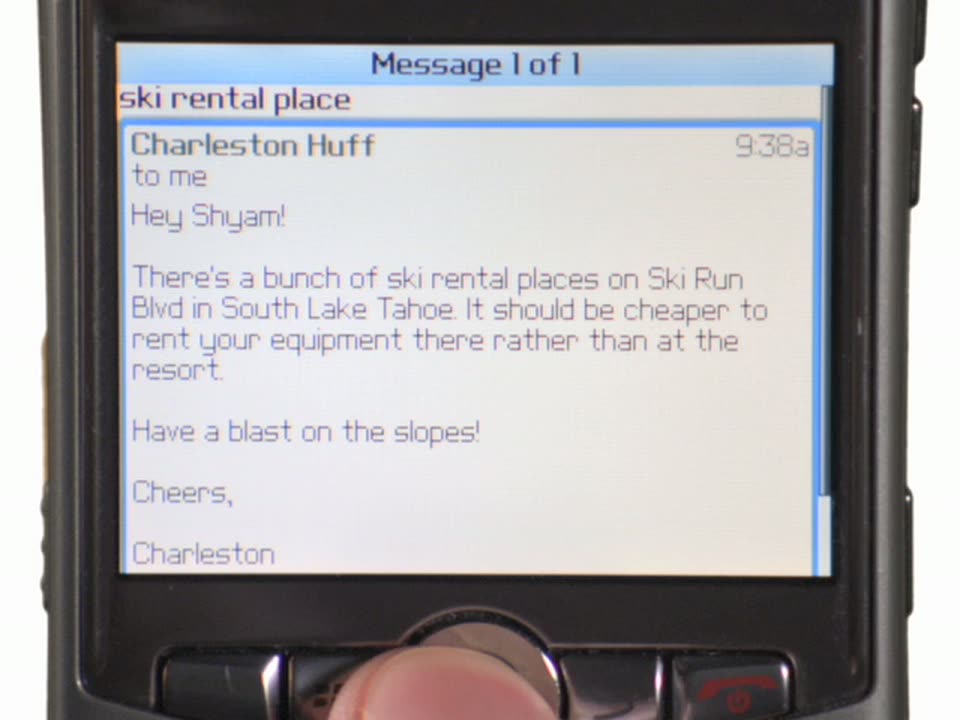
A locked-off close-up of a black phone screen shows an email from Charleston Huff about ski rental places in South Lake Tahoe. A thumb rests on the navigation key at the bottom. The screen stays static throughout the shot.
Camera: Static
07 · Feature reveal · 0:18–0:20
A close-up of a phone lock screen shows the time, date, and an OFF status in the top left. A yellow arrow pops in pointing at OFF as the rest of the screen darkens and blurs out of focus.
Camera: Static
08 · Feature reveal · 0:20–0:22
A close-up of a phone screen shows a Gmail inbox list. A vertical menu panel slides in from the left edge, its Compose Mail item highlighted in blue. A thumb rests on the navigation key at the bottom of the device.
Camera: Static
09 · Feature reveal · 0:22–0:24
A tight close-up of a handheld phone screen shows a Compose Mail window with recipient, subject and body filled in. A blinking caret sits at the end of the message as the name Shyam is typed in. The device's physical keys and round navigation wheel sit at the bottom.
Camera: Static
10 · Feature reveal · 0:24–0:25
A man in a dark suit and orange striped tie stands centered and speaks to camera. Behind him a subway train slides past the platform, its windows blurred by motion, while the yellow platform edge stays fixed.
Camera: Static
11 · Feature reveal · 0:25–0:27
A hand holds a black handheld device, its screen filling the frame with a Compose Mail view. A thumb presses the center button, a context menu pops up with Send highlighted, then the display switches to the Inbox list.
Camera: Static
12 · Feature reveal · 0:27–0:28
Close-up of a phone showing a Gmail inbox list. A thumb presses the center navigation key and a menu panel slides in from the left edge, listing Inbox, Outbox, Mobile Drafts and more, with Outbox highlighted as the voiceover explains it.
Camera: Static
13 · Feature reveal · 0:28–0:30
A tight close-up of a phone screen shows an Outbox list with two rows, the lower one highlighted blue. A thumb presses the navigation key below as the upper row slides into place.
Camera: Static
14 · Feature reveal · 0:30–0:34
Close-up of a handheld device held in a hand. The Compose Mail screen fills the frame as the body field types out a short message. A context menu drops over the screen and the blue highlight slides from Send to Finish Later as a thumb taps the center button.
Camera: Static
15 · Feature reveal · 0:34–0:36
A hand holds a phone in close-up, showing a Gmail inbox list. A dropdown menu drops over the left of the screen as a thumb presses the navigation key, the blue highlight stepping from Open to Mobile Drafts.
Camera: Static
16 · Feature reveal · 0:36–0:37
A close-up of a black phone screen shows a drafts list titled Mobile Drafts, with two entries, Climbing and (no subject), the second highlighted in blue. A thumb rests on the navigation key below the screen.
Camera: Static
17 · Feature reveal · 0:37–0:38
A close-up of a phone status bar over a green circular wallpaper shows the signal icon, carrier name, email count and date. A flat green arrow pops in beneath the signal bars, pointing up at them. The frame stays locked off.
Camera: Static
18 · Feature reveal · 0:38–0:39
A man in a dark suit and orange tie stands at left before a large screen showing a Gmail inbox with a message count and date. A yellow arrow graphic points up near his head. The frame is locked off as he presents.
Camera: Static
19 · Feature reveal · 0:39–0:40
A presenter in a dark suit and orange tie stands center stage holding a phone, speaking in front of a colorful LED backdrop, then the scene cuts to a flat close-up of a Gmail inbox list on a phone screen.
Camera: Static
20 · Feature reveal · 0:40–0:44
A close-up of a phone screen shows a Gmail inbox list with the top row highlighted in blue. A thumb presses the navigation key below. An orange banner reading 'Sending message...' appears in the top right corner. The frame stays locked on the screen.
Camera: Static
21 · Feature reveal · 0:44–0:47
Close-up of a phone held in hand. The Gmail screen shows a message from Charleston Huff; an orange 'Sending message' tag appears at the top right, then a vertical menu of mail actions drops in on the left with 'Reply' highlighted blue as a thumb taps the center key.
Camera: Static
22 · Feature reveal · 0:47–0:50
A locked-off close-up of a black phone screen shows a Compose Mail view with the recipient and subject filled in; the body types out 'Hey Mac. Off to opera,' while a thumb rests on the keypad, then it cuts to a man in a striped shirt speaking to camera.
Camera: Static
23 · Feature reveal · 0:50–0:56
A man with rimless glasses and a light blue plaid shirt is filmed head and shoulders against a plain white backdrop. He faces the camera and speaks continuously, his mouth and head moving slightly as he talks, while the voiceover describes new shortcut keys.
Camera: Static
24 · Feature reveal · 0:56–1:00
Close-up of a hand holding a BlackBerry with a QWERTY keyboard against a white background. The thumb swipes the on-screen email thread up and down, jumping between message 1 and message 6 of 6.
Camera: Static
25 · Feature reveal · 1:00–1:04
A hand holds a BlackBerry against a white background, its screen showing a Gmail inbox list. The thumb taps the keyboard and the list scrolls, inserting a new row above the blue-highlighted ski rental place entry.
Camera: Static
26 · Feature reveal · 1:04–1:07
A man with glasses in a light blue checkered shirt speaks to camera against a white background. The shot then cuts to a close-up of a phone screen showing an email list with a side menu, Open highlighted.
Camera: Static
27 · Feature reveal · 1:07–1:10
A tight close-up of a phone's Gmail screen. A thumb taps the hardware pad as the left dropdown menu scrolls, the blue highlight moving from Mark as unread down to Report spam. The view then cuts to an account switcher with the first account selected in blue.
Camera: Static
28 · Feature reveal · 1:10–1:12
A close-up of a phone screen frames the Gmail account switcher. The blue highlight moves down from [email protected] to [email protected], showing how to switch accounts.
Camera: Static
29 · Feature reveal · 1:12–1:13
A close-up of a phone screen shows a Gmail inbox list. A thumb presses the navigation key at the bottom, scrolling the list up as the blue selection bar moves from the top row to a middle entry.
Techniques: Cursor demo
Camera: Static
30 · Feature reveal · 1:13–1:17
A close-up of a phone screen shows a Gmail inbox list on a light background. A thumb presses the center button, the list scrolls up one row, and an account-switcher menu pops up at the lower left with the current account highlighted in blue.
Camera: Static
31 · Feature reveal · 1:17–1:19
A macro close-up of a phone screen lists Gmail accounts in blue text on white. A new row, [email protected], inserts itself above the highlighted Add account option, shifting the list downward.
Camera: Static
32 · Feature reveal · 1:19–1:20
A locked-off close-up of a physical phone screen shows the Gmail login form: the Gmail logo, an email field with a text caret, a password field, and a Sign in button. A finger rests on the navigation key at the bottom of the device.
Camera: Static
33 · Other · 1:20–1:24
A young man in glasses and a gray Gmail t-shirt stands in a locked-off medium shot, speaking to the camera against a soft-focus backdrop of green trees and purple flowers.
Camera: Static
34 · Other · 1:24–1:25
A man in a gray Gmail t-shirt stands in a sunlit outdoor setting. The frame brightens as the black URL and the multicolor Google logo fade in across his chest.
On-screen text: “m.google.com/mail”
Camera: Static
35 · CTA · 1:25–1:26
A washed-out outdoor shot of a man in a grey shirt fades to plain white, leaving the URL and the multicolor Google logo centered. The frame stays locked and still for the rest of the clip.
On-screen text: “m.google.com/mail”
Camera: Static
36 · CTA · 1:26–1:34
A plain white card shows the black URL m.google.com/mail centered above the multicolor Google logo. The frame is locked off and stays completely still for the whole shot.
On-screen text: “m.google.com/mail”
Camera: Static