0:52
ericosiu - Introducing the Single Brain Gateway. 1 API key for your ENTIRE busi
Single Brain · Sep 2026
Grok · Jul 2026 · 0:46 · AI-annotated
Grok’s 0:46 launch film runs 31 scenes, about 1.5 s each. The product is on screen from the first frame and 6 features are revealed. The call to action lands at 0:39 (86% in), over a voiceover. The video is built as a chain of single-feature reveals, each opened by a voiceover line and shown through morphing UI cards, typographic headlines, or a 3D orb, moving from Configuration to voices, cloning, knowledge base, phone number, languages, price, and a URL. Pacing is slow with long holds and seamless morphs between type, icons, and orbs, anchored by an orange accent underline and a pulsing waveform as the recurring signature moves.
Is this your launch? to your site or press kit.
Single Brain · Sep 2026
Speko · B2B · Nov 2026
Superhuman · Productivity · Jan 2025
Centered on a plain off-white field, the black sans-serif word Introducing holds while thin copper lines are drawn in waves around it, then settle into a single horizontal rule. The text swaps to Voice Agent Builder in copper, with the rule now above it.
On-screen text: “Introducing”, “Voice Agent Builder”
Techniques: Kinetic type
Camera: Static
On a plain off-white background, the orange word Voice dissolves and morphs into a black audio-waveform icon at the left of the static black text Agent Builder, which stays locked in the center.
On-screen text: “Voice Agent Builder”
Techniques: Morph
Camera: Static
A vertical list of dark pill cards, each with a glossy 3D orb icon, scrolls through a black space ringed with faint orbit lines and scattered dots. The Sales Qualifier card grows larger and brighter as it reaches the center while the others dim at the edges.
On-screen text: “Agent Builder”
Camera: Pull out
A dark list of three agent pills compresses to reframe the Customer Support row on a black background. A white circle scales in behind it as a light band sweeps across, and a black pill button overlays the row, its label typing in to read Create Agent.
Techniques: Light sweep, UI zoom
Camera: Static
A black pill button with the white label 'Create Agent' and a plus icon is centered on a plain white background. The label starts as a soft overlapping blur and resolves into a clean, locked-off state.
Camera: Static
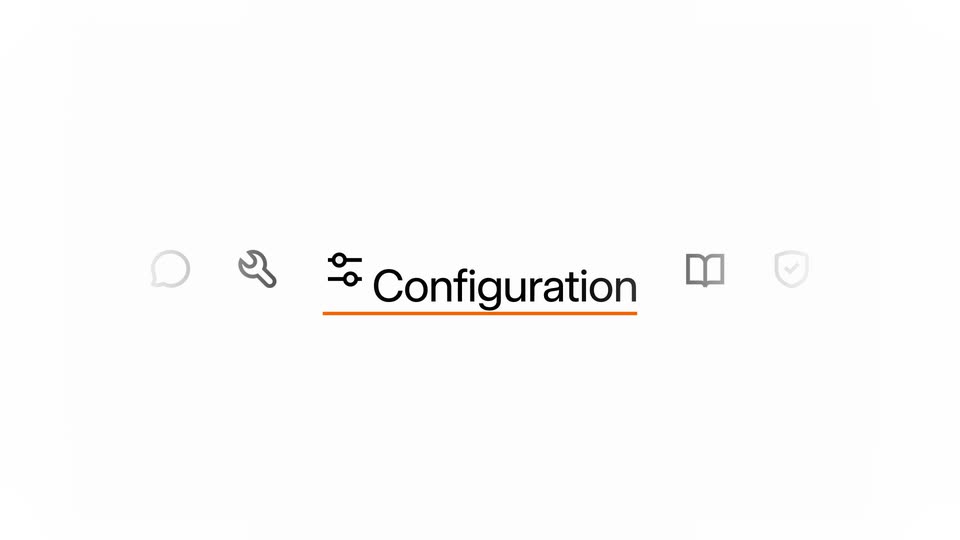
Five dark line icons (chat bubble, wrench, sliders, open book, shield with check) start clustered at center and spread into an even row, while a short orange underline stays fixed beneath them on a white background.
Camera: Static
A row of gray line icons sits centered on a white background, the middle sliders icon paired with the word Configuration underlined in orange. The outer icons fade up in prominence while the central label scales into place.
On-screen text: “Configuration”
Techniques: Kinetic type
Camera: Static
A white screen centers the Configuration heading with a slider icon and orange underline; it scales and slides up as a rounded card rises from below, revealing a Create a Voice Agent form. A letter is typed into the Agent name field.
Techniques: Kinetic type
Camera: Static
A centered form card on a light background shows a goal field being typed into as the card scales down. The view then zooms into the typed sentence, scaling the words to fill the frame with a blinking orange caret.
Techniques: UI zoom
Camera: Push in
On a plain white field, three lines of gray sans-serif text slide left and scale up while the bottom line types in orange, ending on a blinking caret after the word message.
On-screen text: “support agent for Acme”, “their issue, and resolve it with”, “issue, take a message”
Techniques: Kinetic type
Camera: Static
On a black starfield, a purple glowing orb sits left as a chat bubble reading “Hello! How can I help you today?” slides in, then a second bubble “Can I book a hotel room for two people?” slides in from the right below.
Techniques: Particles
Camera: Static
Two outlined chat pills with white dialogue slide in from the right over a black starfield, beside two purple galaxy orbs. The pills and side orbs clear to a single centered galaxy orb emitting thin concentric ripple rings.
On-screen text: “Hello! How can I help you today?”, “Can I book a hotel room for two people?”
Camera: Static
A 3D glass orb filled with a purple nebula and stars floats at the center of a black field crossed by thin concentric orbit rings. The orb's inner plasma shifts and morphs. Below it, the name Ara sits above the line Warm & friendly, which slides in.
On-screen text: “Ara”, “Warm & friendly”
Techniques: Morph
Camera: Static
A 3D iridescent orb rotates at center on a black field with faint concentric rings and drifting star dots. Below it, the name Eve holds still while the trait line slides from Warm & friendly to Energetic & upbeat.
On-screen text: “Eve”, “Warm & friendly”, “Energetic & upbeat”
Techniques: Particles
Camera: Static
A 3D iridescent orb sits centered on black, ringed by faint orbital lines and drifting specks. Its interior glow shifts from amber to teal as the caption below swaps: Eve and Energetic & upbeat give way to Leo and Authoritative & strong.
On-screen text: “Eve”, “Energetic & upbeat”, “Leo”, “Authoritative & strong”
Techniques: Particles
Camera: Static
A teal iridescent glass orb filled with stars sits centered on black, ringed by thin orbital lines and scattered star dots. The orb shrinks and shifts to orange and pink as it fades out, while the labels Leo and Authoritative & strong scale and slide away.
On-screen text: “Leo”, “Authoritative & strong”
Camera: Static
On a plain light gray background, the headline reads 80+ Voices with voice cloning as the number counts up from 2 to 80, a smaller gray subtitle sits below, and an orange audio waveform pulses across the lower third.
On-screen text: “80+ Voices with voice cloning”, “Multilingual voices with natural intonation. Preview any voice instantly.”
Techniques: Kinetic type
Camera: Static
A dark gray headline and a smaller light gray line sit above an orange audio waveform of vertical bars and dots on a pale background. The bars shrink and merge into a single brown pill, then a faint white rounded card with a dot, while the text fades out.
On-screen text: “80+ Voices with voice cloning”, “Multilingual voices with natural intonation. Preview any voice instantly.”
Techniques: Kinetic type, Morph
Camera: Static
A white knowledge base card sits on a light gray field. File chips fly in from the edges and drop into the list, each progress bar filling to 100% as the card stretches to fit the new rows.
Camera: Static
On a pale gray background, a white knowledge base card with three PDF rows at 100 percent fades out, then a white chat bubble with a refund question appears at center and holds still.
Camera: Static
A minimal chat view on a light gray field. The agent's reply and a wrench-tagged issue_refund call sit in place, then the view reframes down to a code block listing the invoice, amount and reason, followed by a confirmation line and a right-aligned thank-you bubble.
Techniques: UI zoom
Camera: Static
A chat thread showing a refund tool call and confirmation message blurs as the frame zooms into a phone-number input field, where “+1 305-5” sits with a blinking caret.
Techniques: UI zoom
Camera: Static
A close-up of a white rounded input field on a blurred warm orange background shows a phone number being typed, the digits updating from 312 555-06734 to 512 555-7788. The frame then reframes to the full panel, revealing the label Existing phone number and a short caption.
Techniques: Kinetic type, UI zoom
Camera: Static
A light modal titled “Existing phone number” sits centered on a gray background. The phone number and SIP URI fields type out their values, then the whole panel slowly drifts downward out of the frame.
Camera: Static
A light configuration screen shows a phone number and SIP URI field, then scrolls up to reveal a grid of nine rounded white pills. Each pill label, such as Expressive and 25+ languages, fades in as the form fades out.
Camera: Static
Nine white pill tags with feature labels drift into place on a light gray field, the “25+ languages” pill lit orange. Large pale gray language names slide in from the top right corner.
On-screen text: “Expressive speech”, “HIPAA eligible”, “Multi-tool workflows”, “Sub-second latency”, “25+ languages”, “GDPR compliant”, “Voice cloning”, “SOC 2”, “Custom voice”
Camera: Static
On a pale gray field, language names in two columns drift upward at varied opacities, lighter words receding and darker ones advancing. The list scrolls so new names like Spanish and French rise from the bottom while others fade at the top.
On-screen text: “Arabic”, “German”, “English”, “Spanish”, “French”, “Portuguese”, “Russian”, “Swedish”, “Turkish”, “Vietnamese”
Techniques: Kinetic type
Camera: Pan
A field of language names in gray sans-serif type drifts slowly across a pale background. Darker words such as Portuguese, Russian, Swedish, Italian, Hindi, Danish, French and German sit in the foreground while fainter names recede behind, the layers gliding at different speeds to suggest depth.
Techniques: Parallax
Camera: Pan
A field of language names in light gray floats and fades on a pale background, then a darker gray price figure '0 / mi' appears in the center as the words recede.
On-screen text: “0 / mi”
Techniques: Kinetic type
Camera: Push in
A black price line sits centered on a pale off-white field. The slash and the word min type in after the figure, completing the rate.
On-screen text: “$0.05/min”
Techniques: Kinetic type
Camera: Static
The URL x.ai/voice types on at center of a plain off-white background, letters filling in left to right. The rust-brown type deepens to near-black, holds still, then fades out to an empty frame.
On-screen text: “x.ai/voice”
Techniques: Kinetic type
Camera: Static