0:50

Hera Video - Introducing Hera for launch videos. Opus 5.5 is great at animating.
Hera · B2B · Nov 2026
Katalyz · Jan 2023 · 1:23 · Full motion · AI-annotated
Katalyz’s 1:23 launch film runs 38 scenes, about 2.2 s each. The product is on screen from the first frame and 4 features are revealed. The call to action lands at 1:20 (96% in). The video opens with the brand mark and a one-line value proposition, then runs three color-coded acts, each introduced by a full-screen verb headline and followed by split-screen UI demos with a bottom caption bar. Signature moves are the outline-word stack collapsing into a solid headline, the teal highlight box stepping behind keywords, and mockups that whoosh between flat and 3D-tilted views.
Is this your launch? to your site or press kit.
Hera · B2B · Nov 2026
Google · AI · Mar 2010
Films whose music sounds like this one, voice left out
Bolna · Upbeat instrumental electronic music with funk and corporate influences
Google · Upbeat pop-rock
Fireflies · Upbeat, high-energy rock instrumental with a modern production style.
On a flat navy field, a white vertical bar grows into the stem of a k, then the rest of the katalyz wordmark fills in to the right, the k's diagonals tinted teal.
On-screen text: “katalyz”
Techniques: Kinetic type
Camera: Static
On a dark navy field, the white words “La première” hold center-left, then “plateforme” appears in light blue to complete the line. The line is replaced by “pour gérer votre cycle de vente,” the last words in blue, on a locked-off frame.
On-screen text: “La première plateforme”, “pour gérer votre cycle de vente”
Techniques: Kinetic type
Camera: Static
A dark blue card holds the line “pour gérer votre cycle de vente” in white and light blue lowercase sans, centered. The line stays still, then cuts to a small teal square with a red letter à centered on the same background.
On-screen text: “pour gérer votre cycle de vente”
Camera: Static
On a flat navy field, the centered title “de A à Z” slides into place, its last three letters set on a teal block, then holds still.
On-screen text: “de A à Z”
Techniques: Kinetic type
Camera: Static
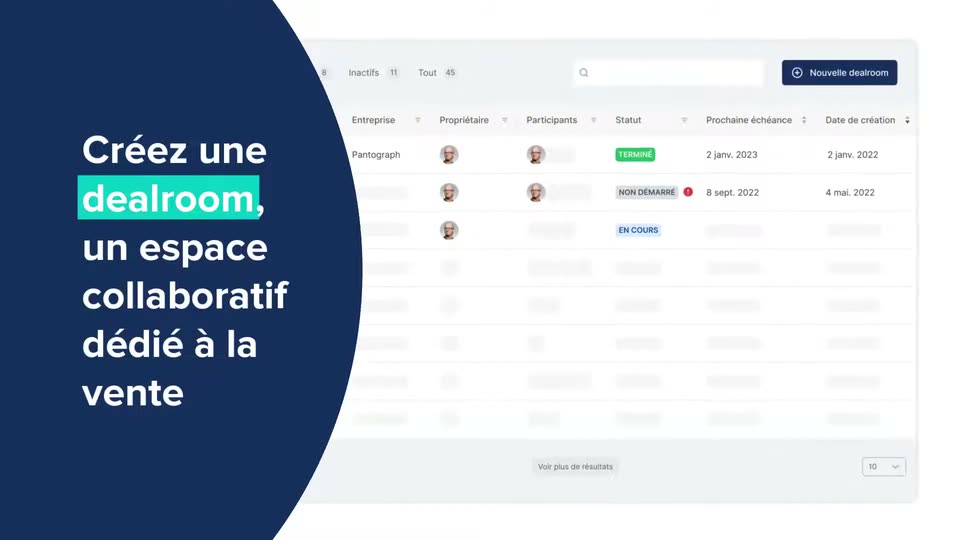
A dark blue curved shape covers the left side of the screen, revealing a French headline. Behind it, a product interface displays a list of deals with status labels and avatars. The word 'dealroom' is highlighted in teal.
On-screen text: “Créez une dealroom, un espace collaboratif dédié à la vente”
Techniques: Masking
Camera: Static
The Katalyz dashboard shows a dealroom table; a cursor hovers the Nouvelle dealroom button, then a centered modal with an input field and Continuer button pops up as the background dims. A white headline Créez une holds at the left while a blue shape exits the top-left corner.
On-screen text: “Créez une”
Techniques: Cursor demo
Camera: Static
A dark dealroom dashboard with a left sidebar sits dimmed behind a white modal titled Créer une dealroom. A cursor types Acme x Katalyz into the field, then clicks Continuer, and the modal closes to reveal the new dealroom's detail page with a hero banner.
Techniques: Cursor demo
Camera: Static
A project overview interface sits centered on a light gray field, a cursor resting over a task row. The whole panel then blurs and streaks horizontally as it whooshes away, dissolving into a bright blue-white flash that wipes the frame.
Techniques: Speed ramp
Camera: Static
A blue field fills the frame as a column of outlined Engagez words scrolls down and collapses into one solid white word. Below it, vos prospects slides in as a thin outline.
On-screen text: “Engagez”, “vos prospects”
Techniques: Kinetic type
Camera: Push in
White headline on a flat blue field: 'Engagez' scales up while the outlined 'vos prospects' slides in below it. The card cuts to a split layout, a navy panel holding 'Créez un climat de confiance' beside a project dashboard tilted in 3D perspective.
On-screen text: “Engagez”, “vos prospects”, “Créez un climat de confiance”
Techniques: Kinetic type, 3D mockup, Split screen
Camera: Static
Split layout: a navy panel on the left types the headline while a product dashboard fades in on the right, its green header wave drawing across. The camera then zooms into the dashboard as a navy caption bar slides up along the bottom edge.
On-screen text: “Créez un climat de confiance”, “Invitez votre prospect dans un espace personnalisé”, “Engagez vos prospects”
Techniques: Kinetic type, UI zoom, Masking, Split screen
Camera: Push in
A tilted 3D mockup of the Acme x Katalyz dashboard sits on a white background, its green wave header, task list and participant sidebar visible. A dark blue banner below types out the caption and highlights the last word in teal.
On-screen text: “Invitez votre prospect dans un espace personnalisé”
Techniques: 3D mockup, Kinetic type
Camera: Pan
A navy vertical bar sweeps across the frame and resolves into a split layout: a white headline on a navy panel at left, a flat project dashboard on the right. A cursor opens a date picker, picks 12 janv. 2023, then moves to the progress section.
On-screen text: “Fixez un cap clair dès le départ”
Techniques: Masking, Cursor demo
Camera: Pan
A dark blue panel carrying the headline, with one word boxed in teal, slides off left while a 3D interface mockup scales up to the center and a white caption fades in at the bottom.
On-screen text: “Fixez un cap clair dès le départ”, “Définissez un horizon et suivez la progression”
Techniques: 3D mockup
Camera: Push in
A flat project dashboard with a green wave header, a video card and a right sidebar where the progress ring fills from 20 to 60 percent. A white caption bar holds the line, the word progression gets a teal highlight box, then the frame blurs and wipes to white.
On-screen text: “Définissez un horizon et suivez la progression”, “Fixez un cap clair dès le départ”
Camera: Static
On a flat teal background, a vertical stack of outline “Alignez” words slides downward while a large solid white “Alignez” settles at the top, with the outline line “vos interlocuteurs” appearing beneath it. The smaller outline copies keep drifting down and fade out.
On-screen text: “Alignez”, “vos interlocuteurs”
Techniques: Kinetic type
Camera: Static
A flat teal background holds a static two-line text lockup, centered and locked off. A large white filled word sits above a smaller thin-outlined line, both held still for the full shot.
On-screen text: “Alignez”, “vos interlocuteurs”
Camera: Static
Vertical bars wipe a teal frame with a large white headline, revealing a split layout: blue left panel with 'Partagez votre plan d'action' in white, and the roadmap interface on white to the right. The view then pushes in on the interface as a caption appears at the bottom.
On-screen text: “Alignez vos interlocuteurs”, “Partagez votre plan d'action”, “Ajoutez des étapes et définissez leur visibilité”
Techniques: Masking, UI zoom
Camera: Push in
A French roadmap view lists project stages in horizontal rows. A blue bar at the bottom holds the caption with two words boxed in dark. A cursor slides to the globe icon on the last row and clicks, making an INTERNE tag appear.
On-screen text: “Ajoutez des étapes et définissez leur visibilité”
Techniques: Cursor demo
Camera: Static
A full-screen French roadmap interface with a blue caption bar slides right and compresses into a card on the right as a white panel wipes in from the left, opening a split layout with a large white headline on the left.
On-screen text: “Ajoutez des étapes et définissez leur visibilité”
Techniques: Masking
Camera: Pan
Blue panel left, white panel right: the headline “Collaborez simplement à chaque étape” slides in, first word on a dark highlight, beside a flat roadmap interface. The interface then slides up and shrinks as a second bold headline, “Centralisez les éléments sans les sortir de leur contexte”, appears along the bottom.
On-screen text: “Collaborez simplement à chaque étape”, “Centralisez les éléments sans les sortir de leur contexte”
Techniques: Kinetic type, Split screen
Camera: Push in
A project management interface displays a task list on the left and a detail panel on the right. A blue banner at the bottom shows a headline with the first word highlighted in a dark box.
On-screen text: “Centralisez les éléments sans les sortir de leur contexte”
Camera: Pan
A blue panel on the left holds the white headline, the first word boxed in dark blue, beside a flat project-management interface on the right. A cursor moves across the checklist and opens a small date picker near the end.
On-screen text: “Alignez”, “toutes les”, “parties”, “prenantes”
Techniques: Cursor demo
Camera: Push in
A flat project-management interface shows a roadmap list beside a task detail panel with a row of participant avatars. A cursor moves to the avatars and a new plus avatar appears, while a blue bar at the bottom carries the caption.
On-screen text: “Impliquez les bonnes personnes au bon moment”
Techniques: Cursor demo
Camera: Pan
A white product roadmap panel slides off to the left, exposing a dark blue field. A vertical stack of the word Réitérez, one solid and the rest outlined, scrolls upward past the phrase vos succès.
On-screen text: “Réitérez”, “vos succès”
Techniques: Kinetic type
Camera: Push in
Dark navy card with two centered lines of French text, the top solid white and the bottom outlined, locked off and sharpening in. At the end a teal band and a motion-blurred white shape slide across from the right as a wipe.
On-screen text: “Réitérez”, “vos succès”
Techniques: Masking
Camera: Static
A teal panel on the left holds a white headline with a dark highlight box stepping behind each word, while the product's project view sits on the right. The frame tightens onto the interface as a cursor opens an activity filter, and a second headline appears along the bottom.
On-screen text: “Accédez à des infos clés”, “Analysez la dynamique de vos deals”
Techniques: UI zoom, Cursor demo
Camera: Push in
A flat activity-log screen fills the frame above a teal strip carrying the white tagline. A cursor opens the date dropdown, flips the calendar from June to July, selects a range, and the list filters down to one entry.
On-screen text: “Analysez la dynamique de vos deals”
Techniques: Cursor demo
Camera: Static
A flat roadmap interface, with filter rows and a dated task entry, holds centered while a teal band at the bottom carries the headline, its first word boxed in dark navy. The interface then slides left and clears to white, a thin teal bar trailing at the right edge.
On-screen text: “Analysez la dynamique de vos deals”
Camera: Static
A teal panel holds the white headline on the left while the dealroom library interface sits faded on the right. The panel wipes left, dark highlight blocks pop behind the words, and the interface slides to center and scales up, ending with a teal caption bar along the bottom.
On-screen text: “Diffusez les bonnes pratiques”, “Analysez la dynamique de vos deals”, “Bénéficiez d'une bibliothèque de modèles de dealrooms”
Techniques: Kinetic type, UI zoom
Camera: Push in
A dealroom interface fills the frame: a dark sidebar beside a grid of template cards, a cursor resting on the first card. The list crossfades into a detail view with a video placeholder and progress panel. A teal band below carries a white caption, its middle word scaling in.
On-screen text: “Diffusez les bonnes pratiques”
Techniques: Kinetic type, Cursor demo
Camera: Static
A static French dealroom interface is centered on a white field, a cursor parked by the top tabs. A teal banner runs along the bottom with a white headline, the word modèles boxed in dark blue.
On-screen text: “Bénéficiez d'une bibliothèque de modèles de dealrooms”
Camera: Static
A teal panel settles on the left carrying the white headline, while the Kanbys task dashboard scales in on the right. A cursor hovers over the dark Nouvelle tâche button in the table header.
On-screen text: “Gagnez en efficacité”
Techniques: Kinetic type, Cursor demo
Camera: Pan
A teal panel on the left carries the white headline, the second word set on a navy block, while a tilted 3D dashboard mockup with an open dialog sits on white to the right. The panel widens and the headline scales as the mockup drifts right and down.
On-screen text: “Gagnez en efficacité”
Techniques: 3D mockup, Kinetic type
Camera: Push in
A dimmed dark dashboard sits behind a white modal with three cards; the cursor hovers over the dark blue “Vos modèles” card while a teal banner at the bottom reads “Créez votre dealroom en un clic à partir d'un modèle”.
On-screen text: “Créez votre dealroom en un clic à partir d'un modèle”
Techniques: Cursor demo
Camera: Push in
A flat interface view shows a 'Créer une nouvelle dealroom' modal over a dimmed app, with the 'Vente consultative' template selected and its participants, roadmap and resources listed. A cursor glides from the roadmap to the Continuer button; a teal caption bar holds the line at the bottom.
On-screen text: “Créez votre dealroom en un clic à partir d'un modèle”
Techniques: Cursor demo
Camera: Static
A 3D-tilted dealroom interface rests on a white field above a teal caption bar. A turquoise panel wipes in from the right, motion-blurring the screen and sliding the interface off to the left.
On-screen text: “Créez votre dealroom en un clic à partir d'un modèle”
Techniques: 3D mockup
Camera: Static
On a flat navy background, the katalyz wordmark starts blurred and snaps into focus, then the tagline and a teal URL bar fade in below it. The bar fills from pale cyan to solid teal as the address becomes legible.
On-screen text: “Simplifiez vous la vente”, “www.katalyz.co”
Camera: Static