2:53
Unity Texture Compression (NTC) and Unity Graphics Kernel (UGK)
Unity · Nov 2026
Human Behavior · May 2025 · 0:50 · Code only · AI-annotated
Human Behavior’s 0:50 launch film runs 14 scenes, about 3.6 s each. The product shows up at 0:03 and 6 features are revealed. The call to action lands at 0:45 (90% in). The video opens on the problem, names the product, then moves through a rapid chain of single-feature demos, each a typed monospace headline over a UI mockup, before closing on a URL and a final logo card. Its signature is glowing white type on a dark green grid, the green 'human behavior' cursor scanning interfaces, and the animated three-bar logo.
Is this your launch? to your site or press kit.
Unity · Nov 2026
Webflow · Design · Oct 2026
Unity · Nov 2026
Films whose music sounds like this one, voice left out
Stitch · Upbeat funk and electronic dance fusion
Backpack · Deep house / Tech house
Atlassian · Upbeat funk, electro-funk, and nu-disco
Two green funnel cards slide in from the edges and settle over a dark green grid as the heading fades in word by word. Curved green lines draw between the card nodes, then the view zooms in and large blurred percentages appear at the bottom.
On-screen text: “It's easy to know when your users drop”, “50%”, “175”, “50>40”
Techniques: 3D mockup, Kinetic type, UI zoom
Camera: Pull out
A dark void with a green glow rising from the base; blurred white figures and percentages drift at varying depths. Centered monospace text types in, stating it is impossible to understand why customers stay, leave, or pay.
On-screen text: “It's impossible to understand”, “WHY your customers stay, leave, or pay.”
Techniques: Kinetic type, Parallax
Camera: Pan
Blurred percentages drift at different depths over a dark green grid behind the line “It's impossible to understand WHY your customers stay, leave, or pay.” A green three-bar mark rises, joins “Introducing Human Behavior,” then centers above “Trusted by” logos as “AI that watches your session replays” fades in.
On-screen text: “It's impossible to understand WHY your customers stay, leave, or pay.”, “Introducing”, “Human Behavior”, “Trusted by”, “AI that watches your session replays”
Techniques: Parallax, Kinetic type
Camera: Static
Dark green grid backdrop. Glowing white monospace line “We help you understand your customers better” eases to center, then fades. “With Human Behavior you need 0 instrumentation” appears with “Human Behavior” in green; a cursor hovers the word, a tooltip pops up. “Trusted by” scales in above a still caption.
On-screen text: “We help you understand your customers better”, “With Human Behavior you need 0 instrumentation”, “Trusted by”, “AI that watches your session replays”
Techniques: Kinetic type, Cursor demo
Camera: Static
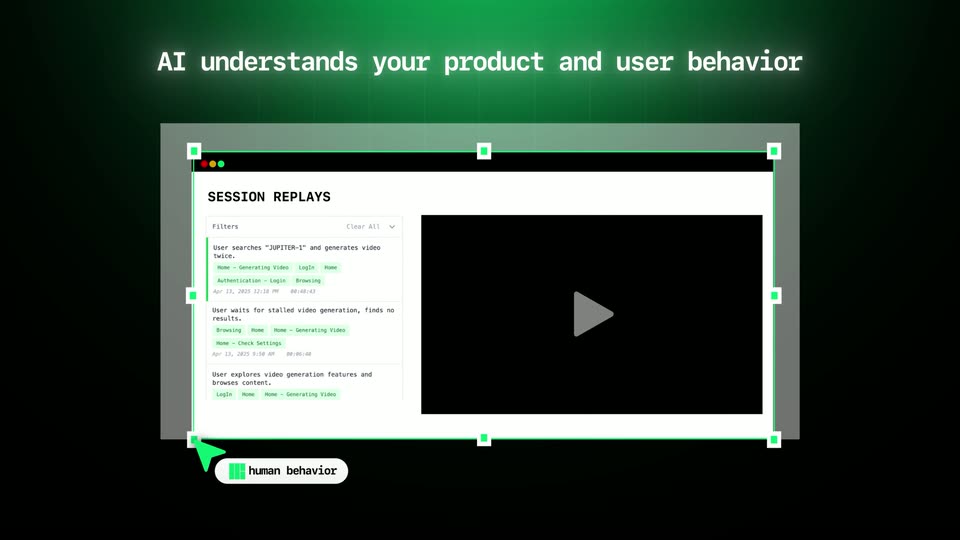
A dark green backdrop frames a browser mockup of a Session Replays screen, overlaid with scan lines and corner brackets. A green cursor labeled “human behavior” moves around it while the headline types out above. The mockup then slides right, revealing “With Human Behavior you need 0 instrumentation”.
On-screen text: “AI understands your product and user behavior”, “human behavior”, “With Human Behavior you need”, “0 instrumentation”
Techniques: Kinetic type
Camera: Push in
On a black background with a green grid glow, the monospace headline about detecting issues affecting customer retention fades in word by word as white issue rows slide in from the right, stacking into a list with status and priority badges.
On-screen text: “SESSION REPLAYS”, “Detect issues affecting customer retention”
Techniques: Kinetic type
Camera: Pull out
A dark frame with a green grid glow at the top holds a white search-window mockup. The headline types in above it, a query is typed into the field, then a green cursor clicks the Search button and a small tag pops out.
On-screen text: “Search Videos using Natural Language”
Techniques: Kinetic type, Cursor demo
Camera: Static
On a black field, four flat browser-window mockups with traffic-light dots and white play triangles drift in a loose cluster around a large green central window. The windows slide and reposition, then the central window clears to reveal a thin vertical axis with an upward arrow and a rotated label, suggesting a chart.
On-screen text: “Search Videos using Natural Language”, “Find sessions using natural language”, “Search”, “Understand patterns among different customer segments”
Techniques: Parallax, Masking
Camera: Pull out
A dark window panel holds a green bar chart whose three white bars grow upward in sequence. Above it, a glowing white headline wipes in from left to right over a faint grid.
On-screen text: “Understand patterns among different customer segments”
Techniques: Masking, Light sweep
Camera: Push in
A flat terminal window on a dark green grid types the install command, then a segmented bar fills to 100 percent with a confirmation line below. Two glowing monospace captions enter above the window.
On-screen text: “Or you can install our SDK”, “It takes exactly 5 seconds to get started”
Techniques: Kinetic type
Camera: Static
A white monospace line reads over a dark green grid, then fades as translucent integration cards for Posthog, Hotjar, Mixpanel and Sentry slide in, each with a green progress bar and percentage.
On-screen text: “Or you can install our SDK”, “npm install humanbehavior-js”, “It takes exactly 5 seconds to get started”, “successfully installed”, “%100”, “Integrate with your current setup”
Techniques: Kinetic type
Camera: Static
Green data cards for Hotjar, Posthog, Mixpanel, Sentry and Google Analytics float on a dark grid, each with a live progress bar. White curved lines draw from each card into one node, then a Human Behavior card slides in from the left as the view tightens on it.
Techniques: Parallax, UI zoom
Camera: Pan
On a dark green grid backdrop, a tilted green three-bar mark rotates into place left of the white wordmark Human Behavior, which scales down from large. The gray tagline and underlined URL fade in below as the lockup settles into a centered sign-off.
On-screen text: “Human Behavior”, “The future of Analytics”, “humanbehavior.co”
Techniques: Kinetic type
Camera: Pull out
A black screen holds as two lines of text scale up in sequence, the first line larger and the second smaller beneath it.
On-screen text: “Ili Human Behavior”, “The future of Analytics”
Techniques: Kinetic type
Camera: Static