
1:29
Explore
00:00:00 / 00:37:06
- Length
- 0:37
- Scenes
- 23 · 1.6 s avg
- Product on screen
- 0:04
- Features shown
- 3
- Voiceover
- No
- Views
- 61K on X
as of November 23, 2026
RightNow’s 0:37 launch film runs 23 scenes, about 1.6 s each. The product shows up at 0:04 and 3 features are revealed. There is no explicit call to action. The video is built as a tight sequence of centered title cards and UI mockups on an off-white dashed grid, each cut driven by a dithered pixel wipe and a scaling lime-green highlight that underlines the key phrase. Pacing is deliberate and even, with text typing in, pixel grids filling row by row, and the pixel R logo bookending the piece, so the signature moves to reuse are the green highlight wipe, the pixel-dissolve transition, and the locked-off centered frame.
No filming indicatedEstimated needs: 3 capture groups — your screens or recordings · 1 official logo — reused across the film · 8 graphic passages — draw or supply
Is this your launch? to your site or press kit.
More like this
1:38
Sahil Mahendrakar - We believe every company should run its own custom models. But right
Cerebellum Labs · Nov 2026
0:47
RightNow (YC F26) - runinfra coding plan is live the fastest open models in claude code,, scene by scene
· 23 scenes as text
01 · Hook · 0:00–0:01
On a white field, the phrase “Your agent” types itself in at center, “agent” tinted green, while six small green squares glide in from scattered points and settle at the corners of a pale green box framing the words.
On-screen text: “Your agent”
Techniques: Kinetic type, Particles
Camera: Static
02 · Problem · 0:01–0:04
A centered code-editor card in a green selection frame fills with typed code while context turns stack on its right. On the left a black headline assembles word by word, then a dithered green wipe cuts to “Every turn”.
On-screen text: “Sends the same context.”, “Every turn”
Techniques: Kinetic type, Masking
Camera: Pan
03 · Product intro · 0:04–0:05
A white blocky letter R is centered on a flat lime-green background. Its square pixels fill in to complete the letterform while the frame stays locked off.
Camera: Static
04 · Product intro · 0:05–0:07
On a white background the Runlnfra logo shrinks and condenses into a small green tile beside a scaling green 'warm' tag. A dark card with a green outline and the text 'replica 2 warm' then settles in over a dashed grid.
On-screen text: “warm”, “warm”
Camera: Static
05 · Feature reveal · 0:07–0:08
A dark rounded card sits centered on a light background with faint dashed grid lines. Inside, a green-outlined box holds the white text “replica 2 warm”, and the word “warm” scales gently in place on the locked-off frame.
On-screen text: “replica 2 warm”
Techniques: Kinetic type
Camera: Static
06 · Feature reveal · 0:08–0:09
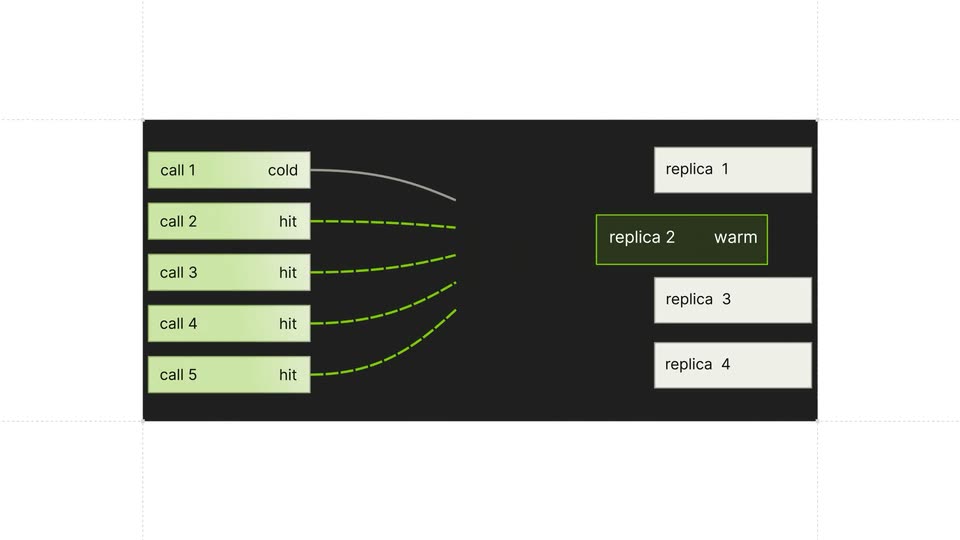
A black diagram panel on a white grid shows five light green call boxes on the left and four replica boxes on the right. A gray line and green dashed lines converge on the highlighted replica 2 box, where the word warm scales in beside it.
On-screen text: “warm”
Techniques: Kinetic type
Camera: Static
07 · Feature reveal · 0:09–0:11
On a white grid, the line “Up to 98% cache hits” scales up from a small size to full width, a solid green rectangle highlighting the words “98% cache hits”.
On-screen text: “Up to 98% cache hits”
Techniques: Kinetic type
Camera: Pull out
08 · Feature reveal · 0:11–0:13
A dark panel with a glowing Z badge and a GLM 5.3 label slides upward on the left while a grid of green squares fills row by row under a GLM 5.3 dropdown on the right. The headline Up to 98% cache hits scales in at the bottom, its second half on a green highlight, then exits as the panel rises.
On-screen text: “Up to 98% cache hits”
Techniques: Kinetic type
Camera: Static
09 · Feature reveal · 0:13–0:14
On a white dashed grid, green pixel blocks glitch across a black panel as the layout swaps: left labels change from GLM 5.3 to Optimized down with a check icon, and the right green button resolves into a black code block with a pixel smear.
On-screen text: “GLM 5.3”, “98.9% cache hits”, “Optimized down”, “DeepSeek V4.1 Flash”, “96.3% cache hits”, “Fast output”, “140 tokens”, “End-to-end, on the buyer path”
Techniques: Kinetic type
Camera: Static
10 · Feature reveal · 0:14–0:15
A white grid layout splits into a left headline and a right dark code block. The headline fills in as a green highlight wipes across the final phrase, while code types out and three stat captions fade in below.
On-screen text: “Optimized down to the GPU kernel”, “DeepSeek V4.1 Flash”, “98.3% cache hits”, “Fast output”, “140 tok/s”, “End-to-end, on the buyer path”, “Low cost”, “$0.01 / 1M”, “Cached input”, “Cached hit rate”
Techniques: Kinetic type, Masking
Camera: Pull out
11 · Feature reveal · 0:15–0:16
A white comparison table builds in, its three rows for Kimi K3, DeepSeek V4 Flash and GLM 5.3 settling into place with green sliders and multipliers at the right. The green-highlighted headline completes above, and a green $0.01 tag flashes at the lower right.
On-screen text: “Cached input from”, “$0.01”
Techniques: Kinetic type
Camera: Pull out
12 · Feature reveal · 0:16–0:17
A white data table compares input prices for three models using horizontal bars. Headlines with green highlights frame the chart at the top left and bottom right.
On-screen text: “Cached input from”, “$0.01 per million token.”
Camera: Pull out
13 · Feature reveal · 0:17–0:20
A green right arrow on a white background gives way to the headline “Introducing Coding”, with a green highlight behind the second word and a blinking cursor, then the line swaps to “</Coding plans/>” under a wider green bar.
On-screen text: “Introducing Coding”, “</Coding plans/>”
Techniques: Kinetic type
Camera: Static
14 · Feature reveal · 0:20–0:24
A light grid background holds a green highlight box that swaps agent names and logo marks: under 'For' it shows 'Claude Code' then 'Codex'. The box then centers between 'And' and 'agents', showing 'open code' then a large '20+', before wiping wider.
On-screen text: “For”, “Claude Code”, “Codex”, “And”, “open code”, “agents”, “20+”
Techniques: Kinetic type
Camera: Static
15 · Pricing · 0:24–0:25
A white pricing card on a faint dotted grid. The heading sits at top, a green button with an arrow below, and two checkmarked lines build in one after another, the first line settling before the second fades in.
On-screen text: “From $10 a month”, “Usage included, resets every 5h and weekly”, “See plans”, “At a limit: credits or free Standby”
Techniques: Kinetic type
Camera: Static
16 · Pricing · 0:25–0:26
A pricing card settles onto a white background with a faint dotted grid: bold heading, two checkmark lines, and a wide green button. A pixel-art hand cursor glides in and clicks the button, triggering a brief glow.
Techniques: Cursor demo
Camera: Pull out
17 · Pricing · 0:26–0:27
A white pricing table with three cards (Starter, Pro, Team) sits on a faint dashed grid; the middle Pro card is outlined in green and a pixelated green hand cursor hovers over its button. The card text shows a brief double-exposure as the values settle.
Techniques: Cursor demo
Camera: Pull out
18 · Feature reveal · 0:27–0:28
On a white field, two green outlined pills reading “Your agents” and “One connection” flank a circular link icon. They slide and scale inward, merging into one long pill while the link icon fills solid green.
On-screen text: “Your agents”, “One connection”
Techniques: Kinetic type, Morph
Camera: Static
19 · Feature reveal · 0:28–0:29
A green tagline with a link icon fades out on white, then a documentation UI appears: model chips at the top, a green-highlighted heading, and a code block where a curl command types in line by line.
On-screen text: “Your agents”, “One connection”, “Open models”
Techniques: Kinetic type
Camera: Static
20 · Feature reveal · 0:29–0:31
A code panel on white shows three model badges and a curl snippet that types itself out. Green highlighter captions read Open models and built for agents. A hand cursor hovers the Copy button.
On-screen text: “Open models”, “built for agents.”
Techniques: Cursor demo
Camera: Pull out
21 · Feature reveal · 0:31–0:32
A white code-editor mockup with model chips and a copy button sits behind a bright green pixel grid that expands from the left, dissolving the layout into scattered squares. Two green-highlighted captions stay fixed at the corners.
On-screen text: “Open models”, “built for agents.”
Techniques: Masking, Particles
Camera: Static
22 · Outro · 0:32–0:33
A small white pixelated R mark holds centered on a flat green field. The green briefly shifts tone with thin vertical bands at the left and right edges, then settles back to a uniform field, keeping the mark static in the middle.
Camera: Static
23 · Outro · 0:33–0:37
On a plain off-white background, the green pixel-R icon sits left of the black wordmark, which fades in letter by letter, then the full RunInfra lockup holds static.
Techniques: Kinetic type
Camera: Static